
Rank Math sitemap not working? Open yoursite.com/sitemap_index.xml in a private window and note what you get. A 404 usually means WordPress’s rewrite rules or Rank Math’s sitemap cache need a flush (re-save Permalinks), or your server needs Rank Math’s rewrite rules. An old list means a page cache or CDN is serving a stored copy. A missing post is usually set to noindex or excluded. A Search Console “Couldn’t fetch” needs you to test the exact URL, check robots.txt and the property, then wait.
This guide gives the fix for each symptom. For a 404 it follows Rank Math’s own fix order, with two quick checks first. It also covers two details Rank Math’s help pages leave out: Easy Mode hides the Links Per Sitemap setting that its first fix needs, and a child sitemap with nothing indexable in it returns a 404.
How I worked this out: this site uses Rank Math SEO 1.0.280 (with PRO 3.0.124) on WordPress 7.1.3, behind LiteSpeed Cache 7.9.2 and Hostinger CDN. On 27 October 2026 I requested its sitemaps logged out from Chrome and recorded the status codes and headers, compared the post sitemap with the list of published posts, read the sitemap settings (without saving), and opened the Sitemaps report in Google Search Console. This site’s sitemap works, so the 404 and Couldn’t fetch fixes below were not reproduced here: they come from Rank Math’s knowledge base, the plugin’s source code, Google’s Search Central and Search Console Help pages, and LiteSpeed’s documentation, all checked on 27 October 2026. The code was read from the plugin’s public SVN trunk while 1.0.280 was the current release.
Key takeaways
- Rank Math’s sitemap lives at /sitemap_index.xml. On this site, /sitemap.xml and /wp-sitemap.xml both redirect there.
- For a 404: check the Sitemap module, flush Rank Math’s sitemap cache and re-save Permalinks, then add server rewrite rules if Rank Math shows a server notice or /?sitemap=1 works while the normal URL does not.
- Rank Math’s cache flush step means changing Links Per Sitemap, which is hidden in Easy Mode. Switch to Advanced Mode first.
- A child sitemap with nothing indexable in it, such as post-sitemap.xml when every post is noindex, returns a 404 by design.
- “Couldn’t fetch” in Search Console means Google could not download the file. Test the exact URL logged out before changing anything.
Table of Contents
- 1Step 1: See What the Sitemap URL Returns
- 2Fix 1: sitemap_index.xml Shows a 404
- 1. Check the Sitemap module is on
- 2. Re-save permalinks
- 3. Flush Rank Math’s sitemap cache
- 4. Test whether rewrite rules are the problem
- 5. Purge every cache and exclude the sitemap
- Two less obvious causes: empty sitemaps and blank pages
- 3Fix 2: The Sitemap Shows Old Content
- 4Fix 3: A Post Is Missing From the Sitemap
- 5Fix 4: Search Console Says “Couldn’t Fetch” or “Has Errors”
- 6Check robots.txt Lists the Sitemap
- 7Quick Fix Order
- 8Frequently Asked Questions
- What is the Rank Math sitemap URL?
- Why does my Rank Math sitemap show a 404?
- Where is Links Per Sitemap in Rank Math?
- Why is my new post not in the Rank Math sitemap?
- Is X-Robots-Tag noindex on my sitemap a problem?
- How long does Search Console take to read a fixed sitemap?
Step 1: See What the Sitemap URL Returns
Open /sitemap_index.xml in a private window (logged out). You want a list of child sitemaps such as post-sitemap.xml and page-sitemap.xml. To see the headers too, run this in a terminal (on Windows use curl.exe):
curl -sI https://example.com/sitemap_index.xmlSome security setups block command-line requests; this site’s protection answered curl GET requests with a 403 when I tested on 26 October 2026, so the checks below were made from the browser instead. Here is what a healthy Rank Math sitemap looked like on this site:
| URL (logged out) | What came back |
|---|---|
| /sitemap_index.xml | 200, text/xml, 3 child sitemaps (posts, pages, categories) |
| /post-sitemap.xml | 200, 86 URLs: all 85 published posts plus the blog page |
| /sitemap.xml and /wp-sitemap.xml | Redirected to /sitemap_index.xml |
| Headers on every sitemap | X-Robots-Tag: noindex · Cache-Control: no-cache, no-store, must-revalidate, max-age=0 |
| Hostinger CDN status | DYNAMIC (not a cache HIT) |
Both headers come from Rank Math itself: its code sends X-Robots-Tag: noindex and the no-store Cache-Control on sitemap files by default. Be aware that Google’s Sitemaps help page lists a noindex response header as one way to stop Google visiting a sitemap. Even so, this site’s sitemap, sent with that header, showed Success in Search Console, last read on 26 October 2026 with 93 discovered pages. So here the header did not stop Google reading it. If your report fails, note this header but check the fixes below first.
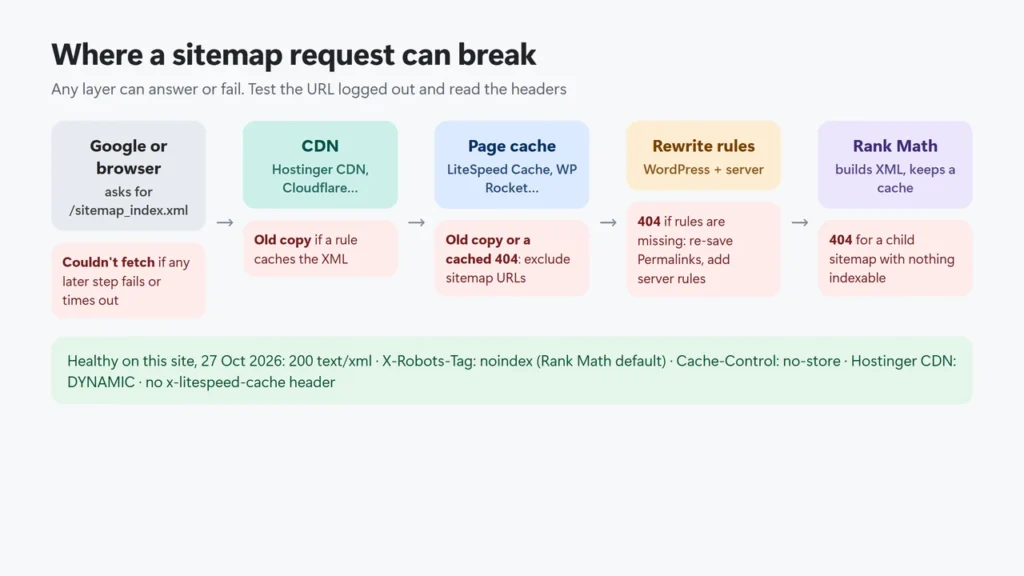
The diagram shows where a sitemap request can go wrong: a CDN or page cache may serve an old copy or a cached 404, WordPress may not know the URL (404), Rank Math may have nothing indexable to list (404 for that child sitemap), or Google may fail to download it.
Fix 1: sitemap_index.xml Shows a 404
Rank Math’s knowledge base names three causes: a changed permalink structure, missing rewrite rules, and caching. Work through the steps below in order and test the URL logged out after each one.
1. Check the Sitemap module is on
Go to Rank Math SEO → Dashboard → Modules and make sure Sitemap is switched on. With it on, Rank Math also switches off WordPress’s built-in sitemap and redirects /wp-sitemap.xml to its own index (from the plugin source).
2. Re-save permalinks
Go to Settings → Permalinks and click Save Changes without changing anything. This rebuilds WordPress’s rewrite rules, which is how WordPress learns the sitemap URLs.
3. Flush Rank Math’s sitemap cache
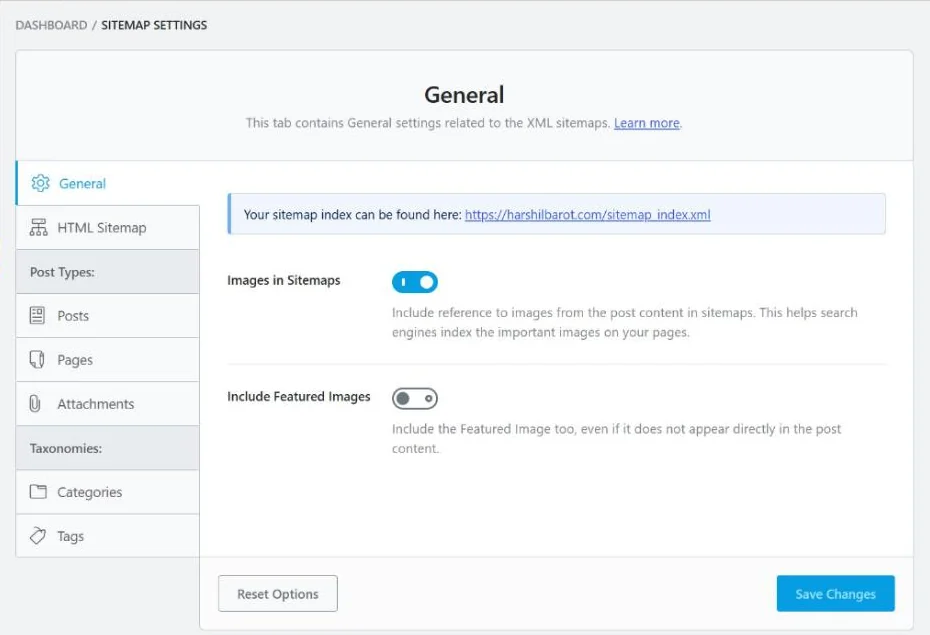
Rank Math’s first official fix is to change the Links Per Sitemap number under Rank Math SEO → Sitemap Settings → General, save, and then re-save Permalinks. Saving the sitemap settings clears the cache Rank Math keeps of built sitemaps (stored as files in uploads/rank-math, or in the database if that folder is not writable).
4. Test whether rewrite rules are the problem
Rank Math’s knowledge base gives a quick test: open yoursite.com/?sitemap=1. If that shows the sitemap but /sitemap_index.xml is still a 404, WordPress can build the sitemap but your server is not passing the pretty URL to WordPress. Add Rank Math’s rules for your server.
Nginx (add to the site’s server block, test with nginx -t, then reload Nginx; on managed hosting, ask your host). These are the rules Rank Math publishes, for WordPress installed at the domain root:
# START Nginx Rewrites for Rank Math Sitemaps
rewrite ^/sitemap_index.xml$ /index.php?sitemap=1 last;
rewrite ^/([^/]+?)-sitemap([0-9]+)?.xml$ /index.php?sitemap=$1&sitemap_n=$2 last;
rewrite ^/([a-z]+)?-sitemap\.xsl$ /index.php?xsl=$1 last;
# END Nginx Rewrites for Rank Math Sitemaps
Apache (download a backup copy of .htaccess first, then add this to the end of the file in the WordPress root):
# START of Rank Math Sitemap Rewrite Rules
RewriteEngine On
RewriteBase /
RewriteRule ^sitemap_index.xml$ /index.php?sitemap=1 [L]
RewriteRule ^([^/]+?)-sitemap([0-9]+)?.xml$ /index.php?sitemap=$1&sitemap_n=$2 [L]
RewriteRule ^([a-z]+)?-?sitemap.xsl$ /index.php?xsl=$1 [L]
# END of Rank Math Sitemap Rewrite Rules
After adding the rules, Rank Math says to change Links Per Sitemap again, save, and re-save Permalinks.
5. Purge every cache and exclude the sitemap
Some page caches store error pages too (LiteSpeed Cache has its own cache time setting for 404 pages), so purge after each fix. Then exclude the sitemap from caching (see Fix 2). As a last resort, Rank Math gives a filter that turns off its own sitemap cache. It goes in a rank-math.php file in your theme folder (the file must start with <?php; use a child theme so a theme update does not remove it):
add_filter( 'rank_math/sitemap/enable_caching', '__return_false');Two less obvious causes: empty sitemaps and blank pages
- Nothing indexable to list. In the plugin’s code, a child sitemap (such as post-sitemap.xml) with no content returns a 404. Rank Math’s help pages make the same point: if all your posts are set to noindex, the sitemap ends up empty. Check the robots setting under Titles & Meta and in the editor’s Advanced tab.
- A real sitemap file on the server. Rank Math builds sitemaps on the fly. Its knowledge base says to delete any physical sitemap file (for example via FTP) if you see a blank page instead of the sitemap.
Fix 2: The Sitemap Shows Old Content
Rank Math clears its own sitemap cache when you save a post, change a post’s status, edit terms or users, or save Rank Math settings (from the plugin source). So when a new post is missing hours later, the stale copy most likely comes from a cache in front of WordPress (or the post itself is excluded: see Fix 3). Exclude the sitemap from that cache.
For LiteSpeed Cache, Rank Math’s guide says to paste these lines into LiteSpeed Cache → Cache → Excludes → Do Not Cache URIs and save:
/(.*)sitemap(.*).xml
/(.*)sitemap.xsl
/sitemap_index.xsl
/sitemap_index.xml
LiteSpeed’s documentation says “By default, LiteSpeed caches as many pages as possible” and does not say how it treats sitemaps, so adding the exclusion is the safe choice. Rank Math says Cloudflare does not cache sitemaps by default; if you added a cache-everything rule, add a bypass for the sitemap URLs. More on cache layers in the LiteSpeed Cache settings guide and Hostinger CDN vs Cloudflare.
How to check: request the sitemap logged out and look at the cache headers (see reading x-litespeed-cache headers). On this site the sitemaps came back with no x-litespeed-cache header at all and Hostinger CDN reported DYNAMIC, so neither showed a cached copy. (I did not check whether this site’s LiteSpeed exclusion list already has the sitemap lines.) The post sitemap’s lastmod was 26 October 2026, 10:48 UTC, the same day the two newest posts were published. After you exclude it, purge once (how to purge LiteSpeed Cache).
Fix 3: A Post Is Missing From the Sitemap
| Cause | Where to check |
|---|---|
| The post is set to noindex | Editor → Rank Math → Advanced tab (Advanced Mode), or Titles & Meta for the post type |
| Its ID is in Exclude Posts | Sitemap Settings → General → Exclude Posts (Advanced Mode) |
| Its post type or taxonomy is not included | Sitemap Settings → that post type or taxonomy → Include in Sitemap |
| It has a custom canonical pointing elsewhere | Rank Math’s KB says such a post won’t appear in the sitemap |
| A cache is serving an older sitemap | Fix 2 |
Defaults matter here too. On a fresh install, Rank Math includes all post types except attachments and web stories, and categories are the only taxonomy included, so tag archives are not in the sitemap unless you add them. To compare counts, check how many posts are published and count the URLs in post-sitemap.xml. On this site the counts matched: 85 published posts, all 85 in the sitemap.
Fix 4: Search Console Says “Couldn’t Fetch” or “Has Errors”
Google’s Sitemaps report help page explains the statuses:
| Status | What Google says it means |
|---|---|
| Success | “The sitemap was loaded and processed successfully with no errors.” |
| Has errors | “The sitemap could be fetched, but has one or more errors.” |
| Couldn’t fetch | “The sitemap could not be fetched for some reason.” |
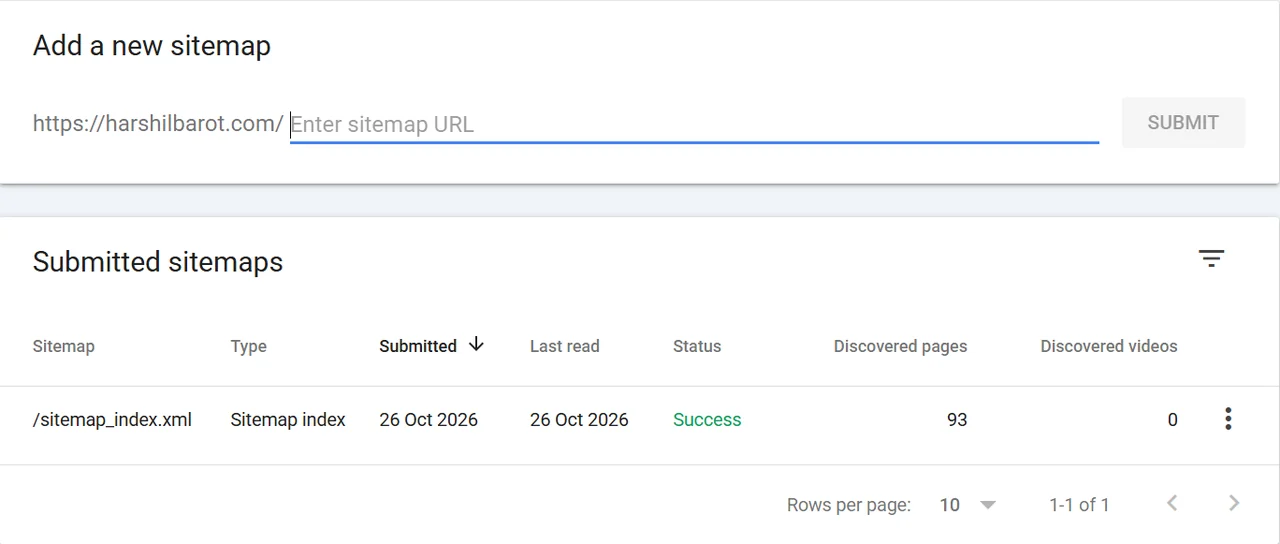
This is what a healthy result looks like, from this site’s Search Console on 27 October 2026. It counted 93 discovered pages at its last read on 26 October; when I checked a day later, the three child sitemaps listed 100 URLs. I did not check which URLs make the difference.
For “Couldn’t fetch”, go through these checks:
- Open the exact URL you submitted in a private window. If it is a 404 or a login page, fix that first (Fix 1).
- Check the address. Rank Math’s guide says there should be only one slash between the domain and the sitemap path, and no spaces.
- Check the property. For a URL-prefix property, the sitemap URL must start with the same address as the property: same https and same www or non-www version.
- Check robots.txt does not block the sitemap. Google says you must remove a rule that stops it fetching the sitemap.
- Use URL Inspection on the sitemap URL and run a live test to see whether Google can fetch it.
- Try the ?sitemap=1 address. Rank Math’s Couldn’t fetch guide suggests submitting the sitemap under a different name, such as
/?sitemap=1. - Resubmit, then wait. Rank Math’s last step is simply to wait for Google to fetch it again.
For Has errors, Google’s advice is to expand the details in the report to see what kind of error occurred, fix it, and resubmit.
Two more points from Google’s documentation help set expectations. A sitemap is a hint and does not guarantee every URL is crawled or indexed. And one sitemap file can hold at most 50,000 URLs or 50 MB uncompressed, which Rank Math’s 200-links-per-file default stays far below.
Speed can matter too. On this site my first sitemap request of the session took 29 seconds, while five repeat requests afterwards took 0.43 to 0.48 seconds. I did not measure why the first was slow, or whether Google ever meets such a delay. If your sitemap is slow every time, Rank Math’s knowledge base has a section on slow sitemaps for large sites.
Check robots.txt Lists the Sitemap
Google accepts a Sitemap: line in robots.txt as another way to submit it. Open yoursite.com/robots.txt and look for a line like Sitemap: https://yoursite.com/sitemap_index.xml. This site’s robots.txt has one. Rank Math’s robots.txt editor (General Settings → Edit robots.txt, Advanced Mode) only applies when there is no physical robots.txt file on the server; if a file exists, edit that file instead.
Quick Fix Order
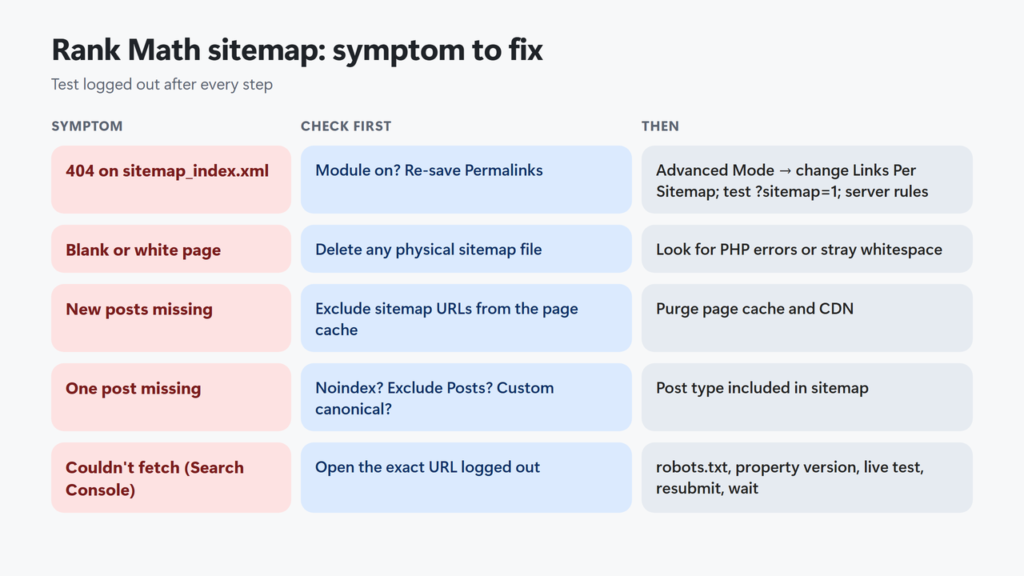
| Symptom | Try first | Then |
|---|---|---|
| 404 on sitemap_index.xml | Module on, re-save Permalinks | Advanced Mode → change Links Per Sitemap → save; ?sitemap=1 test; server rules |
| Blank or white page | Delete any physical sitemap file | Check for PHP errors; Rank Math’s sitemap issues page covers each error message |
| Old or missing new posts | Exclude sitemap URLs in the page cache | Purge the page cache and CDN |
| One post missing | Noindex, Exclude Posts, custom canonical | Post type included in sitemap |
| Couldn’t fetch in Search Console | Open the exact URL logged out | robots.txt, property version, URL Inspection, resubmit, wait |
New to the plugin? The Rank Math review covers what the free and PRO versions include, and Rank Math Instant Indexing explains how Rank Math tells Bing about new URLs without waiting for a sitemap read.
Frequently Asked Questions
What is the Rank Math sitemap URL?
yoursite.com/sitemap_index.xml. It links to child sitemaps such as post-sitemap.xml and page-sitemap.xml. On this site, /sitemap.xml and /wp-sitemap.xml redirect to it.
Why does my Rank Math sitemap show a 404?
Usually the rewrite rules need a refresh (re-save Settings → Permalinks), the sitemap cache needs a flush (change Links Per Sitemap in Advanced Mode), or the server needs Rank Math’s Nginx or Apache rules. A child sitemap (such as post-sitemap.xml) with nothing indexable in it also returns a 404.
Where is Links Per Sitemap in Rank Math?
Rank Math SEO → Sitemap Settings → General. It only appears in Advanced Mode; switch modes in the top-right corner of the Rank Math dashboard.
Why is my new post not in the Rank Math sitemap?
Check that it is published and indexable, not in Exclude Posts, and has no custom canonical. If all of that is fine, a page cache or CDN is probably serving an older copy of the sitemap.
Is X-Robots-Tag noindex on my sitemap a problem?
Rank Math sends it by default. Google’s help lists a noindex response header as a way to stop it visiting a sitemap, but this site’s sitemap carries the header and Search Console still reports Success. Check the other causes first if your report fails.
How long does Search Console take to read a fixed sitemap?
Google does not give a fixed time. Resubmit it in the Sitemaps report and check back; Rank Math’s own advice for Couldn’t fetch ends with waiting for Google to fetch it again.