
Rank Math is a WordPress SEO plugin that handles titles, meta descriptions, XML sitemaps, schema markup, redirects and on-page checks from one dashboard. It runs this website, and I rate it 4.7/5. The free version covers what most blogs and small business sites need; the paid plans are worth it only when you need a specific feature such as keyword tracking, client-site licences or advanced schema. Like any SEO plugin, it controls settings and gives guidance — it does not create rankings on its own.

Table of Contents
- 1Quick Verdict: Is Rank Math Worth Using?
- Pros
- Cons
- 2What Rank Math Does
- 3How I Use Rank Math on This Site
- 4Features That Matter in Practice
- On-page checks and focus keywords
- Schema markup
- Sitemaps, robots and indexing
- Redirections and the 404 monitor
- SEO Analyzer
- Content AI and the newer AI tools
- 5Setting Up Rank Math: What to Check Before Going Live
- 6Rank Math Free vs PRO vs Business vs Agency
- 7Rank Math vs Yoast, All in One SEO and SEOPress
- 8Performance
- 9Mistakes to Avoid
- 10Who Should Use Rank Math — and Who Should Skip It
- 11Final Verdict
- 12FAQs
- Is Rank Math good for beginners?
- Is Rank Math better than Yoast SEO?
- Can Rank Math improve Google rankings?
- Is Rank Math free?
- Does Rank Math slow down websites?
- What is Rank Math Content AI?
- Can I use Rank Math for eCommerce?
- How do I get a high SEO score?
Quick Verdict: Is Rank Math Worth Using?
Rank Math is an all-in-one WordPress SEO plugin that handles titles, meta, schema, sitemaps and redirects. Its free version covers what most sites need, and it is the plugin running on this website.
Pros
- Strong free version
- Easy setup
- Modular feature controls
Cons
- Advanced features need learning
- AI features cost extra
⚡ Key Takeaways
- What it is: an all-in-one WordPress SEO plugin for metadata, sitemaps, schema, redirects and on-page checks.
- Best for: WordPress site owners who want most SEO settings in one place without extra plugins.
- Free vs paid: the free plugin is enough for most sites; PRO adds keyword rank tracking (500 keywords) and advanced schema; Business and Agency add client-site licences.
- AI costs: Rank Math’s AI tools are a separate subscription, and the 15-day AI trial becomes a paid plan unless you cancel it.
- My rating: 4.7/5 — strong value, with a learning curve on the advanced modules.
What Rank Math Does
Rank Math replaces the separate tools many WordPress sites used to combine: an SEO plugin for titles and descriptions, a sitemap generator, a schema plugin and a redirect manager. Each feature is a module you can switch on or off, so you only load what you use.
It does not replace keyword research or a full technical crawl. For those I use dedicated tools — my Semrush vs Ahrefs comparison covers that side.
How I Use Rank Math on This Site
This website runs on WordPress with GeneratePress and Rank Math PRO. In day-to-day publishing, Rank Math handles:
- search titles and meta descriptions for every post and page;
- XML sitemaps for posts, pages and category hubs — categories can be included or kept out of search one by one;
- the structured data graph: website, author, breadcrumbs and article markup on every page;
- the breadcrumbs above each article;
- the llms.txt file that summarises the site for AI tools.
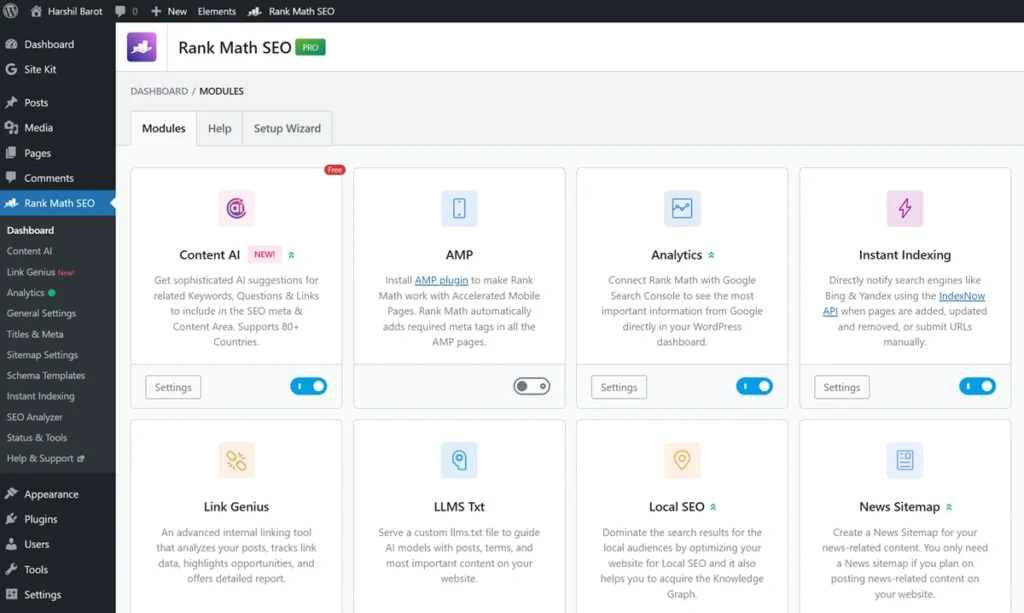
The modules page is where you decide what Rank Math loads. Switching off modules you do not use keeps both the dashboard and the plugin lighter. One module worth knowing is Instant Indexing, which is on by default and pings Bing and other IndexNow search engines when you publish; my guide to Rank Math Instant Indexing explains what it sends and why it does not reach Google.
Two practical lessons from running it here. First, when a sitemap does not reflect a recent change, Rank Math may still be serving a cached copy; clearing its cached sitemap files makes it rebuild on the next request. Second, robots settings can be set per category, which lets you keep strong category hubs indexable while leaving thin archives out of search.
On an earlier project, organic traffic and rich-result appearances improved after I configured Rank Math properly and restructured the content. Because the content changed at the same time and I no longer have that analytics export, I do not credit the gain to Rank Math alone — the plugin made the work easier, but the content did the heavy lifting.
Features That Matter in Practice
On-page checks and focus keywords
While you write, Rank Math scores the post against a checklist: focus keyword in the title and opening, headings, meta description length, image alt text and readability. You can add several focus keywords to check coverage of related terms. Treat the score as a reminder list, not a ranking prediction — a 100/100 score only means the checklist is complete.
Schema markup
Rank Math outputs structured data for articles, products, reviews, local businesses and more, linked together in one graph. Accurate markup can make a page eligible for enhanced search results, but Google decides what to show. One change worth knowing: Google stopped showing FAQ rich results on 7 May 2026, according to its Search Central documentation updates. FAQ sections are still useful for readers, but they no longer earn expandable results in Google.
Sitemaps, robots and indexing
Rank Math builds XML sitemaps automatically and lets you set index or noindex rules by post type, by taxonomy, and for individual posts or categories. A sitemap helps search engines find pages; it does not guarantee they are indexed. Check a few important URLs after any change — an accidental noindex can quietly remove a page from search.
Redirections and the 404 monitor
The redirect manager handles 301 redirects when you change a URL, and the 404 monitor logs requests for missing pages. Redirect a removed page to its closest replacement, not to the homepage.
SEO Analyzer
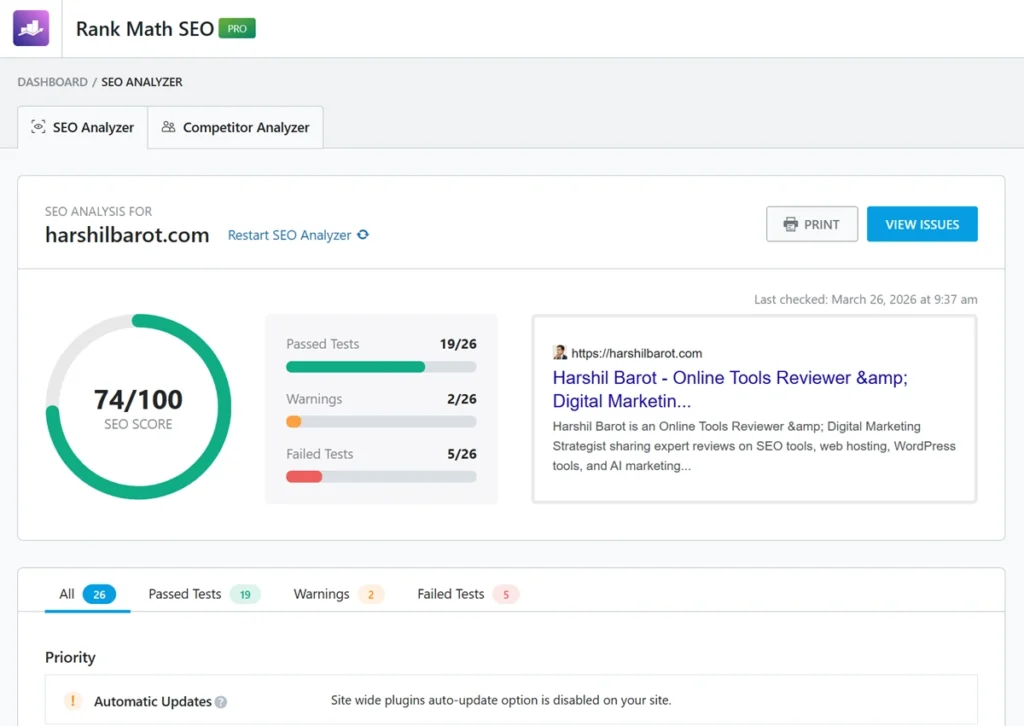
The SEO Analyzer runs a site-wide checklist: missing meta tags, basic link and indexing checks, and common configuration problems. It is a useful health check, but it is not a full crawler; confirm real indexing status in Google Search Console.
Content AI and the newer AI tools
Rank Math now offers Content AI, AI Link Genius for internal-link suggestions, and AI Visibility tracking. I have verified these features on the vendor’s site rather than tested them in depth for this review. They sit under a separate AI subscription, and their suggestions still need fact-checking before you publish. The free plugin can also generate an llms.txt file; my llms.txt for WordPress guide explains how to set it up and what it can and cannot do.
Setting Up Rank Math: What to Check Before Going Live
The setup wizard covers the basics in a few minutes. My Rank Math setup guide walks through each wizard step. The checks afterwards matter more:
- Back up the site and export your current SEO settings before switching from another plugin, and test the import on a staging copy.
- Run the setup wizard and connect Google Search Console.
- Open three or four representative pages and check the title, meta description, canonical URL and robots tag in the page source.
- Confirm the sitemap lists the pages you want indexed — and none that you do not.
- Keep only one SEO plugin active, so two plugins do not output competing metadata.
Rank Math Free vs PRO vs Business vs Agency
| Plan | Websites | Tracked keywords | Best for |
|---|---|---|---|
| Free | Unlimited | — | Most blogs and small business sites |
| PRO | Unlimited personal sites | 500 | Site owners who want rank tracking and advanced schema |
| Business | 100 client sites | 10,000 | Freelancers and small agencies |
| Agency | 500 client sites | 50,000 | Larger agencies |
Paid plans are billed annually. When I checked on 13 October 2026, Rank Math’s pricing page showed prices in euros, excluding VAT: PRO at €7.99 a month (renewing at €8.99), Business at €24.99 a month (renewing at €27.99) and Agency at €54.99 a month (renewing at €64.99). The page shows local currency, so confirm the annual total, tax and renewal price at checkout. New purchases have a 30-day money-back guarantee; renewals do not. Source: Rank Math’s official pricing page. Rank Math’s seasonal sales are covered in my WordPress plugin Black Friday deals guide.
Each paid plan includes a 15-day trial of Rank Math’s AI tools, which becomes a paid AI subscription unless you cancel before it ends. My advice: start on the free plugin and upgrade only when a specific paid feature solves a problem you actually have.
Rank Math vs Yoast, All in One SEO and SEOPress
Compared with Yoast SEO, Rank Math gives you more in the free version — more schema types, a redirect manager and multiple focus keywords — which is the main reason I chose it. I also find its interface cleaner than All in One SEO’s, which keeps more features in its paid tiers. SEOPress is the closest lightweight alternative and worth a look if you prefer a simpler interface. If your current plugin already outputs correct metadata and schema, switching adds migration risk without a clear gain.
Performance
Rank Math’s effect on speed depends on which modules are active and what else runs on the site. I have not run a controlled speed benchmark for this review. Disable modules you do not need, keep an eye on scheduled analytics tasks, and measure your own pages. SEO settings and page speed are separate jobs — my WP Rocket review covers caching.
Mistakes to Avoid
- Chasing a 100/100 score instead of answering the searcher’s question.
- Stuffing focus keywords to turn the checks green.
- Setting all archives to noindex without checking which ones deserve to rank.
- Adding schema that does not match what visitors see on the page.
- Running two SEO plugins at the same time.
Who Should Use Rank Math — and Who Should Skip It
Use it if you run a WordPress site and want titles, sitemaps, schema and redirects in one place, especially if you are starting with the free version. Upgrade to PRO if you need keyword tracking or advanced schema, and choose Business or Agency for client work. Skip it if you are not on WordPress, or if your current SEO plugin already works well and you have no specific problem to solve.
Final Verdict
Rank Math earns 4.7/5 from me. It is the plugin I trust to run this site’s SEO settings, and its free version is unusually complete. The deductions are for the learning curve on the advanced modules and the separate AI subscription. Pair it with useful content and a proper research tool — my Semrush review and Ahrefs review cover that side. My best SEO tools guide compares Rank Math with the other SEO tools I have reviewed.
FAQs
Is Rank Math good for beginners?
Yes, it is designed to be simple and easy to use.
Is Rank Math better than Yoast SEO?
I prefer its feature mix for this website, but the better choice depends on your required features, budget and migration risks. A plugin switch alone does not improve rankings.
Can Rank Math improve Google rankings?
It can help you correct metadata and technical settings and improve your editing workflow. It cannot guarantee rankings; useful content, competition and site quality still matter.
Is Rank Math free?
Yes. The free SEO plugin costs $0. PRO, Business and Agency are paid annual plans, and ongoing AI features require a separate subscription.
Does Rank Math slow down websites?
Performance depends on your hosting, active modules and other plugins. This review does not include a controlled speed benchmark. Enable only what you need and measure your own site.
What is Rank Math Content AI?
Content AI provides writing, editing and SEO suggestions inside WordPress. It can work with the free plugin under an active AI plan and usage limits. Verify generated facts before publishing.
Can I use Rank Math for eCommerce?
Yes, it supports WooCommerce SEO.
How do I get a high SEO score?
Use the checks to spot missing information, but prioritize useful and accurate content. A 100/100 score is a plugin checklist result, not a Google ranking score.




I seriously love your site.. Pleasant colors & theme. Did you make this site yourself?
Please reply back as I’m trying to create my very own site and want to learn where you got this from or exactly what the theme is called.
Many thanks!
Thank you for your kind words! Yes, I built the site myself using the GeneratePress theme on WordPress, with some customizations to achieve the current design and performance. Good luck with your own website project!
I think the admin of this web site is in fact working hard in favor
of his web page, as here every data is quality based stuff.