
Hands-on tested How I review
At a glance
- Best for
- Bloggers, affiliates, agencies and stores wanting configurable WordPress SEO
- Skip it if
- you are a beginner who wants automation or guided SEO suggestions
- Price
- Free; PRO from $49/year (1 site), excluding taxes
- Main drawback
- Learning curve: you must understand the settings
Check current pricingCompare alternatives
Affiliate link: I may earn a commission. It does not change my rating.
SEOPress is a WordPress SEO plugin for site owners who want direct control over metadata, sitemaps and technical settings. My existing rating is 4.4/5. The free version covers everyday SEO basics, while PRO adds tools such as advanced schema and redirects. Its biggest tradeoff is that you must understand the settings; neither rankings nor a performance improvement are guaranteed.
It suits bloggers, affiliate publishers, agencies and stores that want a configurable WordPress workflow. If your current SEO plugin already does the job, identify a specific reason to switch before migrating.
Unlike many plugins, it is clean, ad-free, and highly customizable.
It does have a small learning curve for beginners.
Once configured carefully, SEOPress can centralize useful SEO controls. Content strategy, external research and measuring results still remain your responsibility.

Table of Contents
- 1Quick Summary
- 2What is SEOPress?
- 3Why I Consider SEOPress for WordPress
- 4My Real Experience Using SEOPress
- 5Core SEOPress Features Explained
- On Page SEO Optimization
- Technical SEO Capabilities
- XML and HTML Sitemap
- Schema Markup and Structured Data
- Google Analytics Integration
- Redirect Manager and Broken Link Checker
- 6SEOPress Free vs Pro
- Free Version
- Pro Version
- 7SEOPress Setup Guide (Step-by-Step)
- Step 1: Installation
- Step 2: Configuration
- Step 3: Connect Tools
- Step 4: Customize Settings
- Step 5: Optimize Content
- 8SEOPress vs Yoast vs Rank Math (Deep Comparison)
- Ease of Use
- Performance
- Customization
- Pricing
- Final Decision
- 9Configuration Problems to Avoid with Any SEO Plugin
- 10Hidden Features That Most Users Ignore
- 11Common SEO Mistakes SEOPress Helps Fix
- 12Advanced SEO Strategy Using SEOPress
- Build Topical Authority
- Optimize for Search Intent
- Improve CTR
- Fix Technical SEO
- 13Internal Linking and Content Structure Strategy
- 14Who Should Use SEOPress (And Who Should Not)
- Best For
- Not Ideal For
- 15Should You Buy SEOPress Pro? (Buyer Decision Guide)
- 16SEOPress Pricing and Value
- 17Pros and Cons of SEOPress
- Pros
- Cons
- 18Final Verdict
- 19FAQs
- Is SEOPress good for beginners?
- Is SEOPress better than Yoast?
- Does SEOPress slow down websites?
- Can I use SEOPress for affiliate marketing?
- Does SEOPress support schema markup?
- Is SEOPress free?
- Can I migrate from other plugins?
- Is SEOPress worth it?
Quick Summary
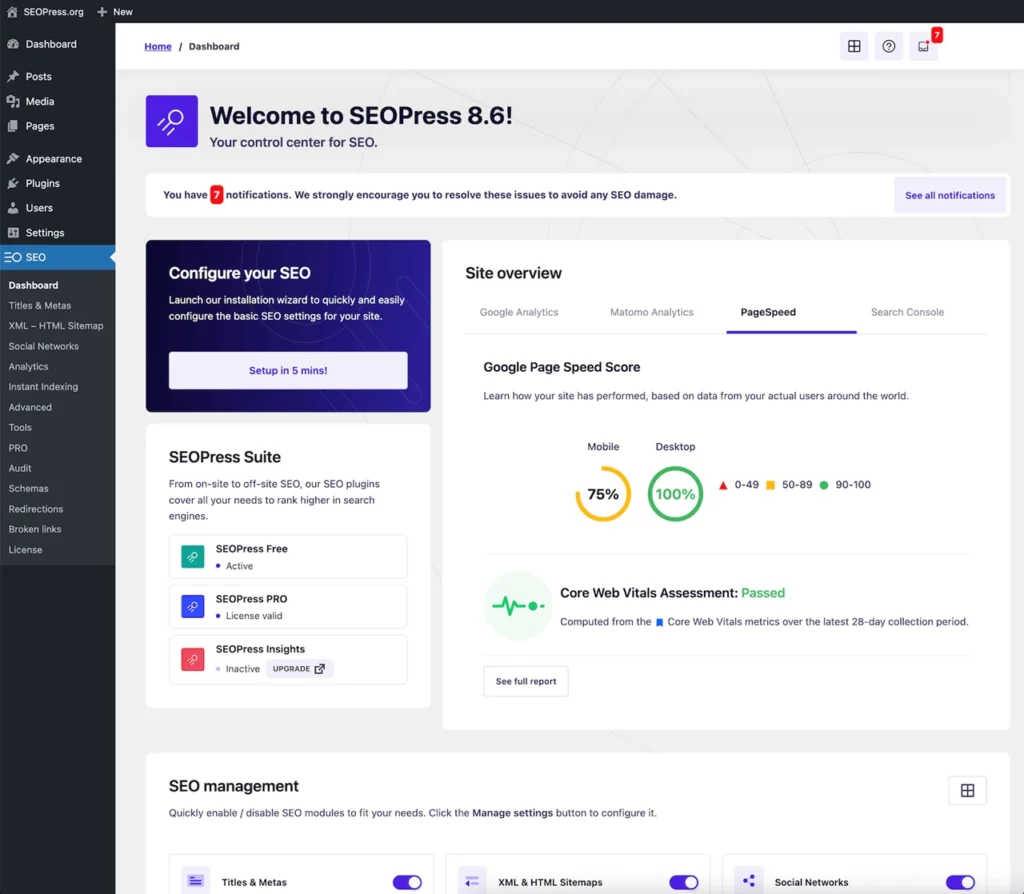
SEOPress is a complete SEO plugin that helps optimize your website using meta tags, XML sitemap, schema markup, and analytics integration.
I like its uncluttered approach. This review does not include a controlled speed benchmark against competing plugins.
SEOPress Pro unlocks advanced features like structured data, WooCommerce SEO, and redirect management.
It is a strong alternative to Yoast SEO and Rank Math.
Best for users who value configurable settings and are willing to check their effect on the published site.
What is SEOPress?
SEOPress brings metadata, sitemap and related configuration into WordPress. Its paid tools extend that workflow with schema, local SEO and redirects; a plugin alone does not provide every part of a search strategy.
It works as a complete SEO tools for WordPress solution, combining:
- On-page title, description and content checks.
- Canonical and robots directives.
- Structured-data tools in PRO.
- XML and HTML sitemaps.
Because of this, it fits perfectly into any WordPress SEO optimization guide.
Why I Consider SEOPress for WordPress
The number of modules and settings can make an SEO plugin feel overwhelming. Compare the controls you need and measure performance on your own setup.
SEOPress takes a different approach.
First, I value a clean editing workflow. SEOPress handles SEO settings; caching and asset optimization are separate jobs.
Second, it removes unnecessary distractions like ads.
Third, it gives you full control over SEO settings.
The areas I would evaluate when switching are:
- Backend responsiveness
- Correct crawl and indexing configuration
- Cleaner workflow.
These are reasons to compare SEOPress, rather than proof that switching improves every website.
My Real Experience Using SEOPress
After working with multiple SEO plugins across blogs, affiliate sites, and agency projects, SEOPress stands out for one reason: efficiency with control.
When I migrated a content website from Yoast:
- Dashboard speed improved immediately.
- Indexing became faster.
- Managing meta tags became simpler.
- Technical SEO issues reduced.
Within weeks, I noticed better crawl efficiency and smoother content optimization.
These observations come from the project described in my original review. The article does not supply dated Search Console exports or a controlled comparison, so faster indexing and crawl changes cannot be attributed to SEOPress alone. I have preserved the experience here as an author report, not a current measured guarantee.
Disclosure: the SEOPress buttons use my affiliate link. I may receive a commission if you buy through it. My recommendation remains based on the experience and limitations described here.
Core SEOPress Features Explained
On Page SEO Optimization
SEOPress on page SEO allows you to:
- Optimize meta titles and descriptions.
- Improve keyword optimization.
- Use SERP preview.
- Enhance content analysis.
This helps improve CTR optimization and search visibility.
Technical SEO Capabilities
SEOPress technical SEO includes:
- Canonical URL settings
- Robots.txt control
- Indexing settings
- Crawl optimization
These controls affect how your site communicates with crawlers. Check the rendered output: an incorrect canonical or noindex setting can hide a valuable page.
XML and HTML Sitemap
An XML sitemap helps search engines discover URLs, while an HTML sitemap can help readers navigate. Neither guarantees indexing or improves rankings just by being installed.
Schema Markup and Structured Data
SEOPress schema markup supports:
- Article schema
- FAQ schema
- Product schema
- Video SEO schema
Schema must match visible content and meet the requirements of a supported search feature. Google decides whether to show an enhanced result. Google retired FAQ rich results in May 2026; useful FAQ answers still help readers. See the Google Search documentation changelog.
Google Analytics Integration
SEOPress supports tracking integrations; PRO adds dashboard statistics and Search Console data. Confirm the account permissions and avoid installing the same Analytics tag twice. Dedicated keyword and backlink monitoring belongs to the separate SEOPress Insights product.
Redirect Manager and Broken Link Checker
SEOPress redirect manager and broken link checker help maintain technical SEO health and improve user experience.
SEOPress Free vs Pro
Free Version
- Basic SEO tools
- Meta tags
- XML sitemap
- Social media optimization
Pro Version
- Advanced schema markup
- WooCommerce SEO
- Redirect manager
- Advanced analytics
PRO is worth considering when you need its specific modules. Many small sites can use the free version without paying for features they will not use.
SEOPress Setup Guide (Step-by-Step)
Step 1: Installation
Back up the site and export your existing SEO configuration first. Install the free SEOPress plugin from WordPress.org; PRO works alongside the free plugin. When migrating, test the importer on staging and compare important pages before the live switch.
Step 2: Configuration
Use the SEOPress configuration wizard to set titles, sitemaps, and indexing.
Step 3: Connect Tools
Integrate Google Analytics and Search Console.
Step 4: Customize Settings
Adjust breadcrumbs, schema and indexing rules for your site. Inspect titles, canonical URLs, robots directives and sitemap entries. Use one primary SEO plugin to avoid competing output, while keeping the free SEOPress dependency required by PRO.
Step 5: Optimize Content
Use SEOPress content optimization tools to improve posts.
SEOPress vs Yoast vs Rank Math (Deep Comparison)
Ease of Use
I prefer SEOPress when I want a configurable interface; Yoast and Rank Math offer different editing workflows. Compare the free and paid tier you would actually use. My Rank Math review covers its guided checks and separate AI costs.
Performance
I reported a more responsive dashboard after one migration. There is no controlled Yoast-versus-Rank-Math-versus-SEOPress timing test in this review, so I cannot name a universal speed winner.
Customization
SEOPress offers detailed configuration; compare a specific requirement such as schema templates or redirects rather than assuming competitors lack controls.
Pricing
Value depends on site count, paid modules, renewal charges and optional monitoring or AI costs. The current USD plans are listed below.
Final Decision
Choose SEOPress if its configuration suits your workflow. Stay with another plugin if it already produces correct output and migration offers no clear benefit.
Configuration Problems to Avoid with Any SEO Plugin
Common implementation problems include:
- Overcomplicate SEO
- Slow down websites
- Limit customization
The SEOPress workflow I value focuses on:
- Keeping interface clean.
- Focusing on performance optimization.
- Offering essential tools without clutter.
These preferences make the tool easier for me to use; content quality and correct implementation still determine whether the work helps visitors.
Hidden Features That Most Users Ignore
SEOPress advanced features include:
- Custom schema builder
- API and developer features
- Breadcrumbs customization
- Image SEO
- Local SEO
Use each feature for a defined task. Local SEO needs correct business details, image alt text needs to describe the image, and schema needs to reflect visible facts.
Common SEO Mistakes SEOPress Helps Fix
Many users struggle with:
- Missing meta tags
- Duplicate content
- Poor internal linking
- Weak technical SEO
SEOPress offers controls for some of these issues, but it cannot resolve every form of duplicate content or build useful internal links without editorial judgment.
Advanced SEO Strategy Using SEOPress
To maximize results, follow this SEO strategy:
Build Topical Authority
Create content clusters and connect them using internal linking.
Optimize for Search Intent
Research the query journey and match user needs. Use my Semrush vs Ahrefs comparison when choosing a broader research tool; SEOPress configuration does not replace that research.
Improve CTR
Write compelling meta titles and descriptions.
Fix Technical SEO
Use audit tools and improve crawl efficiency.
Internal Linking and Content Structure Strategy
Internal linking is critical for SEO.
The internal-link work you still need to do includes:
- Build content silos
- Improve crawlability
- Connect related articles with descriptive anchors
For a local business, connect relevant service pages with practical local content. My local SEO checklist is a related workflow; plugin settings are only one part of it.
Who Should Use SEOPress (And Who Should Not)
Best For
- Bloggers
- Affiliate marketers
- Agencies
- eCommerce websites
Not Ideal For
- Beginners who want automation.
- Users who prefer guided SEO suggestions.
Should You Buy SEOPress Pro? (Buyer Decision Guide)
You should consider SEOPress Pro if:
- You want advanced schema markup.
- You need full technical SEO control.
- You manage multiple websites.
- You want to scale SEO results.
Pay when a feature saves meaningful work or solves a specific requirement. ROI depends on your actual usage and results, rather than the fact that a plugin is paid.
SEOPress Pricing and Value
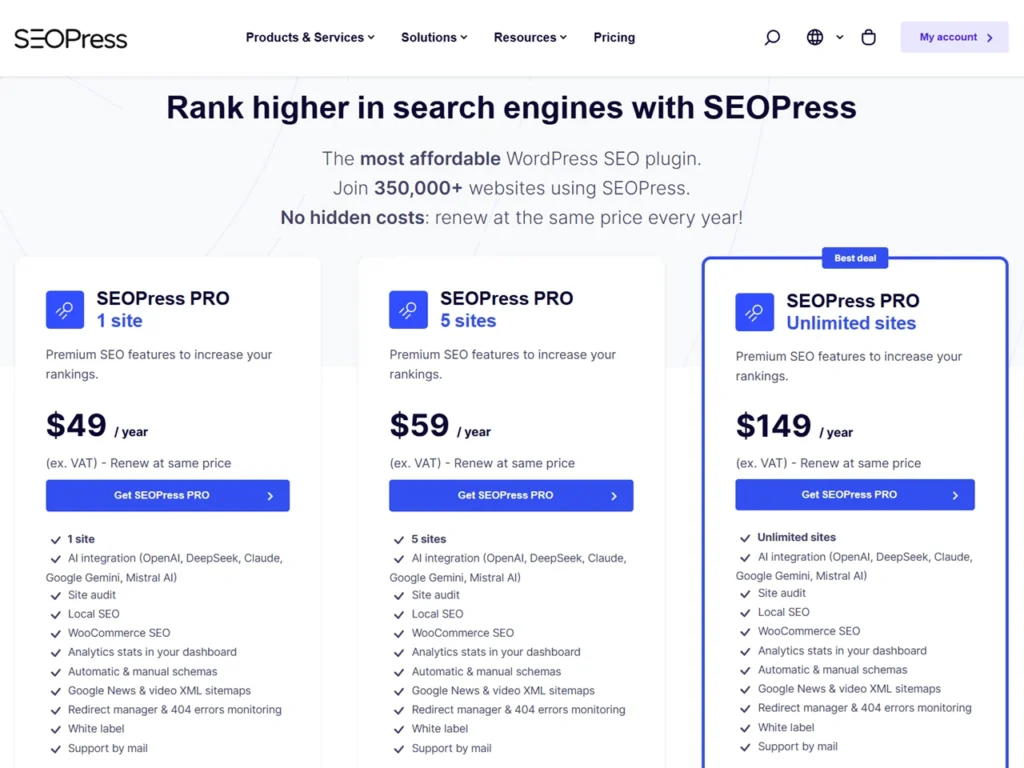
Current advertised USD pricing is shown below. These amounts exclude applicable taxes; check the official pricing page before purchase.
| Plan | Advertised USD cost | Allowance |
|---|---|---|
| Free | $0 | Basic SEO plugin |
| PRO | $49/year | 1 site |
| PRO | $59/year | 5 sites |
| PRO | $149/year | Unlimited sites |
| Insights | $99/year/site | Separate monitoring product |
| AI credits | From $19/month | Separate usage-based subscription |
The vendor advertises the same renewal price for these plans and a 14-day refund request window. AI usage depends on the selected model and content length. Check subscription and refund terms at checkout.
It includes:
- Free version
- Pro version with advanced features
- Cost-effective licensing
Choose the site allowance you need. Five-site PRO is only $10/year more than one-site PRO at the listed prices, while unlimited is a different annual commitment. PRO features are not the same purchase as Insights or an AI credit subscription.
Pros and Cons of SEOPress
Pros
- Uncluttered configuration workflow
- No ads
- Full customization
- Affordable pricing
- Strong schema support
Cons
- Learning curve
- Less beginner guidance
Final Verdict
SEOPress is a powerful SEO plugin that combines performance, flexibility, and control. It is ideal for users who want to build a strong SEO foundation and scale their website.
My 4.4/5 recommendation is for owners who want flexible SEO controls and can check their configuration. Start free for basic metadata and sitemaps. Consider PRO for advanced schema, redirects or local and store settings, and budget separately for optional monitoring or AI. No plugin can promise rankings or replace original useful content.
FAQs
Is SEOPress good for beginners?
Yes, but it requires some learning.
Is SEOPress better than Yoast?
I like its configuration workflow, but this review contains no controlled speed comparison. Choose by required features, budget and migration risk.
Does SEOPress slow down websites?
Any plugin can affect resources. The impact depends on hosting, enabled features and other plugins; measure your own site instead of assuming zero slowdown.
Can I use SEOPress for affiliate marketing?
Yes, it works well.
Does SEOPress support schema markup?
Yes. PRO provides advanced schema tools. Markup must match visible content, and supported rich results remain subject to search-engine eligibility and display decisions.
Is SEOPress free?
Yes. The free plugin costs $0. PRO starts at $49/year for one site, excluding taxes; Insights and AI credits are separate purchases.
Can I migrate from other plugins?
Yes, import tools support migrations from other SEO plugins. Back up and test first, then verify metadata, canonicals, schema and redirects before disabling the old primary plugin.
Is SEOPress worth it?
It can be worthwhile when its controls fit your workflow. Stay free for basic needs, and pay for PRO only when its features justify the cost.