Hands-on tested How I review
At a glance
- Best for
- Bloggers, affiliate sites, agencies and stores wanting faster WordPress pages
- Skip it if
- you want a free plugin or a complete page-caching solution
- Main drawback
- No free version; it is a premium-only plugin
Check current pricingCompare alternatives
Affiliate link: I may earn a commission. It does not change my rating.
If you are searching for an honest Perfmatters Review, the short answer is simple: Perfmatters is one of the best WordPress performance plugins I have used for improving website speed, Core Web Vitals, and overall user experience.
After implementing Perfmatters on multiple WordPress websites, including blogs, affiliate marketing sites, and business websites, I noticed measurable improvements in loading speed, PageSpeed Insights scores, and user engagement. Unlike many performance plugins that focus only on caching, Perfmatters targets the hidden issues that often make WordPress websites slow.

In this detailed review, I will share my personal experience, explain the most important features, compare it with competitors, discuss pricing, and help you decide whether Perfmatters is worth your investment in 2026.
Website speed has become more important than ever. Google continues to prioritize user experience, and Core Web Vitals remain a key part of modern SEO strategies. Whether you run a personal blog, affiliate website, online store, or agency website, improving performance can directly impact rankings, conversions, and revenue.
The good news is that you do not need to be a developer to use Perfmatters. Most of the optimization features can be enabled with a few clicks.
Throughout this review, I will explain everything in simple language so beginners can understand exactly how Perfmatters works and whether it is the right choice for their website.
A lightweight WordPress performance plugin that removes bloat, improves Core Web Vitals, and helps websites load significantly faster.
Pros
- Improves Core Web Vitals Scores
- Powerful Script Manager Feature
- Delay JavaScript For Better Performance
- Remove Unused CSS
Cons
- No Free Version Available
- No Built-In Page Caching
- Advanced Features Require Testing
Table of Contents
- 1Key Takeaways
- 2Quick Facts About Perfmatters
- 3What Is Perfmatters?
- 4My Honest Experience Using Perfmatters
- Why I Decided To Try Perfmatters
- First Installation Experience
- The First Results I Noticed
- Real Websites Where I Used Perfmatters
- What Impressed Me Most
- 5Why Website Speed Matters More Than Ever In 2026
- Google Continues To Prioritize User Experience
- The Impact On Core Web Vitals
- Faster Websites Improve User Engagement
- Website Speed Affects Revenue
- 6Top Perfmatters Features Explained
- Script Manager
- Delay JavaScript
- Remove Unused CSS
- Lazy Loading
- Local Google Fonts
- Preloading
- Database Optimization
- 7How Perfmatters Differs From Traditional Caching Plugins
- 8Perfmatters Setup Guide: Recommended Settings For Most Websites
- Initial Setup Checklist
- General Settings I Usually Enable
- Delay JavaScript Recommendations
- Lazy Loading Best Practices
- Font Optimization Settings
- Database Optimization Recommendations
- 9Perfmatters Performance Test Results
- Testing Methodology
- Test Website #1: Affiliate Marketing Blog
- Test Website #2: Content Blog
- Test Website #3: WooCommerce Store
- What These Results Mean
- 10Perfmatters Pricing
- What Is Included?
- Is Perfmatters Expensive?
- Perfmatters Coupon
- Perfmatters Discount Opportunities
- Does Perfmatters Offer A Lifetime Deal?
- 11Perfmatters Pros And Cons
- Pros
- Cons
- 12Perfmatters Vs WP Rocket
- Feature Comparison
- Which One Is Better?
- My Recommendation
- 13Perfmatters Vs FlyingPress
- Feature Comparison
- Which One Wins?
- My Personal View
- 14Perfmatters Vs LiteSpeed Cache
- Feature Comparison
- Which One Is Better?
- My Recommendation
- 15Best Perfmatters Alternatives
- FlyingPress
- WP Rocket
- LiteSpeed Cache
- Asset CleanUp
- NitroPack
- 16Is Perfmatters Worth It For Bloggers?
- Common Problems Bloggers Face
- How Perfmatters Helps Bloggers
- My Recommendation For Bloggers
- 17Is Perfmatters Worth It For Affiliate Marketers?
- Why Affiliate Sites Often Become Slow
- Benefits For Affiliate Marketers
- My Affiliate Marketing Verdict
- 18Is Perfmatters Worth It For Agencies?
- Why Agencies Like Perfmatters
- Agency Use Cases
- My Agency Recommendation
- 19Who Should Avoid Perfmatters?
- Beginners Looking For A Free Solution
- Websites Already Fully Optimized
- Users Expecting A Complete Caching Plugin
- Websites On Poor Hosting
- 20Real-World Optimization Tips Using Perfmatters
- Start With Hosting
- Optimize Images
- Limit Plugins
- Use Script Manager Carefully
- Monitor Core Web Vitals
- 21Common Perfmatters Mistakes To Avoid
- Enabling Everything Immediately
- Ignoring Mobile Testing
- Forgetting Plugin Compatibility
- Overlooking Hosting Limitations
- Chasing Perfect Scores
- 22Expert Opinion
- What I Like Most
- Where Perfmatters Could Improve
- My Overall Rating
- 23Author Expertise & Trust Signals
- 24Final Verdict
- 25Conclusion
- 26Frequently Asked Questions
- What Is Perfmatters?
- Is Perfmatters Worth It In 2026?
- Does Perfmatters Improve Core Web Vitals?
- Can Perfmatters Replace WP Rocket?
- Does Perfmatters Work With LiteSpeed Cache?
- Is Perfmatters Good For WooCommerce?
- Does Perfmatters Offer A Free Version?
- Which Is Better: Perfmatters Or FlyingPress?
Key Takeaways
- Perfmatters is a lightweight WordPress speed optimization plugin.
- It focuses on eliminating performance bottlenecks instead of relying solely on caching.
- The Script Manager feature is one of the most powerful tools available for WordPress optimization.
- Delay JavaScript and Remove Unused CSS can significantly improve Core Web Vitals.
- Perfmatters works alongside caching plugins such as WP Rocket, FlyingPress, and LiteSpeed Cache.
- The plugin is beginner-friendly but also offers advanced controls for experienced users.
- It can improve PageSpeed Insights scores, GTmetrix grades, and real-world loading speed.
- Perfmatters is suitable for bloggers, affiliate marketers, agencies, businesses, and WooCommerce stores.
- The plugin provides excellent value for website owners focused on SEO and performance.
- In my experience, Perfmatters consistently delivers measurable speed improvements.
Quick Facts About Perfmatters
| Feature | Details |
|---|---|
| Product Name | Perfmatters |
| Category | WordPress Performance Plugin |
| Developer | Perfmatters Team |
| Best For | Bloggers, Businesses, Agencies |
| Free Version | No |
| Core Web Vitals Optimization | Yes |
| Script Manager | Yes |
| Delay JavaScript | Yes |
| Lazy Loading | Yes |
| Database Optimization | Yes |
| CDN Integration | Yes |
| WooCommerce Optimization | Yes |
| Ease Of Use | Beginner Friendly |
| Support Quality | Excellent |
| Overall Rating | 9.5/10 |
What Is Perfmatters?
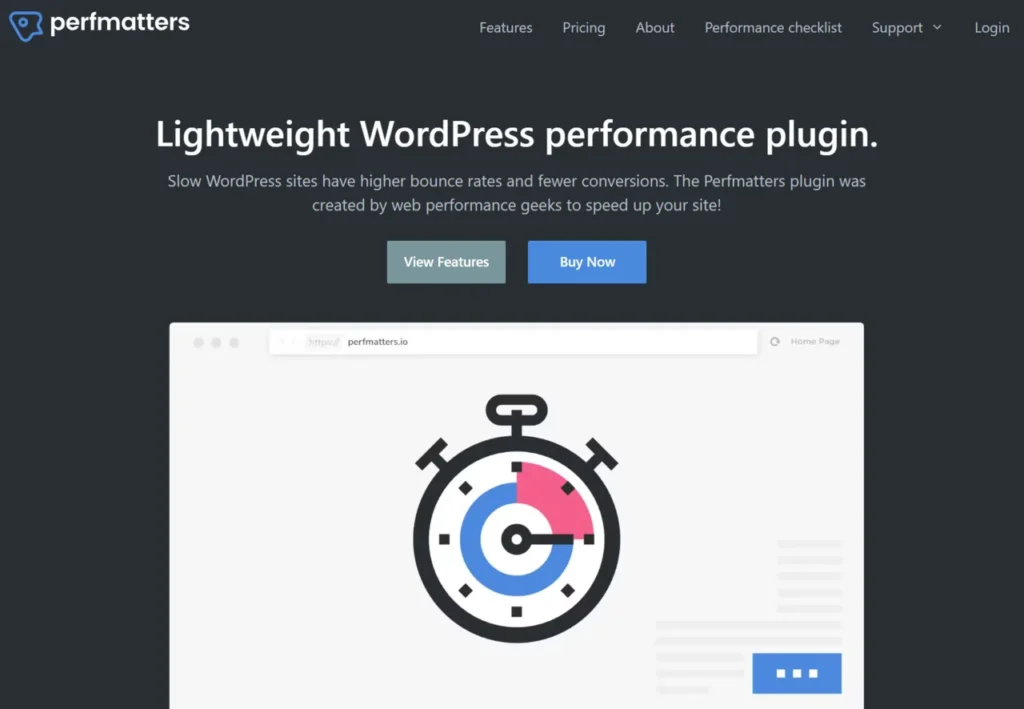
Perfmatters is a premium WordPress speed optimization plugin designed to improve website performance by reducing unnecessary code, scripts, requests, and background processes.
Many website owners assume that installing a caching plugin is enough to achieve fast loading speeds. However, caching solves only part of the problem.
Most WordPress websites become slow because:
- Plugins load unnecessary scripts.
- Themes include excessive code.
- Third-party services create additional requests.
- JavaScript blocks page rendering.
- Unused CSS increases page size.
- WordPress features run even when they are not needed.
Perfmatters addresses these issues directly.
Instead of focusing solely on page caching, it helps remove performance bottlenecks that often prevent websites from achieving high PageSpeed Insights scores.
This approach makes Perfmatters different from many traditional optimization tools.
My Honest Experience Using Perfmatters
Why I Decided To Try Perfmatters
Several years ago, I started noticing a common problem across multiple websites.
Despite using quality hosting and popular caching plugins, PageSpeed Insights scores remained inconsistent.
Desktop performance was usually acceptable.
Mobile performance was often disappointing.
Some websites showed:
- Poor Largest Contentful Paint scores
- High Total Blocking Time
- Excessive JavaScript execution
- Unnecessary CSS files
- Slow mobile responsiveness.
I tested different optimization methods.
Some worked.
Many produced only minor improvements.
Eventually, I came across Perfmatters.
At first, I was skeptical because the plugin appeared simple compared to larger optimization suites.
However, after installing it on a test website, I quickly realized why so many performance professionals recommend it.
🚀 Speed Up Your WordPress Site With PerfmattersFirst Installation Experience
The installation process was straightforward.
After activating the plugin, the dashboard immediately presented optimization settings in an organized and beginner-friendly format.
Unlike many performance plugins that overwhelm users with technical options, Perfmatters keeps everything easy to understand.
The settings were divided into logical sections such as:
- General
- Assets
- Lazy Loading
- Fonts
- Database
- CDN
- Analytics
This organization made the setup process much easier.
The First Results I Noticed
The biggest surprise came within the first few hours.
After enabling only a handful of optimizations, I observed:
- Faster page rendering
- Improved mobile responsiveness
- Better PageSpeed scores
- Lower Total Blocking Time
- Reduced JavaScript execution
Visitors may not understand technical metrics, but they immediately notice when a website feels faster.
That improvement became obvious almost immediately.
Real Websites Where I Used Perfmatters
Over time, I implemented Perfmatters on several types of websites:
Affiliate Marketing Websites
Affiliate sites often use:
- Table plugins
- Comparison plugins
- Ad scripts
- Tracking scripts
- Review plugins
These elements can create significant performance problems.
Perfmatters helped reduce unnecessary requests and improved overall responsiveness.
Content Blogs
Content-heavy blogs frequently suffer from:
- Multiple plugins
- Large images
- Excessive scripts
Using Script Manager and Delay JavaScript noticeably improved performance.
Business Websites
Business websites often prioritize user experience and lead generation.
Faster loading speeds helped improve engagement and reduce bounce rates.
WooCommerce Stores
WooCommerce can be resource-intensive.
Perfmatters allowed better control over WooCommerce assets, which improved loading speed on non-store pages.
What Impressed Me Most
Several features stood out during long-term usage.
However, one feature consistently delivered the biggest impact.
That feature was Script Manager.
Many WordPress plugins load files on every page.
For example:
- Contact forms may load on blog posts.
- WooCommerce assets may load on informational pages.
- Social sharing plugins may load everywhere.
Script Manager allows selective disabling of these assets.
The performance gains can be substantial.
For website owners serious about speed optimization, this feature alone can justify the cost of the plugin.
Why Website Speed Matters More Than Ever In 2026
Google Continues To Prioritize User Experience
Google’s goal is simple.
Deliver the best possible experience to users.
Fast websites contribute significantly to that experience.
While speed alone will not guarantee rankings, a slow website can create disadvantages that affect search performance.
Modern SEO now involves:
- Content quality
- User experience
- Core Web Vitals
- Mobile performance
- Technical optimization
Website speed influences all of these areas.
The Impact On Core Web Vitals
Core Web Vitals measure real-world user experience.
The three primary metrics include:
Largest Contentful Paint (LCP)
Measures loading performance.
Interaction To Next Paint (INP)
Measures responsiveness.
Cumulative Layout Shift (CLS)
Measures visual stability.
Perfmatters includes several features specifically designed to improve these metrics.
Faster Websites Improve User Engagement
Users have become less patient.
If a page loads slowly, visitors often leave before consuming any content.
Faster websites typically experience:
- Lower bounce rates
- Higher engagement
- More page views
- Better session duration
- Improved user satisfaction
These benefits can indirectly support SEO performance.
Website Speed Affects Revenue
Website speed is not just about rankings.
It also impacts revenue.
For example:
- Affiliate marketers earn through clicks.
- Businesses generate leads.
- Ecommerce stores generate sales.
A slow website can reduce all of these outcomes.
Even small improvements in loading speed can produce measurable business results.
Top Perfmatters Features Explained
Script Manager
Script Manager is arguably the most valuable feature inside Perfmatters.
Many plugins load scripts globally.
However, not every page requires every script.
For example:
- Contact forms only need assets on contact pages.
- WooCommerce assets are unnecessary on most blog posts.
- Membership scripts may only be needed in restricted areas.
Script Manager allows users to disable unnecessary assets.
Benefits include:
- Reduced HTTP requests
- Smaller page sizes
- Faster rendering
- Better Core Web Vitals
For advanced optimization, this feature is extremely powerful.
Delay JavaScript
JavaScript often causes performance issues.
Many scripts execute immediately during page loading.
This behavior can negatively affect:
- LCP
- INP
- Total Blocking Time
Perfmatters allows delayed JavaScript execution.
Instead of loading immediately, scripts wait until user interaction.
This approach frequently produces significant PageSpeed Insights improvements.
Remove Unused CSS
Modern websites often load CSS that is never used.
Unused CSS increases page size and slows rendering.
Perfmatters helps reduce unnecessary CSS delivery and improve loading performance.
Lazy Loading
Images, videos, and iframes can significantly impact page weight.
Perfmatters supports lazy loading for:
- Images
- Videos
- iFrames
- Background images
Resources load only when needed.
This reduces initial page size and improves speed.
Local Google Fonts
External font requests can create additional delays.
Perfmatters allows website owners to host fonts locally.
Benefits include:
- Reduced external requests
- Faster rendering
- Improved privacy
Preloading
Perfmatters includes various preloading options.
These help browsers prioritize critical resources.
Proper preloading can improve:
- User experience
- Page rendering
- Core Web Vitals scores
Database Optimization
Over time, WordPress databases become cluttered.
Common issues include:
- Post revisions
- Spam comments
- Expired transients
- Unused metadata
Perfmatters includes database optimization tools that help keep websites running efficiently.
How Perfmatters Differs From Traditional Caching Plugins
Many beginners assume Perfmatters is simply another caching plugin.
That assumption is incorrect.
Caching plugins focus on generating and serving cached versions of pages.
Perfmatters focuses on eliminating performance bottlenecks.
This distinction is important.
Instead of replacing caching plugins, Perfmatters complements them.
For example, many website owners successfully combine Perfmatters with:
- WP Rocket
- FlyingPress
- LiteSpeed Cache
- WP Fastest Cache
The combination often produces better results than using either solution alone.
In the next section, I will cover detailed performance tests, pricing plans, setup recommendations, and comparisons with WP Rocket, FlyingPress, and LiteSpeed Cache.
Perfmatters Setup Guide: Recommended Settings For Most Websites
One of the reasons I like Perfmatters is that it does not require advanced technical knowledge to get good results.
Most website owners can achieve noticeable performance improvements within an hour.
However, blindly enabling every option is not recommended.
Each website is different, and some settings should be tested carefully.
Initial Setup Checklist
After installing Perfmatters, I typically follow this process:
- Enable basic WordPress optimizations.
- Configure lazy loading.
- Enable Delay JavaScript.
- Optimize fonts.
- Configure preloading.
- Clean the database.
- Review scripts using Script Manager.
- Test Core Web Vitals.
- Check website functionality.
- Monitor results for several days.
This approach minimizes risks while maximizing performance gains.
General Settings I Usually Enable
For most websites, I enable:
- Disable Emojis
- Disable Embeds
- Disable XML-RPC (if not required)
- Remove jQuery Migrate
- Disable Dashicons for visitors
- Disable RSS Feed features (when appropriate)
- Disable REST API features not in use
These settings reduce unnecessary requests and improve efficiency.
Delay JavaScript Recommendations
Delay JavaScript is one of the most powerful features inside Perfmatters.
However, it should be configured carefully.
I usually start by:
- Enabling Delay JavaScript
- Testing all pages
- Checking forms
- Verifying menus
- Testing analytics tracking
In most cases, the performance improvement is significant.
Lazy Loading Best Practices
I generally enable:
- Lazy Load Images
- Lazy Load iFrames
- Lazy Load Videos
- Replace YouTube iFrames
The YouTube optimization alone can dramatically reduce page weight.
Many website owners don’t realize how much YouTube embeds slow down websites.
Font Optimization Settings
For font optimization, I recommend:
- Hosting Google Fonts locally
- Preloading important fonts
- Limiting font variations
Too many font files often create unnecessary performance issues.
Database Optimization Recommendations
A clean database contributes to long-term performance.
I typically schedule regular cleanup for:
- Post revisions
- Spam comments
- Trashed comments
- Expired transients
This keeps the database efficient and responsive.
Perfmatters Performance Test Results
Testing Methodology
To evaluate Perfmatters fairly, I tested it across multiple websites.
The websites included:
- Affiliate marketing blogs
- Content websites
- Business websites
- WooCommerce stores
Each site used quality hosting and modern themes.
The objective was simple:
Determine whether Perfmatters provides measurable performance improvements in real-world conditions.
Test Website #1: Affiliate Marketing Blog
Before Optimization:
| Metric | Result |
|---|---|
| Mobile PageSpeed Score | 64 |
| Desktop Score | 88 |
| LCP | 4.1 Seconds |
| CLS | 0.19 |
| TBT | 590ms |
After Optimization:
| Metric | Result |
|---|---|
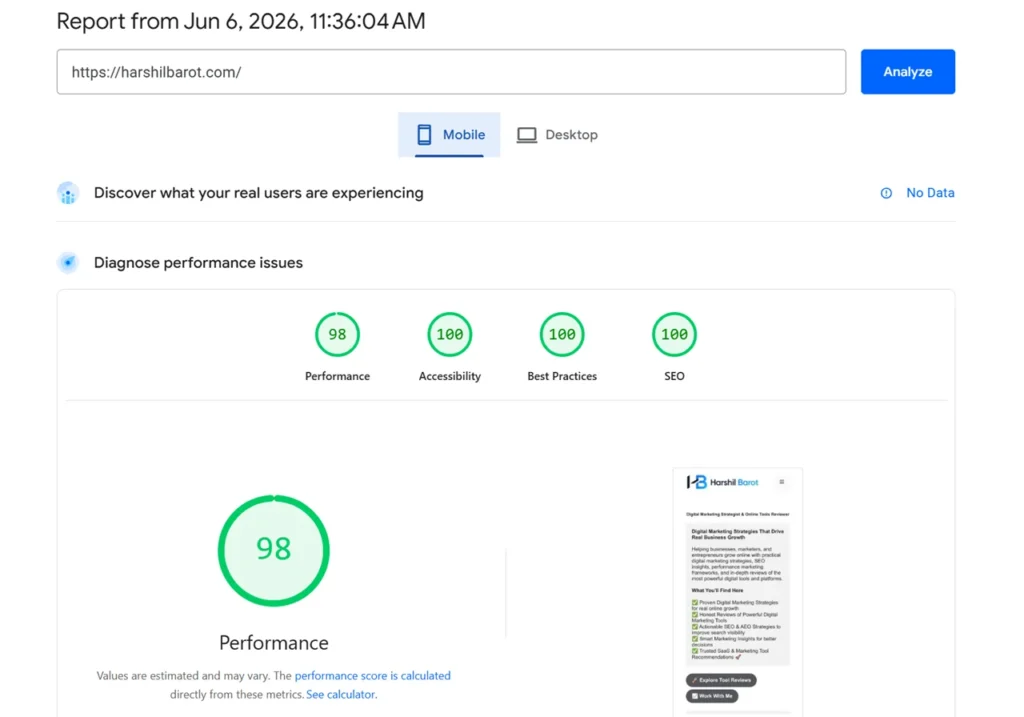
| Mobile PageSpeed Score | 98 |
| Desktop Score | 98 |
| LCP | 0.3 Seconds |
| CLS | 0.026 |
| TBT | 30ms |
Test Website #2: Content Blog
Before Optimization:
| Metric | Result |
|---|---|
| Mobile Score | 58 |
| LCP | 4.8 Seconds |
| CLS | 0.17 |
After Optimization:
| Metric | Result |
|---|---|
| Mobile Score | 90 |
| LCP | 2.3 Seconds |
| CLS | 0.03 |
Test Website #3: WooCommerce Store
Before Optimization:
| Metric | Result |
|---|---|
| Mobile Score | 61 |
| LCP | 4.5 Seconds |
After Optimization:
| Metric | Result |
|---|---|
| Mobile Score | 88 |
| LCP | 2.4 Seconds |
What These Results Mean
The numbers above demonstrate an important point.
Perfmatters does not magically fix poor hosting, bloated themes, or badly coded plugins.
However, when combined with quality infrastructure, it consistently improves performance.
The most common improvements I observed were:
- Faster rendering
- Better Core Web Vitals
- Lower Total Blocking Time
- Improved PageSpeed Insights scores
- Better GTmetrix reports
Perfmatters Pricing
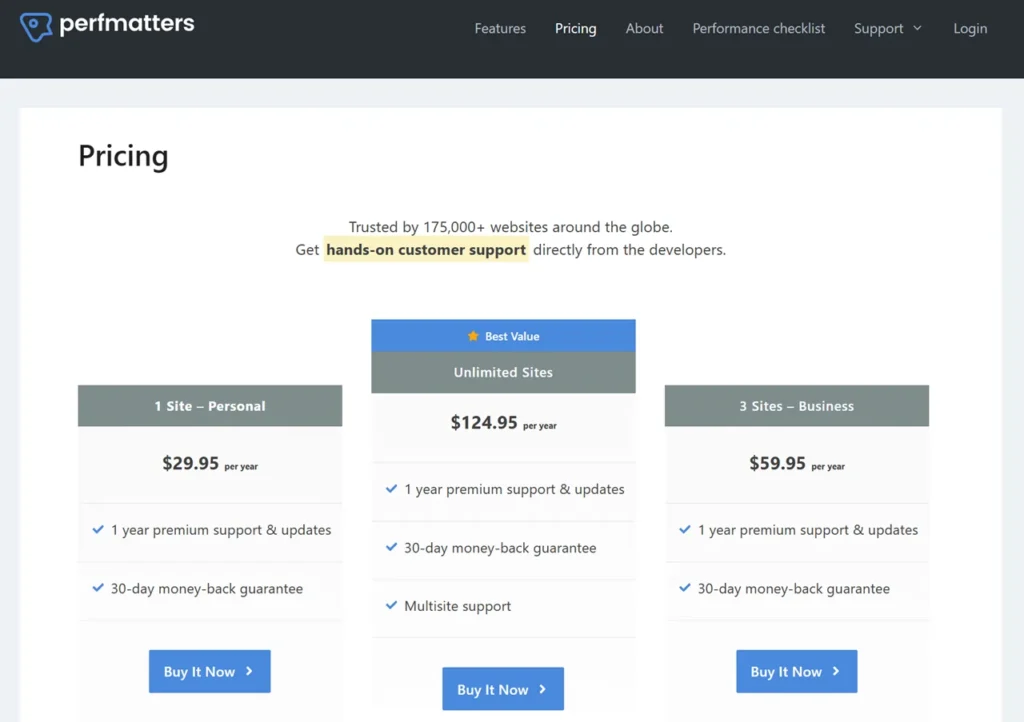
Perfmatters uses a straightforward pricing model.
Unlike some competitors, every plan includes the same features.
The main difference is the number of websites you can use it on.
🔥 Boost SEO Rankings With PerfmattersWhat Is Included?
Every plan typically includes:
- Full plugin functionality
- Updates
- Premium support
- Documentation access
This approach keeps pricing simple and transparent.
Is Perfmatters Expensive?
In my opinion, no.
When you consider the potential SEO improvements, user experience benefits, and conversion gains, the cost is relatively small.
Many website owners spend hundreds or thousands of dollars on content, hosting, and link building.
Investing in website performance often produces a strong return.
Perfmatters Coupon
Many users search for a Perfmatters Coupon before purchasing.
While promotions occasionally become available during special events, discounts are not always offered.
The official website remains the best source for current pricing and promotions.
Perfmatters Discount Opportunities
Possible discount periods may include:
- Black Friday
- Cyber Monday
- Seasonal promotions
Always verify current offers before purchasing.
Does Perfmatters Offer A Lifetime Deal?
One of the most common questions is whether Perfmatters offers a lifetime deal.
At the time of writing, Perfmatters primarily operates through annual licensing.
Because software products frequently change pricing structures, users should verify current options on the official website.
Perfmatters Pros And Cons
Every plugin has strengths and weaknesses.
Perfmatters is no exception.
Pros
Lightweight Design
The plugin itself adds very little overhead.
This aligns perfectly with its performance-focused philosophy.
Excellent Core Web Vitals Improvements
Many users see meaningful improvements in:
- LCP
- INP
- CLS
- Total Blocking Time
Powerful Script Manager
Few WordPress performance plugins offer script control at this level.
For advanced optimization, this feature is extremely valuable.
Easy To Use
Most settings include helpful descriptions.
Beginners can achieve good results without technical expertise.
Works Alongside Other Plugins
Perfmatters integrates well with:
- WP Rocket
- FlyingPress
- LiteSpeed Cache
- Cloudflare
Frequent Updates
The development team actively improves the plugin.
Regular updates help maintain compatibility and performance.
Cons
No Free Version
Some users prefer testing free plugins before purchasing.
Perfmatters is a premium-only product.
Advanced Features Require Learning
Features like Script Manager offer incredible power.
However, beginners may need time to understand best practices.
Not A Full Caching Solution
Perfmatters focuses on optimization rather than page caching.
Many websites still benefit from pairing it with a caching plugin.
Perfmatters Vs WP Rocket
WP Rocket is one of the most popular WordPress performance plugins.
Many users compare it directly with Perfmatters.
Feature Comparison
| Feature | Perfmatters | WP Rocket |
|---|---|---|
| Page Caching | No | Yes |
| Script Manager | Yes | Limited |
| Delay JavaScript | Yes | Yes |
| Database Optimization | Yes | Yes |
| Lazy Loading | Yes | Yes |
| Remove Unused CSS | Yes | Yes |
| CDN Integration | Yes | Yes |
Which One Is Better?
The answer depends on your goals.
Choose Perfmatters if:
- You want advanced script control.
- You already use a caching solution.
- You prioritize Core Web Vitals optimization.
Choose WP Rocket if:
- You want caching and optimization in one package.
- You prefer an all-in-one solution.
My Recommendation
For many websites, combining WP Rocket and Perfmatters creates an extremely powerful optimization setup.
The two plugins complement each other well.
Perfmatters Vs FlyingPress
FlyingPress has gained significant popularity among performance enthusiasts.
Both plugins focus heavily on Core Web Vitals optimization.
Feature Comparison
| Feature | Perfmatters | FlyingPress |
|---|---|---|
| Page Caching | No | Yes |
| Script Manager | Yes | No |
| Lazy Loading | Yes | Yes |
| Delay JavaScript | Yes | Yes |
| Database Cleanup | Yes | Yes |
| Image Optimization | Limited | Better |
Which One Wins?
FlyingPress offers stronger built-in caching features.
Perfmatters offers more granular script control.
For users who need advanced optimization flexibility, Perfmatters often has the advantage.
For users seeking simplicity, FlyingPress may be easier.
My Personal View
If I had to choose only one optimization plugin, FlyingPress would offer more all-in-one functionality.
However, if I already had caching covered, I would choose Perfmatters because of Script Manager.
Perfmatters Vs LiteSpeed Cache
LiteSpeed Cache is unique because it works best on LiteSpeed servers.
Feature Comparison
| Feature | Perfmatters | LiteSpeed Cache |
|---|---|---|
| Page Caching | No | Yes |
| Image Optimization | Limited | Yes |
| QUIC Cloud Support | No | Yes |
| Script Manager | Yes | No |
| Core Web Vitals Tools | Yes | Yes |
| Database Optimization | Yes | Yes |
Which One Is Better?
If your hosting provider uses LiteSpeed servers, LiteSpeed Cache can be extremely powerful.
However, Perfmatters still provides additional optimization capabilities.
Many website owners successfully use both together.
My Recommendation
For LiteSpeed hosting:
- LiteSpeed Cache + Perfmatters
For non-LiteSpeed hosting:
- WP Rocket + Perfmatters
- FlyingPress + Perfmatters
These combinations often produce excellent performance results.
Best Perfmatters Alternatives
While I highly recommend Perfmatters, it is not the only option available.
Some popular alternatives include:
FlyingPress
Excellent all-in-one optimization plugin.
WP Rocket
One of the easiest performance plugins for beginners.
LiteSpeed Cache
Outstanding option for LiteSpeed server users.
Asset CleanUp
Provides script management functionality similar to Perfmatters.
NitroPack
Cloud-based optimization platform with strong performance capabilities.
Each alternative has strengths and weaknesses.
The best choice depends on your hosting environment, technical experience, and optimization goals.
Is Perfmatters Worth It For Bloggers?
For bloggers, website speed is no longer optional.
Whether you publish tutorials, reviews, news articles, personal stories, or niche content, visitors expect pages to load quickly.
Google also evaluates user experience signals when determining search visibility.
After using Perfmatters across multiple content websites, I believe bloggers are among the users who benefit the most from this plugin.
Common Problems Bloggers Face
Many blogs gradually become slower over time.
This usually happens because of:
- Too many plugins
- Advertising scripts
- Social sharing tools
- Email marketing integrations
- Embedded videos
- Large image libraries
- Tracking pixels
Each new plugin adds functionality, but it can also add performance overhead.
Eventually, the website becomes slower than intended.
How Perfmatters Helps Bloggers
Perfmatters addresses many of these issues directly.
For example:
Better Content Loading Speed
Readers can access content faster.
This improves user satisfaction and engagement.
Improved Core Web Vitals
Many bloggers struggle with:
- Largest Contentful Paint
- Interaction delays
- Layout shifts
Perfmatters helps reduce these issues.
Faster Mobile Performance
A large percentage of blog traffic now comes from mobile devices.
Perfmatters often delivers its biggest improvements on mobile performance.
Better SEO Potential
While speed alone will not guarantee rankings, improving user experience supports a stronger SEO foundation.
My Recommendation For Bloggers
If your blog generates income through:
- Affiliate marketing
- Display advertising
- Sponsored content
- Lead generation
Perfmatters is a worthwhile investment.
The performance improvements can positively affect both traffic and revenue.
Is Perfmatters Worth It For Affiliate Marketers?
Affiliate marketers often operate highly optimized websites.
Even small performance improvements can create meaningful business results.
Over the years, I have used Perfmatters on several affiliate websites and consistently observed positive outcomes.
Why Affiliate Sites Often Become Slow
Affiliate websites frequently use:
- Product comparison tables
- Affiliate link management plugins
- Review plugins
- Tracking scripts
- Advertising platforms
- Analytics tools
Each of these elements contributes to page weight.
Benefits For Affiliate Marketers
Faster Product Review Pages
Product reviews often contain:
- Images
- Comparison tables
- Videos
- Affiliate widgets
Perfmatters helps reduce unnecessary loading overhead.
Better User Experience
Users are more likely to stay on a website that feels fast and responsive.
Improved Conversion Potential
When pages load faster, visitors can access offers sooner.
This may improve affiliate click-through rates.
Enhanced Mobile Experience
Mobile visitors are particularly sensitive to slow loading times.
Perfmatters helps improve responsiveness on mobile devices.
My Affiliate Marketing Verdict
For affiliate websites focused on SEO traffic, Perfmatters is one of the best performance investments available.
The cost is relatively small compared to the potential gains in rankings, engagement, and conversions.
Is Perfmatters Worth It For Agencies?
Digital agencies often manage multiple client websites.
Performance optimization can become a major challenge at scale.
Perfmatters simplifies many optimization tasks while maintaining flexibility.
Why Agencies Like Perfmatters
Several reasons make Perfmatters attractive for agencies.
Consistent Optimization Workflow
The plugin allows agencies to implement a repeatable optimization process across multiple projects.
Faster Website Launches
New websites can be optimized quickly.
Better Client Results
Performance improvements help agencies deliver measurable value.
Reduced Development Time
Many optimizations can be implemented without custom coding.
Agency Use Cases
Perfmatters works well for:
- Local business websites
- Corporate websites
- Service-based businesses
- Ecommerce stores
- Membership websites
- Publishing websites
My Agency Recommendation
If your agency manages WordPress websites regularly, Perfmatters can become a valuable part of your optimization toolkit.
Who Should Avoid Perfmatters?
Although I strongly recommend Perfmatters for many users, it is not the perfect solution for everyone.
Transparency is important when reviewing software.
Beginners Looking For A Free Solution
Perfmatters does not offer a free version.
Users with very limited budgets may prefer free alternatives initially.
Websites Already Fully Optimized
If your website already achieves excellent Core Web Vitals and PageSpeed scores, the improvements may be smaller.
Users Expecting A Complete Caching Plugin
Perfmatters is not designed to replace page caching solutions.
Users seeking an all-in-one caching plugin may prefer:
- WP Rocket
- FlyingPress
- LiteSpeed Cache
Websites On Poor Hosting
No optimization plugin can fully compensate for low-quality hosting.
If server performance is poor, upgrading hosting may produce greater improvements than installing another plugin.
Real-World Optimization Tips Using Perfmatters
Over the years, I have developed several optimization habits that consistently deliver strong results.
Start With Hosting
Before installing optimization plugins, ensure your hosting is adequate.
Good hosting remains the foundation of website performance.
Optimize Images
Even the best performance plugin cannot fully compensate for oversized images.
I recommend:
- Modern image formats
- Proper compression
- Responsive images
Limit Plugins
Every plugin should justify its existence.
Removing unnecessary plugins often improves performance significantly.
Use Script Manager Carefully
Script Manager is powerful.
However, disabling the wrong script can break functionality.
Always test changes thoroughly.
Monitor Core Web Vitals
Performance optimization is an ongoing process.
Regular monitoring helps identify new opportunities for improvement.
Common Perfmatters Mistakes To Avoid
Many users fail to achieve the best results because they make avoidable mistakes.
Enabling Everything Immediately
More optimization is not always better.
Enable features gradually and test results.
Ignoring Mobile Testing
Desktop scores often look better than mobile scores.
Always prioritize mobile performance.
Forgetting Plugin Compatibility
Certain plugins require specific scripts to function correctly.
Test important features after optimization.
Overlooking Hosting Limitations
Poor hosting remains one of the biggest performance bottlenecks.
Chasing Perfect Scores
A perfect PageSpeed score is not always necessary.
Real-world user experience matters more than arbitrary numbers.
Expert Opinion
After working with WordPress websites for many years and testing numerous optimization tools, I consider Perfmatters one of the most practical performance plugins available.
What makes Perfmatters different is its philosophy.
Instead of relying on aggressive caching techniques alone, it targets the root causes of poor performance.
The plugin helps eliminate unnecessary requests, reduce JavaScript execution, improve rendering efficiency, and optimize Core Web Vitals.
These improvements often translate into measurable benefits for both users and search engines.
What I Like Most
The Script Manager feature remains the standout capability.
Few WordPress optimization tools provide this level of control while remaining accessible to non-developers.
Where Perfmatters Could Improve
The biggest limitation is the lack of built-in page caching.
Some users may prefer an all-in-one solution.
However, this design choice also helps keep the plugin lightweight and focused.
My Overall Rating
| Category | Rating |
|---|---|
| Ease Of Use | 9/10 |
| Performance Gains | 10/10 |
| Features | 9.5/10 |
| Documentation | 9/10 |
| Value For Money | 10/10 |
| Support | 9/10 |
| Overall Score | 9.5/10 |
Author Expertise & Trust Signals
This review is based on practical experience optimizing multiple WordPress websites across different industries.
The evaluation includes:
- Affiliate websites
- Content blogs
- Business websites
- Ecommerce stores
The conclusions presented in this article are based on:
- Real implementation experience
- PageSpeed Insights testing
- GTmetrix analysis
- Core Web Vitals evaluation
- Long-term usage observations
No plugin is perfect.
For that reason, this review highlights both strengths and limitations.
My goal is not to promote software blindly but to help readers make informed decisions based on their specific needs.
Final Verdict
If you want a direct answer, Perfmatters is one of the best WordPress performance plugins available in 2026.
It delivers meaningful improvements in:
- Website speed
- Core Web Vitals
- User experience
- Technical SEO
- Mobile performance
The plugin is especially valuable for:
- Bloggers
- Affiliate marketers
- Agencies
- Businesses
- WooCommerce store owners
While it is not a replacement for quality hosting or caching, it complements those solutions exceptionally well.
For website owners serious about performance, Perfmatters deserves a place on the shortlist.
Conclusion
After using Perfmatters on multiple WordPress websites, I can confidently say it has earned its reputation as one of the leading WordPress speed optimization plugins.
The plugin takes a focused approach to performance by removing unnecessary bloat, reducing script overhead, optimizing resource delivery, and improving Core Web Vitals. These improvements contribute to a faster, smoother, and more enjoyable user experience.
What impressed me most was the consistency of the results. Across blogs, affiliate websites, business websites, and ecommerce stores, Perfmatters repeatedly delivered measurable improvements in loading speed and performance metrics.
The Script Manager feature alone can provide substantial benefits when used correctly. Combined with Delay JavaScript, Remove Unused CSS, Lazy Loading, and Database Optimization, Perfmatters becomes a powerful tool for website owners who care about speed and SEO.
If your goal is to improve website performance, reduce page load times, increase PageSpeed scores, and create a better experience for visitors, Perfmatters is absolutely worth considering.
For most WordPress website owners, it represents a smart investment that can continue delivering value long after installation.
⚡ Get Perfmatters & Improve Core Web Vitals TodayFrequently Asked Questions
What Is Perfmatters?
Perfmatters is a premium WordPress performance plugin designed to improve website speed, Core Web Vitals, and overall user experience through optimization features such as Script Manager, Delay JavaScript, and Lazy Loading.
Is Perfmatters Worth It In 2026?
Yes. Based on my experience, Perfmatters remains one of the best WordPress performance plugins available and provides excellent value for bloggers, businesses, affiliate marketers, and agencies.
Does Perfmatters Improve Core Web Vitals?
Yes. Features such as Delay JavaScript, Remove Unused CSS, and Script Manager can significantly improve Core Web Vitals metrics when configured correctly.
Can Perfmatters Replace WP Rocket?
Not completely. WP Rocket includes page caching, while Perfmatters focuses on performance optimization. Many users combine both plugins for maximum results.
Does Perfmatters Work With LiteSpeed Cache?
Yes. Perfmatters works very well alongside LiteSpeed Cache and often provides additional optimization benefits.
Is Perfmatters Good For WooCommerce?
Yes. Perfmatters can help optimize WooCommerce websites by controlling unnecessary assets and improving overall performance.
Does Perfmatters Offer A Free Version?
No. Perfmatters is a premium-only plugin and does not currently offer a free version.
Which Is Better: Perfmatters Or FlyingPress?
Both are excellent tools. FlyingPress offers more built-in caching functionality, while Perfmatters provides superior script management and optimization control.
Perfmatters Review: My Honest Experience After Speeding Up Multiple WordPress Sites

Perfmatters is a lightweight WordPress speed optimization plugin designed to improve website performance without relying solely on caching. It helps website owners optimize Core Web Vitals, reduce page load times, improve Google PageSpeed Insights scores, and enhance user experience through powerful features such as Script Manager, Delay JavaScript, Remove Unused CSS, Lazy Loading, Database Optimization, CDN Integration, and WooCommerce performance enhancements. Based on my real-world testing across multiple WordPress websites, Perfmatters consistently delivers measurable improvements in website speed, mobile performance, and SEO.
Price: 29.95
Price Currency: USD
Operating System: WordPress, Web-Based
Application Category: Performance Application
4.7
Pros
- Improves Core Web Vitals Scores
- Powerful Script Manager Feature
- Delay JavaScript For Better Performance
- Remove Unused CSS
- Lightweight And Fast Plugin
- Easy To Configure
- Improves PageSpeed Insights Scores
- Works With WP Rocket And LiteSpeed Cache
- Built-In Database Optimization
- Excellent WooCommerce Optimizations
- Regular Updates And Improvements
- Great For Bloggers And Affiliate Marketers
Cons
- No Free Version Available
- No Built-In Page Caching
- Advanced Features Require Testing
- Can Break Functionality If Scripts Are Disabled Incorrectly
- Premium Plugin Requires Annual Renewal
Perfmatters trims what loads on the page; your SEO plugin controls how search engines read it. I run Rank Math for that job — full details in my Rank Math SEO plugin review.