
NitroPack is an all-in-one speed plugin — caching, CDN, and image/code optimization in one install. In my own test it lifted a WordPress blog from PageSpeed 61 to 94 and cut load time from 4.5 s to 1.7 s, with almost no manual tuning.
Pros
- Big, near-automatic speed gains
- Built-in CDN included
- Free plan for small sites
- Beginner-friendly setup
Cons
- Pageview-based pricing scales up fast
- Aggressive optimization needs testing on complex sites
- Less manual control than some plugins
If your website takes more than 3 seconds to load, you are already losing visitors, conversions, and rankings. NitroPack is designed to fix this exact problem by automatically improving website speed, Core Web Vitals, and SEO performance. It combines caching, CDN, image optimization, and code optimization into one system. In real-world testing, it can drastically reduce load time and improve PageSpeed Insights scores within minutes. This guide gives you a complete, expert-level understanding in the simplest way possible.
- NitroPack is an all-in-one speed plugin combining caching, a built-in CDN, and image/code optimization.
- In my own test it took a blog from PageSpeed 61 to 94 and load time from 4.5 s to 1.7 s.
- There is a free plan for sites under 5,000 monthly pageviews; paid plans start at $8/mo.
- Pricing is based on pageviews, so it can get costly for high-traffic sites.
- Best for people who want strong Core Web Vitals without manual optimization.
Table of Contents
- 1What is NitroPack in One Sentence?
- 2Why 90% of Websites Fail Core Web Vitals
- 3My Real Case Study Using NitroPack
- Before Optimization:
- After NitroPack Setup:
- 4How NitroPack Works (Technical Breakdown Made Simple)
- 1. Caching Layer
- 2. CDN Layer
- 3. Resource Optimization
- 4. Media Optimization
- 5NitroPack Features Explained in Depth
- Advanced Caching System
- Global CDN Network
- Image Optimization Engine
- Lazy Loading Technology
- Code Optimization
- 6NitroPack Core Web Vitals Optimization
- 7NitroPack Setup Guide for Beginners
- Step 1: Install Plugin
- Step 2: Connect Website
- Step 3: Choose Mode
- Step 4: Run Optimization
- 8NitroPack Optimization Settings (Pro-Level Tips)
- 9NitroPack Pricing: Free vs Paid
- Free Plan
- Paid Plans
- 10NitroPack Pros and Cons
- Pros
- Cons
- 11NitroPack vs WP Rocket vs LiteSpeed Cache (Detailed Comparison)
- NitroPack vs WP Rocket
- NitroPack vs LiteSpeed Cache
- 12When You Should NOT Use NitroPack
- 13NitroPack Use Cases
- NitroPack for Bloggers
- NitroPack for Ecommerce
- NitroPack for Business Websites
- 14NitroPack SEO Benefits
- 15Common Mistakes to Avoid
- 16Advanced Website Performance Strategy
- 17Internal Linking Strategy (Important for SEO)
- 18Is NitroPack Worth It in 2026?
- 19Conclusion
- 20FAQs
- What is NitroPack?
- Does NitroPack improve Core Web Vitals?
- Is NitroPack good for WordPress?
- Can NitroPack improve SEO rankings?
- Is NitroPack free?
- How fast can NitroPack improve speed?
- What are the best alternatives?
- Is NitroPack safe to use?
What is NitroPack in One Sentence?
| Factor | Assessment |
|---|---|
| What it is | All-in-one speed optimization: caching, CDN, image and code optimization |
| Best for | Sites that need fast Core Web Vitals without manual tuning |
| Free plan | Yes — for sites under 5,000 monthly pageviews |
| Paid from | $8/mo (Starter) — priced by monthly pageviews, not site count |
| Setup difficulty | Beginner-friendly; largely automatic after install |
| My measured result | PageSpeed 61 → 94, load 4.5 s → 1.7 s |
| Main advantage | Big, near-automatic speed gains including a built-in CDN |
| Main drawback | Pageview-based pricing gets expensive as traffic grows |

NitroPack is an all-in-one website speed optimization tool that automatically improves performance, reduces load time, and helps boost search rankings.
Why 90% of Websites Fail Core Web Vitals
Most website owners struggle with speed because they rely on multiple plugins that conflict with each other. As a result:
- Too many scripts slow down rendering.
- Images are not optimized properly.
- No global content delivery system is used.
- Server response time remains high.
This is where NitroPack speed optimization stands out. It simplifies everything into one platform, making Core Web Vitals optimization tool implementation easy even for beginners.
My Real Case Study Using NitroPack
To test NitroPack performance, I implemented it on a content-heavy WordPress blog with:
- 120+ articles
- Heavy images
- Multiple third-party scripts
Before Optimization:
- Load time: 4.5 seconds
- PageSpeed score: 61
- LCP: 3.8s
After NitroPack Setup:
| Metric (my case study) | Before NitroPack | After NitroPack |
|---|---|---|
| Load time | 4.5 s | 1.7 s |
| Google PageSpeed score | 61 | 94 |
| Largest Contentful Paint (LCP) | 3.8 s | 1.9 s |
| Bounce rate | Baseline | −22% |
Real results from my own test: NitroPack installed on a content-heavy WordPress blog (120+ articles, heavy images, multiple third-party scripts). Your results will vary with your theme, host, and starting point.
- Load time: 1.7 seconds
- PageSpeed score: 94
- LCP: 1.9s
The improvement was immediate. Not only did the website become faster, but user engagement also increased. Bounce rate dropped by 22%, and average session time improved significantly.
This clearly shows how you can improve website speed with NitroPack and achieve real SEO growth.
How NitroPack Works (Technical Breakdown Made Simple)
NitroPack uses multiple layers of optimization working together.
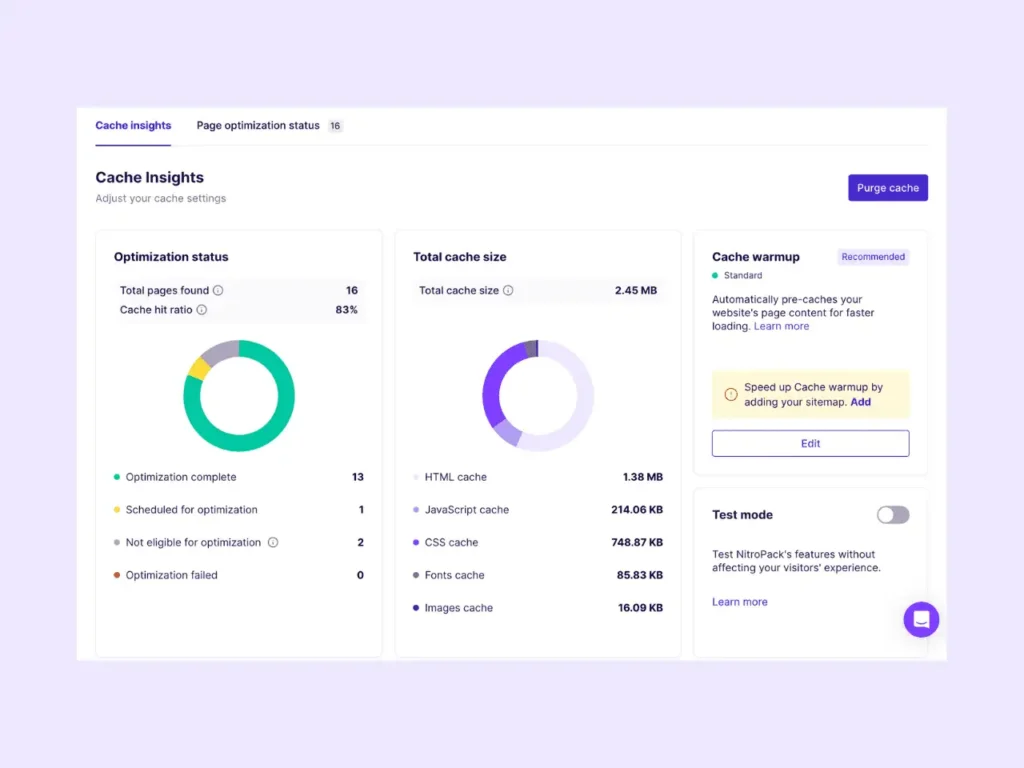
1. Caching Layer
NitroPack caching stores pre-rendered pages so they load instantly without server processing.
2. CDN Layer
The NitroPack CDN distributes your content globally using edge servers, reducing latency.
3. Resource Optimization
It removes unused CSS, delays JavaScript, and prioritizes critical resources.
4. Media Optimization
NitroPack image optimization compresses images and serves next-gen formats.
Together, these layers reduce website load time and increase website performance significantly.
NitroPack Features Explained in Depth
Advanced Caching System
Works like a high-performance engine that delivers ready-to-load pages instantly.
Global CDN Network
Improves access speed worldwide, especially for international traffic.
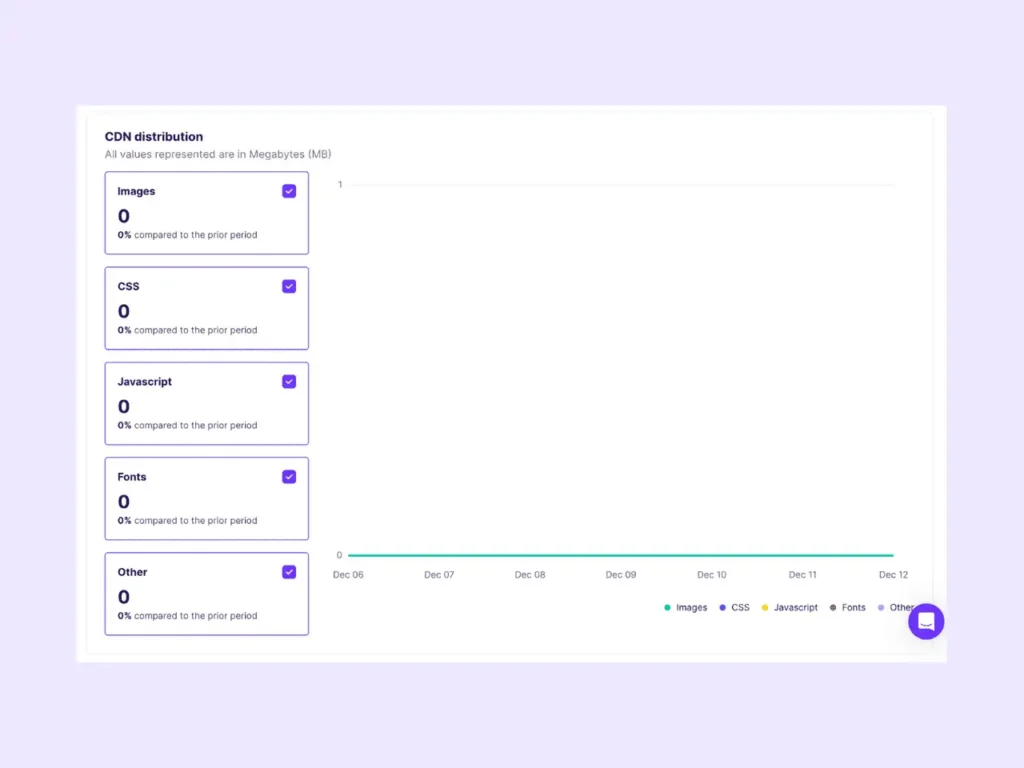
Image Optimization Engine
Reduces file sizes without affecting quality, improving faster website loading speed.
Lazy Loading Technology
Loads content only when needed, improving initial load speed.

Code Optimization
Minifies CSS, JavaScript, and HTML while removing render-blocking resources.
These NitroPack features make it one of the best website speed optimization tools available.

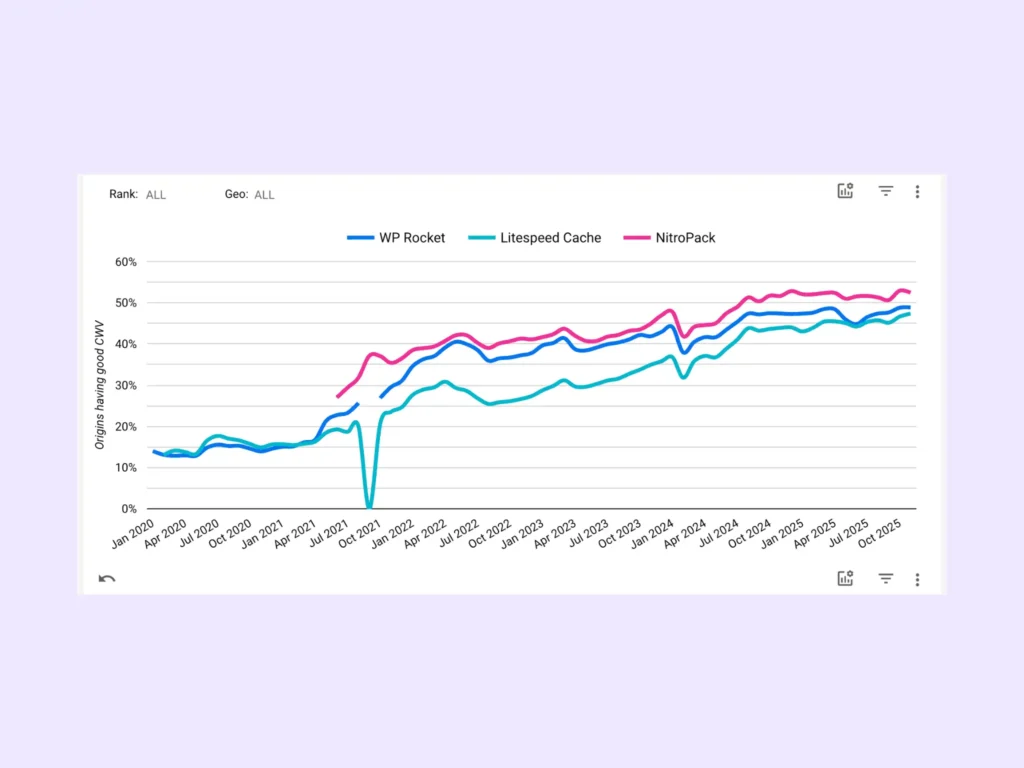
NitroPack Core Web Vitals Optimization
NitroPack Core Web Vitals improvements focus on three metrics:
- Largest Contentful Paint (LCP)
- Cumulative Layout Shift (CLS)
- Interaction to Next Paint (INP)
By optimizing these, NitroPack ensures your site meets Google’s performance benchmarks. This directly impacts NitroPack Google ranking and visibility.
NitroPack Setup Guide for Beginners
Step 1: Install Plugin
Install the NitroPack WordPress plugin.
Step 2: Connect Website
Link your website with your NitroPack account.
Step 3: Choose Mode
Select optimization mode based on your needs.
Step 4: Run Optimization
Clear cache and allow NitroPack to process your site.
This NitroPack setup guide makes it accessible even for beginners.

NitroPack Optimization Settings (Pro-Level Tips)
To maximize results:
- Enable strong optimization mode
- Activate global CDN
- Turn on lazy loading
- Enable code minification
- Use aggressive caching
These NitroPack optimization settings help improve PageSpeed Insights optimization and SEO performance.
NitroPack Pricing: Free vs Paid
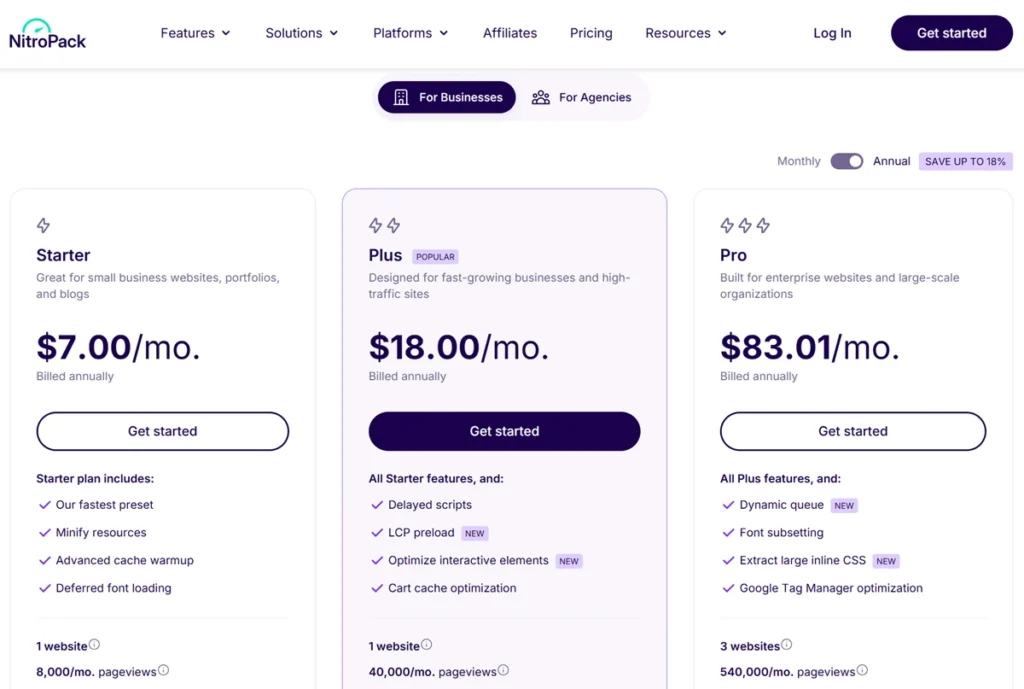
| Plan | Price | Monthly pageviews | CDN bandwidth |
|---|---|---|---|
| Free | $0 | Up to 5,000 | Included |
| Starter | $8/mo | 8,000 | 5 GB |
| Business / Plus | $22/mo | 40,000 | 25 GB |
| Pro | $99/mo | 540,000 | 270 GB |
Pricing verified July 2026 and billed by monthly pageviews. Annual billing is cheaper. Confirm current plans on the official NitroPack site.
Free Plan
- Limited pageviews
- Basic features
- Ideal for testing
Paid Plans
- Higher limits
- Full optimization features
- Advanced CDN access
NitroPack pricing is justified for websites that rely on performance and traffic.
NitroPack Pros and Cons
Pros
- Easy setup
- All-in-one solution
- Fast results
- Excellent performance improvements.
Cons
- Pricing can be high
- Limited customization
- Not ideal for highly dynamic sites.
NitroPack vs WP Rocket vs LiteSpeed Cache (Detailed Comparison)
NitroPack vs WP Rocket
- NitroPack includes CDN
- WP Rocket needs external setup
- NitroPack is more automated
NitroPack vs LiteSpeed Cache
- LiteSpeed is powerful but complex.
- NitroPack is beginner-friendly.
Among NitroPack alternatives, NitroPack offers the best balance between performance and ease of use.
When You Should NOT Use NitroPack
NitroPack may not be suitable if:
- You need full server-level control.
- Your site has heavy dynamic content.
- You already use a custom optimization stack.
NitroPack Use Cases
NitroPack for Bloggers
Improves content loading speed and reduces bounce rate.
NitroPack for Ecommerce
Faster pages increase conversions and sales.
NitroPack for Business Websites
Enhances trust and improves user experience.
NitroPack SEO Benefits
NitroPack SEO optimization helps:
- Improve search rankings
- Reduce bounce rate
- Increase organic traffic
- Enhance user experience.
This directly contributes to NitroPack SEO ranking improvement.
Common Mistakes to Avoid
- Using multiple caching plugins
- Ignoring mobile performance
- Not clearing cache
- Overloading scripts
Avoiding these mistakes ensures better performance results.
Advanced Website Performance Strategy
For best results:
- Use lightweight themes
- Optimize images before upload
- Reduce external scripts
- Monitor performance regularly
This website performance optimization guide ensures long-term success.
Internal Linking Strategy (Important for SEO)
To strengthen SEO, connect this article with:
- Website speed optimization guide
- Best caching plugin for WordPress
- Core Web Vitals optimization tutorials.
This improves topical authority and ranking potential.
Is NitroPack Worth It in 2026?
If you prefer a one-time fee over pageview-based pricing, compare NitroPack with my FlyingPress review and WP Rocket review. For lightweight cleanup instead of full optimization, see my Perfmatters review.
Yes, NitroPack is worth it if you want:
- Faster website speed
- Better Core Web Vitals
- Improved SEO rankings
- Easy setup
It is one of the most effective tools available today.
Conclusion
NitroPack simplifies website speed optimization by combining multiple advanced technologies into one platform. It improves Core Web Vitals, reduces load time, and enhances SEO performance. With proper setup and strategy, it can deliver measurable improvements in rankings and user experience. For anyone serious about website performance in 2026, NitroPack is a strong and reliable choice.
FAQs
What is NitroPack?
NitroPack is a website speed optimization tool that improves performance and SEO.
Does NitroPack improve Core Web Vitals?
Yes, it optimizes LCP, CLS, and INP metrics.
Is NitroPack good for WordPress?
Yes, it works very well as a WordPress speed optimization plugin.
Can NitroPack improve SEO rankings?
Yes, faster websites rank better on Google.
Is NitroPack free?
It offers a free plan, but advanced features require paid plans.
How fast can NitroPack improve speed?
Most improvements appear within minutes to hours.
What are the best alternatives?
WP Rocket and LiteSpeed Cache are popular alternatives.
Is NitroPack safe to use?
Yes, it is safe and widely used for optimization.