Ahrefs is an SEO research platform for keyword discovery, backlink analysis, competitor research, audits and ranking reports. I retain my existing 4.7/5 editorial rating. It is most useful when you have regular research and implementation work to justify the subscription. Its biggest tradeoffs are cost, plan limits and the fact that traffic and difficulty metrics are estimates. This review explains the current USD plans, useful workflows and limitations so you can choose paid access or start free.
Table of Contents
- 1What Is Ahrefs?
- 2Where Ahrefs Is Most Useful—and Where Its Data Has Limits
- 3How to Interpret Ahrefs Metrics
- 4Ahrefs Features
- Site Explorer: Competitor Analysis Made Easy
- Keywords Explorer: Find Winning Keywords
- Site Audit: Fix Technical SEO Issues
- Rank Tracker: Monitor Your Progress
- Content Explorer: Research Published Content
- Web Analytics: Privacy-Friendly Tracking
- 5Brand Radar and AI Search Monitoring
- 6Ahrefs Pricing and Plans (2026)
- 7Ahrefs For Beginners: Step-by-Step Tutorial
- Step 1: Keyword Research
- Step 2: Competitor Analysis
- Step 3: Content Creation
- Step 4: On-Page Optimization
- Step 5: Link Building
- Step 6: Track Rankings
- 8Common Mistakes While Using Ahrefs
- 9Ahrefs For Bloggers, Agencies, and Businesses
- Ahrefs For Bloggers
- Ahrefs For Agencies
- Ahrefs For Businesses
- 10Ahrefs Vs Semrush Vs Moz
- 11A Practical Plan-Selection Checklist
- 12Pros and Cons of Ahrefs
- Advantages
- Disadvantages
- 13Who Should Use Ahrefs?
- 14Final Verdict: Is Ahrefs Worth It in 2026?
- 15Conclusion
- 16FAQs
- What is Ahrefs used for?
- Is Ahrefs good for beginners?
- Does Ahrefs offer free tools?
- Is Ahrefs better than Semrush?
- Can Ahrefs increase website traffic?
- How accurate is Ahrefs data?
- Is Ahrefs worth the price?
- Who should use Ahrefs?
What Is Ahrefs?
Ahrefs is an all-in-one SEO software designed to improve your website’s visibility in search engines. It started as a backlink analysis tool but has now evolved into a complete SEO ecosystem.
Today, it is widely used by:
- Bloggers
- SEO professionals
- Digital marketing agencies
- Businesses and startups
What makes it powerful is its ability to turn complex SEO data into simple, actionable insights.
Ahrefs can reveal patterns in a search market. Its database does not expose Google’s ranking algorithm, and no report tells you every reason a competitor ranks.
Where Ahrefs Is Most Useful—and Where Its Data Has Limits
I recommend evaluating Ahrefs for its connected research workflow: start with a market or competitor, inspect promising pages and links, then investigate technical issues. That is a more useful buying criterion than declaring a universal best SEO tool.
First, Ahrefs maintains a substantial backlink index. It is useful for discovery, but no third-party index should be treated as a complete record of every link on the web.
Second, keyword volume and traffic numbers help compare opportunities, but they are estimates. Check intent, seasonality, the current results and your own Search Console data before treating an opportunity as worthwhile.
Third, it provides a complete SEO workflow—from keyword research to ranking tracking.
Moreover, it fits perfectly into modern SEO strategy 2026 where data-driven decisions dominate.
How to Interpret Ahrefs Metrics
Estimated traffic is not recorded traffic. Site Explorer models search traffic from keyword positions, estimated search volume and CTR assumptions. It does not have access to a competitor’s private Analytics account. Use it to compare patterns, then use Search Console and Analytics for your own measured results. Ahrefs explains this in its traffic-estimation documentation.
Difficulty is a filter, not a decision. KD focuses on referring domains to top-ranking pages. Read the results yourself to assess whether they demand a tool, product page, local service, fresh news or original experience. A low-KD phrase with the wrong intent can be less useful than a more competitive query that closely matches your business.
Authority metrics are proprietary indicators. Do not confuse a tool’s domain or page score with a Google ranking factor or assume that every high-score backlink is relevant. Check the actual linking page, editorial context, destination and reader value.
Ahrefs Features
Ahrefs is not just one tool—it is a full suite of SEO tools. Let’s break them down in a practical way.
Site Explorer: Competitor Analysis Made Easy
Ahrefs Site Explorer is the core feature of the platform. It allows you to analyze any website.
You can:
- Check organic traffic
- Discover top-performing pages
- Analyze backlinks
- Find competitor keywords
This makes it a powerful competitor analysis tool SEO professionals rely on daily.
For example, inspect a competing page’s topics and referring domains to form hypotheses about its strengths. Use that research to find a useful angle of your own; the report cannot establish the exact cause of its ranking.
Keywords Explorer: Find Winning Keywords
Ahrefs Keyword Research is one of the strongest features.
With Keywords Explorer, you can:
- Find keyword ideas
- Check keyword difficulty tool score.
- Analyze search volume tool data.
- Understand search intent.
Use the data as an input to judgment. Ahrefs Keyword Difficulty is based on referring domains to top-ranking pages and does not account for on-page factors. A low KD is not a promise that your page can rank easily.
This is why it is considered a best keyword research tool.
Site Audit: Fix Technical SEO Issues
Technical SEO is often ignored by beginners. However, it plays a major role in rankings.
Ahrefs Site Audit scans your website and finds issues like:
- Broken links
- Slow pages
- Missing meta tags
- Duplicate content
This makes it a reliable SEO audit tool and technical SEO tool.
Prioritize issues that affect access, indexing or the reader experience, then verify the fix. A better audit health score alone does not prove higher rankings, and the crawler does not automatically implement every correction.
Rank Tracker: Monitor Your Progress
Ahrefs Rank Tracker helps you track keyword rankings over time.
You can:
- Monitor keyword positions
- Compare performance across countries.
- Track SEO progress.
It works as a complete SEO ranking tool and SEO performance tracking system.
Content Explorer: Research Published Content
Content Explorer helps research indexed articles and filter potential examples or outreach prospects. It is included from Standard upward on the current plan comparison; do not assume it comes with every subscription.
You can:
- Discover popular articles
- Analyze backlinks
- Identify content gaps
This is extremely useful for content marketing tools SEO strategies.
Web Analytics: Privacy-Friendly Tracking
Ahrefs Web Analytics provides insights into your website traffic without relying heavily on cookies.
You can:
- Track traffic sources
- Monitor user behavior
- Analyze performance
It acts as a powerful website traffic checker and SEO analytics tool.
Brand Radar and AI Search Monitoring
Ahrefs now offers Brand Radar for monitoring brand mentions and citations in AI responses. It separates a pre-collected visibility index from custom prompts you choose to track. Limited custom prompts are included with Lite and higher plans; broader access and additional checks may cost extra. See the official Brand Radar description for current coverage.
A tracked mention, citation and recommendation are different outcomes. Results depend on the question, location, platform and time. Use monitoring to find gaps and verify cited pages; a subscription does not make an AI system recommend your business. These are verified feature descriptions, not a new hands-on test in this review.
Ahrefs Pricing and Plans (2026)
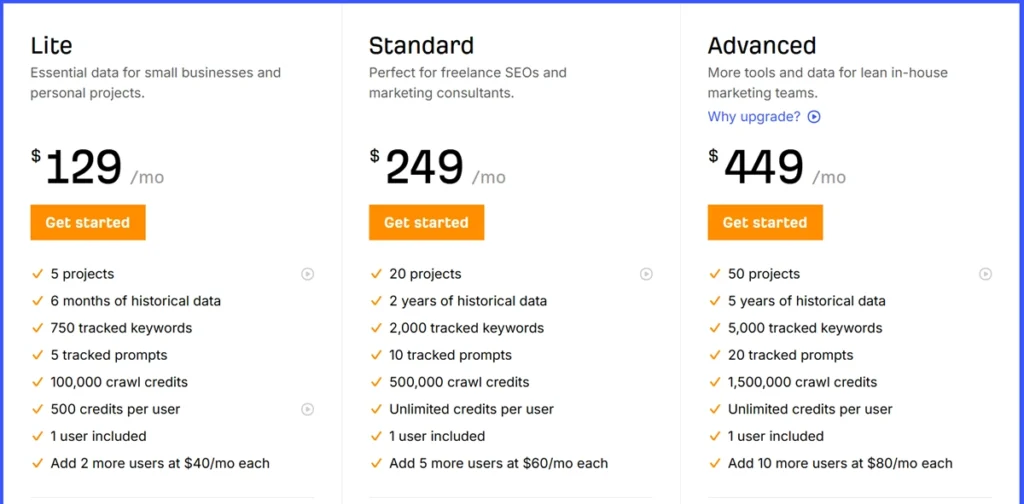
Ahrefs offers multiple plans depending on your needs.
- Starter – For beginners
- Lite – For small websites
- Standard – For growing businesses
- Advanced – For agencies
- Enterprise – For large teams
Value depends on whether you use the reports often enough to justify their cost. The current advertised USD plan prices are below; evaluate usage limits and the full bill before committing.
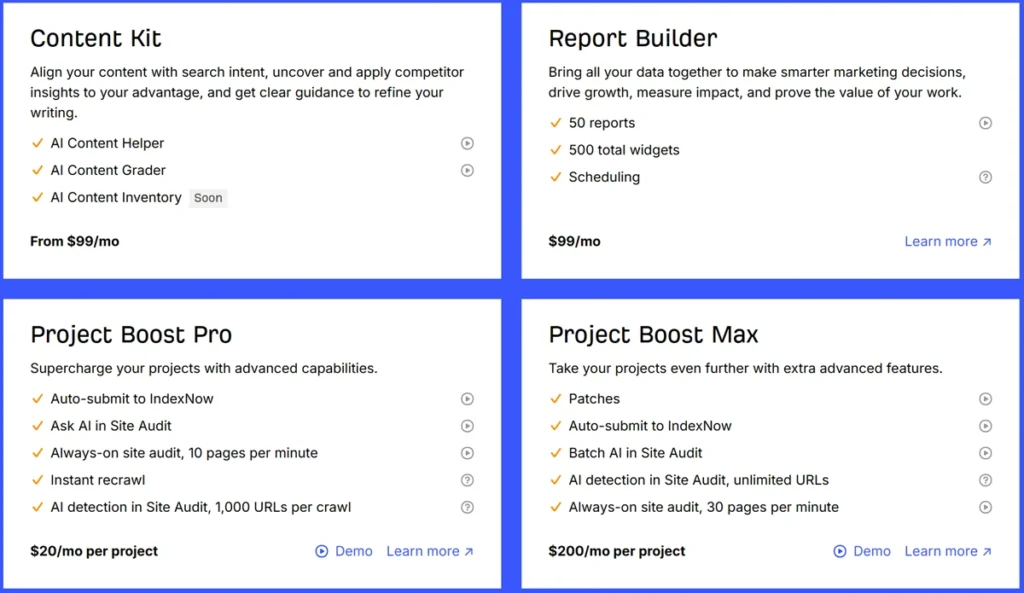
If you only need to audit a site you own, start with Ahrefs Free, the offering associated with Webmaster Tools. It requires ownership verification for site data and is not a full trial of competitor research.
| Plan | Advertised USD price | Billing note |
|---|---|---|
| Ahrefs Free | $0 | Verified owned sites |
| Starter | $29/month | Monthly only |
| Lite | $129/month | Monthly rate |
| Standard | $249/month | Monthly rate |
| Advanced | $449/month | Monthly rate |
| Enterprise | From $1,499/month | Annual commitment |
Current Lite, Standard and Advanced allowances list 750, 2,000 and 5,000 tracked keywords respectively, with one included user. Lite has 1,000 monthly credits per user; higher tiers list unlimited credits, with other limits still applying. Annual billing advertises savings up to 17%. Optional add-ons can increase the total. Check official pricing before purchase.
Starter is a constrained entry plan with its own report and usage limits. Its terms say that extra users, credits and add-ons cannot be purchased, and a Lite-or-higher account cannot downgrade to Starter. Review the Starter terms if you expect to expand or switch plans.
Ahrefs Free provides 5,000 crawl credits per verified project per month and limited visible backlink and keyword rows. Ahrefs does not offer a full free trial. Start here if you want to inspect your own site before paying for competitor research.
Ahrefs For Beginners: Step-by-Step Tutorial
If you are new, don’t worry. Here is a simple Ahrefs tutorial you can follow.
Step 1: Keyword Research
Start by finding low-competition keywords.
Step 2: Competitor Analysis
Use Site Explorer to study top-ranking websites.
Step 3: Content Creation
Create high-quality content based on keyword intent.
Step 4: On-Page Optimization
Optimize titles, headings, and internal links.
Step 5: Link Building
Use Ahrefs backlink checker to build links.
Step 6: Track Rankings
Monitor your progress using Rank Tracker.
This process forms a complete SEO optimization guide.
Common Mistakes While Using Ahrefs
Many beginners use Ahrefs incorrectly.
Avoid these mistakes:
- Targeting high difficulty keywords.
- Ignoring search intent.
- Not fixing technical SEO issues.
- Overlooking backlink quality.
- Not tracking performance.
Correcting these mistakes improves the quality of your decisions. Compare outcomes in Search Console and Analytics rather than assuming faster rankings.
Ahrefs For Bloggers, Agencies, and Businesses
Ahrefs is versatile and works for different users.
Ahrefs For Bloggers
Helps find low-competition keywords and grow traffic.
Ahrefs For Agencies
Provides SEO reporting tool and SEO dashboard tool features for clients.
Ahrefs For Businesses
Supports research for pages intended to attract customers; measure leads and revenue separately.
It is ideal as an SEO tool for small business, ecommerce, and websites.
Ahrefs Vs Semrush Vs Moz
Choosing the right tool is important.
- Ahrefs: A strong candidate for backlink-led SEO research and competitor analysis.
- Semrush: Strong in PPC and marketing tools.
- Moz: Another SEO research option; compare its current reports, limits and workflow against your needs.
There is no controlled Ahrefs-versus-Semrush-versus-Moz performance benchmark in this review. My Semrush vs Ahrefs comparison explores the different workflows; choose by the job you need done rather than a blanket winner.
A Practical Plan-Selection Checklist
Write down the tasks you need each month: owned-site audits, competitor pages, keyword discovery, content research and reports. Match that list to plan coverage and allowances. Include collaborators and optional products in the cost. A freelancer who needs Content Explorer should evaluate Standard rather than assuming Lite covers it.
For a content refresh, select one page with a business-relevant query. Record its existing intent, clicks and conversions; inspect competing pages for unanswered reader questions; improve the page while preserving its URL; add relevant internal links; and measure again after sufficient time. This is a proposed workflow, not a claim that I ran a new Ahrefs test for this article.
Pros and Cons of Ahrefs
Advantages
- Massive backlink database
- Useful keyword estimates with known limitations
- Strong competitor insights
- Easy-to-use interface
- Regular updates
Disadvantages
- Expensive for beginners
- No full free trial
- Limited PPC features
Who Should Use Ahrefs?
Ahrefs can suit these groups when they have a defined research workflow and sufficient budget:
- Beginners learning SEO
- Bloggers building niche sites
- Agencies managing clients
- Businesses scaling growth.
However, if your budget is very limited, start with free tools.
Final Verdict: Is Ahrefs Worth It in 2026?
Ahrefs can be worth the cost for regular SEO research. It is harder to justify for an occasional user who mainly needs basic metadata editing or a small owned-site audit.
Its core research tools work together, but features and limits differ by plan. You still need to create useful content, implement technical fixes and evaluate results; the subscription does not do all that work for you.
Choose the least expensive plan that covers your actual reports and workload. Run a short evaluation with a written list of tasks before taking on a larger annual commitment.
Conclusion
My 4.7/5 editorial recommendation is strongest for people who regularly use competitor and backlink research to make decisions. Start with free access for your own site if that is sufficient; pay when competitor access and additional reports solve a specific need. My best SEO tools guide shows where Ahrefs fits alongside the other tools I have reviewed.
Ahrefs complements WordPress configuration tools rather than replacing them. My Rank Math review and SEOPress review explain that distinction. Neither a research subscription nor an SEO plugin guarantees search visibility.
FAQs
What is Ahrefs used for?
Ahrefs is used for keyword research, backlink analysis, site audits, and SEO performance tracking.
Is Ahrefs good for beginners?
Yes, Ahrefs for beginners is easy to learn with practice and tutorials.
Does Ahrefs offer free tools?
Yes. Ahrefs Free provides limited owned-site data after ownership verification. It is different from a full free trial of paid competitor research.
Is Ahrefs better than Semrush?
Both can support SEO research. Compare the reports, data coverage, limits and wider marketing workflow you need. This review does not establish a universal winner.
Can Ahrefs increase website traffic?
It can inform content and technical work, but subscribing does not itself increase traffic. Implement useful changes and measure actual search clicks and conversions.
How accurate is Ahrefs data?
Its reports are useful estimates and index observations. Organic traffic is not actual Analytics traffic, Keyword Difficulty omits on-page factors, and backlink coverage is not exhaustive.
Is Ahrefs worth the price?
It can offer value for frequent research and implementation work. For occasional owned-site checks, try free access first and compare the cost against actual tasks.
Who should use Ahrefs?
Bloggers, agencies, businesses, and marketers can all benefit from Ahrefs.

Affiliate disclosure: some links on this page are affiliate links, so I may earn a commission if you buy, at no extra cost to you.