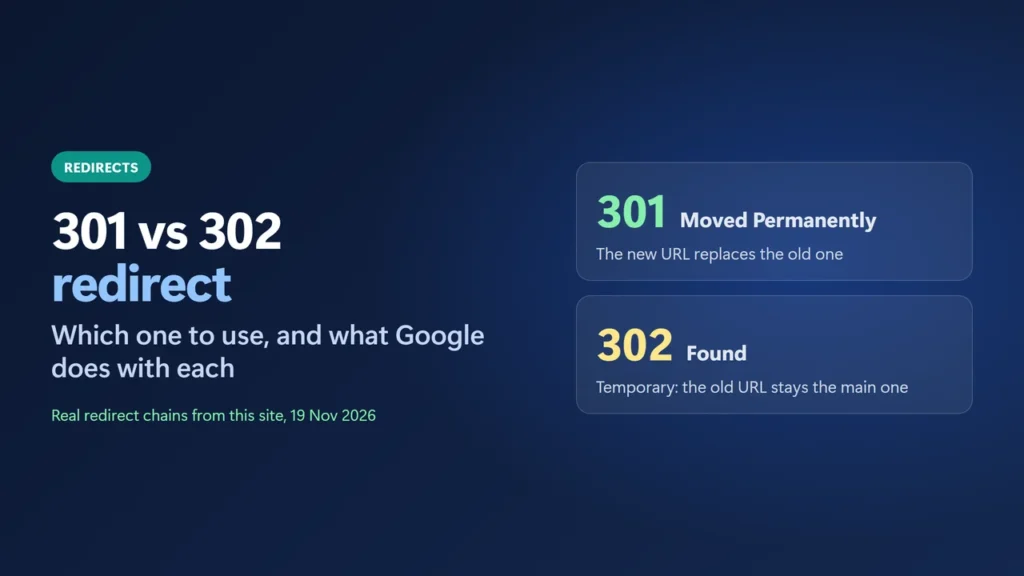
A 301 redirect tells browsers and search engines a page has moved for good, so the new URL should replace the old one. A 302 redirect says the move is temporary, so the old URL stays the main one. Use a 301 when you change a URL, switch to https or merge two pages. Use a 302 only when the original page is coming back, such as a login bounce or a short sale page. Google uses a permanent redirect as a signal that the new URL should be the one shown in search; a temporary one is not treated that way.
That is the whole 301 vs 302 redirect choice. To show what it looks like on a real site, I sent a set of curl requests to this site on 19 November 2026; six of them are in the table below. I didn’t change any redirect for this article.
Key takeaways
- 301 = moved permanently. 302 = found, a temporary move. Both send the visitor to the new URL straight away.
- The difference is what they tell search engines and browsers to remember: Google uses a 301 as a signal that the new URL should be canonical, and doesn’t use a 302 that way.
- 307 and 308 are the method-preserving versions of 302 and 301, so a form POST stays a POST.
- Most site changes (new slug, http to https, www to non-www, merged posts) need a 301 that points straight at the final URL.
- Check any redirect with
curl -sIL: it prints each hop’s status code and target.
Table of Contents
- 1301 vs 302 at a glance
- 2What a 301 redirect means
- 3What a 302 redirect means
- 4307 and 308: the strict versions
- 5Real redirects on this site
- 6How to check which redirect a URL uses
- 7How to set up a 301 redirect in WordPress
- 8Common redirect mistakes
- What is the difference between a 301 and a 302 redirect?
- Is a 302 redirect bad for SEO?
- Does a 301 make Google show the new URL?
- When should I use 307 or 308 instead?
- How long should I keep a 301 redirect?
- How do I check if a redirect is 301 or 302?
301 vs 302 at a glance
| 301 Moved Permanently | 302 Found | |
|---|---|---|
| Meaning | The page has a new permanent address | The page is somewhere else for now |
| Google Search | Signal that the new URL is canonical | Not a canonical signal; the old URL may stay |
| Browser caching | Heuristically cacheable (may be remembered) | Cached only if headers allow it |
| Typical use | Changed slug, https, domain move, merged pages | Login bounce, short campaign, maintenance |
| Strict version | 308 Permanent Redirect | 307 Temporary Redirect |
What a 301 redirect means
RFC 9110, the current HTTP standard, defines 301 as the status for a resource that “has been assigned a new permanent URI”. It adds that “any future references to this resource ought to use one of the enclosed URIs”. A 301 is also “heuristically cacheable”, which means a browser may remember it and skip the old URL next time, even without a cache header.
For search, Google’s guide Redirects and Google Search says that with a permanent redirect, “the indexing pipeline uses the redirect as a signal that the redirect target should be canonical”, which means the version Google shows in results. The old URL then “becomes an alternate name of the canonical URL”. Google’s HTTP status code page also calls a 301 a “strong signal that the redirect target should be processed”.
Use a 301 when:
- you change a URL’s slug or your permalink structure (WordPress adds a 301 by itself only when you change the slug of a published post, not a page, so pages and structure changes need a redirect rule);
- you move from http to https, or from www to the bare domain (or the reverse);
- you move a site to a new domain, or merge two pages into one;
- you delete a page and there is a close replacement for it.
What a 302 redirect means
RFC 9110 says a 302 means the resource “resides temporarily under a different URI”, and that the client “ought to continue to use the target URI for future requests”, so it should keep using the old address. RFC 9110 does not list 302 as heuristically cacheable, so it is only cached when the response’s cache headers allow it.
For temporary redirects, Google’s guide says the indexing pipeline “doesn’t use the redirect as a signal that the redirect target should be canonical”, although the target “might still be indexed if other canonicalization signals are present”. So the original URL usually stays the one in search results. That is what you want for a short detour, and what you don’t want after a real move.
Use a 302 when the original page is coming back:
- a login screen that sends visitors back to the page they asked for;
- a page that sends people elsewhere for a short time, such as during maintenance or a short promotion;
307 and 308: the strict versions
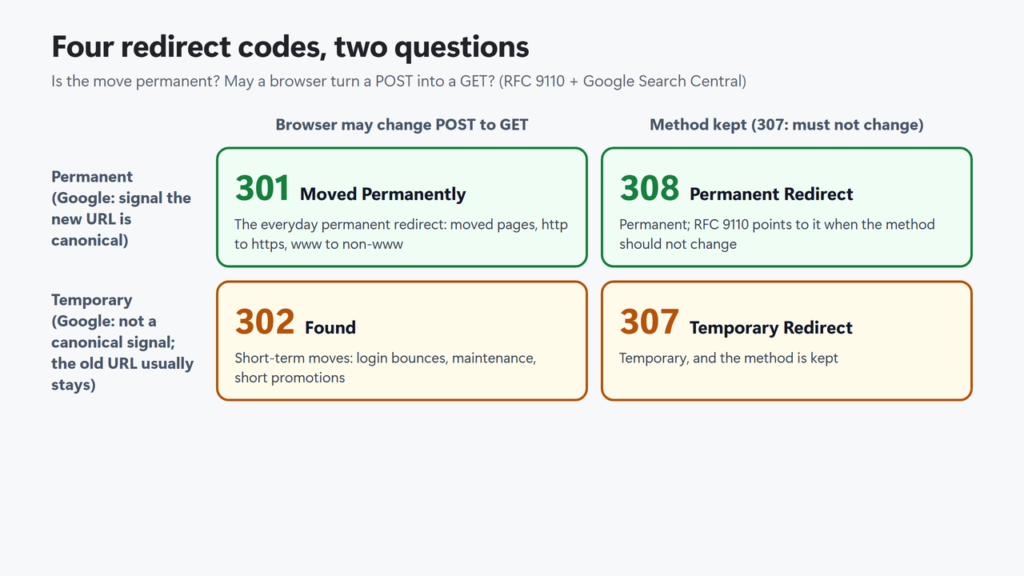
For historical reasons, RFC 9110 lets a browser change a POST request into a GET when it follows a 301 or 302. That matters for forms and APIs: the form data can be lost on the way. Two newer codes close that gap:
- 307 Temporary Redirect: like 302, but the browser must not change the request method.
- 308 Permanent Redirect: like 301, and RFC 9110 names it as the code to use when the method should not change.
RFC 9110 says 307 and 308 “were later added to unambiguously indicate method-preserving redirects”. Google says 308 is treated like 301 and 307 like 302. For normal pages that people open with a link, 301 and 302 are fine. Choose 308 or 307 when a form or an API posts to the old URL.
Two non-HTTP methods also exist. Google treats an instant meta refresh as a permanent redirect and a delayed one as temporary, and it only sees a JavaScript redirect after it renders the page. Use a real 301 or 302 from the server whenever you can.
Real redirects on this site
Here is what six requests to this site returned on 19 November 2026. When WordPress code redirects with wp_redirect(), it adds an x-redirect-by header, which says “WordPress” unless the code names itself.
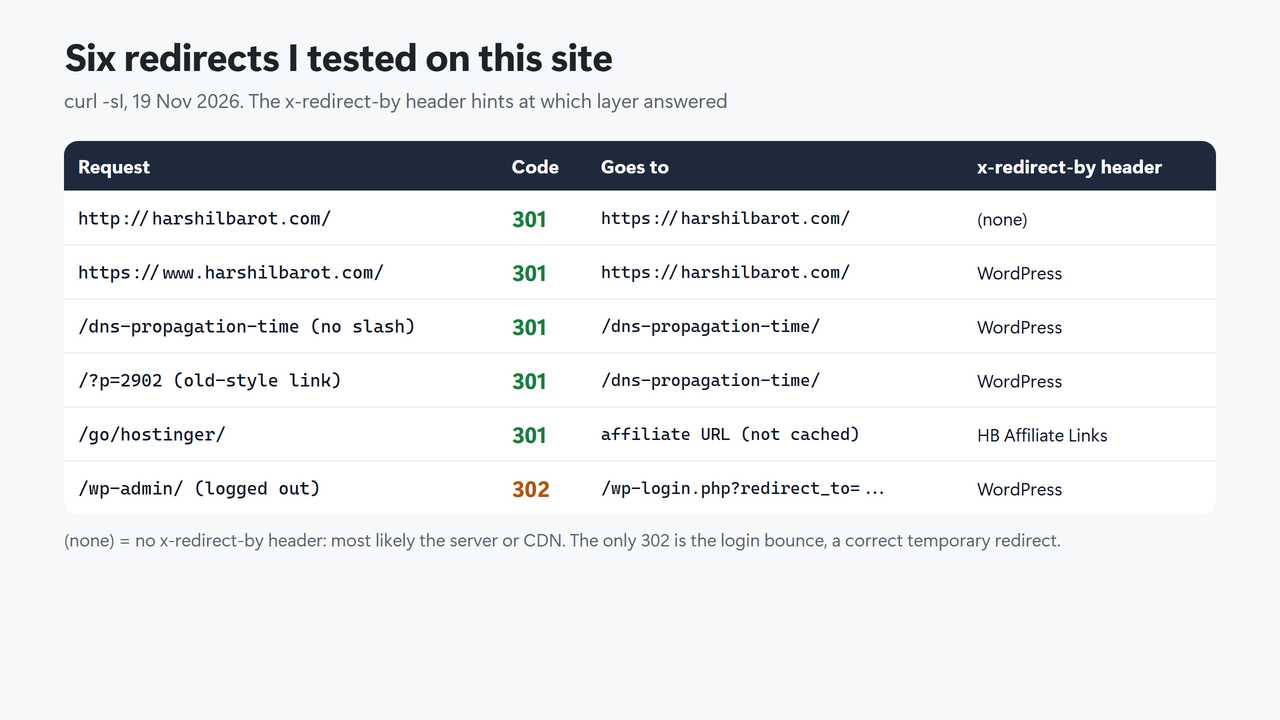
Three things stand out:
- Different layers send different redirects. The http to https redirect carries no
x-redirect-byheader, so it most likely comes from the server or CDN before WordPress runs. The www, trailing-slash and?p=redirects say “WordPress” (WordPress or a plugin using its function), and the affiliate link names its plugin. Every response showedServer: hcdn, so that header alone can’t tell you which layer decided. - The only 302 is the right one. A logged-out visit to
/wp-admin/gets a 302 to the login page, because the admin area has not moved. WordPress’swp_redirect()function uses 302 unless the code asks for another status. - One old address takes two hops.
http://www.harshilbarot.com/goes first tohttps://www.harshilbarot.com/and then tohttps://harshilbarot.com/. Both hops are 301s, and Google’s crawlers follow up to 10 redirect hops. Still, each hop is an extra round trip for every visitor, so one hop to the final URL is better.
How to check which redirect a URL uses
The quickest check is curl. curl’s own site says every Windows 10 and 11 installation has it by default, and it is usually already on macOS and Linux. -I asks for headers only, -L follows every hop, and -s hides the progress bar:
curl -sIL http://www.example.com/old-page/In Windows PowerShell, type curl.exe instead of curl, because curl there is a shortcut for a different command. Read the first line of each block: it shows the status code. The location line shows where that hop goes.
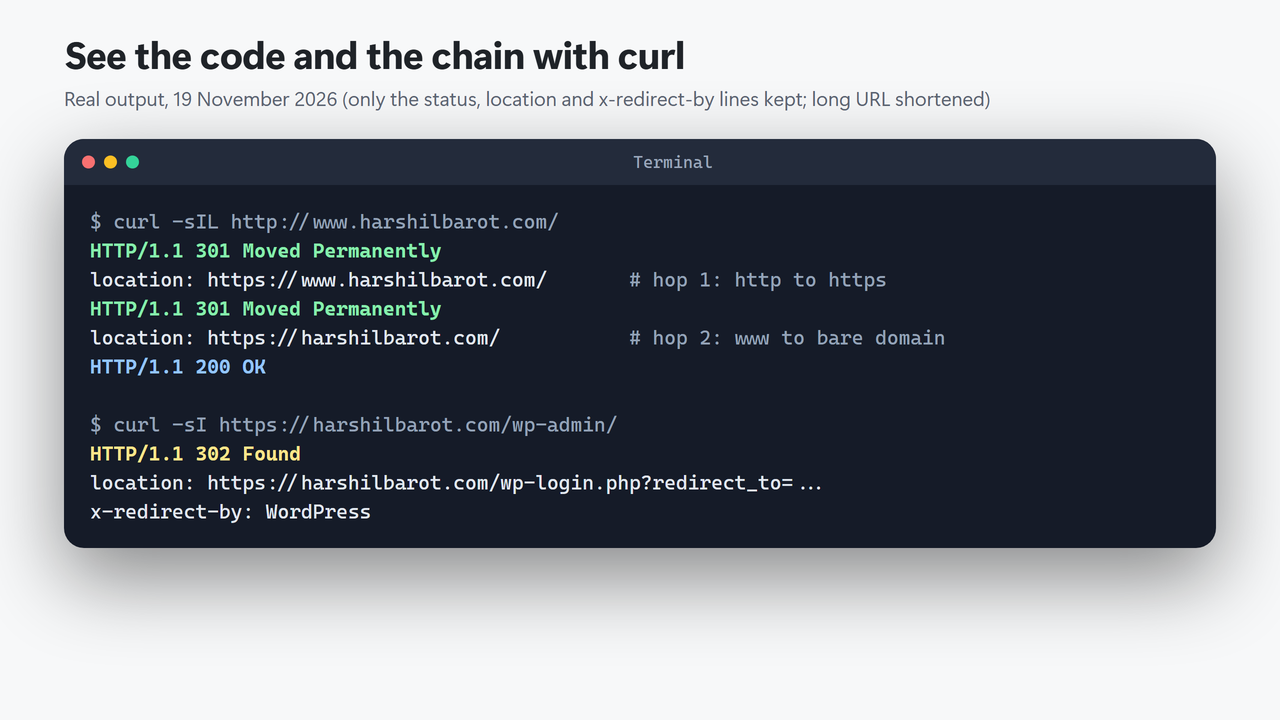
To count the hops in one line, add -w:
curl -sIL -o /dev/null -w "num_redirects=%{num_redirects} final=%{url_effective} code=%{http_code}\n" http://www.example.com/For http://www.harshilbarot.com/ it printed num_redirects=2 final=https://harshilbarot.com/ code=200. In Windows PowerShell, type curl.exe and replace /dev/null with NUL; I ran it that way too and got the same line.
In Chrome you can see the same thing without a terminal: open DevTools (F12), go to the Network tab, tick Preserve log and Disable cache, then load the old URL. Each hop appears as its own row with its status code.
One catch: this site sends a strict-transport-security (HSTS) header. After one visit, the browser upgrades http to https by itself, so the Network tab may not show the server’s 301 for that hop. For the server’s real answer, use curl, which doesn’t apply HSTS by default.
curl -I returns 403 or 405 while the page works in a browser, use the browser’s Network tab instead.How to set up a 301 redirect in WordPress
WordPress already sends 301s on its own for some changes, such as a missing trailing slash or an old ?p= link, as the table above shows. For your own redirects, an SEO plugin is the simplest route. Rank Math’s documentation lists 301, 302 and 307 as redirect types (plus 410 and 451, which are not redirects); my Rank Math setup guide covers turning the module on.
- Enter the old URL as the source and the final new URL as the destination.
- Choose 301 for a real move, or 302/307 only if the old page will return.
- Save, purge the LiteSpeed cache if your host uses LiteSpeed, then test the old URL with curl.
Server rules in .htaccess or Nginx work too, and they run before WordPress loads. Whichever way you choose, keep each redirect in one place: two layers sending different redirects for the same URL can cause a loop (see my ERR_TOO_MANY_REDIRECTS guide). Moving the whole site to a new host? My guide to moving a WordPress site to a new host covers the rest of the switch.
Common redirect mistakes
- A 302 for a permanent move. WordPress’s own
wp_redirect()defaults to 302, so code that doesn’t set a status sends a temporary redirect. Check the code with curl after you create a rule. - Redirect chains. Point every old URL straight at the final page, and update internal links so your own pages don’t pass through redirects at all.
- Sending old pages to the home page. Google’s site-move guide warns that redirecting many old URLs to one irrelevant page, such as the home page, “might be treated as a soft 404 error”. If there is no close replacement, return 404 or 410 instead.
- Removing redirects too soon. Google’s site-move guide says: “Keep the redirects for as long as possible, generally at least 1 year.”
- Redirecting a form or API URL with 301 or 302. A POST can arrive as a GET. Use 308 or 307.
- Forgetting caches. A 301 is heuristically cacheable, so a browser may keep using a wrong 301 after you fix it. Test in a private window.
If an old URL still shows in Search Console after a correct 301, give Google time to recrawl it. My guide to Crawled – currently not indexed explains what the indexing statuses mean. A moved site also needs a valid SSL certificate on the old https address, or visitors get a warning before the redirect even runs. Here is how to check your SSL certificate expiry date.
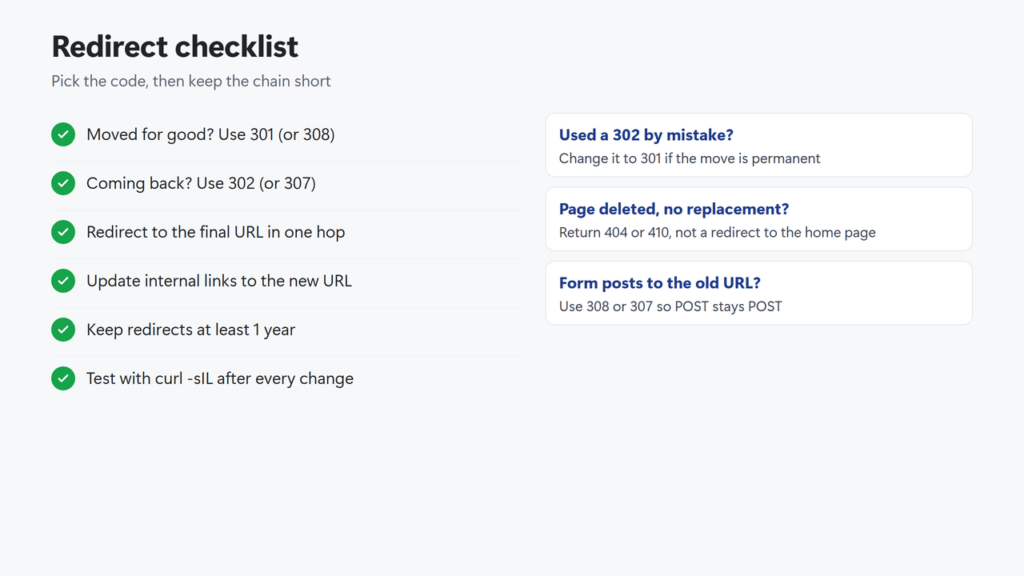
Checklist in text: moved for good, use 301 (or 308); coming back, use 302 (or 307); point every redirect at the final URL in one hop; update internal links; keep redirects at least a year; test with curl -sIL after every change. If you used a 302 by mistake, change it to 301. If a page is gone with no replacement, return 404 or 410. If a form posts to the old URL, use 308 or 307.
What is the difference between a 301 and a 302 redirect?
A 301 says a page has moved permanently: Google uses it as a signal to show the new URL, and browsers may cache it. A 302 says the move is temporary, so the old URL stays the main one. Visitors see the same thing: both send them to the new page at once.
Is a 302 redirect bad for SEO?
Not when the move really is temporary. It becomes a problem when it is used for a permanent move, because Google doesn’t use a temporary redirect as a canonical signal and may keep the old URL in results. For permanent moves, use a 301.
Does a 301 make Google show the new URL?
Usually, over time. Google uses a permanent redirect as a signal that the target should be canonical, and the old URL becomes an alternate name for it. It is one signal among others, so also update internal links and your sitemap to the new URL (see how to submit a sitemap to Google Search Console).
When should I use 307 or 308 instead?
When the request method matters. A browser may turn a POST into a GET after a 301 or 302. 307 (temporary) and 308 (permanent) are the codes for keeping the method, so use them for form or API endpoints.
How long should I keep a 301 redirect?
As long as you can. Google’s site-move guide says to keep them as long as possible, generally at least one year. Old links on other sites and in bookmarks keep working only while the redirect exists.
How do I check if a redirect is 301 or 302?
Run curl -sIL followed by the URL (curl.exe in Windows PowerShell). The first line of each response shows the status code. In Chrome, use the Network tab in DevTools with Preserve log and Disable cache turned on. If the site uses HSTS, Chrome may upgrade http to https itself, so trust curl for that hop.