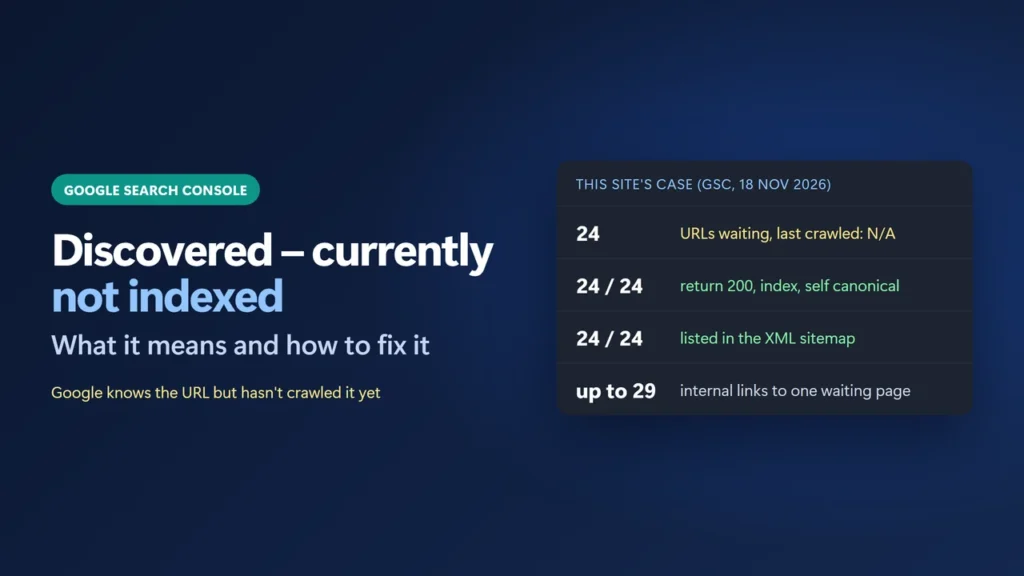
Discovered – currently not indexed means Google knows the URL exists but has not crawled it yet. You may also see it searched as “discovered currently not indexed”. Google’s Search Console Help says Google usually wanted to crawl the page, but this “was expected to overload the site”, so it rescheduled the crawl. Google describes a rescheduled crawl, and there is no switch to flip. The fix is to make sure nothing technical blocks the page, stop wasting Google’s crawls on junk URLs, link to the page from indexed pages, and make the page (and the site) clearly worth crawling.
Below I use this site’s own report: 24 URLs in this state, a validation that says “Passed”, and every technical check I could run on them.
Key takeaways
- Discovered means not crawled yet. Google has no copy of the page, so the “Last crawled” column is empty.
- Google sets crawling by two things: how much your server can take (crawl capacity) and how much it wants your URLs (crawl demand).
- Check the server first in Settings → Crawl stats: host status, response time and the share of Discovery requests.
- On this site all 24 URLs passed every technical check, so the remaining levers are links, wasted crawls and quality.
- “Validation passed” did not mean the pages were indexed. Google does not publish a time frame for these URLs.
Table of Contents
- 1What “Discovered – Currently Not Indexed” Means
- Discovered vs Crawled – currently not indexed
- 2A Real Example: 24 URLs on This Site
- 3What I Checked and Ruled Out
- 4Why Google Waits: Capacity and Demand
- 5How to Fix Discovered – Currently Not Indexed
- Step 1: Sort the list
- Step 2: Check your server in Crawl stats
- Step 3: Stop wasting crawls
- Step 4: Link to the page from indexed pages
- Step 5: Make the page and the site worth crawling
- Step 6: Request indexing for your top pages, once
- 6“Validation Passed”, but the URLs Are Still There
- 7How Long Does It Take?
- 8Mistakes to Avoid
- What does discovered currently not indexed mean?
- Is discovered currently not indexed bad?
- How long does it take Google to crawl a discovered URL?
- Does Request indexing fix discovered currently not indexed?
- What does validation passed mean for this issue?
- What is the difference between discovered and crawled currently not indexed?
What “Discovered – Currently Not Indexed” Means
Search Console’s Page indexing report gives three short sentences: “The page was found by Google, but not crawled yet. Typically, Google wanted to crawl the URL but this was expected to overload the site; therefore Google rescheduled the crawl. This is why the last crawl date is empty on the report.”
So Google found the URL, usually through a link or your sitemap, and put it in a queue. It has not fetched the page. Because it has never read the page, it cannot have judged the content of that page yet. Google’s guide to how Search works says it plainly: “Googlebot doesn’t crawl all the pages it discovered.”
In the report’s Source column this reason is labelled Google systems. Google’s help says that “in general, you can fix only issues where the source is listed as ‘Website'”. You can’t remove this status by changing one setting. You change the conditions that make Google want to crawl.
Discovered vs Crawled – currently not indexed
| Status | Has Google fetched the page? | Where to look first |
|---|---|---|
| Discovered – currently not indexed | No. The URL is known, the crawl was postponed. | Server health, wasted crawls, links to the page |
| Crawled – currently not indexed | Yes. Google read it and chose not to index it for now. | The page itself: duplicate, thin or low value |
A Real Example: 24 URLs on This Site
On 18 November 2026 I opened Indexing → Pages in Search Console for this site (data last updated 13 November 2026). It showed 96 indexed pages and 41 not indexed. Discovered – currently not indexed held 24 URLs, and every one had “N/A” as its last crawl date.
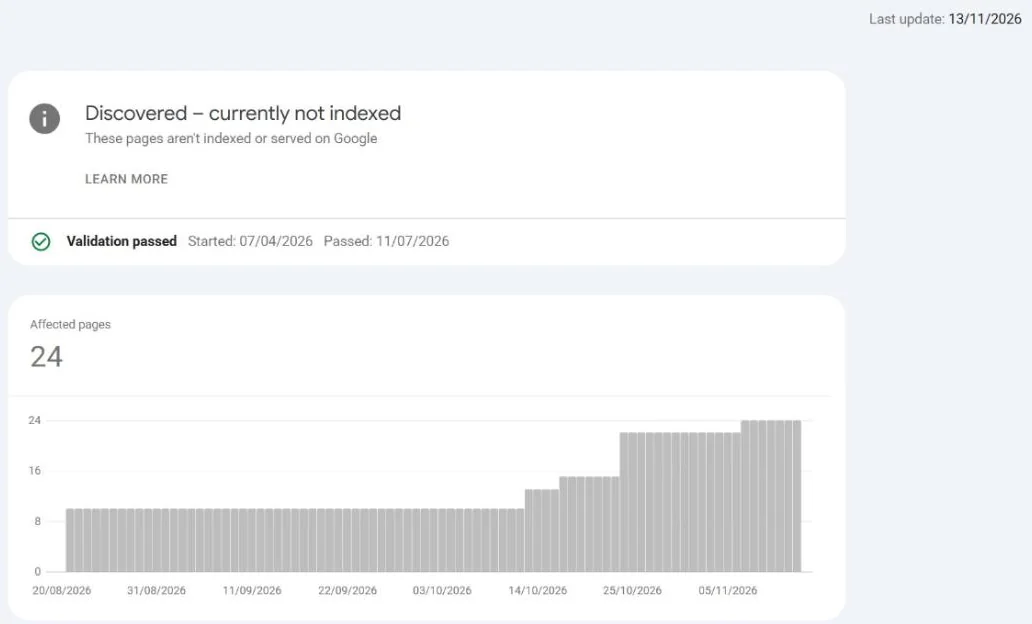
The chart is worth reading. From 20 August to early October the count sat at about 10. It then climbed in steps to 24 by early November. Twelve of the 24 URLs were published between 9 October and 3 November 2026, when this site added many new posts. That fits Google finding new URLs faster than it chose to crawl them, but the report does not say why, so treat it as a pattern, not proof.
Sorted by type, the 24 URLs look like this:
| Type | Count | Examples |
|---|---|---|
| Site pages (about, policies, how I review, start here, work with me) | 7 | /about-me/, /privacy-policy/ |
| Category archives | 2 | /category/seo/, /category/vpn/ |
| Black Friday and Cyber Monday deal posts | 6 | /proton-vpn-black-friday/ |
| “Best of” roundups | 4 | /best-web-hosting-services/ |
| Reviews, a comparison and a guide | 5 | /surfshark-vpn-review/, /hostinger-vs-siteground/ |
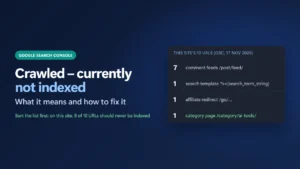
Unlike the Crawled bucket on this site, which held feeds and a search template, this list is mostly real content. Seven of the site’s 10 WordPress pages are in it. These are the pages I would want crawled first: the four roundups and the five reviews and guides.
What I Checked and Ruled Out
Before blaming Google, rule out your own site. Here is what I checked for all 24 URLs on 18 November 2026, with logged-out requests and Search Console:
| Check | Result on this site |
|---|---|
| HTTP status | All 24 returned 200 |
| Robots meta tag | All 24 say index, follow |
| Canonical | All 24 point to themselves |
| XML sitemap | All 24 are listed in Rank Math’s sitemap |
| robots.txt | None of them is blocked |
| Internal links (22 posts and pages) | From 0 to 29 links in other posts’ content; the median post on the site has 4 |
| Server (Crawl stats) | Host status: “Host had problems in the past”, recent fail rate acceptable |
Internal links alone don’t explain it here. /best-web-hosting-services/ has 29 links from other posts and is still waiting. URL Inspection shows Google knows the page from the sitemap and from a referring post, but has never crawled it:
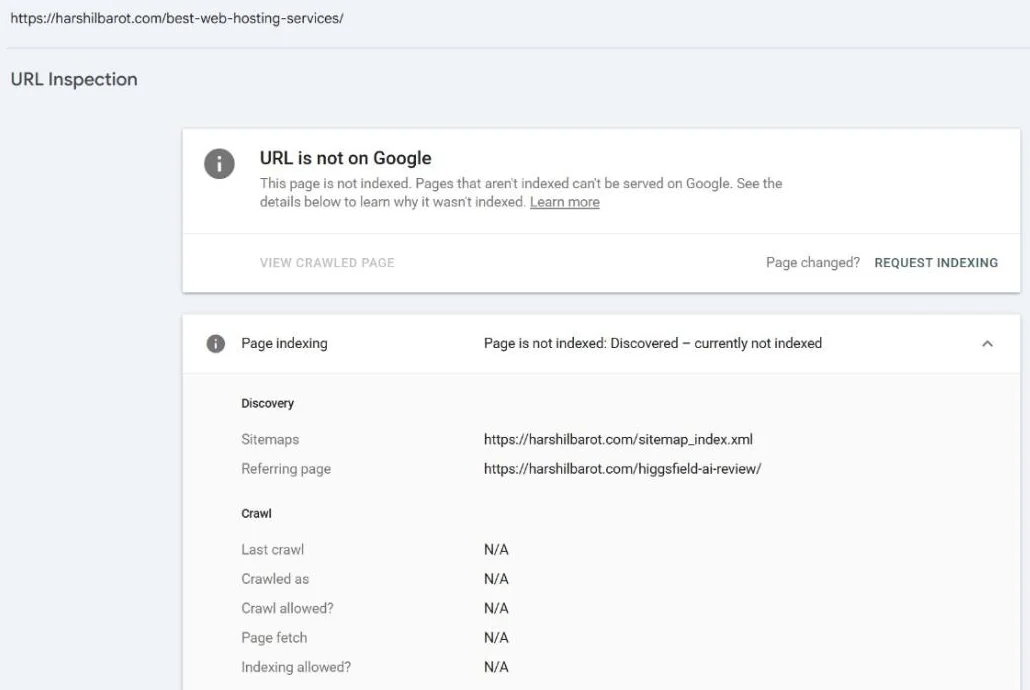
That leaves the two things Google says decide crawling: how much the server can take, and how much Google wants these URLs.
Why Google Waits: Capacity and Demand
Google’s crawl budget guide defines crawl budget as the URLs “that Google can and wants to crawl”. It has two parts:
- Crawl capacity limit. “Google wants to crawl your site without overwhelming your servers.” If the site slows down, returns 5xx errors or sends HTTP 429, “the limit goes down and Google crawls less.”
- Crawl demand. Demand “varies based on a site’s size, update frequency, page quality, and relevance”. Google adds that more popular URLs “tend to be crawled more often”.
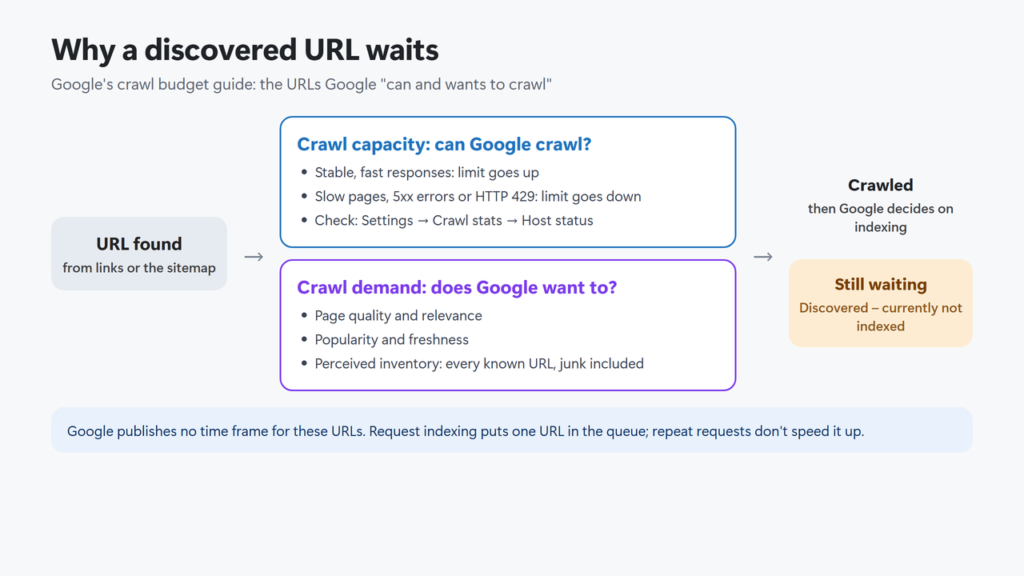
The guide says it is mainly for very large sites. Its “Who this guide is for” list also includes “sites with a large portion of their total URLs classified by Search Console as Discovered – currently not indexed”. Google does not say what counts as a large portion. This site has 24 of the 137 URLs in its Page indexing report in that state, so I read the guide as relevant.
Quality matters too. In Google’s Search Off the Record episode “How to read the Indexing Report” (16 July 2026), Martin Splitt asked whether Discovered is a sign of a quality problem. John Mueller answered “Sometimes.” He said that if Google’s systems are “seriously worried about the quality of a website”, “we’ll probably crawl a lot less, we’ll index a lot less”, and you then see statuses like this one. When there is no technical reason, he said you “almost need to take a step back and think about the quality overall.” That is about the whole site, not one page.
How to Fix Discovered – Currently Not Indexed
Step 1: Sort the list
Open the reason in the Page indexing report and read the Examples table. For each URL, ask whether a searcher would be glad to land on it. A privacy policy waiting in the queue costs you little. A buying guide waiting there costs you traffic. Put the few pages that matter most at the top of your list.
Step 2: Check your server in Crawl stats
Go to Settings → Crawl stats (it is available for root-level properties). Google’s help says that if your site responds slowly or its error rate rises, “Googlebot will throttle back its requests to avoid overloading your server.” Look at three things:
- Host status. Open it and check robots.txt fetch, DNS resolution and server connectivity.
- Average response time. A rising line means Google waits longer for each page.
- By purpose. Discovery is a URL “never crawled by Google before”; Refresh is “a recrawl of a known page”.
On this site (report updated 15 November 2026): 2.36k crawl requests over about three months, an average response time of 627 ms, and only 5% of requests for Discovery. Server connectivity read “acceptable fail rate recently, but high in the past”, with two short spikes around 19 September and 22 October. Google doesn’t connect those spikes to specific URLs, so I can’t say they caused the backlog. If your host status shows recent problems, fix that first: see how to reduce TTFB in WordPress and how to fix 500 errors.
Step 3: Stop wasting crawls
Every request Google spends on a useless URL is one it doesn’t spend on your new pages. Google’s crawl budget best practices include:
- Remove duplicates “to focus crawling on unique content rather than unique URLs.”
- Return 404 or 410 for pages you removed. A 404 “is a strong signal not to crawl that URL again.”
- Fix soft 404s, pages that say “not found” but return 200. They “will continue to be crawled, and waste your budget.”
- Avoid long redirect chains, which “have a negative effect on crawling.”
- Block URLs you never want crawled with robots.txt. Google’s examples are “infinite scrolling pages that duplicate information on linked pages, or differently sorted versions of the same page”. Only do this for URLs you never want in Search. (To control AI bots rather than Googlebot, see how to block AI crawlers with robots.txt.)
One trap to avoid: don’t add noindex to save crawl budget. Google’s guide says “Don’t use noindex” for that, because Google will still request the page and only drop it after reading the tag. On this site, 15% of Googlebot’s requests in the period got a 404 response. Those URLs are the next thing I would trace in the Crawl stats “By response” table.
Step 4: Link to the page from indexed pages
Google finds pages “when Google extracts a link from a known page to a new page”, and its link guidelines say “Every page you care about should have a link from at least one other page on your site.” Add a natural, descriptive link from two or three related posts that are already indexed, using a normal <a href> link. Google does not document that links move a specific URL up the crawl queue, but links are how Google finds pages and judges which ones matter.
Keep the URL in your XML sitemap with an accurate <lastmod>. Google says it uses lastmod “if it’s consistently and verifiably” accurate, and it “ignores <priority> and <changefreq> values.” If you have not submitted your sitemap yet, see how to submit a sitemap to Google Search Console. If Search Console can’t read it, my Rank Math sitemap troubleshooting guide covers the fixes.
Step 5: Make the page and the site worth crawling
Google’s crawl budget guide names two ways to get more crawl budget: add server resources if capacity is the limit, and improve quality. For Google Search it lists “popularity, overall user value, content uniqueness, and serving capacity.” In practice that means:
- Merge near-duplicate pages that answer the same question, and redirect the weaker one.
- Give each important page something only it has: your own tests, data, screenshots or experience.
- Remove or improve thin pages that exist only to target a keyword.
- Keep the page experience clean. Mueller said Google takes “into account the full experience on a page”.
Step 6: Request indexing for your top pages, once
For the few URLs that matter most, open URL Inspection, run Test live URL, and click Request indexing. Google says the page then goes to “the indexing queue” if it passes a quick check, that “there is a daily limit” on requests, and that “Submitting a request does not guarantee that the page will appear in the Google Index.” Its recrawl page adds that requesting “multiple times for the same URL won’t get it crawled any faster.” For many URLs, Google points you to your sitemap instead.
Bing and some other engines accept IndexNow pings, which Rank Math Instant Indexing can send. Google does not appear in IndexNow’s list of participating search engines, so it does not replace this step for Google. As of 18 November 2026 I have not requested indexing for this site’s 24 URLs; I am working through steps 3 to 5 first.
“Validation Passed”, but the URLs Are Still There
This site’s Discovered drilldown shows a green Validation passed banner: started 7 April 2026, passed 11 July 2026. Yet the same page lists 24 affected URLs today.
Google’s help explains the pieces. “Passed” means “All known instances of the issue are gone (or the affected URL is no longer available)”. It also says an issue counts as open again if “a new instance of the issue occurs” later, and that counts update when Google crawls. Google does not document why the banner can still say Passed while URLs sit in the bucket, and this site’s data doesn’t explain it either: 7 of the 24 were published before the validation passed (one, /about-me/, before it even started), and all 24 still show no crawl date. So treat the banner as history, not as a status of today’s list. Either way, Passed does not mean indexed.
Should you click Validate fix? Google describes it as a way “to let Google know that you’ve fixed the issue”, and Google’s help says you can generally fix only issues whose source is Website. For Discovered, the source is Google systems. In the same podcast, Mueller said Google tests “a sample of the pages” you mark as fixed and “in most cases” triggers a faster recrawl, but he was talking about real site-wide errors, such as CDN or hosting bot protection serving errors to Googlebot. If you had a genuine outage and fixed it, validating makes sense. If nothing was broken, it gives Google nothing new.
How Long Does It Take?
Google does not publish a time frame for Discovered URLs. The nearest statements are general: the Page indexing help says that after a URL is known, “it can take some time (up to a few weeks)” before Google crawls some or all of a site, and that “Indexing is never instant”. URL Inspection says indexing after a request “can take up to a week or two”. On this site, /best-web-hosting-services/ was published on 14 April 2026 and had still not been crawled on 18 November 2026. So be careful with anyone who promises a date.
Mistakes to Avoid
- Requesting indexing every day. Repeat requests don’t speed up crawling and use your quota.
- Adding noindex or robots.txt blocks to good pages to “clean up” the report. That keeps them out of Search for as long as the block stays.
- Changing
priorityorchangefreqin the sitemap. Google ignores both. - Bumping the modified date without a real change. Google uses lastmod only if it is accurate.
- Chasing a ratio. Splitt said in the podcast that a ratio of indexed to non-indexed pages “doesn’t matter”. Google also says “Don’t expect every URL on your site to be indexed.”
- Publishing many new pages while old ones wait. This site’s count grew as new posts went live. Improving what already exists can matter more than adding more.
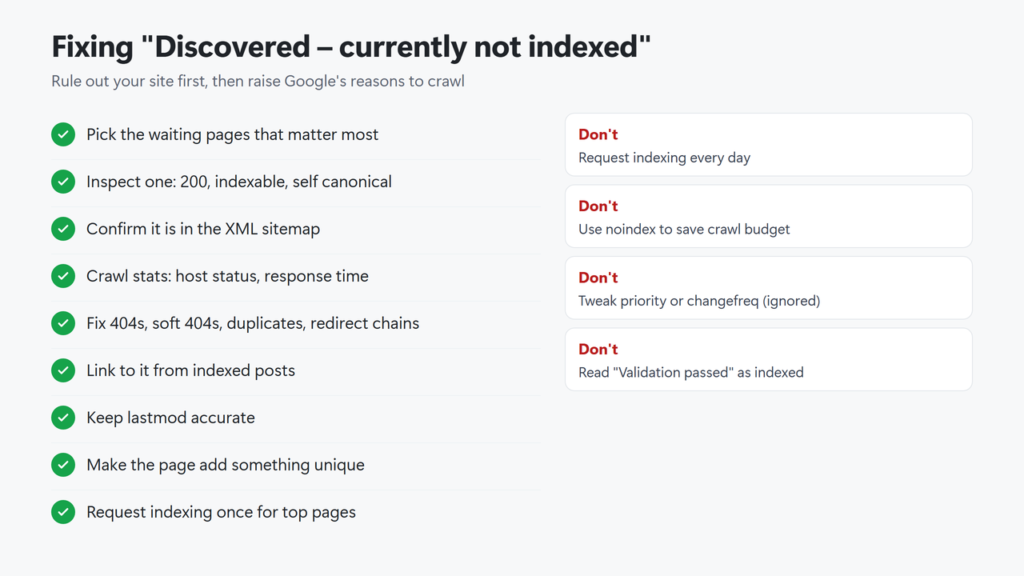
Checklist in text: read the example list and pick the pages that matter; inspect one and confirm it returns 200, is indexable, has a self canonical and is in the sitemap; check Crawl stats host status and response time; fix 404s, soft 404s, duplicates and redirect chains; link to the page from indexed posts; keep lastmod accurate; improve the page so it adds something unique; request indexing once for your top pages; check back in a few weeks.
What does discovered currently not indexed mean?
Google knows the URL but has not crawled it yet. Google’s help says it usually rescheduled the crawl because crawling was expected to overload the site, so the last crawl date is empty.
Is discovered currently not indexed bad?
Google describes it as a rescheduled crawl. It matters only for pages you want people to find. If many important pages stay in this state, check your server, your internal links and the overall quality of the site.
How long does it take Google to crawl a discovered URL?
Google publishes no time frame for this status. Its general help says crawling can take up to a few weeks after a URL is known. On this site one roundup has waited about seven months.
Does Request indexing fix discovered currently not indexed?
It can put one URL in Google’s queue, but Google says a request does not guarantee indexing and repeat requests won’t speed it up. Use it once for your most important pages after fixing any problems.
What does validation passed mean for this issue?
Google’s help says Passed means all known instances were gone when the validation ran. It does not mean the pages were indexed. On this site the banner reads Passed while 24 URLs are still listed, which Google does not explain.
What is the difference between discovered and crawled currently not indexed?
Discovered means Google has not fetched the page yet. Crawled means Google fetched it and chose not to index it for now.