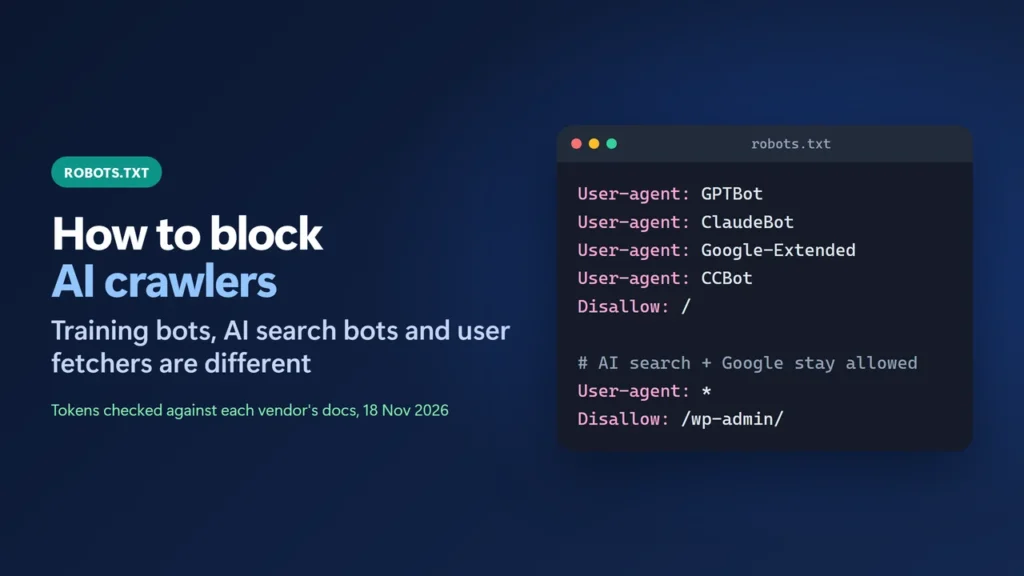
To block AI crawlers with robots.txt, add a group that names each crawler’s token and disallows the whole site, for example User-agent: GPTBot followed by Disallow: /. Name every bot you want to stop: blocking one token does not block another, and OpenAI says each setting “is independent of the others”. OpenAI, Anthropic and Perplexity each run separate bots for training or search and for fetches a user asks for, so you can refuse training and still appear in AI answers. Two limits matter: some user-triggered fetchers say they may ignore robots.txt, and robots.txt is a request, not a lock.
Below are the tokens from each vendor’s own documentation (checked 18 November 2026), ready-to-paste rules for WordPress, and how I tested them.
Key takeaways
- Each AI company publishes its own robots.txt tokens. Block the training ones (GPTBot, ClaudeBot, Google-Extended, Applebot-Extended, meta-externalagent) to opt out of model training. CCBot feeds a public web archive.
- Search bots (OAI-SearchBot, Claude-SearchBot, PerplexityBot) are separate. Leave them allowed to be cited in AI answers.
- Google-Extended does not affect Google Search. AI Overviews and AI Mode follow Googlebot and snippet controls instead.
- Google, OpenAI, Perplexity, Meta and Amazon say their user-requested fetchers may not follow robots.txt.
- On WordPress, a real robots.txt file in the site root overrides the one WordPress or Rank Math generates.
Table of Contents
- 1Three Kinds of AI Bots
- 2Decide What You Want First
- 3Copy-Paste robots.txt Rules
- Block AI training, keep AI search
- Also block AI search
- Block one folder instead of the whole site
- 4How to Edit robots.txt on WordPress
- 5Test Your Rules
- 6What robots.txt Can’t Do
- 7Google AI Overviews and AI Mode
- 8Mistakes to Avoid
- How do I block AI crawlers with robots.txt?
- Does blocking GPTBot remove my site from ChatGPT?
- Will blocking Google-Extended hurt my Google rankings?
- Do AI crawlers respect robots.txt?
- How long does a robots.txt change take to work?
- Why can’t I edit robots.txt in Rank Math?
Three Kinds of AI Bots
Before you write any rule, know what each bot does. Most of the bots below do one of three jobs:
- Training crawlers collect pages to train AI models.
- Search crawlers index pages so an AI assistant can cite and link them in answers.
- User fetchers load one page because a person asked the assistant to read it.
Here are the tokens, as each company describes them:
| Company | Token | What it does (vendor’s words or summary) |
|---|---|---|
| OpenAI | GPTBot | Training. Disallowing it means content “should not be used in training generative AI foundation models.” |
| OpenAI | OAI-SearchBot | ChatGPT search. Blocked sites “will not be shown in ChatGPT search answers”, though they can still appear as navigational links. |
| OpenAI | ChatGPT-User | User fetches. OpenAI says “robots.txt rules may not apply.” |
| Anthropic | ClaudeBot | Training. Blocking it signals future content should be excluded from training datasets. |
| Anthropic | Claude-SearchBot | Indexing content to improve search results in Claude. |
| Anthropic | Claude-User | Fetches a page in response to a user’s question. |
Google-Extended | Gemini training and grounding. Not a separate crawler, and it “does not impact a site’s inclusion in Google Search”. | |
| Apple | Applebot-Extended | Opt-out from training Apple’s foundation models. It “does not crawl webpages.” |
| Perplexity | PerplexityBot | Perplexity search results. “It is not used to crawl content for AI foundation models.” |
| Perplexity | Perplexity-User | User fetches. It “generally ignores robots.txt rules.” |
Google-Agent, Google-GeminiNotebook | User fetches for Google’s agents and Gemini Notebook. Google says these “generally ignore robots.txt rules.” | |
| Common Crawl | CCBot | Crawls for Common Crawl’s public web archive, which third parties can reuse. Its CCBot page doesn’t say who uses the data. |
| Meta | meta-externalagent | Training AI models and indexing content. |
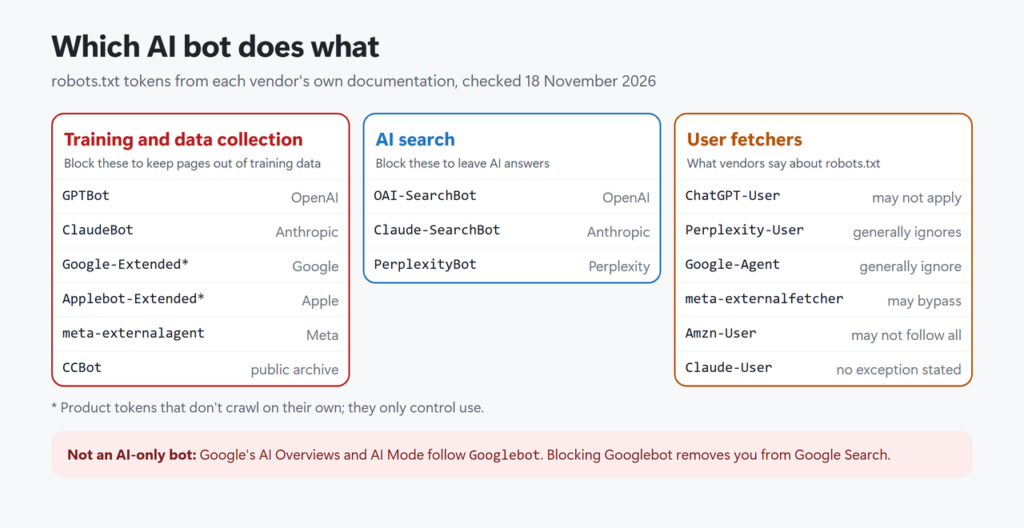
Anthropic is the one company here that states no robots.txt exception for its user fetcher. Its help article says its bots “respect ‘do not crawl’ signals by honoring industry standard directives in robots.txt.” Apple adds a useful detail: if your file has no Applebot rules but has Googlebot rules, “the Apple robot will follow Googlebot instructions.” Amazon publishes tokens too (Amazonbot, and a user fetcher, Amzn-User, that “may not follow all robots.txt directives”). I found no official page from ByteDance for Bytespider, so I can’t tell you what it does or whether it obeys the file.
Decide What You Want First
| Your goal | What to do |
|---|---|
| Be used and cited everywhere | Change nothing. With no AI groups, every bot follows your User-agent: * rules. |
| No model training, but appear in AI answers | Block the training tokens only (first example below). |
| Stay out of AI answers too | Also block the AI search tokens (second example). You lose those citations and the clicks they send. |
| Stay out of Google’s AI Overviews | robots.txt can’t do this without leaving Google Search. See the Google section below. |
This site has chosen the first row. Its robots.txt, which I fetched on 18 November 2026, has a single User-agent: * group and a comment welcoming search and AI crawlers. It also publishes an llms.txt file (see llms.txt for WordPress for what that file does and doesn’t do).
Copy-Paste robots.txt Rules
Block AI training, keep AI search
Add the AI group as its own block, separate from your existing rules. Several User-agent lines in a row share the rules under them. Replace the sitemap URL with your own.
# Block AI training crawlers, keep AI search and Google Search
User-agent: GPTBot
User-agent: ClaudeBot
User-agent: Google-Extended
User-agent: Applebot-Extended
User-agent: CCBot
User-agent: meta-externalagent
Disallow: /

# Everyone else (Googlebot, Bingbot, OAI-SearchBot, Claude-SearchBot, PerplexityBot...)
User-agent: *
Disallow: /wp-admin/
Allow: /wp-admin/admin-ajax.php

Sitemap: https://example.com/sitemap_index.xml
Why the User-agent: * group stays: under Google’s specification, “user agent specific groups and global groups (*) are not combined.” A bot that finds its own name uses only that group and ignores the rest. So GPTBot here follows Disallow: /, and Googlebot, which has no group of its own, follows the * group.
Also block AI search
Add this group as well if you don’t want AI assistants to index and cite your pages:
# Also stay out of AI search answers
User-agent: OAI-SearchBot
User-agent: Claude-SearchBot
User-agent: PerplexityBot
Disallow: /Googlebot or Bingbot to these groups. That removes your pages from Google or Bing Search, not only from their AI features. Also check paths carefully: Google treats the path as case-sensitive, while the user-agent name is not case-sensitive.Block one folder instead of the whole site
Use a path instead of /. For example, Disallow: /members/ under User-agent: GPTBot keeps GPTBot out of that folder only. GPTBot then ignores your * group, so copy any * rules you still want it to follow into its group.
How to Edit robots.txt on WordPress
WordPress has no robots.txt file on disk by default. It builds a virtual one when someone requests /robots.txt; its do_robots() function “displays the default robots.txt file content”. SEO plugins edit that virtual file. A real file uploaded to the site root works differently: WordPress’s standard Apache rules only hand a request to WordPress when no real file exists, so the server sends the real file instead.
With Rank Math: go to Rank Math SEO → General Settings → Edit robots.txt (Advanced Mode must be on), add your groups, and save. If you are new to the plugin, my Rank Math setup guide covers the rest of its settings, and my Rank Math review explains what else it does.
When Rank Math’s box is locked: this is what it looks like on this site, which has a real robots.txt file on its Hostinger server:
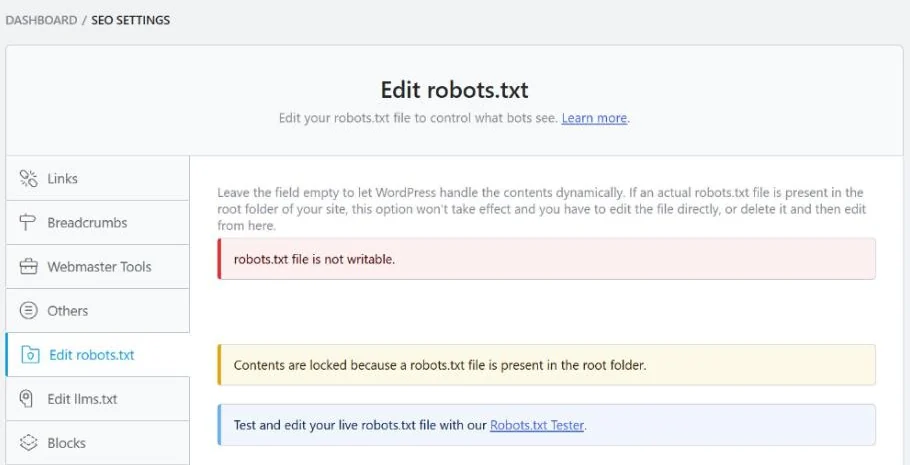
Rank Math explains it on screen: “If an actual robots.txt file is present in the root folder of your site, this option won’t take effect and you have to edit the file directly, or delete it and then edit from here.” You have two choices:
- Edit the real file in your host’s file manager or over FTP. It sits in the site’s root folder, usually next to
wp-config.php. - Or delete the file and manage the rules in Rank Math. Rank Math’s knowledge base says to delete it, for example over FTP. Download a copy first so you can paste the old rules back in.
Keep a copy of the old file before changing anything. A typo here can block Google too.
Test Your Rules
Do three checks after every change:
- Open the live file. Visit
yoursite.com/robots.txtin a private window and make sure your new groups are there. If not, a real file is overriding your plugin, or a cache is serving an old copy. - Test the logic. I wrote a short script using Python’s built-in
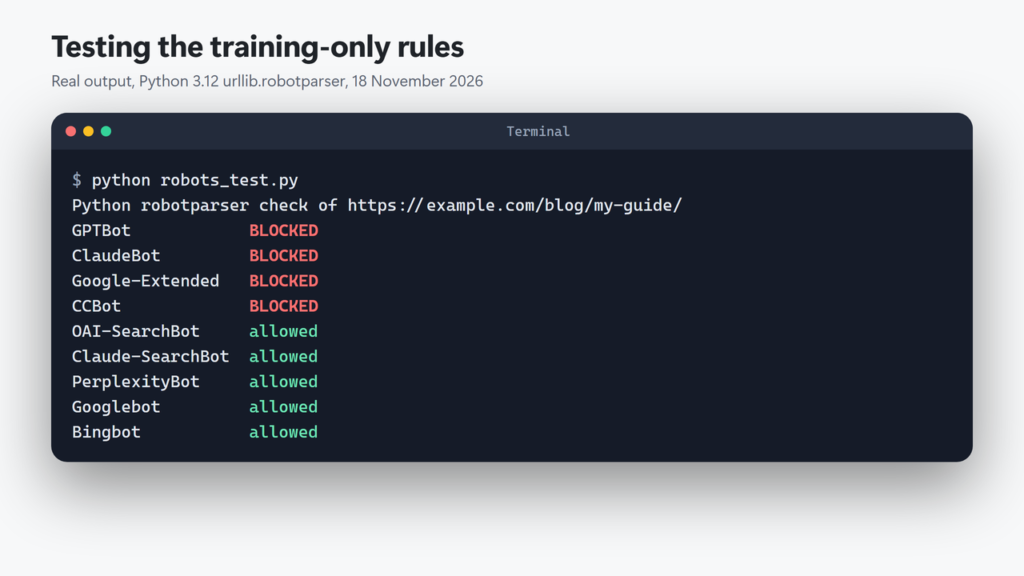
urllib.robotparserand ran it against a shorter version of the training-only rules, with four training tokens (Python 3.12, 18 November 2026):
python robots_test.py

Python robotparser check of https://example.com/blog/my-guide/
GPTBot            BLOCKED
ClaudeBot         BLOCKED
Google-Extended   BLOCKED
CCBot             BLOCKED
OAI-SearchBot     allowed
Claude-SearchBot  allowed
PerplexityBot     allowed
Googlebot         allowed
Bingbot           allowed
The output shows the key point: the four training tokens are blocked, while OAI-SearchBot, Claude-SearchBot, PerplexityBot, Googlebot and Bingbot are still allowed. Python’s parser is a quick sanity check, not Google’s own parser. It has two limits. Pass it the bare token (GPTBot), not a full user-agent string, or it can give the wrong answer. And it uses the first matching rule in the file, while Google uses the most specific one, so it would wrongly report /wp-admin/admin-ajax.php as blocked under the rules above. For Googlebot rules, rely on Google’s specification.
- Check Search Console. Settings → robots.txt shows the file Google fetched, when it checked it, and any problems. On this site it showed one file, “Fetched”, 722 bytes (matching the live file), last checked 5 November 2026.
Then allow time. Google “generally caches the contents of robots.txt file for up to 24 hours, but may cache it longer.” OpenAI says search results can take “~24 hours” to reflect a change, and Perplexity says “up to 24 hours”.
What robots.txt Can’t Do
- It is not access control. The robots.txt standard, RFC 9309, says: “These rules are not a form of access authorization.” A bot that ignores the file can still read your pages.
- Names can be faked. On 18 November 2026 I requested a page on this site with user-agent strings claiming to be GPTBot, ClaudeBot and PerplexityBot. All got the full page (HTTP 200). Those were fake strings from my own computer, which is exactly the point: a name alone proves nothing. OpenAI, Anthropic, Perplexity and Common Crawl publish IP lists so firewalls can verify real bots.
- It does not remove content already collected. Anthropic, for example, describes blocking ClaudeBot as excluding the site’s future materials.
- It does not keep pages out of Google. Google says robots.txt “is not a mechanism for keeping a web page out of Google”. Use
noindexor a password for that.
Anthropic also warns that blocking its IP addresses “may not work correctly”, because the bot then can’t read your robots.txt at all. If you need a hard block, use your host’s or CDN’s firewall, and verify bots by their published IP ranges rather than by name.
Google AI Overviews and AI Mode
This is the most common mix-up. Google-Extended controls Gemini training and grounding. It “does not impact a site’s inclusion in Google Search” and is not a ranking signal. AI Overviews and AI Mode are part of Search, so Google’s AI features page says “robots.txt directives for Googlebot is the control” for them.
To appear as a link in those features, Google says a page “must be indexed and eligible to be shown in Google Search with a snippet.” To limit what they show, Google points to nosnippet, data-nosnippet, max-snippet or noindex. These also limit your normal search snippets. If pages aren’t indexed at all, start with Crawled – currently not indexed or Discovered – currently not indexed, and make sure you submit your sitemap in Search Console.
Microsoft is different again. In a 2023 Bing Webmaster blog post about Bing Chat, Bing said its controls are the NOCACHE and NOARCHIVE meta tags (the post names no AI robots.txt token), and that pages using them “will still appear in our search results.” I could not confirm that this guidance is unchanged for Copilot, so check Bing’s current documentation before relying on it.
Mistakes to Avoid
- Blocking only GPTBot and thinking you blocked ChatGPT. ChatGPT search uses OAI-SearchBot, and user requests use ChatGPT-User.
- Blocking Google-Extended to escape AI Overviews. It has no effect on Search features.
- Putting the rules in a plugin while a real file exists. The real file wins and your plugin rules never show.
- Using
Crawl-delayfor Google. Google ignores it. Anthropic supports it; Amazon says it does not. - Forgetting subdomains. Each host needs its own file. Anthropic says to do this “for every subdomain”.
- Copying long bot lists from unknown sources. Use the names each vendor documents, and review the list every few months.
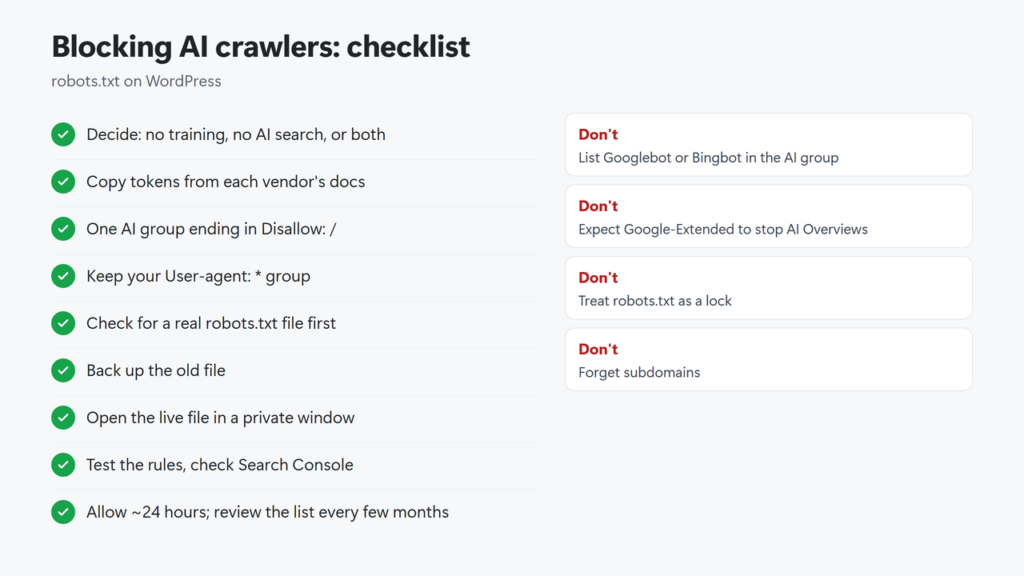
Checklist in text: decide your goal (training, AI search, both); list the tokens from each vendor’s docs; add one AI group with Disallow: /; keep your User-agent: * group; never list Googlebot or Bingbot; check for a real robots.txt file before editing in a plugin; back up the old file; open the live file in a private window; test the rules; check Search Console’s robots.txt report; allow about 24 hours; review the token list every few months.
How do I block AI crawlers with robots.txt?
Add a group with each bot’s token on its own User-agent line, for example GPTBot, ClaudeBot, Google-Extended and CCBot, followed by Disallow: /. Keep your normal User-agent: * group for everyone else.
Does blocking GPTBot remove my site from ChatGPT?
No. GPTBot is OpenAI’s training crawler. ChatGPT search uses OAI-SearchBot, and OpenAI says the two settings are independent. Block OAI-SearchBot too if you don’t want to appear in ChatGPT search answers.
Will blocking Google-Extended hurt my Google rankings?
Google says Google-Extended does not affect inclusion in Google Search and is not a ranking signal. It also does not control AI Overviews, which follow Googlebot and snippet controls.
Do AI crawlers respect robots.txt?
The vendors’ training and search crawlers are documented as robots.txt controls. Several user-triggered fetchers are not: Google, OpenAI, Perplexity, Meta and Amazon say theirs may ignore it. robots.txt is a request, not a lock.
How long does a robots.txt change take to work?
Google says it generally caches robots.txt for up to 24 hours, sometimes longer. OpenAI says ChatGPT search results can take about 24 hours to adjust, and Perplexity says up to 24 hours.
Why can’t I edit robots.txt in Rank Math?
Usually because a real robots.txt file exists in the site root. Rank Math then locks its editor. Edit that file with your host’s file manager or FTP, or delete it and manage the rules in Rank Math.