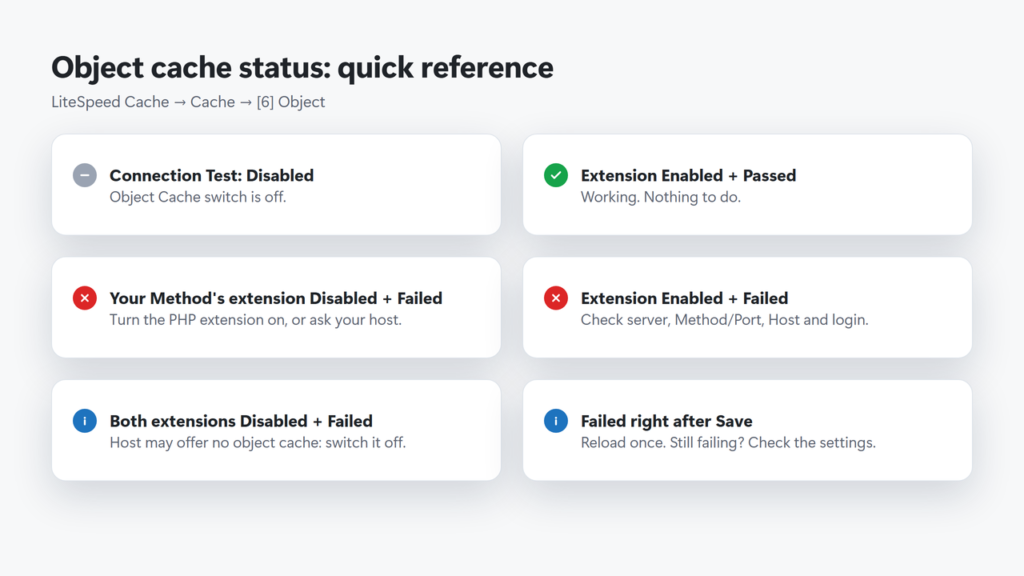
A LiteSpeed object cache Connection Test: Failed (on Cache → [6] Object) means the plugin could not reach a Memcached or Redis server with the settings you entered. The usual causes are a plan with no object cache server, the PHP extension missing for your PHP version, a Method and Port that do not match, or a wrong Host. On the current version (7.9.2) your site keeps working: LiteSpeed falls back to the database. Read the two Extension lines above the test first, because they tell you which of these it is.
This guide explains what the test checks, what this site’s working setup looks like, and how to fix a failed test step by step.
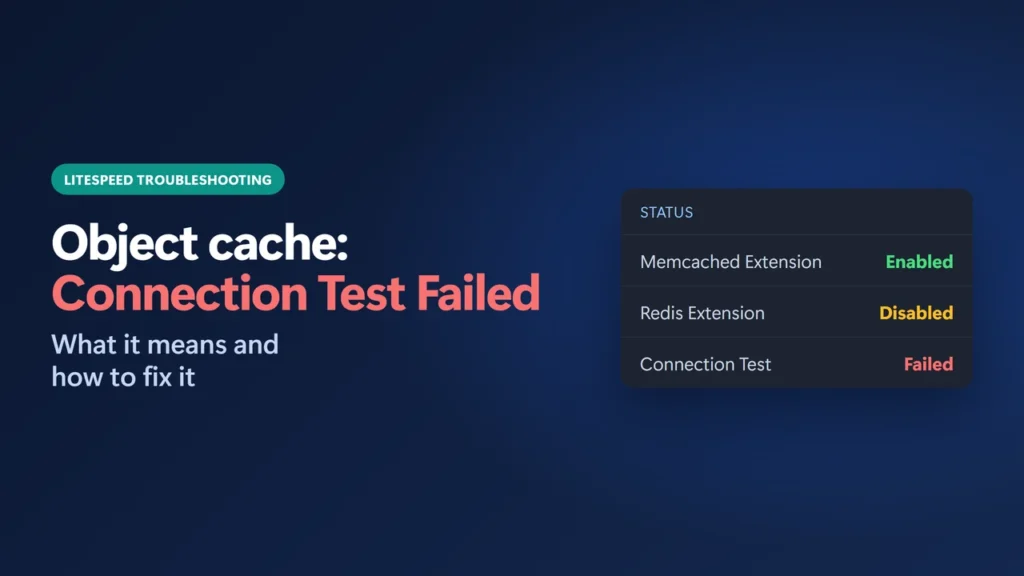
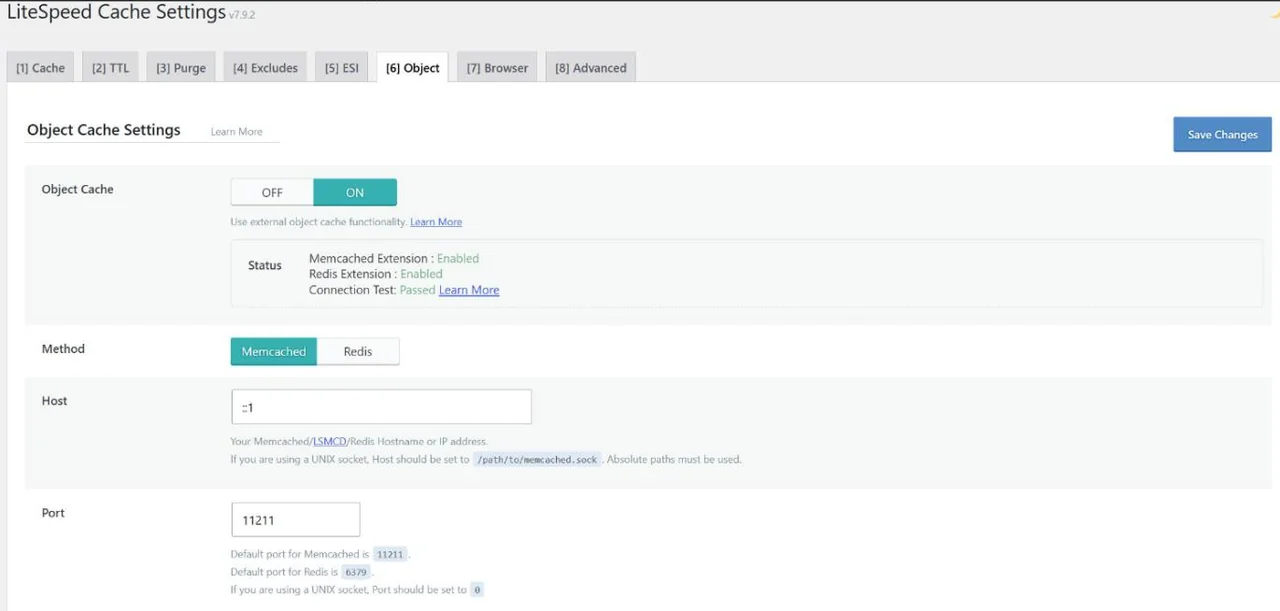
How I worked this out: this site runs LiteSpeed Cache 7.9.2 on Hostinger with object cache on. On 24 October 2026 its Object tab showed Connection Test: Passed with Method Memcached, Host ::1 and Port 11211 (screenshot below). How the test works comes from the plugin’s own source code for version 7.9.2 and LiteSpeed’s documentation; the common causes come from those plus recurring reports in the plugin’s WordPress.org support forum, which I label as user reports. Checked on 24 October 2026.
Key takeaways
- The Connection Test only passes if PHP can talk to a running Memcached or Redis server with your Host, Port and login.
- “Extension: Enabled” only means the PHP extension is loaded. It does not mean a server is running.
- The default ports are 11211 for Memcached and LSMCD and 6379 for Redis, but your host may use another. Switching Method resets the Port box.
- On 7.9.2, a failed test does not break the site. LiteSpeed stops using the object cache for that request and uses the database.
- If your host offers no object cache server, the test cannot pass. Leave Object Cache off.
Table of Contents
- 1What the Object Cache Connection Test Checks
- 2What a Working Setup Looks Like
- 3How to Fix Connection Test: Failed
- 1. Reload the tab after every save
- 2. Read the Extension lines
- 3. Make sure a server is actually running
- 4. Match Method and Port
- 5. Check the Host (or socket)
- 6. Check the login details
- 7. Match Persistent Connection to PHP
- 8. Remove a second object cache plugin
- 9. Still failing
- 4Does a Failed Test Break My Site?
- 5Is Object Cache Worth Fixing?
- 6Frequently Asked Questions
- What does Connection Test: Failed mean in LiteSpeed Cache?
- Why does Memcached Extension say Enabled but the test still fails?
- Which port should I use for LiteSpeed object cache?
- Does a failed object cache test slow down or break my site?
- Should I turn Object Cache off if the test fails?
- Can I use LiteSpeed object cache with the Redis Object Cache plugin?
What the Object Cache Connection Test Checks
Open LiteSpeed Cache → Cache → [6] Object. (On a multisite network, the Object tab is in Network Admin instead.) With Object Cache switched on, the top of the tab shows three status lines:
| Line | What it really checks |
|---|---|
| Memcached Extension: Enabled / Disabled | Whether PHP has the memcached extension loaded. Nothing else. |
| Redis Extension: Enabled / Disabled | Whether PHP has the redis (phpredis) extension loaded. Nothing else. |
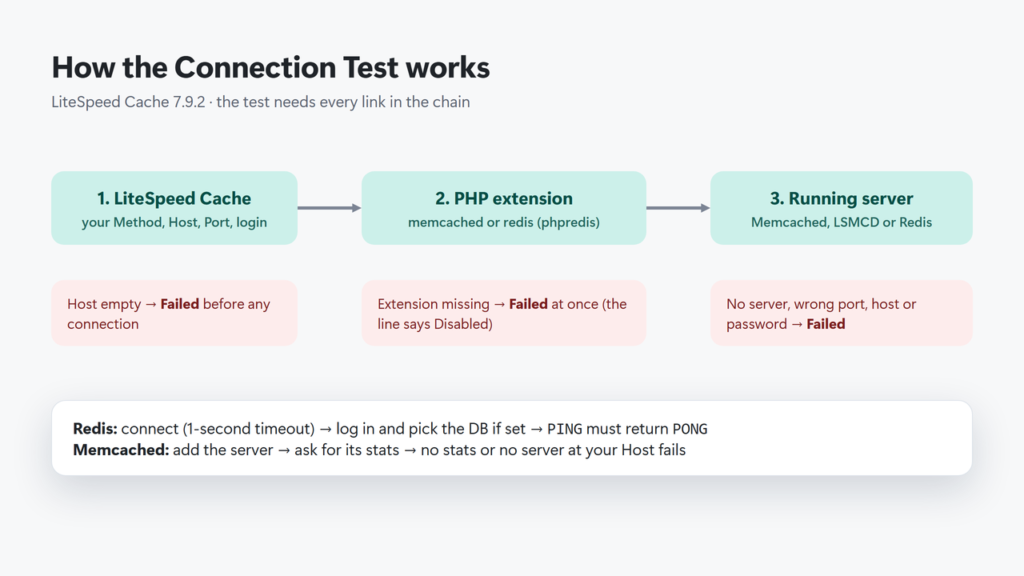
| Connection Test: Passed / Failed | Whether the plugin can actually connect to the server set under Method, Host and Port. |
The test runs every time the tab loads. For Redis, the plugin connects with a one-second timeout, logs in and selects the database if you set them, sends PING and needs PONG back. For Memcached, it adds your server and asks it for its stats; it fails if there is no answer or no running server at your Host. If the extension for your chosen Method is missing, or Host is empty, the test fails without trying to connect at all. The test shows Disabled when the Object Cache switch is off.
What a Working Setup Looks Like
This is this site’s Object tab on 24 October 2026, with the test passing. Two things are worth noticing:
- Both extensions say Enabled, but the test only checks the Method you picked, here Memcached. Enabled on its own tells you nothing about which server is running.
- The Host is
::1, the IPv6 address for the server itself (the same idea aslocalhostor127.0.0.1), and the Port is the Memcached default, 11211. I did not change these values for this guide.
How to Fix Connection Test: Failed
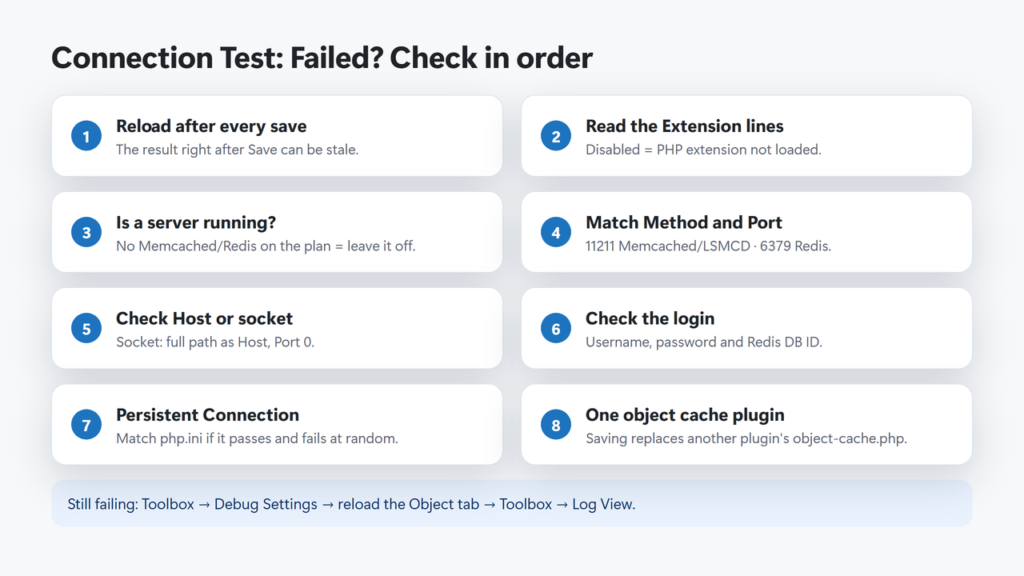
Work through these in order. The first three solve most cases.
1. Reload the tab after every save
The page you see after clicking Save runs the test in the same page load as the save. In the 7.9.2 code, the test reuses a connection that is already open and gives up at once if a connection already failed earlier in that load, so the result straight after saving can reflect your old settings: Failed after a fix, or Passed after a mistake. Reload the Object tab once before you trust the result.
2. Read the Extension lines
If the Extension line for your Method says Disabled, PHP cannot load the client, so the test fails every time. Turn the extension on for the PHP version your site uses, or ask your host. On Hostinger, PHP extensions are under Websites → Dashboard → PHP Configuration → PHP extensions; Hostinger notes that the extensions on offer depend on your PHP version. LiteSpeed needs the memcached extension (not the older memcache) or the redis extension (phpredis).
In one forum report, a site on Hostinger showed the Memcached extension as Disabled while it was enabled in the host panel; a test script then said “Class Memcached not found”, meaning that site’s PHP was not loading it. Check after any PHP version change.
3. Make sure a server is actually running
An enabled extension is only half of it: a Memcached, LSMCD or Redis server must also be running and reachable. Many shared plans do not include one. If both Extension lines say Disabled and your host offers no object cache, the test cannot pass, and the right setting is Object Cache off. Hostinger says its object cache is available on Business plans or higher and is switched on automatically when you install LiteSpeed Cache; its help article is subtitled “Managing LiteSpeed Memcached (LSMCD)”. See my Hostinger review for how this site’s plan is set up.
4. Match Method and Port
Choose Memcached for Memcached or LSMCD and Redis for Redis; there is no separate LSMCD option. The default ports are 11211 for Memcached and 6379 for Redis. A Redis server set to port 11211 is a common mistake in support threads. Watch out: switching Method resets the Port box to that default, so if your host gave you a custom port, type it in again before saving.
5. Check the Host (or socket)
Host is usually localhost, 127.0.0.1 or ::1 (this site uses ::1), or the address your host gives you. If your host gives you a UNIX socket instead, enter its full path as the Host (it must start with /) and set Port to 0. Since version 7.9, the plugin rejects an invalid Host on save with the message “Object Cache: Invalid host…” and keeps the old value.
6. Check the login details
For Memcached, leave Username empty unless your server uses SASL (the field only works when SASL is installed). For Redis, enter a Username only if your host gave you a Redis user name; the plugin then logs in with both the user name and the password. Check the Redis Database ID too (0 by default). A changed Redis password makes the test fail until you update it here.
7. Match Persistent Connection to PHP
This one applies to Memcached. LiteSpeed’s documentation says the test can fail on and off if Persistent Connection does not match the memcached.sess_persistent setting in PHP. Set it to match, save, and reload. If you cannot see your PHP settings, try it off.
8. Remove a second object cache plugin
Only one plugin can own wp-content/object-cache.php. When you save with Object Cache on, LiteSpeed Cache replaces any different object-cache.php with its own, without a warning. If you use another plugin such as Redis Object Cache, keep LiteSpeed’s Object Cache off, or deactivate the other plugin first.
9. Still failing
Turn on the debug log (Toolbox → Debug Settings), reload the Object tab, and read Toolbox → Log View; a failed connection is logged there. If you have server access, LiteSpeed’s own checks are:
redis-cli ping            # Redis: should reply PONG
telnet localhost 11211    # Memcached: should connect
Otherwise, send your host the three status lines and your Method, Host and Port. LiteSpeed’s support often asks for a report number from Toolbox → Report.
Does a Failed Test Break My Site?
No. In version 7.9.2, when the connection fails, the plugin stops using the object cache for that request and WordPress falls back to the database. Pages still load; you simply lose the speed-up. If Redis becomes unavailable while the site is running, LiteSpeed shows an admin notice that starts “LiteSpeed Object Cache: Redis is unavailable”.
Older versions were different. In LiteSpeed Cache 7.8.0.1 and 7.8.1, saving the Object tab while the server could not be reached could cause a critical error (“Call to undefined function LiteSpeed\litespeed_oc_disable_ext_cache()”), according to several forum reports. That function is gone in 7.9 and later, so update the plugin if you are still on 7.8.
Is Object Cache Worth Fixing?
Object cache stores the results of database queries, so it helps most on pages that cannot use the page cache: the WordPress dashboard, logged-in users, carts and searches. For logged-out visitors, the page cache does most of the work. My LiteSpeed Cache settings guide shows how the two fit together on this site. If pages are not being cached at all, fix that first with my x-litespeed-cache: miss guide, and after any settings change, see my guide to purging LiteSpeed Cache. If you are still choosing a caching plugin, my WordPress speed plugins roundup compares the options.
Frequently Asked Questions
What does Connection Test: Failed mean in LiteSpeed Cache?
The plugin could not connect to a Memcached or Redis server with the Method, Host, Port and login set on the Object tab. On LiteSpeed Cache 7.9.2, the site keeps working without the object cache.
Why does Memcached Extension say Enabled but the test still fails?
The Extension line only checks that PHP has the extension loaded. A Memcached or LSMCD server must also be running and reachable at the Host and Port you entered.
Which port should I use for LiteSpeed object cache?
11211 for Memcached or LSMCD and 6379 for Redis, unless your host gives you a different port. For a UNIX socket, enter the socket path as Host and set Port to 0.
Does a failed object cache test slow down or break my site?
Not on the current version. In LiteSpeed Cache 7.9.2 the plugin falls back to the database, so pages load normally but without the object cache speed-up.
Should I turn Object Cache off if the test fails?
Yes, if your host offers no Memcached or Redis server. Otherwise fix the Method, Port, Host or login, save, and reload the tab once before checking that it says Passed.
Can I use LiteSpeed object cache with the Redis Object Cache plugin?
Use one or the other. Both need wp-content/object-cache.php, and LiteSpeed replaces a different object-cache.php when you save with Object Cache on.