
Hands-on tested Pricing checked 10 Oct 2026 How I review
At a glance
- Best for
- Growing sites and agencies that value a choice of cloud infrastructure
- Skip it if
- you are an ultra-budget user or want fully pre-built hosting
- Price
- $11/mo (DigitalOcean Basic Standard), before extras and taxes (checked 10 Oct 2026)
- Main drawback
- The bill can grow with server resources and paid extras
Check current pricingCompare alternatives
Affiliate link: I may earn a commission. It does not change my rating.
Cloudways is a managed cloud hosting platform for people who want more control over server resources without maintaining the entire server stack themselves. This Cloudways review explains the practical trade-offs: ongoing USD costs, shared server resources across your applications, paid extras and the work you still need to manage.
My overall rating remains 4.7/5. I value its server choice and management tools, but it is less straightforward than an all-in-one hosting package for a first website.
Purchase buttons use my Cloudways affiliate redirect. I may earn a commission if you buy through it. See my affiliate disclosure.
Its dashboard reduces routine server administration. You still need to configure domains, monitor capacity, maintain applications and test backups.
Quick verdict: Cloudways suits growing sites and agencies that value infrastructure choice. My rating is 4.7/5. Allow for paid extras and application maintenance.
Table of Contents
- 1Quick Answer
- 2Key Takeaways
- 3What is Cloudways and How Does It Work?
- 4Historical Performance Case Study
- Before Cloudways:
- After Cloudways:
- Result:
- 5Cloudways Features That Actually Drive Results
- Core Cloudways Features:
- 6How to Evaluate Cloudways Performance
- Why it performs well:
- What to measure on your own site:
- 7Cloudways Pricing: Value vs Cost
- Budget for Backups, Email and Bandwidth
- Billing and Scaling Limits
- What you get:
- 8Cloudways Pros and Cons
- Pros:
- Cons:
- 9Cloudways Setup Guide
- Cloudways tutorial:
- 10Cloudways WordPress Hosting: Practical Benefits
- Benefits:
- 11Cloudways vs Competitors (Comparison Table)
- 12Cloudways vs AWS vs DigitalOcean
- 13Who Should Use Cloudways?
- Best for:
- Not for:
- 14Is Cloudways Safe and Reliable?
- Reasons:
- 15Cloudways Hosting India and Global Reach
- 16Cloudways Optimization Tips
- 17Common Mistakes to Avoid
- 18Related Hosting Guides
- 19Cloudways Alternatives
- 20Is Cloudways Worth It in 2026?
- 21Conclusion
- 22Trial and Promotion Eligibility
- 23FAQs
- What is Cloudways used for?
- Is Cloudways good for beginners?
- Does Cloudways offer a free trial?
- Is Cloudways better than shared hosting?
- Which providers does Cloudways support?
- Can I host WordPress on Cloudways?
- Is Cloudways expensive?
- Does stopping a server stop billing?
- Will Cloudways improve SEO rankings?
Quick Answer
- Cloudways is a managed cloud hosting platform that simplifies server management.
- It offers high performance, scalability, and strong security.
- Ideal for WordPress, business websites, and high-traffic sites.
- Pricing is flexible and pay-as-you-go.
- Best for users who want speed without handling servers.

Key Takeaways
- Choose between Flexible server control and Autonomous WordPress autoscaling; their billing and limits differ.
- Flexible supports DigitalOcean, Vultr, Linode, AWS and Google Cloud.
- Compare the complete bill, including backup storage, bandwidth and optional add-ons.
- The retained case study is historical and is not a guarantee for your site.
What is Cloudways and How Does It Work?
| Factor | Practical assessment |
|---|---|
| Service | Managed cloud hosting with a choice of infrastructure |
| Best fit | Growing WordPress sites and agencies comfortable with configuration |
| Starting example | $11/month DigitalOcean Basic Standard, before extras and taxes |
| Management | Dashboard, SSL, staging, caching and backup tools |
| Main trade-off | Budget for resources, offsite backup storage and optional services |
Cloudways is a managed hosting platform that sits on top of major cloud providers.
Instead of configuring servers manually, you simply choose:
- Hosting with DigitalOcean
- Hosting with AWS
- Hosting with Google Cloud
- Hosting with Vultr
- Hosting with Linode
Cloudways handles the supported server stack and offers optimization and security tooling. Check the scope of standard versus paid support; application troubleshooting and every optional service are not automatically included.
This review primarily covers Flexible. Autonomous is a separate WordPress service with autoscaling and different limits. Do not apply the Flexible server table to Autonomous.
You manage applications through Cloudways while selecting the underlying cloud infrastructure. This reduces server administration rather than eliminating technical decisions.
Historical Performance Case Study
The existing review reports a WordPress migration from shared hosting. I have retained the original observations below. The original test logs, server size, cache settings, testing location and monitoring duration are not provided here, so these are historical observations rather than a reproducible current benchmark.
Before Cloudways:
- Load time: 3.4 seconds
- Time to first byte: 900 ms
- The original review reported downtime during traffic spikes; no monitoring window is supplied.
After Cloudways:
- Load time: 1.2 seconds
- Time to first byte: 320 ms
- No downtime was reported in the original observation; this is not an uptime guarantee.
Result:
| Historical metric | Before migration | After migration |
|---|---|---|
| Load time | 3.4 s | 1.2 s |
| TTFB | 900 ms | 320 ms |
These figures are retained from the original review. No new test was conducted for this refresh, and the underlying logs are not supplied.
- The reported load time fell by about 65%; this calculation describes that observation only.
- Core Web Vitals require separate measurements of LCP, INP and CLS.
- The review does not provide controlled evidence of a ranking increase caused by hosting.
A migration can improve a poorly configured site, but this example does not establish that Cloudways is faster than every competing plan. Use the same site, test location and cache state when comparing hosts.
Cloudways Features That Actually Drive Results
Cloudways focuses on performance-first features.
Core Cloudways Features:
- One click WordPress hosting
- Cloudways cache system (Varnish, Redis)
- Free SSL certificates
- Cloudways backup system
- Cloudways staging environment
- CDN integration
- Advanced Cloudways security features.
The dashboard makes routine tasks accessible, but beginners still face DNS, billing, caching and deployment decisions.
How to Evaluate Cloudways Performance
Hosting can affect response time and page experience. It cannot guarantee rankings or repair every frontend problem.
Why it performs well:
- SSD cloud servers
- Optimized tech stack
- Global server locations
What to measure on your own site:
- Cached and uncached response times using the same test location
- Availability over a stated monitoring period
- Checkout, logged-in pages and response times under realistic concurrency
Monitor CPU, memory and database load alongside field page-experience data. A higher server tier may help a bottleneck, but oversized images or heavy JavaScript need separate fixes.
Cloudways Pricing: Value vs Cost
Before upgrading, check my Cloudways coupon guide for the current public signup result, offer qualifications and realistic savings examples.
| DigitalOcean Flexible example | Monthly USD | Resources |
|---|---|---|
| Basic Standard entry | $11 | 1 GB RAM, 1 vCPU, 25 GB SSD, 1 TB transfer |
| Basic Premium entry | $14 | 1 GB RAM, 1 vCPU, 25 GB NVMe, 1 TB transfer |
| Basic Standard 2 GB | $24 | 1 vCPU, 50 GB SSD, 2 TB transfer |
Selected configurations checked on 10 October 2026. Flexible is billed for usage; prices exclude applicable tax and paid extras. Provider, region and server family affect the quote. Pay-as-you-go does not mean rates can never change.
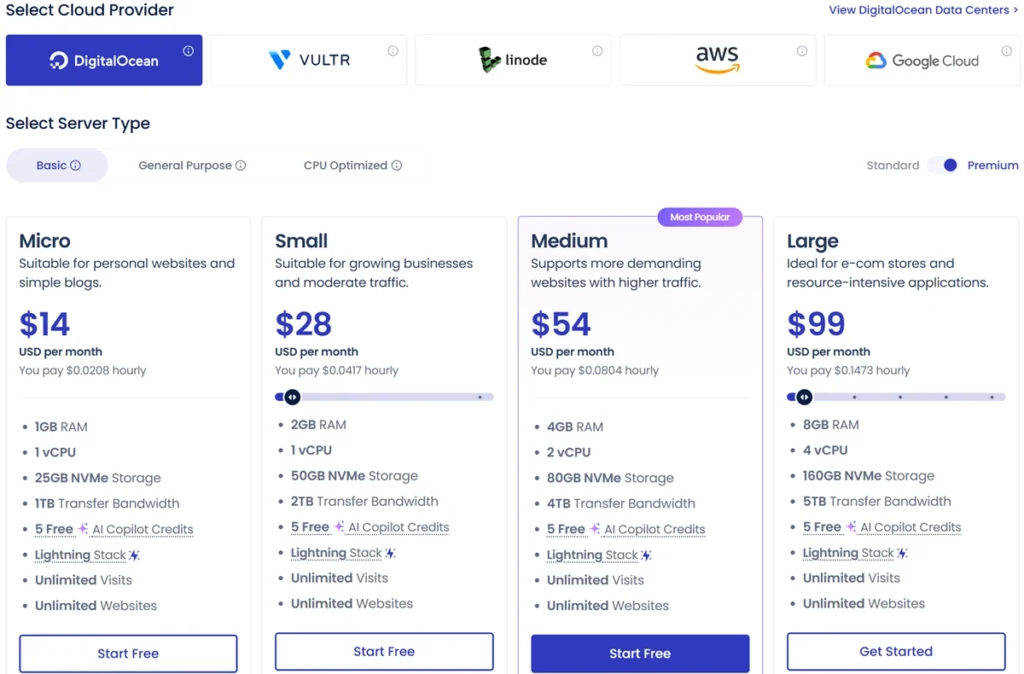
The selected DigitalOcean Basic Standard entry configuration is $11/month; Basic Premium is $14/month. These are server prices rather than complete all-in-one website budgets.
Budget for Backups, Email and Bandwidth
The pricing page lists offsite backup storage at $0.033/GB per server. Rackspace mailbox hosting is a paid add-on at $1.50/mailbox/month. Cloudflare Enterprise, additional security and enhanced support can also add to the bill; confirm selected services before activating them.
DigitalOcean Flexible bandwidth above the included allowance is listed at $0.02/GB. Other providers and regions use different overage rules. Unlimited application installations are still constrained by your server’s CPU, memory, storage and transfer allowance.
Billing and Scaling Limits
Flexible invoices cover previous usage. Set a billing alert and monitor the estimated total. A stopped DigitalOcean, Linode or Vultr server still incurs charges while allocated; follow the cancellation process when you no longer need the service.
Scaling can temporarily interrupt service. Current DigitalOcean options can increase only CPU/RAM and later revert to the original size; expanding disk alongside them has different downscaling limits. Vultr and Linode generally require cloning to a smaller server. Plan and test the operation rather than assuming every upgrade is instantly reversible.
What you get:
- Managed cloud infrastructure
- Performance optimization
- Scalability
For a small site, paid backups and optional services can make the complete bill more useful to compare than the headline server price.
Cloudways Pros and Cons
Pros:
- Choice of server resources and caching tools.
- Easy management
- Scalable infrastructure
- Secure web hosting
- Reliable uptime
Cons:
- No bundled mailbox hosting; paid email add-ons are available
- No domain registration
- Slight learning curve
Cloudways Setup Guide
Cloudways tutorial:
- Create account (Cloudways login)
- Choose provider
- Select application
- Launch server
- Manage via dashboard
Provisioning is only the first step. Allow time for domain mapping, HTTPS, migration checks, email delivery and backup testing before switching a live site.
Cloudways WordPress Hosting: Practical Benefits
Cloudways WordPress hosting is optimized for speed.
Benefits:
- Fast WordPress hosting
- Automatic backups
- Staging environment
- Performance optimization
WordPress publishers and stores can benefit from staging and caching. Test checkout and logged-in pages carefully; caching rules that help a blog may be unsuitable for customer-specific content.
Cloudways vs Competitors (Comparison Table)
| Hosting approach | When to compare it | What to check |
|---|---|---|
| Cloudways Flexible | Growing applications needing server choice | Resource size, stack, extras and support scope |
| Bluehost | A bundled WordPress setup | Plan limits, renewal and support channels |
| SiteGround | Managed site tools in a hosting bundle | Resource policies and renewal costs |
| Hostinger | Budget-conscious sites comparing packages | Introductory term, renewal and included services |
Cloudways vs AWS vs DigitalOcean
| Factor | Cloudways Flexible | Direct cloud infrastructure |
|---|---|---|
| Management | Managed hosting stack and dashboard | You choose the operations approach and tools |
| Control | Within the platform’s supported configurations | Broader configuration choices and more responsibility |
| Cost | Managed platform rate plus extras | Compute plus your tools, services and administration time |
| Best fit | Teams wanting application hosting with server choice | Teams able to configure and operate infrastructure |
Cloudways simplifies cloud infrastructure dramatically.
Who Should Use Cloudways?
Best for:
- Bloggers
- Business websites
- Agencies
- High-traffic websites
Not for:
- Ultra budget users
- Users wanting fully pre-built hosting
Is Cloudways Safe and Reliable?
Cloudways provides managed infrastructure and security tools. Reliability still depends on your provider, region, application configuration and recovery process.
Reasons:
- Strong firewall protection
- Regular updates
- Dedicated resources
- High uptime
Keep application plugins and themes maintained, restrict access and test a restore. A firewall or backup feature is not a promise that a site cannot be compromised or lose data.
Cloudways Hosting India and Global Reach
Cloudways offers multiple server locations including India.
A nearby region may help reduce network distance, although these outcomes need testing:
- Low latency
- Faster loading times
- Better user experience
For an Indian audience, compare an available India region such as DigitalOcean Bangalore against nearby options with your own site. Region availability and server families vary by provider.
Cloudways Optimization Tips
To maximize performance:
- Enable caching
- Use CDN
- Optimize images
- Use Cloudways Breeze plugin
These steps can reduce avoidable page load costs. Verify the effect on real users; they do not guarantee higher search rankings.
Common Mistakes to Avoid
- Choosing low server resources
- Ignoring backups
- Not enabling caching
- Skipping CDN
Also set billing alerts, verify backup retention and check how scaling down works before committing to a larger server.
Related Hosting Guides
Compare the management approach in my Kinsta review and WP Engine review. If you prefer direct infrastructure control, read my DigitalOcean review.
Cloudways Alternatives
Some Cloudways alternatives include:
Choose between these services by support scope, budget and operational needs. Flexibility is useful only if you are comfortable making the configuration decisions.
Is Cloudways Worth It in 2026?
Cloudways can be worth paying for when you need server choice, several applications or a managed stack with room to grow.
It offers:
- Speed
- Scalability
- Ease of use
A small site with modest traffic may be better served by a simpler bundle. For a growing project, compare total cost and test the workload before moving production traffic.
Conclusion
My 4.7/5 assessment reflects the flexibility and management workflow. The trade-off is ongoing configuration responsibility and a bill that can grow with resources and paid extras.
Use the trial to check your real application, support workflow and expected monthly cost. Make the purchase decision on those results rather than an advertised speed claim.
Trial and Promotion Eligibility
Cloudways currently advertises a three-day Flexible trial without a credit card. Check the selected provider and account eligibility before starting. Trial limitations and paid-service activation conditions matter; I have removed the expired April Easter coupon from this review.
FAQs
What is Cloudways used for?
It manages the hosting stack on selected cloud infrastructure for applications such as WordPress and PHP websites. Flexible gives you server choices; Autonomous focuses on autoscaling WordPress hosting.
Is Cloudways good for beginners?
The dashboard simplifies server tasks, but you still make DNS, resource, caching and billing decisions. A first website may be easier to manage on a simpler bundled hosting plan.
Does Cloudways offer a free trial?
The pricing page advertises a three-day Flexible trial without a credit card. Check eligibility, supported configurations and restrictions before starting; this is not a money-back guarantee on every paid service.
Is Cloudways better than shared hosting?
It can provide more resource control and scaling options. That does not establish faster performance for every website. Compare the same workload and complete ongoing cost.
Which providers does Cloudways support?
Cloudways Flexible lists DigitalOcean, Vultr, Linode, AWS and Google Cloud. Available regions, server families and charges differ.
Can I host WordPress on Cloudways?
Yes. WordPress hosting includes management tools such as staging and caching. You remain responsible for appropriate application settings, plugin compatibility and testing deployments.
Is Cloudways expensive?
A selected DigitalOcean Basic Standard entry server is $11/month before extras and taxes. The complete cost can include offsite backup storage, bandwidth overages, email and optional services.
Does stopping a server stop billing?
For DigitalOcean, Linode and Vultr, stopping the server does not stop billing while resources remain allocated. AWS and Google Cloud can retain storage charges. Follow the account cancellation process, export needed data first and expect a final invoice for prior usage.
Will Cloudways improve SEO rankings?
Hosting can influence response time and page experience, but it does not guarantee rankings. Content quality, crawlability, frontend performance and other signals still matter.





I appreciate the clear and straightforward writing style.