
Cloudways coupon code SUMMER404 was accepted at public signup on October 15, 2026. Advertised offer: 40% off for four months for new customers. Campaign dates conflict; confirm your billing discount before paying.
Cloudways coupon: signup accepted
SUMMER404
Copy the code, then apply it at Cloudways signup.
Offer status: Signup acceptance confirmed; advertised saving 40% for four months. Eligibility: New customers under the campaign terms. Validity: Uncertain—older official wording says September 15, 2026. Last verified: October 15, 2026.
I have personally used Cloudways in the past. I do not currently have an active subscription, so this guide separates that experience from today’s public-page checks. For the platform’s wider strengths and limitations, read my detailed Cloudways review.
Affiliate disclosure: The buttons use my Cloudways affiliate redirect. I may earn a commission if you purchase through it, at no additional cost to you. Opening the link does not guarantee a coupon is applied. See my affiliate disclosure.
Table of Contents
- 1Current Cloudways Coupon: What Is Confirmed?
- 2Why the Verification Status Needs a Qualification
- 3How to Apply the Cloudways Coupon Code
- 4Cloudways Coupon Terms and Eligibility
- 5How Much Could You Save?
- 6Cloudways Pricing After the Promotion
- Costs to Check Beyond the Server Price
- 7Free Trial, Coupon and Promotional Credit: The Difference
- 8My Previous Experience With Cloudways
- 9Is Cloudways Worth Buying With a Coupon?
- A Good Fit to Evaluate
- When a Simpler Hosting Plan May Be Enough
- 10Cloudways Coupon Not Working? Check These Points
- 11Cancellation and the Bill After You Stop Using Cloudways
- 12Black Friday, Student and Other Cloudways Deals
- 13How I Check and Update This Coupon Page
- 14Cloudways Coupon Code FAQs
- What Cloudways coupon code was accepted in this check?
- Is SUMMER404 guaranteed to reduce my bill?
- Where do I enter a Cloudways promo code?
- Can existing Cloudways users use this coupon?
- Can I use two Cloudways coupons together?
- How long does the Cloudways discount last?
- Does Cloudways offer a free trial?
- Does the discount continue at the same rate afterward?
- Can I use a Cloudways coupon in India?
- Is there a verified Cloudways student or Black Friday code?
- Does stopping a Cloudways server stop charges?
- Is the coupon worthwhile for a small server?
- 15Final Verdict: Confirm the Terms, Then Decide
Current Cloudways Coupon: What Is Confirmed?
| Offer detail | What I could verify |
|---|---|
| Code | SUMMER404 |
| Public signup result | Accepted; no account creation or payment completed |
| Advertised benefit | 40% off for four months, with migration benefits advertised |
| Intended customers | New customers upgrading from a trial to a paid plan |
| Products named on the offer page | Flexible and Autonomous; exact account-level coverage not tested |
| Existing customers | Not eligible under this campaign’s published terms |
| Expiry | Conflicting official wording; no current deadline confirmed |
| Last checked | October 15, 2026 |
The useful distinction is between a code that the signup form recognizes and a discount that has actually reduced a bill. The first is confirmed here. The second is not. I would not upgrade solely because a green signup message appears; first check the percentage, eligible service and discount dates in Billing.
This is not an exclusive Harshil Barot coupon. It is the code supplied by Cloudways’ own public offer link. I have not established that it is the largest possible account-specific deal, nor that every advertised add-on or migration benefit will apply to your account.

Why the Verification Status Needs a Qualification
Cloudways’ dedicated promotion page continued to advertise the summer campaign when I checked. Its signup link passed SUMMER404 into the public registration form, which returned a success message. Some official pricing and product-page wording still gave September 15, 2026 as the campaign deadline—a date that had already passed.
Those signals do not justify declaring the code expired everywhere, because the signup form accepted it. They also do not establish a formally extended campaign. I have therefore kept the code visible with its actual status instead of relabelling an old deadline as a new offer or promising a discount that has not been invoiced.
If the billing area does not show the advertised terms after registration, ask Cloudways to confirm the applicable offer before adding a payment method or authorizing a paid upgrade. An acceptance message alone does not establish your billing start date, four full discount months or eligibility for every product.

How to Apply the Cloudways Coupon Code
- Copy SUMMER404 using the button above, then open Cloudways through the offer button.
- On the registration page, find the Promo Code field. If another code is prefilled, compare its terms before replacing it.
- Enter SUMMER404 if it is not already present. Check the form’s response; do not assume the affiliate button applied the code automatically.
- Complete registration only if the account and offer suit your needs. Select the relevant product and review the available trial or paid configuration.
- Before a paid upgrade, open Billing and inspect Credits & Discounts. Confirm the discount percentage, start and end months, status and eligible service.
- Review the normal price, tax, backups, add-ons and usage allowances. Authorize paid service only when the applicable billing terms are clear.
I directly verified the public signup field and its response. The later billing-check step follows Cloudways’ Help Center instructions; I did not enter a current customer dashboard. Existing users should inspect their own account offers rather than open a duplicate account to bypass campaign restrictions.

Cloudways Coupon Terms and Eligibility
- New customers: The advertised campaign is for new users who register and move from a trial to a paid plan. Account-level approval was not tested.
- Existing users: This specific offer excludes existing customers. A separate offer, if available in your account, has its own terms.
- Products: The promotion page names Flexible and Autonomous. Do not automatically extend it to Velocity, AI products or every paid integration.
- Duration: Four months is the advertised discount period. Check the actual start and end months shown for your account.
- Stacking: Cloudways allows one active promo code at a time. Do not add two advertised percentages together.
- Expiry and region: No current unambiguous end date or country-by-country eligibility list was established. Registration acceptance does not prove eligibility for an Indian or other specific billing address.
The offer page also advertises unlimited migrations and savings on selected add-ons. I did not submit a migration request or verify a paid add-on invoice. If those benefits affect your decision, ask which sites, products and services qualify before planning a move around them.
How Much Could You Save?
The figures below are conditional calculations, not paid-cart results. They apply the advertised 40% reduction to monthly prices visible in the live DigitalOcean Basic pricing view. They assume unchanged resources, four fully eligible months and no tax, backup storage, add-ons or other usage charges.
| Visible monthly base price | At 40% off, if eligible | Saving over four full months |
|---|---|---|
| $14.00 | $8.40 | $22.40 |
| $28.00 | $16.80 | $44.80 |
| $54.00 | $32.40 | $86.40 |
For the $14 example, the calculation is $14 × 60% = $8.40. The saving is $5.60 per eligible month, or $22.40 across four full months. This does not establish a final invoice of $8.40; the invoice can contain charges outside the discount’s scope.
It is also not a 40% saving across an entire year. With four discounted $14 months followed by eight at $14, the hypothetical hosting-only annual total is $145.60 instead of $168.00. That is about 13.33% less over the year, assuming the same service, rates and full eligibility throughout.
For your own quote, multiply only the eligible charges by the discount rate. Add charges the offer does not cover separately. A larger server creates a bigger dollar saving, but it also creates a larger ongoing bill. Choose capacity for the site rather than to maximize the apparent coupon value.
Cloudways Pricing After the Promotion
Once an eligible temporary discount ends, standard charges apply to the resources you keep using. In the $14 illustration, the base cost returns to $14 for a full month if that price and configuration remain unchanged. Cloudways is not a five-year shared-hosting prepayment deal; do not treat a promotional monthly example as a permanent rate.
Cloudways Flexible uses hourly resource billing with monthly invoices. Provider-specific rules matter: DigitalOcean, Linode and Vultr have monthly caps under the documented billing model, while AWS and Google Cloud are billed hourly without the same monthly cap. A resource change partway through a month can change the calculation.
Keep the selected product explicit when comparing prices. Flexible gives you server-resource and cloud-provider choices. Autonomous is a managed WordPress/WooCommerce option with different allocation and scaling rules. This guide’s savings table uses the visible Flexible price examples, not an Autonomous invoice estimate.
Costs to Check Beyond the Server Price
- Offsite backups: The checked Flexible pricing view listed $0.033 per GB per server for backup storage.
- Paid integrations: Email, DNS, CDN, security or management subscriptions can add separate charges.
- Usage: Bandwidth, storage and scaling can affect the bill according to the product and provider.
- Taxes: Listed prices exclude applicable taxes; billing location determines the treatment.
A useful purchase budget has two lines: the eligible server charge during the promotion and the expected normal bill afterward. If you can only afford the first line, the coupon has not solved the ongoing hosting cost. Leave room for traffic growth and the services your site actually requires.
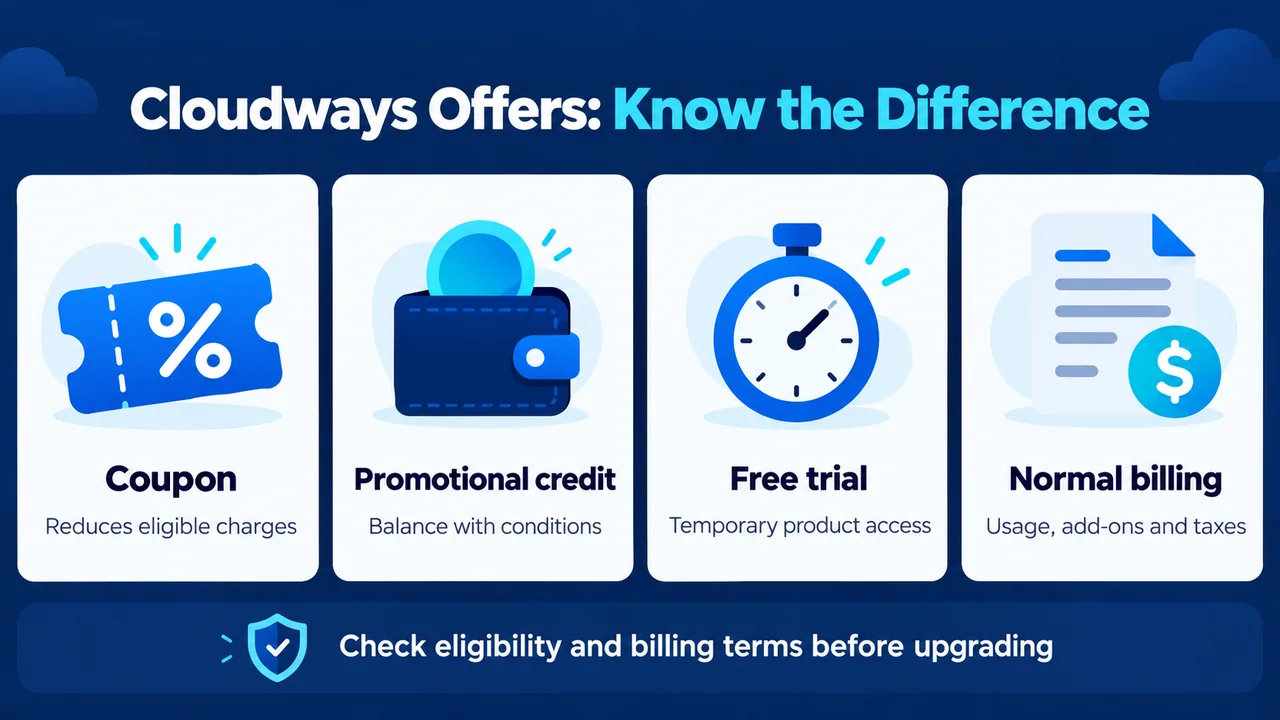
Free Trial, Coupon and Promotional Credit: The Difference
| Type | What it changes | What to check |
|---|---|---|
| Coupon | Reduces eligible charges for an approved period | Percentage, product, start/end dates |
| Promotional credit | Adds conditional billing credit | Balance, validity and eligible usage |
| Free trial | Provides temporary product access | Duration, resource limits and upgrade behavior |
| Normal billing | Charges for billable resources and services | Usage, paid extras and taxes |
Cloudways documents a three-day Flexible trial without a credit card, with the trial period starting when a trial server is created. It is a short evaluation window, not ongoing free hosting. Use it to check the platform and your application before deciding whether to pay.
Autonomous also has a documented three-day trial, but its upgrade conditions deserve attention. If a payment method was already added before starting the Autonomous trial, Cloudways says it automatically upgrades to Plan 1 when the trial ends. Review the current subscription screen; do not assume every Cloudways trial ends without any paid conversion.
Promotional credit is not a percentage discount or a cash refund. The payments guide says promotional credits are used before prepaid account funds and generally expire one year after issue. Check the actual credit and campaign terms in your billing area; the existence of a coupon does not establish that you also receive a free dollar-credit bonus.
My Previous Experience With Cloudways
I have used Cloudways personally in the past, and my existing service review carries a 4.7/5 overall rating. I value the choice of infrastructure and the management tools, but I would not describe it as the simplest all-in-one package for someone building a first website.
The practical buying question is whether you want that control after the discount ends. You still need to manage your application, connect domains, watch capacity and maintain a recovery plan. A smaller first bill does not remove those responsibilities.
My Cloudways hosting review explains the broader trade-offs. This coupon article does not reuse old performance numbers as current benchmarks. I have not logged into an active account, launched a server or measured new speed and uptime results for this check.
Is Cloudways Worth Buying With a Coupon?
Cloudways is worth considering when managed cloud infrastructure solves a real problem for your site. The coupon can reduce an eligible introductory bill, but it should be a secondary benefit. Compare the normal price with the cost of the management work and services you otherwise need.
A Good Fit to Evaluate
- Growing WordPress sites whose owners want server-resource choices and are willing to manage application maintenance.
- Agencies comparing the operational benefits of managing several projects on a cloud platform.
- WooCommerce businesses that can budget for suitable resources, staging, backups and ongoing support needs.
When a Simpler Hosting Plan May Be Enough
A very small first site may benefit more from straightforward account management and a lower ongoing budget than from cloud-provider selection. If that sounds like you, compare my Hostinger review and its current coupon guide. Compare full billing terms rather than two unrelated headline monthly prices.
For people comfortable managing their own server, my DigitalOcean review explains a different approach. Direct cloud infrastructure and a managed hosting platform involve different responsibilities; a cheaper server price alone is not a like-for-like comparison.
Cloudways Coupon Not Working? Check These Points
- Copy accurately: Remove accidental spaces and check the exact code shown at the top of this page.
- Check the response: A prefilled code is not proof of acceptance. Look for the form’s actual status.
- Check customer status: The advertised SUMMER404 campaign is for new users, not all existing accounts.
- Inspect active promotions: Only one promo code can be active at a time. Compare terms before replacing an offer.
- Check product coverage and dates: A recognized registration code does not confirm all services or a current paid discount.
- Ask before upgrading: If the billing area omits or contradicts the promised offer, get clarification from Cloudways rather than assuming support will apply it later.
Do not delete an account, create multiple identities or authorize extra resources merely to experiment with coupon eligibility. Keep the actual response and advertised terms so you can explain the issue accurately if you contact support.
Cancellation and the Bill After You Stop Using Cloudways
Stopping a server does not necessarily stop billing. Cloudways’ guidance says DigitalOcean, Linode and Vultr resources continue to be charged while allocated; stopped AWS or Google Cloud servers can still incur storage or IP-related costs. Save and verify backups before removing resources you no longer need.
To stop future usage charges, follow Cloudways’ current instructions for removing the relevant servers or applications and deactivating paid add-ons. Because billing is in arrears, a final invoice for earlier usage can still arrive afterward. Removing a payment method is not a substitute for ending billable services.
I have not verified a blanket money-back guarantee for this coupon. A trial, promotional credit and refund policy are separate matters. Confirm any refund entitlement directly for the service and payment involved rather than treating the coupon as insurance against buying the wrong plan.
Black Friday, Student and Other Cloudways Deals
I have not established a current Black Friday promotion or a general student coupon for this article. Seasonal and account-specific offers can differ from the public signup code. A future campaign should not be presented as available before Cloudways publishes its terms.
If a different offer appears when you visit, compare its duration, eligible charge, migration terms and price afterward. A 50% discount for one month, for example, is not automatically better than a smaller discount lasting longer. Compare dollar savings over the same time horizon, using the plans you would actually choose.
How I Check and Update This Coupon Page
I check Cloudways’ public offer and pricing pages, follow the vendor’s coupon link, record the signup response and compare the result with published eligibility and billing guidance. I keep the evidence privately, including conflicts, so a recognized code is not silently promoted into a paid-invoice claim.
The visible verification date changes only after an actual offer check. This verification stopped before entering personal details, accepting registration terms, creating an account or paying. The screenshot shows a public registration page, not Harshil’s private billing area. The original graphics explain concepts and are labelled as illustrations.
Cloudways Coupon Code FAQs
What Cloudways coupon code was accepted in this check?
SUMMER404 was accepted by Cloudways’ public signup form on October 15, 2026. The offer page advertises 40% off for four months, but older official deadline wording conflicts. Confirm the actual discount in Billing before a paid upgrade.
Is SUMMER404 guaranteed to reduce my bill?
No. This check confirms public signup acceptance, not a completed purchase or discounted invoice. Your account, selected product and campaign terms determine the applicable benefit.
Where do I enter a Cloudways promo code?
The checked public registration form had a Promo Code field. Enter the code there and read the result. After registration, inspect Billing → Credits & Discounts before upgrading to verify the actual discount status and dates.
Can existing Cloudways users use this coupon?
The advertised SUMMER404 campaign excludes existing customers. Check any separate offer available in your own account; do not assume a new-user signup code applies to existing resources.
Can I use two Cloudways coupons together?
Cloudways allows only one active promo code at a time. Compare the full benefit and duration before replacing an existing promotion. Two percentages should not be added together.
How long does the Cloudways discount last?
The public campaign advertises four months. Check the actual start and end months in your account. A percentage shown on a landing page is not proof that every new account will receive four full discounted invoices.
Does Cloudways offer a free trial?
Cloudways documents three-day trials for Flexible and Autonomous. Their upgrade behavior differs, particularly if a payment method is already present on an Autonomous account. Check the product’s current conditions before starting.
Does the discount continue at the same rate afterward?
A temporary coupon does not make the reduced price permanent. Standard resource and service charges apply after the approved period, with taxes and any paid extras added as applicable.
Can I use a Cloudways coupon in India?
I did not verify eligibility using an Indian billing address or a paid Indian account. The public signup check was not country-specific. Cloudways processes new billing transactions in USD; local tax and payment-provider charges can affect your cost.
Is there a verified Cloudways student or Black Friday code?
No general student code or current Black Friday offer was established in this check. Use the status at the top of this page and confirm any separate campaign directly before paying.
Does stopping a Cloudways server stop charges?
Not necessarily. Allocated resources can remain billable when stopped. Follow the product’s resource-removal and add-on cancellation instructions, with verified backups, and expect a possible final invoice for usage already incurred.
Is the coupon worthwhile for a small server?
It can lower eligible costs, but the dollar saving may be modest. At a $14 monthly base, 40% off would save $5.60 per eligible full month. The ongoing price and suitability matter more than the size of the percentage badge.
Final Verdict: Confirm the Terms, Then Decide
SUMMER404 was accepted at public signup; the advertised benefit is 40% off for four months. The unresolved issue is the campaign’s inconsistent date information. Treat the code as a candidate to confirm in your account, not a guaranteed paid discount or a reason to rush an upgrade.
Cloudways is most interesting when you value managed cloud infrastructure and can afford the normal service cost after a temporary promotion. Start with the configuration that fits your site, inspect the current trial conditions and compare the complete bill. Keep backups, add-ons, usage and taxes in that decision.
My recommendation is to verify the discount details in Billing before authorizing payment. If those details do not match the offer, ask Cloudways for clarification first. The useful deal is the one whose eligibility, duration and ongoing price you understand—not simply the largest number on a coupon page.
Cloudways coupon: signup accepted
SUMMER404
Copy the code, then apply it at Cloudways signup.