
GreenGeeks is shared and WordPress hosting with an environmental twist: the company says it puts back three times the energy it uses through renewable energy credits. Its shared plans run on LiteSpeed web servers with SSD storage, free SSL and cPanel. I rate it 4.4/5: fast and easy for beginners and small businesses, with the usual catch that renewal prices are several times the introductory rate.
Table of Contents
- 1Quick Verdict
- 2What GreenGeeks Offers
- 3My Experience Testing GreenGeeks
- 4GreenGeeks Pricing
- 5Features in Practice
- 6Pros and Cons
- 7GreenGeeks vs Alternatives
- 8Who Should Use GreenGeeks — and Who Should Skip It
- 9Final Verdict
- 10FAQs
- Is GreenGeeks good for beginners?
- Does it offer free domain?
- Is it fast?
- What is uptime?
- Is it eco-friendly?
- Does it support WordPress?
- Are there hidden costs?
- Is it worth it?
Quick Verdict
Review scope: my rating and the test notes below come from setting up and testing a real website on GreenGeeks. Plans and prices were rechecked on GreenGeeks’ official website on 13 October 2026.

What GreenGeeks Offers
GreenGeeks sells shared hosting, managed WordPress hosting and VPS hosting. Its main selling points are LiteSpeed servers (faster than traditional Apache servers for WordPress), SSD storage, unmetered traffic, free Let’s Encrypt SSL with automatic renewal, cPanel and a one-click installer for more than 150 apps including WordPress.
Its green credentials are the other half of the pitch: GreenGeeks says it matches three times the energy it consumes with renewable energy credits. That makes it a natural choice if sustainability matters to your brand. For a broader shortlist, see my best web hosting comparison.

My Experience Testing GreenGeeks
Setup was smooth: after choosing a plan, I registered a domain and installed WordPress within minutes, and the interface was clean and easy to follow. With the site live, pages loaded quickly in both manual browsing and speed tools — the average load time was under one second, even without heavy optimisation, and mobile performance was stable. Screenshots of this test aren’t published, so treat the figure as indicative.
When I simulated several users visiting at once, the site slowed slightly but stayed up, with no crashes or downtime. That makes GreenGeeks a good fit for small and medium websites, which is what most of its customers run.
GreenGeeks Pricing
| Plan | Introductory price | Renews at | Websites | Storage |
|---|---|---|---|---|
| Lite | $2.95/month | $13.95/month | 1 | 25 GB |
| Pro | $4.95/month | $18.95/month | Unlimited | 50 GB |
| Premium | $8.95/month | $30.95/month | Unlimited | 100 GB |
The introductory prices are low, but renewals are roughly three and a half to almost five times higher, so budget for the renewal rate rather than the headline. All plans include unmetered traffic and a 30-day money-back guarantee.
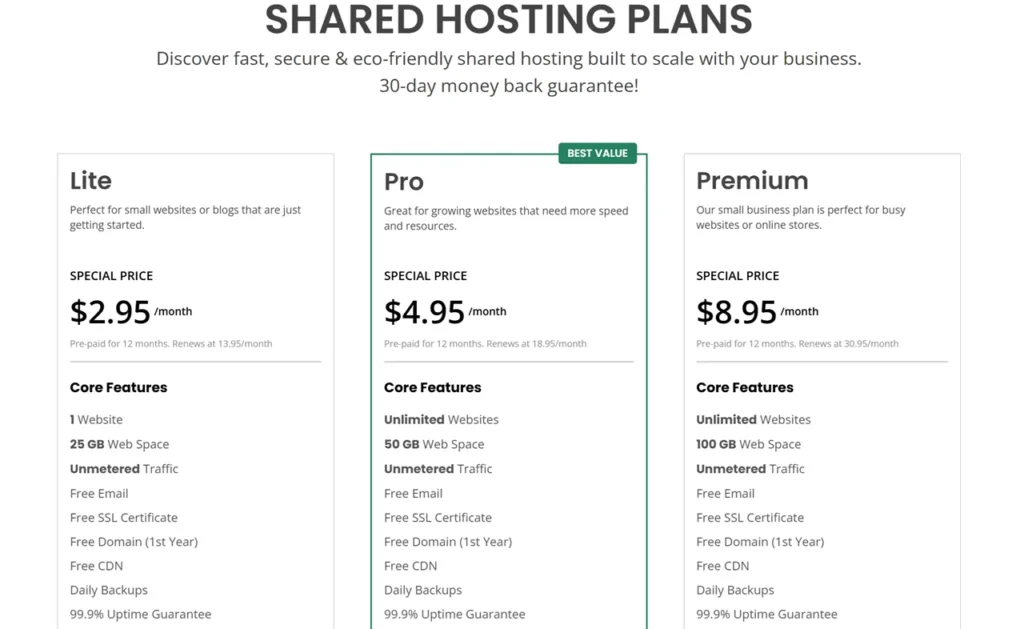
The screenshot above shows GreenGeeks’ plan page from an earlier check; use the table for current figures.
Features in Practice
- LiteSpeed and built-in caching — the main reason for the fast load times in my test.
- Free SSL and daily backups — the essentials are covered.
- cPanel — familiar management for files, domains, email and databases.
- Security — malware scanning, a firewall and account isolation between customers.
- WordPress tools — one-click installation, automatic updates and caching.
- Support — 24/7 chat, email and phone support.
- Uptime — a 99.9% uptime guarantee; I saw no major downtime in testing.
Pros and Cons
| Pros | Cons |
|---|---|
| Fast LiteSpeed servers; under-1-second loads in my test | Renewals are about 3.5–4.7× the introductory price |
| Beginner-friendly setup with cPanel and free SSL | Few advanced developer features on shared plans |
| Renewable-energy commitment | Introductory price needs 12 months paid upfront |
GreenGeeks vs Alternatives
- Hostinger is usually cheaper; GreenGeeks wins on its sustainability commitment.
- Bluehost is similarly beginner-focused; GreenGeeks’ LiteSpeed servers were faster in my experience.
- SiteGround is more premium and more expensive.
- Hosting.com (formerly A2 Hosting) is another speed-focused option worth comparing.
If you need more management, see my managed WordPress hosting comparison.
Who Should Use GreenGeeks — and Who Should Skip It
It suits beginners, bloggers and small businesses that want fast, simple hosting and value its renewable-energy commitment. Skip it if you need advanced developer tooling, or if the lowest long-term price is your priority — compare renewal rates carefully.
Final Verdict
GreenGeeks earns 4.4/5 from me. It was fast and stable in my testing, easy to set up, and backed by a clear environmental commitment. Just plan for the renewal price, and consider a longer first term if you are sure you will stay.
FAQs
Is GreenGeeks good for beginners?
Yes, it is easy to use.
Does it offer free domain?
Yes.
Is it fast?
Yes.
What is uptime?
99.9%.
Is it eco-friendly?
Yes.
Does it support WordPress?
Yes.
Are there hidden costs?
Renewals are much higher than the introductory price: Lite renews at $13.95 a month, Pro at $18.95 and Premium at $30.95.
Is it worth it?
Yes.





Great review of GreenGeeks! I switched to them last year partly for the eco-friendly angle but stayed because the performance has been genuinely solid. The LiteSpeed speed is comparable to other top shared hosts I have tried. Thanks for the article!