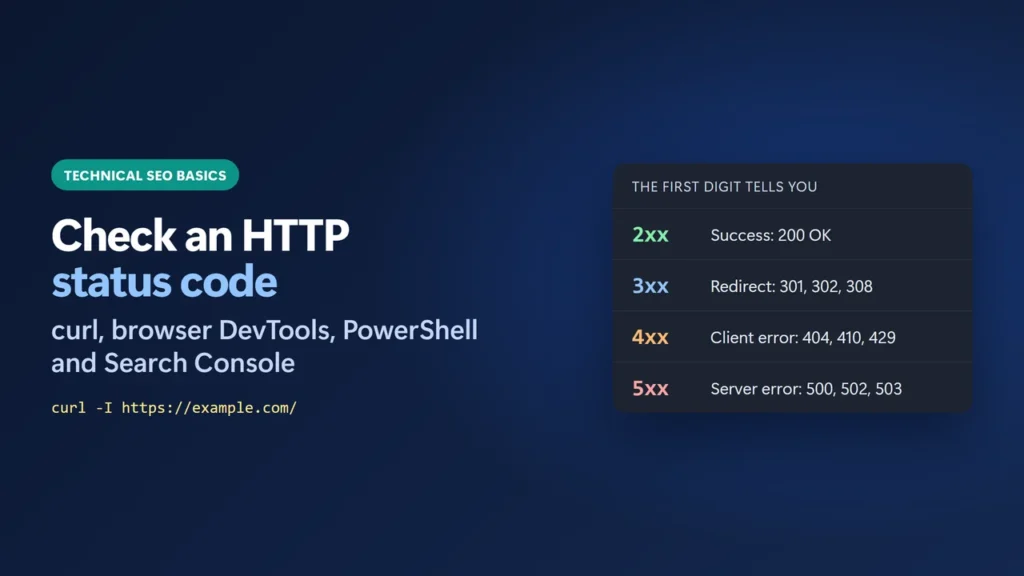
To check an HTTP status code, run curl -I https://example.com/ in a terminal (curl ships with macOS, Windows 10 and 11, and most Linux distributions; in Windows PowerShell type curl.exe -I https://example.com/, because plain curl there is an alias for Invoke-WebRequest). The number on the first line, such as 200, 301 or 404, is the status code. In a browser, open DevTools, go to the Network tab, reload the page and read the Status column. Codes starting with 2 mean success, 3 a redirect, 4 a problem with the request (such as a missing page) and 5 a server error.
Below are the exact commands, real output from checks I ran on this site on 21 November 2026, and what each code means for visitors and for Google.
Key takeaways
- Fastest check:
curl -s -o /dev/null -w "%{http_code}" URLprints just the number (on Windows:curl.exe -s -o NUL -w "%{http_code}" URL). - The browser address bar and PowerShell (by default) follow redirects silently, so they can show 200 for a URL that really returns 301. curl without
-Lshows the first hop. - On Windows PowerShell 5.1,
curlis an alias for Invoke-WebRequest. Typecurl.exeto get real curl. - Trust the number, not the words after it: RFC 9110 says reason phrases “are only recommendations”.
- For Google, a 200 doesn’t guarantee indexing, 4xx pages are dropped, and 5xx or 429 slow crawling.
Table of Contents
- 1What an HTTP Status Code Is
- 2Method 1: curl (Windows, macOS, Linux)
- Show the status line and headers
- Print only the number
- Follow every redirect to the end
- 3Method 2: Your Browser’s DevTools
- 4Method 3: PowerShell on Windows
- 5Method 4: Google Search Console
- 6Common Status Codes and What to Do
- Soft 404: the error that returns 200
- 7What I Found on This Site
- 8Mistakes to Avoid
- How do I check the HTTP status code of a URL?
- How do I check a status code with curl?
- Why does my browser show 200 when curl shows 301?
- How do I check a status code in PowerShell?
- What is the difference between 404 and 410?
- Does a 200 status code mean Google will index my page?
What an HTTP Status Code Is
Every time a browser or crawler requests a page, the server answers with a three-digit status code before anything else. RFC 9110, the HTTP standard, says “The first digit of the status code defines the class of response.” There are five classes:
| Class | Meaning (RFC 9110) | Common codes |
|---|---|---|
| 1xx | Informational: the request was received, keep going | 100, 101 |
| 2xx | Success | 200 OK, 204 No Content |
| 3xx | Redirection: “further action needs to be taken” | 301, 302, 304, 307, 308 |
| 4xx | Client error: “the client seems to have erred” | 403, 404, 410, 429 |
| 5xx | Server error: the server “has erred or is incapable” of handling it | 500, 502, 503 |
Method 1: curl (Windows, macOS, Linux)
curl is the quickest and most honest check, because by default it does not follow redirects. It ships with macOS, most Linux distributions and Windows (Microsoft announced it in January 2018 for Windows 10 Insider build 17063). On Windows PowerShell, type curl.exe instead of curl in every command below. I ran the site checks with curl 8.19 in Git Bash; the curl.exe built into my Windows 11 PC is version 8.23.0 and gave the same code for the redirect I tested.
Show the status line and headers
curl -I http://harshilbarot.com/

HTTP/1.1 301 Moved Permanently
location: https://harshilbarot.com/
(other headers trimmed)
-I sends a HEAD request, which the curl manual describes as fetching “the headers only”. The first line is the status. For a redirect, the location header shows where it points.
Print only the number
curl -s -o /dev/null -w "%{http_code}\n" https://harshilbarot.com/this-page-does-not-exist-test/

404
-s hides the progress bar, -o /dev/null throws away the page (use -o NUL in Windows Command Prompt or PowerShell), and -w "%{http_code}" prints the code. Add %{redirect_url} to see where a redirect goes without following it.
Follow every redirect to the end
curl -sIL http://harshilbarot.com/

HTTP/1.1 301 Moved Permanently
location: https://harshilbarot.com/
HTTP/1.1 200 OK
(only the status and location lines shown)
-L makes curl follow the Location header and print each hop. This is how you spot redirect chains. (If you’re choosing between redirect types, see 301 vs 302 redirects.)
-f if you want a script to fail on 4xx and 5xx responses. On Windows the % sign has special meaning in .bat files, so the curl manual tells you to write it as %% there.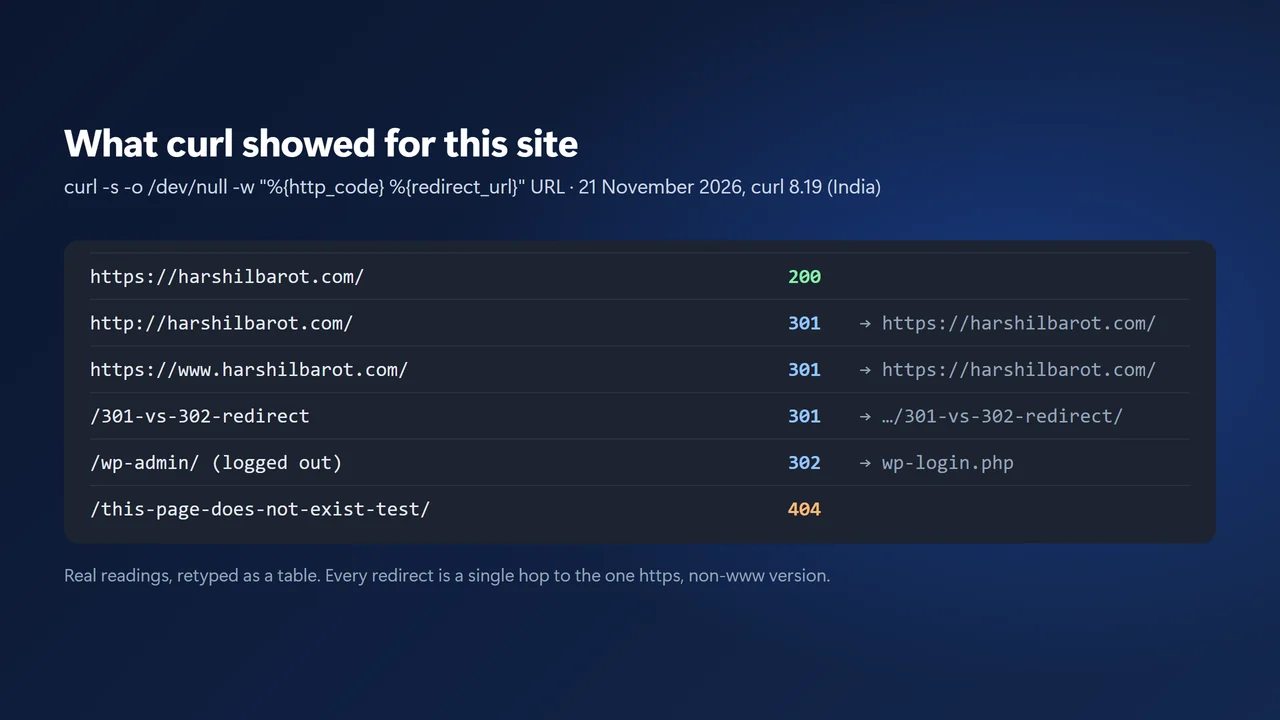
Method 2: Your Browser’s DevTools
- Open the page in Chrome and press Ctrl+Shift+J (Windows) or Cmd+Option+J (Mac) to open DevTools, then click the Network tab.
- Tick Disable cache and Preserve log so redirects and fresh responses are kept.
- Reload the page. The first row is the page itself; read its Status column.
- Click the row and open Headers. The General section shows the status code with its message.
Chrome’s documentation says the Status column shows the “HTTP status code, for example, 200 or 404”, or labels such as (failed) and CORS error when no normal response arrived. Right-click a row and choose Copy as cURL or Copy as PowerShell to repeat the same request in a terminal.
Two catches: the address bar hides redirects (you only see where you ended up), and a cached page can show 304 Not Modified or a cached 301. Preserve log and Disable cache fix both.
Method 3: PowerShell on Windows
PowerShell’s Invoke-WebRequest returns a StatusCode property:
(Invoke-WebRequest https://harshilbarot.com/ -Method Head -UseBasicParsing).StatusCode

200
On Windows PowerShell 5.1 (the version built into Windows), add -UseBasicParsing. Microsoft’s documentation says that since the December 2025 security update, 5.1 otherwise shows a script-execution confirmation prompt.
Error codes behave differently. Microsoft says that on “a non-success HTTP message (404, 500, etc.)” the cmdlet “returns no output and throws a terminating error”, so you read the code from the error:
try { Invoke-WebRequest https://harshilbarot.com/this-page-does-not-exist-test/ -Method Head -UseBasicParsing }
catch { $_.Exception.Response.StatusCode.value__ }

404
Redirects are followed silently by default (Microsoft lists a default of 5). To see the redirect itself on Windows PowerShell 5.1, stop redirects and don’t turn the result into an error:
$r = Invoke-WebRequest http://harshilbarot.com/ -Method Head -UseBasicParsing -MaximumRedirection 0 -ErrorAction SilentlyContinue
$r.StatusCode; $r.Headers.Location

301
https://harshilbarot.com/
With -ErrorAction Stop instead, my run in a script threw “Operation is not valid due to the current state of the object.”, so keep SilentlyContinue for this check, or use curl.exe. PowerShell 7 adds -SkipHttpErrorCheck, which returns error responses like normal ones; I didn’t test PowerShell 7 here.
One more real quirk from this site: in Windows PowerShell 5.1, -Method Head on the missing page returned 404, but a plain GET request aborted each time I tried, with “The connection was closed unexpectedly”. If one method gives an odd error, try the other, or curl.
curl is an alias for Invoke-WebRequest, not real curl. Type curl.exe to run the curl that ships with Windows (version 8.23.0 on my PC).Method 4: Google Search Console
To see the code Google got, not the one you get, use Search Console. The Page indexing report (Indexing → Pages) groups URLs by reason. On 21 November 2026 this site’s report listed one Not found (404) and one Page with redirect:
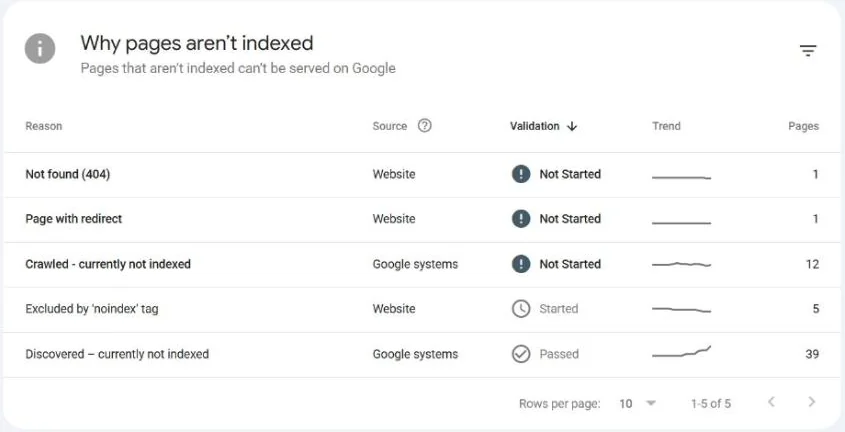
For a single URL, the URL Inspection tool shows whether Google could fetch it and runs a live test. Google says its inspection tools don’t follow redirects, so a redirected URL shows up as a redirect rather than the final page.
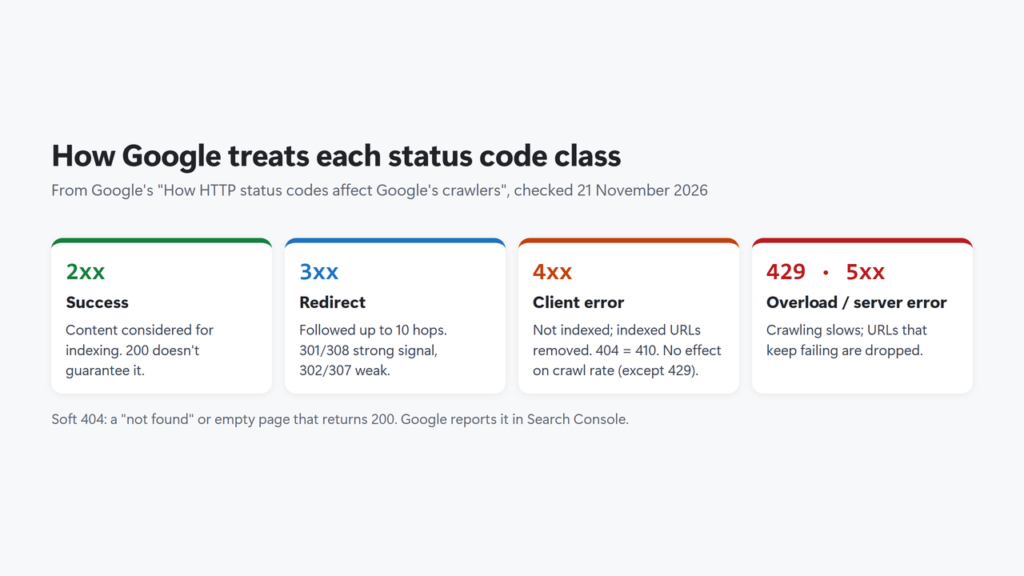
Common Status Codes and What to Do
| Code | Meaning | What Google does | What to do |
|---|---|---|---|
| 200 OK | “the request has succeeded” | Considers the content for indexing; “doesn’t guarantee indexing” | Nothing, unless the page is empty or an error page (a soft 404) |
| 301 / 308 | Moved permanently | Follows it; a “strong signal” the target should be indexed | Use for permanent moves |
| 302 / 307 | Moved temporarily | Follows it; a “weak signal” | Use only for short-term moves |
| 304 | Not modified since last request | “no effect on indexing” | Normal for cached files |
| 403 | Server refuses the request | Treated like other 4xx: not indexed | Check permissions, firewall or security plugin rules |
| 404 | Not found | Not indexed; indexed URLs are removed | Fine for deleted pages; 301 it if the content moved |
| 410 | Gone, likely for good | Treated the same as 404 | Optional alternative to 404 |
| 429 | Too many requests (RFC 6585) | Treated as a server error; crawling slows | Loosen rate limits for real crawlers |
| 500 | Unexpected server error | Crawling slows; URLs that keep failing are dropped | Check error logs; see how to fix a 500 internal server error in WordPress |
| 502 / 503 | Bad gateway / temporarily unavailable | Same as 500 | Check the host, CDN or maintenance mode |
Soft 404: the error that returns 200
A soft 404 is a page that tells visitors “not found” (or is nearly empty) but returns 200. Google detects these and reports them in Search Console. The fix is to return a real 404 or 410 if the page is gone, or a 301 if it moved, and to check the result with the URL Inspection tool. A status check is the quickest way to catch it. Pages that return 200 and are fine but still aren’t indexed are a different issue: see Crawled – currently not indexed.
What I Found on This Site
My checks on 21 November 2026, run with curl 8.19 (Git Bash) from India:
| URL | Status | Notes |
|---|---|---|
| https://harshilbarot.com/ | 200 | The home page |
| http://harshilbarot.com/ | 301 → https://harshilbarot.com/ | HTTP is redirected to HTTPS in one hop |
| https://www.harshilbarot.com/ | 301 → https://harshilbarot.com/ | www goes to the bare domain |
| /301-vs-302-redirect (no trailing slash) | 301 → the same URL with a slash | WordPress adds the trailing slash |
| /wp-admin/ (logged out) | 302 → the login page | A temporary redirect, as expected |
| /this-page-does-not-exist-test/ | 404 | A real 404, not a soft 404 |
This is what a healthy small site should look like: one-hop redirects to a single version of each URL, and real 404s for missing pages. If you’re checking someone else’s site, it can also help to find out who hosts a website, and for HTTPS problems, check when an SSL certificate expires.
Mistakes to Avoid
- Trusting the address bar. It hides redirects. Check with curl or DevTools.
- Typing curl in Windows PowerShell 5.1. That’s Invoke-WebRequest. Use curl.exe.
- Reading only the final 200. A chain of several redirects slows visitors down; check every hop with
curl -sIL. - Assuming HEAD and GET always match. RFC 9110 lets servers leave some headers out of HEAD responses. If something looks odd, repeat with the other method.
- Returning 200 for missing pages. That creates soft 404s.
- Using 403 or 401 to slow Google down. Google says those codes “have no effect on crawl rate”; 429 or 503 signal overload.
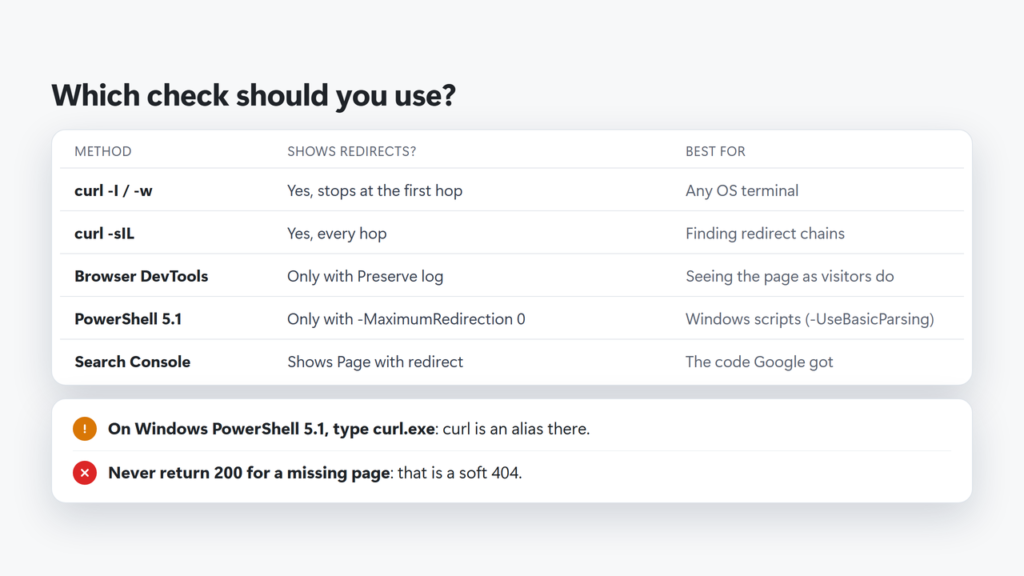
Checklist in text: run curl -I for the code and Location; use -L to see every redirect hop; in a browser, use DevTools Network with Preserve log and Disable cache; on Windows, use curl.exe or Invoke-WebRequest with -UseBasicParsing; check Google’s view in Search Console; fix soft 404s and long redirect chains.
How do I check the HTTP status code of a URL?
Run curl -I followed by the URL in a terminal (curl.exe -I on Windows PowerShell) and read the first line, or open DevTools in your browser, go to the Network tab, reload and read the Status column.
How do I check a status code with curl?
Use curl -s -o /dev/null -w “%{http_code}” followed by the URL to print only the code. On Windows PowerShell type curl.exe instead of curl and use -o NUL. Add -L to follow redirects.
Why does my browser show 200 when curl shows 301?
Browsers follow redirects automatically and show only the final page. curl without -L stops at the first response, so it shows the redirect.
How do I check a status code in PowerShell?
Use (Invoke-WebRequest URL -Method Head -UseBasicParsing).StatusCode. For 404 or 500 it throws an error, so read $_.Exception.Response.StatusCode.value__ in a catch block.
What is the difference between 404 and 410?
404 means not found; 410 means gone and likely permanent. Google says it treats all 4xx codes except 429 the same way.
Does a 200 status code mean Google will index my page?
No. Google says a 2xx code doesn’t guarantee indexing. It only means the content can be considered.