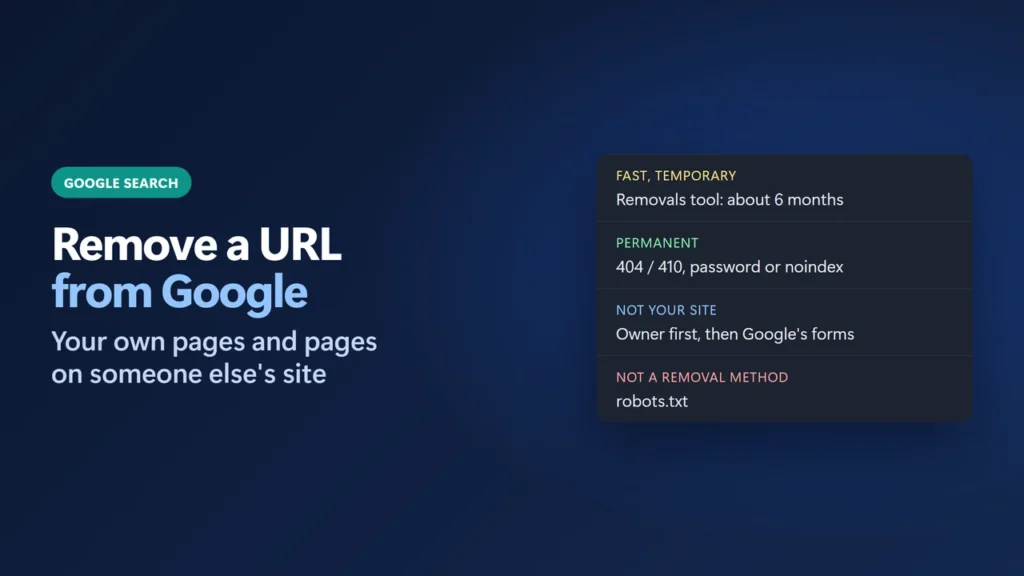
To remove a URL from Google quickly, use the Removals tool in Google Search Console: it hides the page from Google Search for about six months, usually within a day. To keep it out for good, also delete the page so it returns 404 or 410, put it behind a password, or add a noindex tag. If the page is on a site you don’t own, ask the site owner first, then use Google’s Refresh Outdated Content tool once the page has changed or gone, or Google’s personal-information removal request if it shows things like your phone number or address.
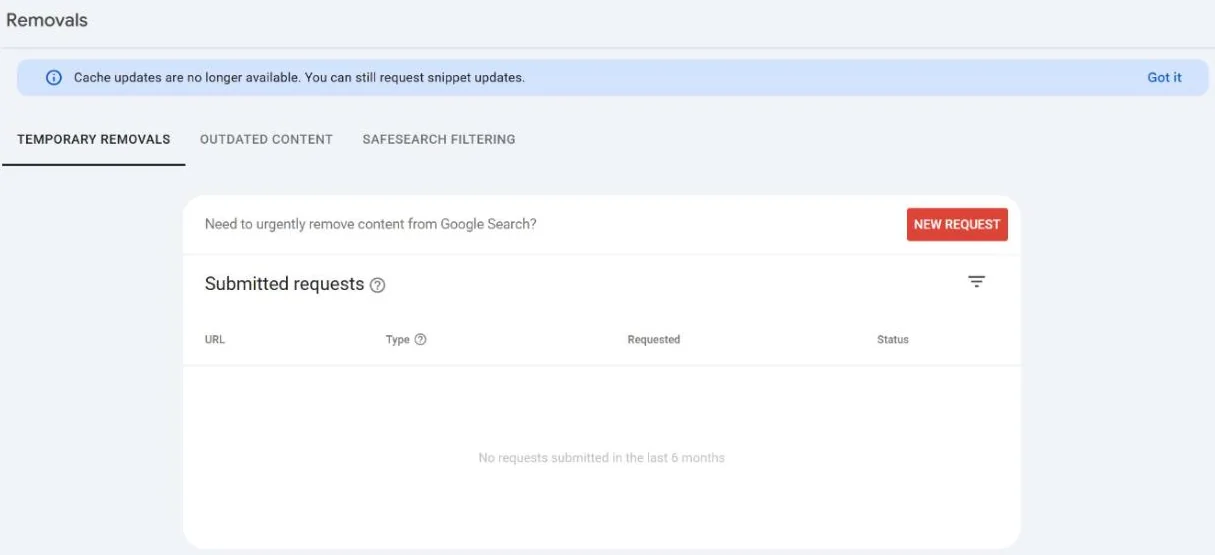
Below are the steps for each case, with real screenshots of the Removals tool from this site’s Search Console on 21 November 2026 (I opened the request form and cancelled it, so nothing was removed).
Key takeaways
- The Removals tool is temporary: about six months. It hides the page but doesn’t stop Google crawling it.
- For a permanent removal, the page itself must change: 404 or 410, a password, or
noindex. - Don’t use robots.txt to remove a page. Google says a blocked URL can still appear, just without a description.
- Google treats 404 and 410 the same way; there’s no documented speed advantage for 410.
- Someone else’s page: get the owner to change it, then use Refresh Outdated Content, or a personal-info or legal request.
Table of Contents
- 1First: Which Situation Are You In?
- 2Remove Your Own Page Quickly: the Removals Tool
- Steps
- Clear snippet: when the page stays but the text is wrong
- 3Make the Removal Permanent
- 404 or 410?
- Using noindex correctly
- Why robots.txt doesn’t remove pages
- 4Remove a Page From a Site You Don’t Own
- 1. Ask the site owner
- 2. Refresh Outdated Content
- 3. Personal information about you
- 4. Legal removal requests
- 5Removing Images From Google Images
- 6Check It Worked (or Cancel It)
- 7How Long Does Removal Take?
- 8What About Bing?
- 9Mistakes to Avoid
- How do I remove a URL from Google search?
- How long does the Google Removals tool last?
- Can I remove a URL from Google if I don’t own the site?
- Does robots.txt remove a page from Google?
- Is 410 better than 404 for removing a page?
- What happened to Clear cached URL?
First: Which Situation Are You In?
| Your situation | Fastest step | Permanent fix |
|---|---|---|
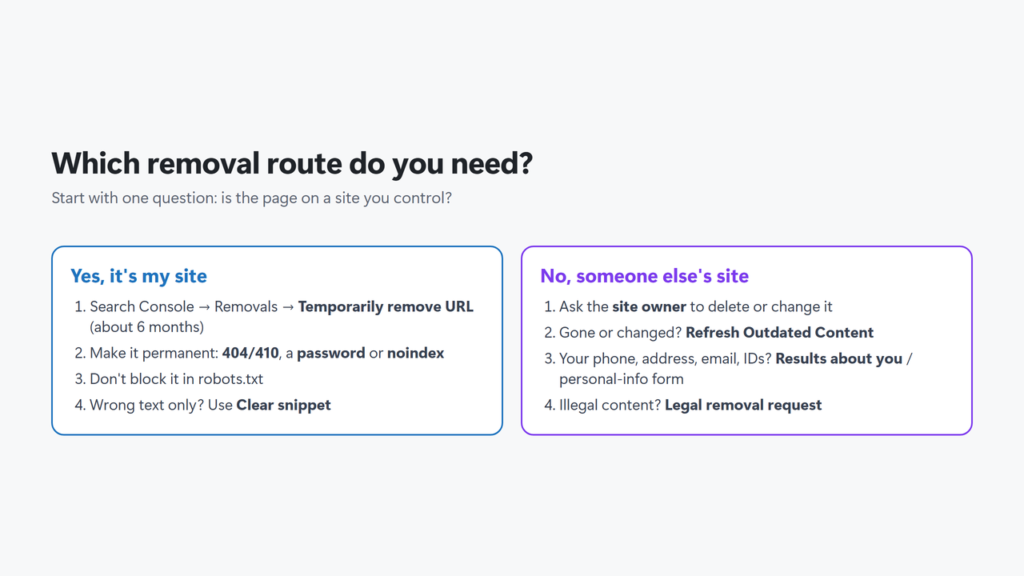
| Your own page must vanish from Google now | Search Console → Removals → Temporarily remove URL | Delete it (404/410), password-protect it, or add noindex |
| Your own page is fine, but the old snippet is wrong | Update the page, then Removals → Clear snippet | Nothing else: Google builds a new snippet when it next indexes the page |
| Someone else’s page is gone or changed, but Google still shows it | Refresh Outdated Content tool | Nothing else once approved |
| Someone else’s page shows your phone, address or email | “Results about you” or Google’s personal-info removal form | Ask the site owner to delete it too |
| Content that breaks the law (for example copyright) | Google’s legal removal request | Ask the site owner or host |
Remove Your Own Page Quickly: the Removals Tool
Open Search Console, choose your property and click Removals in the left menu (under Indexing). You’ll see three tabs: Temporary removals, Outdated content and SafeSearch filtering. On 21 November 2026 this site’s Removals page also showed a banner: “Cache updates are no longer available. You can still request snippet updates.”
Steps
- Click New request. The dialog has two tabs: Temporarily remove URL and Clear snippet.
- On Temporarily remove URL, paste the full URL.
- Choose Remove this URL only (the exact URL, including parameters) or Remove all URLs with this prefix (a whole folder, or the whole site if you enter the home page).
- Click Next to complete the request. It then appears under Submitted requests with a status such as “Processing request” or “Temporarily removed”.
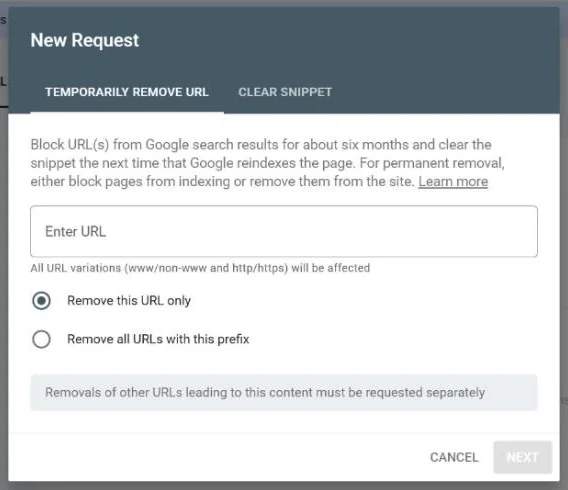
The form itself says what happens: it will “Block URL(s) from Google search results for about six months and clear the snippet the next time that Google reindexes the page.” Under the URL box it adds that “All URL variations (www/non-www and http/https) will be affected”. Google’s help says other subdomains such as m. are not included, and that URLs that differ only in letter case count as different URLs, so request each one you need.
Google’s Search Central guide says the tool can remove a page “within a day”; the Help page says a request “usually takes up to a day to process, and is not guaranteed to be accepted.” You need owner or full-user access: Google’s permissions table lists Remove URLs for owners and full users, and “View only” for restricted users.
Clear snippet: when the page stays but the text is wrong
If the page is fine but Google still shows old text from it (a removed phone number, an old price), use the Clear snippet tab instead. The form describes it as: “Keep URL(s) in search results and clear the snippet the next time that Google reindexes the page. The current snippet will be deleted until then.” Google’s help adds that the page “might still appear” for searches that match the removed text until it is reindexed.
Make the Removal Permanent
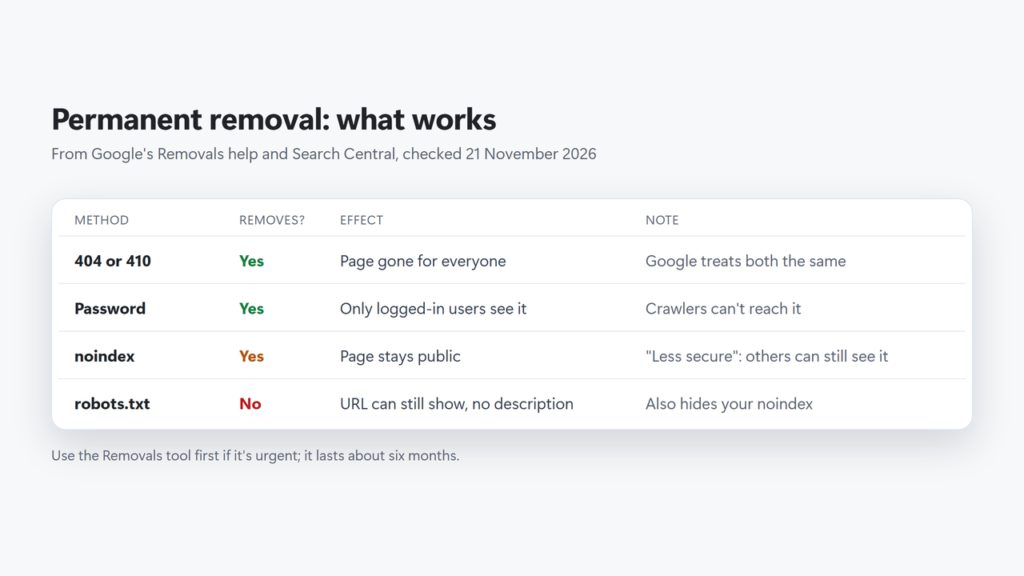
Google’s Removals help lists what to do for a permanent removal. Do one of these on your own site, ideally while the temporary removal is active:
| Method | What Google says | Good for |
|---|---|---|
| Delete the page so it returns 404 or 410 | Google’s first option. Non-HTML files such as PDFs “should be completely removed from your server.” | Pages you no longer need at all |
| Password-protect the page | “Block access to the content, for example by requiring a password.” | Private pages that some people still need |
| Add noindex | Works, but Google calls it “less secure than the other methods”: people and other search engines can still reach the page. | Pages that must stay public but out of Google |
| Block in robots.txt | “Do not use robots.txt as a blocking mechanism.” | Not a removal method |
404 or 410?
Either works. Google’s documentation on HTTP status codes says “All 4xx errors, except 429, are treated the same”, and that URLs already in the index that return 4xx “are removed from the index.” I found no current Google statement that 410 is removed faster, so don’t change a working 404 just for that. You can check the HTTP status code with one command to confirm what the page really returns. If the content has moved rather than disappeared, use a 301 redirect instead.
Using noindex correctly
Add <meta name="robots" content="noindex"> to the page’s head, or send an X-Robots-Tag: noindex HTTP header (the header also works for PDFs and images). In WordPress, SEO plugins such as Rank Math and Yoast have a per-page noindex setting. Two rules from Google:
- The page must not be blocked by robots.txt. Google has to crawl it to see the tag.
- It can take time: Google says it “may take months” to revisit a page. You can speed up one URL with the URL Inspection tool (Request indexing) so Google sees the noindex sooner.
Why robots.txt doesn’t remove pages
Robots.txt stops crawling, not indexing. Google’s robots.txt guide says it is “not a mechanism for keeping a web page out of Google”, and that a blocked URL “can still appear in search results, but the search result won’t have a description.” Worse, a robots.txt block hides your noindex tag from Google. The one exception Google gives is media files: robots.txt can keep images, video and audio out of results. More in my robots.txt guide.
Remove a Page From a Site You Don’t Own
Google can only change its own search results. If the content is still on the live page, Google will usually keep showing it, so the first step is almost always the site owner.
1. Ask the site owner
Use the site’s contact page, or find the host or owner through a WHOIS lookup, as Google’s own help suggests. Once they delete or change the page, Google’s help (written for images) says the result is “eventually refreshed” in Search as part of its regular updates; pages are usually refreshed the same way, when Google recrawls them.
2. Refresh Outdated Content
If the page is already gone or changed but Google still shows the old version, use Google’s Refresh Outdated Content tool. Google says it’s for when “you do not own the web page” and “the page or image no longer exists or is significantly different”. You need to be signed in to a Google account, and for a changed page you enter one or two words that were in the old snippet but are no longer on the page. Google says processing “can take a few days”. Site owners see these requests in their own Removals report, under Outdated content.
3. Personal information about you
Google’s personal-content policy lets you ask it to remove results that show, among other things:
- Your address, phone number or email
- Confidential government ID numbers
- Bank account or credit card numbers
- Pictures of your signature or ID
- Private records such as medical records
- Confidential usernames and passwords
For phone numbers, home addresses and email addresses there is also Results about you in your Google account; Google says some of its features are “currently rolling out for users who are over the age of 18 in certain markets”. Google may refuse content of public value, for example on government or news sites, and a removal can be “query-based”, hiding the result only for searches that include your name. It doesn’t delete the page from the internet.
4. Legal removal requests
For content that may break the law, such as copyright infringement, use Google’s legal removal request in its Legal Help Center. Google asks for the exact URLs, not the site’s home page. Google gives no standard response time, so I don’t quote one. Google also notes that where its own policies don’t apply, “specific local laws may apply in your country or region”; that is a question for the law where you live, not something this guide can settle.
Removing Images From Google Images
For an image on your own site, Google suggests the Removals tool for an emergency, then one of two lasting methods (not both):
- A robots.txt rule, for example
User-agent: Googlebot-ImageandDisallow: /images/photo.jpg. Google says aGooglebot-Imagerule removes the image from Google Images, and aGooglebotrule removes it from all Google results; a rule forUser-agent: *also covers other search engines that follow robots.txt. Google notes this is slower than the Removals tool. - A
noindexX-Robots-Tag header on the image file. Google needs to be able to crawl the image to see it.
To get the right address for the Removals tool, Google says to right-click the image in Google Images and copy the link address rather than opening it. For an image on someone else’s site, contact the owner; once it’s removed, use Refresh Outdated Content, with a separate request for each page where the image appears.
Check It Worked (or Cancel It)
In Search Console, the request’s status in the Removals history changes to “Temporarily removed” when it has worked. To cancel, Google says to find the request in the history table, open its menu and choose “Cancel request”. For a permanent fix, check the HTTP status code to confirm the page returns 404 or 410, or inspect it with the URL Inspection tool to confirm Google sees the noindex. For someone else’s page, search Google for the page title or your details again after the request is approved.
How Long Does Removal Take?
| Method | What Google says |
|---|---|
| Removals tool (your site) | Usually up to a day; lasts about six months |
| noindex | May take months for Google to revisit; Request indexing can help for one URL |
| 404 or 410 | Removed from the index when Google recrawls; no time given |
| Refresh Outdated Content | A few days; approvals expire after 180 days or if the URL no longer exists |
| Results about you | After approval, removal can lag; Google says you can check within a few hours |
| Legal requests | No time given |
One trap: Google’s help says that if the URL is unreachable (404 or 502/503) when you use the Removals tool, Google assumes the page is gone and the block request expires; anything later published at that URL is treated as a new page. A 404 is still a valid permanent fix: it just means the temporary block isn’t what is keeping the page out.
What About Bing?
Google’s tools don’t affect Bing. In Bing Webmaster Tools, Block URLs (under Configuration) lets site owners block a page or a whole directory. Microsoft says the block lasts 90 days unless extended, and that most blocks are processed in under 12 hours. For a permanent removal Microsoft lists 404 or 410, noindex or a redirect, and suggests IndexNow or a sitemap to get Bing to notice sooner (Rank Math Instant Indexing sends IndexNow pings from WordPress). If you don’t own the site, Bing has its own Content Removal Tool for pages that are gone or changed.
Mistakes to Avoid
- Relying only on the Removals tool. After about six months the page can return.
- Blocking the page in robots.txt. The URL can stay in results, and Google can’t see your noindex.
- Removing the whole site by accident. “Remove all URLs with this prefix” on the home page blocks everything.
- Using Removals to fix duplicates or http vs https. Google says it may remove all versions; use redirects and canonicals.
- Using it to tidy old 404s. Google says those drop out on their own.
- Asking Google before the site owner. If the content is still live, Refresh Outdated Content will be denied.
Checklist in text: decide whether it’s your page; for your page, submit a temporary removal, then delete it (404/410), password-protect it or add noindex, and don’t block it in robots.txt; check the status code; for someone else’s page, contact the owner, then use Refresh Outdated Content, Results about you or a legal request; repeat in Bing Webmaster Tools if needed.
How do I remove a URL from Google search?
For your own site, use Search Console’s Removals tool for a quick, temporary removal of about six months, then make it permanent by deleting the page (404 or 410), password-protecting it or adding noindex.
How long does the Google Removals tool last?
About six months. Google’s help also gives it as 180 days. After that the page can reappear unless you have removed or noindexed it.
Can I remove a URL from Google if I don’t own the site?
Not directly. Ask the site owner to remove or change it, then use Google’s Refresh Outdated Content tool. For personal info such as your phone or address, use Results about you or Google’s removal request form.
Does robots.txt remove a page from Google?
No. Google says robots.txt is not a way to keep a page out of Google, and a blocked URL can still appear without a description. Use noindex and let Google crawl the page.
Is 410 better than 404 for removing a page?
Google says all 4xx errors except 429 are treated the same, and indexed URLs that return them are removed. Either is fine.
What happened to Clear cached URL?
This site’s Search Console showed “Cache updates are no longer available. You can still request snippet updates.” The Removals tool now offers Temporarily remove URL and Clear snippet.