To check which TLS versions a website supports, test each version on its own with OpenSSL: openssl s_client -connect yoursite.com:443 -servername yoursite.com -tls1_2 -brief, then repeat with -tls1_3, and with -tls1_1 and -tls1 plus -cipher "DEFAULT@SECLEVEL=0" (otherwise OpenSSL 3 refuses them itself). A line like Protocol version: TLSv1.2 means the server accepts that version; an alert protocol version error means it refuses it. A healthy site in 2026 accepts TLS 1.2 and TLS 1.3 and refuses TLS 1.0 and 1.1.
Below are real results for six well-known sites from 25 November 2026 (two of them still accept TLS 1.0), the commands for Windows, Mac and Linux, a free browser check, and how to switch the old versions off.
Key takeaways
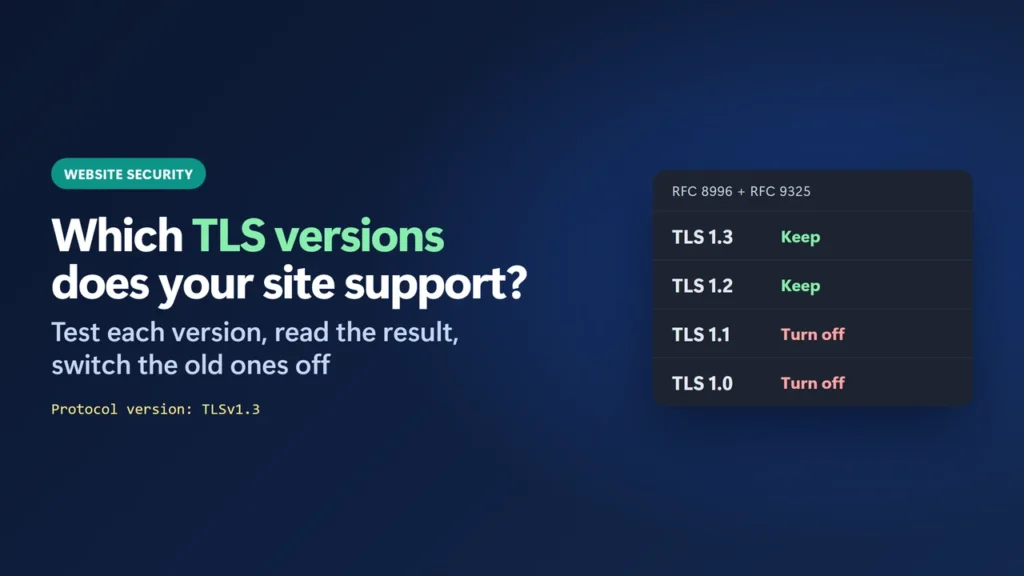
- TLS 1.0 and 1.1 are formally deprecated: RFC 8996 (March 2021) says each “MUST NOT be used”.
- RFC 9325 says implementations MUST support TLS 1.2 and SHOULD support TLS 1.3.
- A browser only shows the one version it used, so test each version separately with OpenSSL, curl or an online scanner.
- OpenSSL 3.x refuses TLS 1.0/1.1 on your side by default, so add a lower security level when testing them, or you’ll get false “refused” results.
- Turn the old versions off in your CDN (Cloudflare’s default minimum is still TLS 1.0) or in your server’s ssl_protocols / SSLProtocol setting.
Table of Contents
- 1Which TLS Versions Are Safe in 2026
- 2Real Results: Six Sites Tested
- 3How to Check TLS Versions
- 1. OpenSSL (Linux, Windows with Git Bash, Mac with OpenSSL 3)
- 2. curl (Windows 11, Mac, Linux)
- 3. In the browser
- 4. Online scanners
- 4How to Turn Off TLS 1.0 and 1.1
- 5Does the TLS Version Affect SEO or Compliance?
- 6Mistakes to Avoid
- How do I check what TLS version a website uses?
- Which TLS version should my website support?
- Is TLS 1.2 still secure?
- Why does OpenSSL fail to connect with -tls1 on every site?
- How do I disable TLS 1.0 and 1.1 on Cloudflare?
- Does TLS 1.3 improve SEO?
Which TLS Versions Are Safe in 2026
TLS (Transport Layer Security) is the encryption behind every https:// address. Four TLS versions exist:
| Version | Status | What to do |
|---|---|---|
| TLS 1.3 | Current. RFC 8446 (August 2018), republished as RFC 9846 in July 2026 | Support it |
| TLS 1.2 | Still safe when configured well; RFC 9325 says it MUST be supported | Support it |
| TLS 1.1 | Deprecated by RFC 8996 (March 2021): “MUST NOT be used” | Turn it off |
| TLS 1.0 | Deprecated by RFC 8996 (March 2021): “MUST NOT be used” | Turn it off |
RFC 8996 gives the reasons: the old versions’ handshake integrity “depends on SHA-1 hash”, and supporting four versions “increases the likelihood of misconfiguration”. RFC 8446 lists what TLS 1.3 changed: legacy ciphers were removed, “all public-key based key exchange mechanisms now provide forward secrecy”, and “all handshake messages after the ServerHello are now encrypted”. RFC 9325 adds that, with its recommendations followed, “the use of TLS 1.2 is as safe as the use of TLS 1.3”, which is why you keep both.
Major browsers have dropped the old versions. Chrome’s Platform Status entry says Chrome 84 shows a full-page warning on sites that don’t support TLS 1.2 or higher, and that from Chrome 98 “the error will no longer be bypassable”. Microsoft says Edge disables TLS 1.0/1.1 by default from version 84; Mozilla and Apple announced the same for Firefox and Safari from March 2020. So turning them off on your site doesn’t lock out modern visitors.
Real Results: Six Sites Tested
On 25 November 2026 I tested six sites from my Windows 11 PC with OpenSSL 3.5.6 (s_client -brief, one run per version, with the local security level lowered for the 1.0 and 1.1 tests):
| Site | TLS 1.3 | TLS 1.2 | TLS 1.1 | TLS 1.0 |
|---|---|---|---|---|
| harshilbarot.com | Yes | Yes | Refused | Refused |
| wordpress.org | Yes | Yes | Refused | Refused |
| www.cloudflare.com | Yes | Yes | Refused | Refused |
| github.com | Yes | Yes | Refused | Refused |
| www.google.com | Yes | Yes | Yes | Yes |
| example.com | Yes | Yes | Yes | Yes |
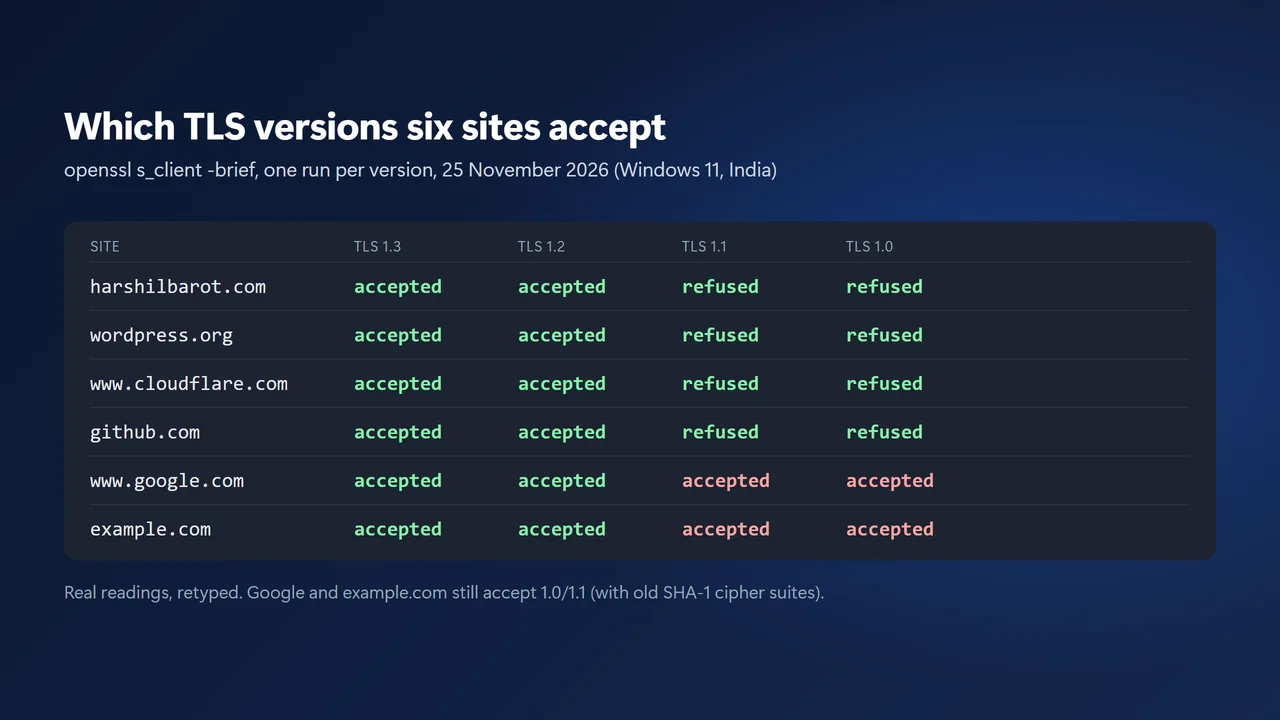
Four sites refuse the old versions outright. Google and example.com still accept TLS 1.0 and 1.1. Those connections used an old cipher suite with SHA-1 (ECDHE-ECDSA-AES128-SHA on Google, ECDHE-RSA-AES128-SHA on example.com), and both sites accepted TLS 1.3 when it was offered. Keeping legacy versions for very old devices is a choice some large sites make; for a typical blog or business site there’s no reason to. This site runs behind Hostinger CDN, whose help page says “both TLS 1.2 and 1.3 are supported” by default, which matches what I measured. My test reached the CDN, not the origin server behind it.
Windows’ own curl.exe (8.23.0) agreed for the two sites I cross-checked: harshilbarot.com and wordpress.org both returned 200 with TLS 1.2 only and with TLS 1.3 only.
How to Check TLS Versions
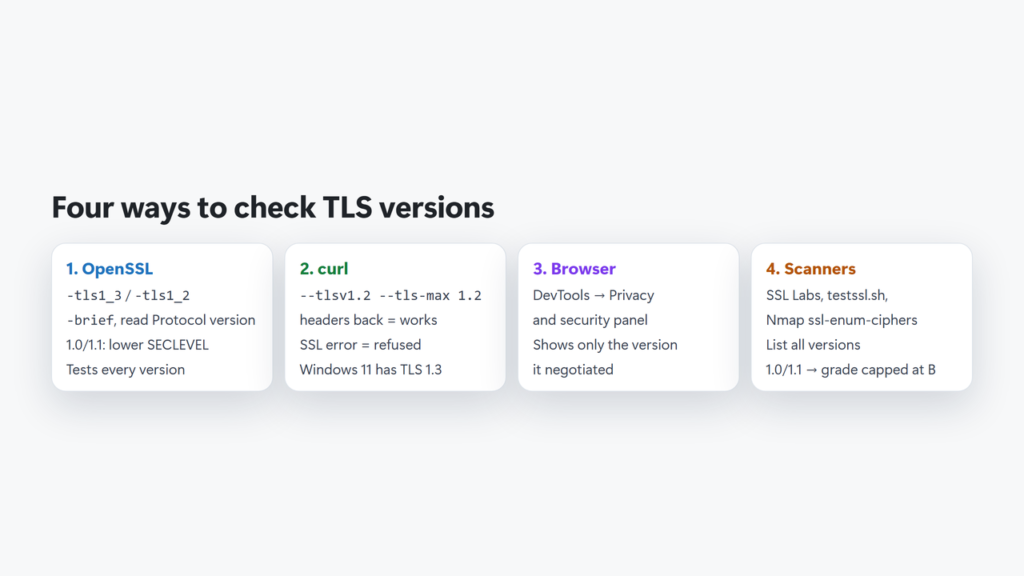
1. OpenSSL (Linux, Windows with Git Bash, Mac with OpenSSL 3)
Run openssl version first: these commands are for OpenSSL 3 (I used 3.5.6). Other builds, including the one some Macs ship with, can behave differently, so on a Mac install OpenSSL 3 (for example with Homebrew) and use that. Then run one command per version, replacing yoursite.com in both places:
echo | openssl s_client -connect yoursite.com:443 -servername yoursite.com -tls1_3 -brief
echo | openssl s_client -connect yoursite.com:443 -servername yoursite.com -tls1_2 -brief
OpenSSL’s docs say a version option means “only that version will be offered or accepted”, and -brief gives “a brief summary of connection parameters”. Look for Protocol version: TLSv1.3 (TLS 1.0 shows as TLSv1). The echo | at the start closes the connection so the command doesn’t wait for input. -servername matters on shared hosting and CDNs, where many sites share one IP address.
For TLS 1.1 and 1.0, add a lower security level. OpenSSL’s docs say that from security level 1 “TLS 1.0, TLS 1.1 and DTLS 1.0 are all disabled”, and the default level is 2, so without it your own OpenSSL refuses first and every server looks safe: OpenSSL stops with “no protocols available” before it sends the server anything. This exact form worked in my tests with OpenSSL 3.5.6:
echo | openssl s_client -connect yoursite.com:443 -servername yoursite.com -tls1_1 -cipher "DEFAULT@SECLEVEL=0" -brief
echo | openssl s_client -connect yoursite.com:443 -servername yoursite.com -tls1 -cipher "DEFAULT@SECLEVEL=0" -brief
Here you want an error such as alert protocol version: that’s the server refusing the old version.
Protocol version line (or the Protocol : line without -brief). The New, TLSv1.0, Cipher is … line in the long output names the version a cipher was introduced in, not the version you’re connected with: in my re-check, a TLS 1.1 connection to www.google.com printed New, TLSv1.0, Cipher is ECDHE-ECDSA-AES128-SHA while the Protocol line said TLSv1.1.2. curl (Windows 11, Mac, Linux)
curl.exe -sSI --tlsv1.3 --tls-max 1.3 https://yoursite.com/
curl.exe -sSI --tlsv1.2 --tls-max 1.2 https://yoursite.com/
On Mac and Linux, type curl instead of curl.exe. curl’s docs say --tlsv1.2 means “TLS version 1.2 or later”, so pair it with --tls-max to test exactly one version. Headers back means that version works; a curl: (35) SSL error means it’s refused (-S makes curl show that error, which -s alone would hide). Windows curl uses Microsoft’s Schannel, and Microsoft says “TLS 1.3 is supported starting in Windows 11 and Windows Server 2022”. I used OpenSSL for the TLS 1.0/1.1 tests. (More curl header checks: check HTTP status codes and headers.)
3. In the browser
- Open the site, press F12 (Cmd+Option+I on Mac) to open DevTools.
- Press Ctrl+Shift+P (Cmd+Shift+P on Mac), type privacy and choose Show privacy and security.
- Click the site’s origin in the list to see its connection and certificate information.
This shows only the version your browser negotiated (normally the highest both sides support), not the full list, so it can’t tell you whether TLS 1.0 is still on.
4. Online scanners
Qualys SSL Labs’ Server Test, testssl.sh (a free command-line tool that checks “ciphers, protocols, key exchanges and much more”) and Nmap’s ssl-enum-ciphers script list every version and cipher a server accepts. SSL Labs’ rating guide says a server that supports TLS 1.0 or 1.1 is “capped to B”, and since May 2025 a server without TLS 1.3 is capped at A-.
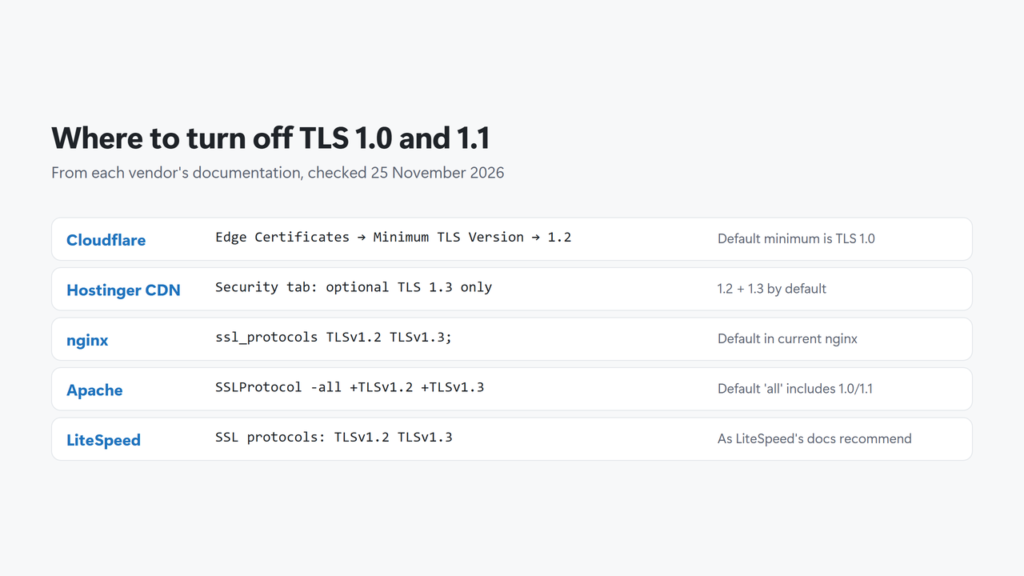
How to Turn Off TLS 1.0 and 1.1
| Where your site runs | What to do |
|---|---|
| Cloudflare | On the Edge Certificates page, set Minimum TLS Version to TLS 1.2, and make sure TLS 1.3 is on (both on all plans). Cloudflare’s docs say TLS 1.0 “is the version that Cloudflare sets by default”, so check this. |
| Hostinger CDN | Hostinger’s help says TLS 1.2 and 1.3 are on by default; its Security tab can restrict connections to TLS 1.3 only. |
| nginx | ssl_protocols TLSv1.2 TLSv1.3; — this is the default in the current nginx docs, but older nginx versions and many existing configs still list TLSv1 and TLSv1.1, so search your config for every ssl_protocols line. |
| Apache | SSLProtocol -all +TLSv1.2 +TLSv1.3 — Apache’s default (all -SSLv3) still includes TLSv1 and TLSv1.1 unless the OpenSSL library blocks them. |
| LiteSpeed | LiteSpeed’s docs recommend setting the SSL protocols to TLSv1.2 and TLSv1.3. |
On managed or shared hosting you usually can’t edit these files; ask your host which versions the server accepts, then confirm with the OpenSSL commands above. After any change, test again, because a CDN in front answers with its own settings (more on that in Hostinger CDN vs Cloudflare).
Does the TLS Version Affect SEO or Compliance?
Google said in 2014 that HTTPS is “a very lightweight signal”, and its page experience docs say that beyond Core Web Vitals “other page experience aspects don’t directly help your website rank higher”. I found no Google statement that TLS 1.2 versus 1.3 changes rankings. The real reasons are security and access: visitors on modern browsers can’t reach a site that only speaks TLS 1.0. TLS 1.3 is also required for HTTP/3.
For card payments, the PCI Security Standards Council set 30 June 2018 as the deadline to disable “SSL/early TLS” and move to “TLS 1.1 or higher (TLS v1.2 is strongly encouraged)”. Check the current PCI DSS wording with your payment provider; I didn’t verify the latest version.
Mistakes to Avoid
- Trusting a refused TLS 1.0 test without lowering the security level. Your own OpenSSL may be the one refusing (the error is “no protocols available”).
- Leaving out -servername. On a shared IP you may test the wrong site’s certificate and settings.
- Reading the cipher’s version as the protocol. Use the Protocol version line.
- Changing the server but not the CDN. Visitors connect to the CDN, so its minimum version is the one that counts.
- Forgetting the certificate. TLS settings don’t help if the certificate lapses; check when an SSL certificate expires and see free vs paid SSL certificates. An HSTS header keeps browsers on HTTPS.
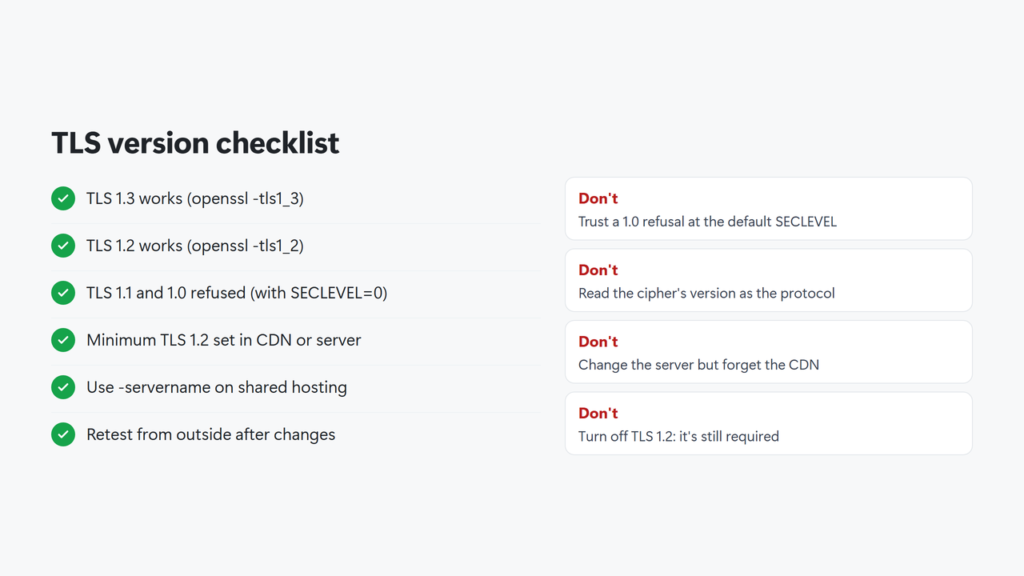
Checklist in text: test TLS 1.3 and 1.2 with OpenSSL or curl and confirm both work; test 1.1 and 1.0 with a lowered security level and confirm both are refused; set the minimum to TLS 1.2 in your CDN or server; turn TLS 1.3 on; test again from outside.
How do I check what TLS version a website uses?
Run openssl s_client -connect site.com:443 -servername site.com -tls1_2 -brief and repeat with -tls1_3. For -tls1_1 and -tls1, also add -cipher “DEFAULT@SECLEVEL=0”, or OpenSSL 3 refuses them itself. ‘Protocol version: TLSv1.2’ means accepted; ‘alert protocol version’ means the server refused. Online scanners such as SSL Labs list all versions at once.
Which TLS version should my website support?
TLS 1.2 and TLS 1.3. RFC 8996 says TLS 1.0 and 1.1 must not be used, and RFC 9325 says TLS 1.2 must be supported and TLS 1.3 should be.
Is TLS 1.2 still secure?
Yes, when configured with modern cipher suites. RFC 9325 says that with its recommendations followed, TLS 1.2 is as safe as TLS 1.3. Keep both enabled.
Why does OpenSSL fail to connect with -tls1 on every site?
OpenSSL 3.x disables TLS 1.0 and 1.1 at its default security level. Add -cipher “DEFAULT@SECLEVEL=0” to the test command so the refusal you see comes from the server.
How do I disable TLS 1.0 and 1.1 on Cloudflare?
On the Edge Certificates page in the Cloudflare dashboard, set Minimum TLS Version to TLS 1.2. It’s available on all plans.
Does TLS 1.3 improve SEO?
Google hasn’t said the TLS version affects ranking. HTTPS itself is a very lightweight signal.