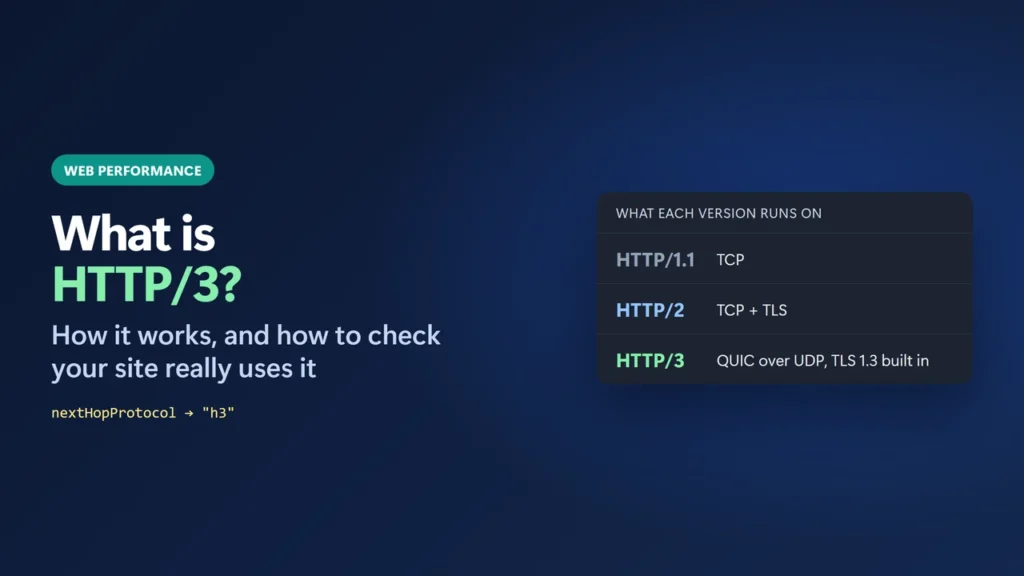
HTTP/3 is the newest version of HTTP, the protocol browsers use to load websites. It runs over QUIC, a transport built on UDP, instead of TCP. Because QUIC combines the connection and encryption handshakes and handles packet loss per stream, pages can connect faster and can cope better with patchy networks. To check if your site uses HTTP/3, open Chrome DevTools, turn on the Protocol column in the Network tab and look for h3, or run curl -sI https://yoursite.com/ and look for an alt-svc: h3=… header.
Below I explain how it works, show real checks from 25 November 2026 (this site loads over HTTP/3; WordPress.org tells browsers not to switch), and cover how to turn it on.
Key takeaways
- HTTP/3 = HTTP over QUIC over UDP, with TLS 1.3 built in (RFC 9114, RFC 9000).
- Browsers usually find out about HTTP/3 from an
Alt-Svcheader, so the first visit is often HTTP/2 and the next one HTTP/3. - If UDP is blocked, browsers fall back to HTTP/2 or HTTP/1.1 automatically.
- Most sites get HTTP/3 from their CDN or web server (Cloudflare, Hostinger CDN, LiteSpeed); nginx support is still labelled experimental.
- Google documents crawling over HTTP/1.1 and HTTP/2 only; I found no Google statement that HTTP/3 affects ranking.
Table of Contents
- 1What HTTP/3 Is
- 2How Browsers Switch to HTTP/3
- 3Real Checks: Who Uses HTTP/3
- 4How to Check If Your Site Uses HTTP/3
- 1. Chrome DevTools
- 2. curl: check the header
- 3. curl: make an HTTP/3 request
- 5How to Turn HTTP/3 On
- 6Does HTTP/3 Help SEO or Speed?
- 7Mistakes to Avoid
- What is HTTP/3?
- How do I check if a website uses HTTP/3?
- Why does my site show h2 instead of h3?
- Is HTTP/3 good for SEO?
- Does HTTP/3 work if UDP is blocked?
- Do I need to change my WordPress site for HTTP/3?
What HTTP/3 Is
RFC 9114 (June 2022) defines HTTP/3 as HTTP’s usual meaning (requests, responses, headers, status codes) carried over QUIC. QUIC, defined in RFC 9000, sends its packets in UDP datagrams and merges the transport and TLS handshakes. In practice that gives three changes compared with HTTP/2 over TCP:
- Fewer round trips to connect. The connection and encryption setup happen together.
- Less head-of-line blocking. RFC 9114 says that with HTTP/2 over TCP, “a lost or reordered packet causes all active transactions to experience a stall”. With QUIC, a lost packet only holds up the streams whose data it carried, so one loss doesn’t stall every file. It reduces the problem rather than removing every delay.
- Encryption is always on. HTTP/3 uses TLS 1.3 and can’t be used for plain
http://URLs.
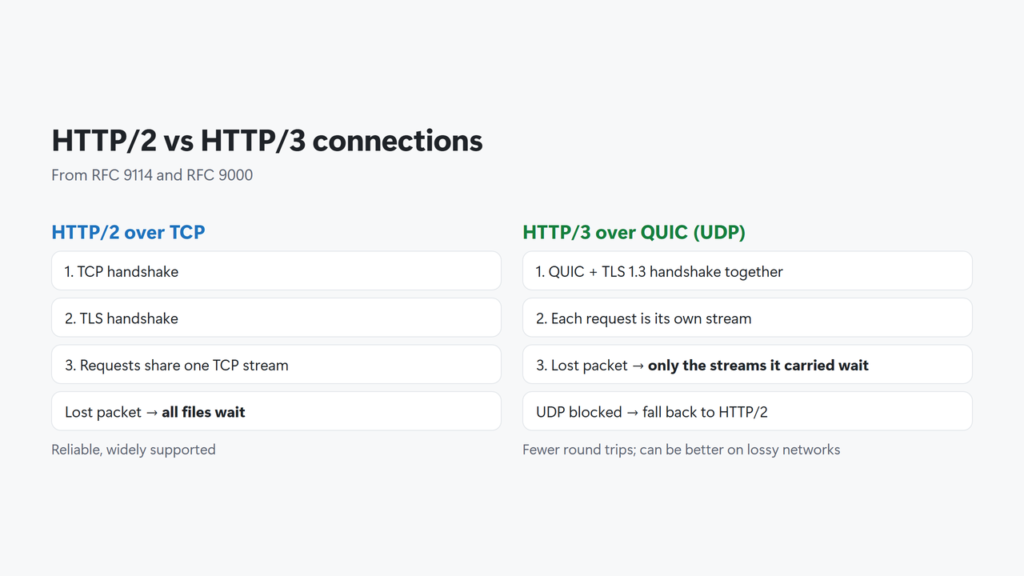
| HTTP/1.1 | HTTP/2 | HTTP/3 | |
|---|---|---|---|
| Runs over | TCP | TCP | QUIC over UDP |
| Encryption | Optional (TLS) | TLS in practice | TLS 1.3 built in |
| Several files at once on one connection | No (several connections) | Yes | Yes |
| One lost packet stalls all files | — | Yes (TCP level) | No, only the streams it carried |
| ALPN token | http/1.1 | h2 | h3 |
How Browsers Switch to HTTP/3
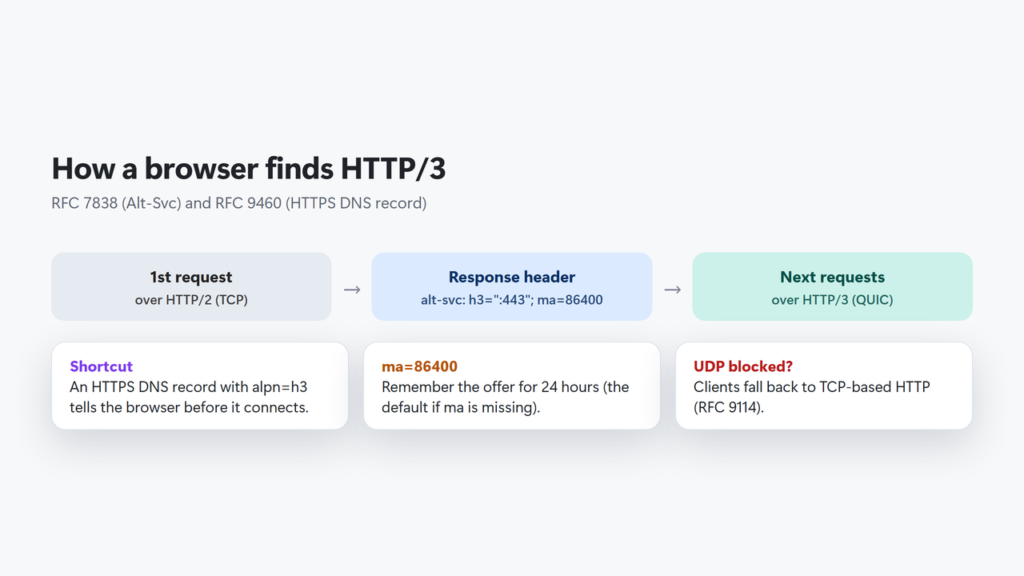
A browser can’t know in advance that a server speaks HTTP/3, so it usually starts with HTTP/2 over TCP. The server’s response includes an Alt-Svc header such as h3=":443"; ma=86400, which RFC 7838 defines: “h3” is the protocol, “:443” the port, and ma how many seconds to remember it (the default is 24 hours). The browser then uses HTTP/3 for later requests. A newer route is the HTTPS DNS record (RFC 9460), whose alpn list can include h3 so the browser knows before it connects.
MDN says HTTP/3 is “supported by most major browsers including Chromium (and its variants such as Chrome and Edge) and Firefox”; the Chromium blog says Chrome turned it on by default in October 2020.
RFC 9114 also says that if UDP is blocked, “clients SHOULD attempt to use TCP-based versions of HTTP”. So turning HTTP/3 on doesn’t lock out visitors on networks that block it.
Real Checks: Who Uses HTTP/3
On 25 November 2026 I loaded four sites in Chrome and read which protocol each page actually used, from the browser’s Performance API (nextHopProtocol):
| Site | First visit | Next visit | Alt-Svc header (curl) |
|---|---|---|---|
| harshilbarot.com | h3 | h3 | h3=”:443″; ma=86400 |
| www.cloudflare.com | h2 | h3 | h3=”:443″; ma=86400 |
| www.google.com | h3 | — | h3=”:443″; ma=2592000, h3-29… |
| wordpress.org | h2 | h2 | clear |
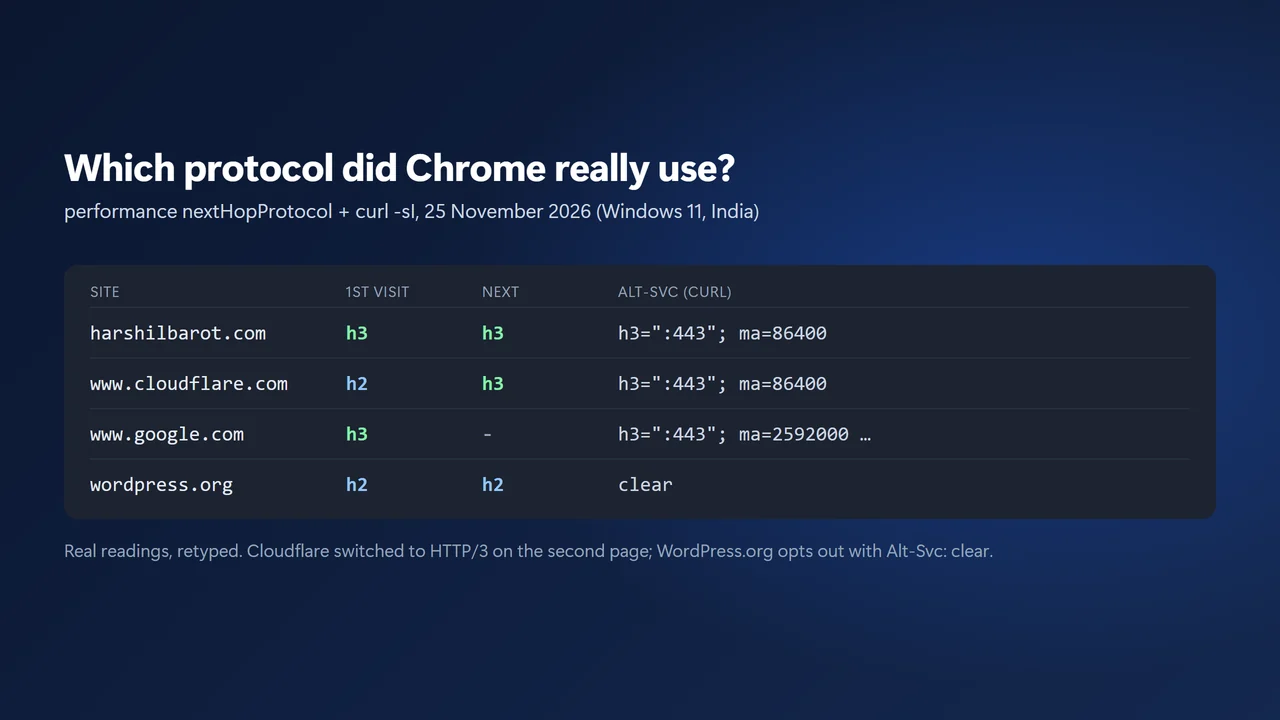
Cloudflare shows the discovery step exactly: HTTP/2 on the first page, HTTP/3 on the next. This site’s first page was already HTTP/3, most likely because the browser had remembered the Alt-Svc from an earlier visit; 36 of the first 40 files on the page also loaded over HTTP/3; 3 came from third-party hosts over HTTP/2 and 1 reported no protocol. WordPress.org sends Alt-Svc: clear, which RFC 7838 defines as cancelling any advertised alternative, so it stays on HTTP/2. A DNS lookup (through Cloudflare’s DNS-over-HTTPS) also showed HTTPS records listing h3 for the cloudflare.com root and www.google.com; this site has none, so it relies on the Alt-Svc header. Browsers don’t always use the HTTPS record on a first visit, which fits Chrome’s first www.cloudflare.com load being HTTP/2.
How to Check If Your Site Uses HTTP/3
1. Chrome DevTools
- Open the site and press Ctrl+Shift+J (Windows) or Cmd+Option+J (Mac), then open the Network tab.
- Right-click the column headers and tick Protocol (it’s hidden by default).
- Reload the page twice. Chrome’s docs say the column shows
h3for HTTP/3 (h2for HTTP/2).
Or paste this into the Console after the page loads:
performance.getEntriesByType('navigation')[0].nextHopProtocolIt returns "h3" for HTTP/3 or "h2" for HTTP/2.
2. curl: check the header
curl -sI https://yoursite.com/ | grep -i alt-svcOn Windows PowerShell, run curl.exe -sI https://yoursite.com/ | findstr /i alt-svc instead (plain curl and grep aren’t the same there). If the site offers HTTP/3 you’ll see a line like alt-svc: h3=":443"; ma=86400. That means the server offers HTTP/3; it doesn’t prove a connection (more in my guide to check HTTP headers and status codes).
3. curl: make an HTTP/3 request
curl --http3-only -sI -o /dev/null -w "%{http_version}\n" https://yoursite.com/curl’s docs say %{http_version} prints the HTTP version actually used, so a successful HTTP/3 request prints 3. On Windows, use -o NUL instead of -o /dev/null. This only works with a curl build that lists HTTP3 under Features in curl -V. The curl that ships with Windows (8.23.0) and the one in Git Bash (8.19.0) on my PC don’t, and on 25 November 2026 both failed --http3-only with “the installed libcurl version does not support this”. curl’s docs say HTTP/3 builds use the ngtcp2 and nghttp3 libraries, and curl’s official Windows download lists them, so that build should work (I haven’t tested it). curl’s docs say --http3 falls back to older versions while --http3-only doesn’t.
How to Turn HTTP/3 On
| Where your site runs | What to do |
|---|---|
| Behind Cloudflare | Speed → Settings → Protocol Optimization → HTTP/3 (with QUIC); Cloudflare says it’s on all plans. It covers visitor ↔ Cloudflare only: Cloudflare says HTTP/3 to your origin “is not yet supported”. |
| Hostinger with CDN | Turn on Hostinger CDN for the site in its dashboard; Hostinger’s CDN help says visitors then connect over HTTP/3 for sites on their own domain. An x-hcdn-request-id response header confirms the CDN is active. |
| LiteSpeed Web Server | LiteSpeed’s docs say QUIC is on by default; the host must allow UDP 443 and use a trusted certificate. |
| nginx | Supported since 1.25.0 (May 2023), still labelled experimental. Use a build with the http_v3 module, keep your normal listen 443 ssl line, add listen 443 quic (reuseport on one server block only), and add the Alt-Svc header yourself. |
HOSTINGER
HTTP/3 through Hostinger CDN
- Hostinger’s CDN help says visitors connect over TLS 1.3 and, for sites on their own domain, HTTP/3
- This site runs on it: Chrome used HTTP/3 for the page on 25 November 2026
- CDN availability depends on the plan; check before you buy
Affiliate link. From Hostinger’s CDN help page, checked 25 November 2026.
Most WordPress owners get HTTP/3 from their CDN rather than their server (background: what a CDN is and Hostinger CDN vs Cloudflare). On Hostinger, changing CDN settings is also a good moment to clear the cache on Hostinger.
Does HTTP/3 Help SEO or Speed?
Google’s crawler overview documents crawling over HTTP/1.1 and HTTP/2, and says HTTP/2 crawling brings “no ranking boost”. I found no Google statement about HTTP/3 and crawling or ranking, so don’t expect a ranking effect. The possible benefit is for visitors: connection setup can be quicker, and it can cope better with lossy mobile networks. I didn’t run speed tests for this guide, so I quote no speed numbers. HTTP/3 changes how the connection is made, not how fast your server builds the page, so a slow server response still needs fixing separately (how to reduce TTFB in WordPress).
Mistakes to Avoid
- Checking only the first page load. Reload: HTTP/3 often appears from the second request.
- Reading Alt-Svc as proof. It’s an offer; confirm with DevTools or nextHopProtocol.
- Blocking UDP 443 on your server firewall. QUIC needs it.
- Expecting a ranking boost. Google hasn’t said HTTP/3 affects rankings.
- Forgetting HTTPS basics. HTTP/3 only works over HTTPS with a valid certificate; an HSTS header helps keep visitors on HTTPS.
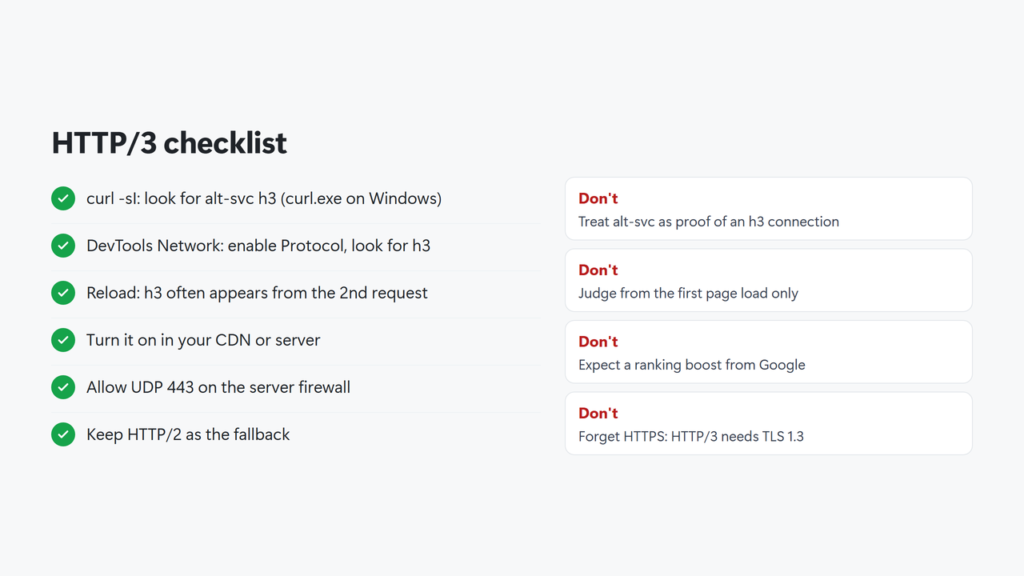
Checklist in text: look for alt-svc h3 with curl -sI; confirm h3 in DevTools’ Protocol column or nextHopProtocol after a reload; turn it on in your CDN or server; allow UDP 443; keep HTTP/2 as the fallback.
What is HTTP/3?
HTTP/3 is the latest version of HTTP. It runs over QUIC on UDP instead of TCP, with TLS 1.3 built in, which speeds up connection setup and reduces stalls from lost packets.
How do I check if a website uses HTTP/3?
In Chrome DevTools’ Network tab, enable the Protocol column and look for h3, or run performance.getEntriesByType(‘navigation’)[0].nextHopProtocol in the Console. curl -sI shows whether the server advertises it in an alt-svc header.
Why does my site show h2 instead of h3?
Browsers often use HTTP/2 first and switch after reading the Alt-Svc header, so reload. If it never changes, the server may not offer HTTP/3 or UDP may be blocked on your network.
Is HTTP/3 good for SEO?
Google documents crawling over HTTP/1.1 and HTTP/2 and hasn’t said HTTP/3 affects ranking. Any benefit is for visitors: connection setup can be quicker.
Does HTTP/3 work if UDP is blocked?
The site still works. RFC 9114 says clients should fall back to TCP-based HTTP versions when UDP is blocked.
Do I need to change my WordPress site for HTTP/3?
No. HTTP/3 is handled by the CDN or web server, not by WordPress.

Affiliate disclosure: some links on this page are affiliate links, so I may earn a commission if you buy, at no extra cost to you.