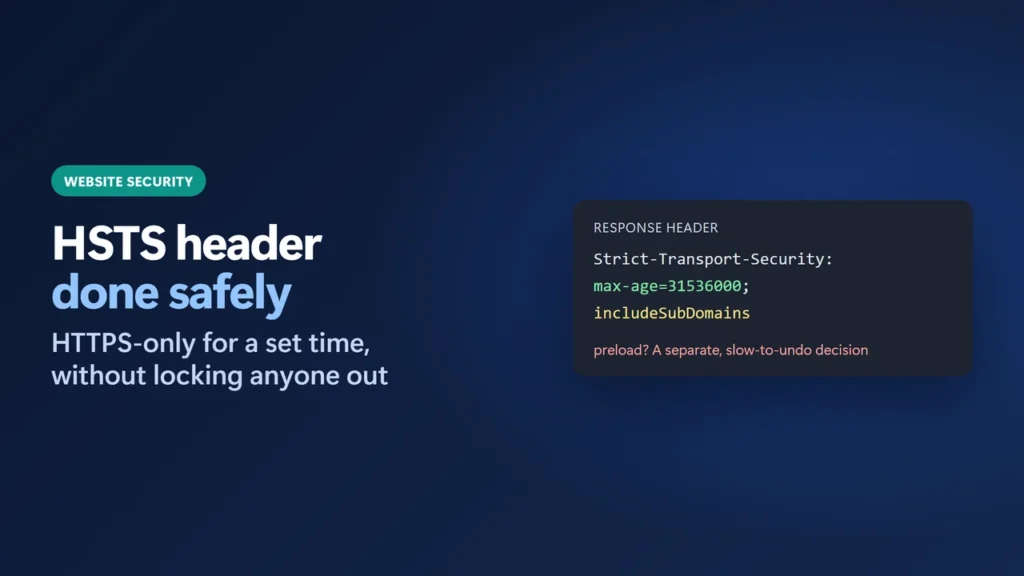
The HSTS header (Strict-Transport-Security) tells browsers to load your site only over HTTPS for a set time. A typical value is max-age=31536000; includeSubDomains: for one year, the browser changes any http:// link to https:// before sending a request, and refuses to let visitors click past certificate errors. Add it only after every page, and every subdomain if you use includeSubDomains, works over HTTPS. Start with a short max-age, and treat preload as a separate decision that is slow to undo.
Below I show the header this site sends, compare it with what GitHub, Wikipedia, Cloudflare and WordPress.org sent on 21 November 2026, and give the exact lines for Apache, LiteSpeed, Nginx and Cloudflare.
Key takeaways
- HSTS only works over HTTPS. RFC 6797 says browsers “MUST ignore” the header on plain HTTP responses.
- It protects visits after the first one. The preload list covers the first visit too, though hstspreload.org notes Chrome and Safari already upgrade most HTTP navigations to HTTPS on their own.
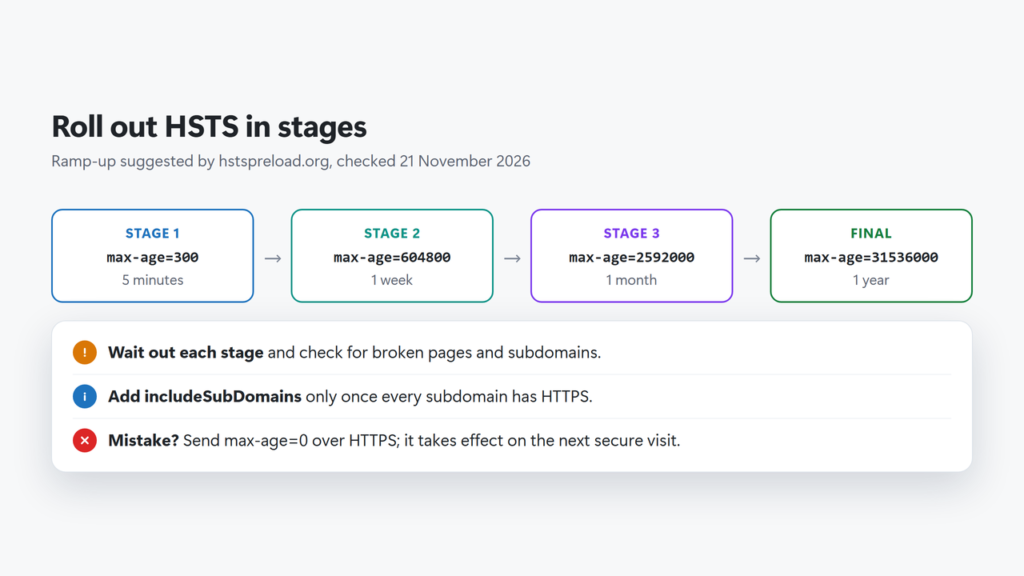
includeSubDomainscovers every subdomain. One subdomain without HTTPS becomes unreachable.- Ramp up: 5 minutes, 1 week, 1 month, then 1 year, checking for broken pages at each stage.
- The preload list’s own site says “HSTS preloading is not recommended”, and removal takes weeks to months.
Table of Contents
- 1What the HSTS Header Does
- 2The Three Directives
- 3What Real Sites Send
- 4Before You Turn It On
- 5How to Add the HSTS Header
- Apache, or LiteSpeed via .htaccess (most shared and WordPress hosting)
- Nginx
- Cloudflare
- Hostinger and WordPress
- 6Check That It Works
- 7HSTS Preload: Read This Before Adding preload
- 8Mistakes to Avoid
- What is the HSTS header?
- What is a good HSTS max-age?
- Should I use includeSubDomains?
- Should I submit my site to the HSTS preload list?
- How do I check if a site has HSTS?
- How do I disable HSTS?
What the HSTS Header Does
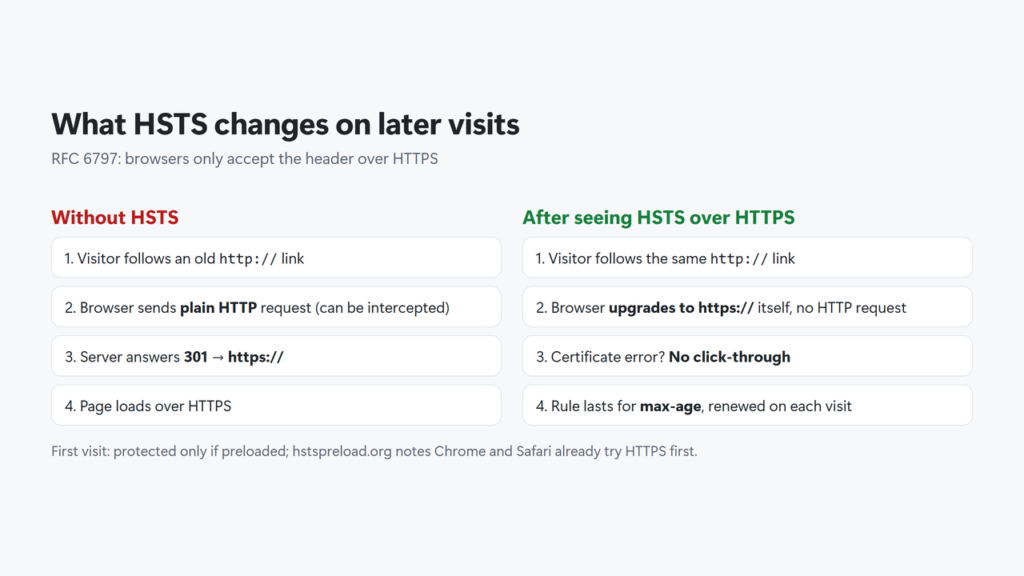
RFC 6797, the standard that defines HSTS, says the header “indicates to a UA that it MUST enforce the HSTS Policy” for that host. In practice, after a browser has seen the header over a secure connection, for the length of max-age:
- It upgrades HTTP to HTTPS itself. MDN says future attempts to use HTTP “should automatically be upgraded to HTTPS”, so the insecure request is never sent.
- It blocks certificate click-throughs. RFC 6797 says certificate errors should fail with “no user recourse”, because letting users click through warnings “is a recipe for a man-in-the-middle attack.”
- It applies to the host name, not the page. MDN notes an IP address can’t be an HSTS host, and the policy covers all ports of the host.
Without HSTS, someone who follows an old http:// link can make one insecure request before your 301 redirect to HTTPS. On a hostile network, that one request is the opening an attacker needs. HSTS removes it for return visitors. (hstspreload.org adds that many browsers, such as Chrome and Safari, now try HTTPS first anyway; HSTS makes that a firm rule an attacker can’t downgrade.)
The Three Directives
| Directive | Required? | What it does |
|---|---|---|
max-age=SECONDS | Yes | How long the browser remembers the rule. 31536000 is about one year; max-age=0 deletes the rule. |
includeSubDomains | No | Applies the rule to every subdomain too (www, shop, mail, staging, and so on). |
preload | No, and not in the standard | Signals you want to be on the browser preload list. You still have to submit the domain. |
Two rules from the RFC that catch people out. A host “MUST include only one” HSTS header, and if a browser gets more than one it “MUST process only the first”, so don’t set it in Cloudflare, your server and a plugin at the same time. And each time the header arrives, the browser resets the timer: max-age counts from the latest response, not from the first.
What Real Sites Send
I ran curl -I against these home pages on 21 November 2026:
| Site | Strict-Transport-Security header |
|---|---|
| harshilbarot.com (this site) | max-age=31536000; includeSubDomains |
| github.com | max-age=31536000; includeSubdomains; preload |
| www.wikipedia.org | max-age=106384710; includeSubDomains; preload |
| www.cloudflare.com | max-age=31536000; includeSubDomains |
| wordpress.org | max-age=3600 |
| www.google.com, www.hostinger.com | No header on the home page response |
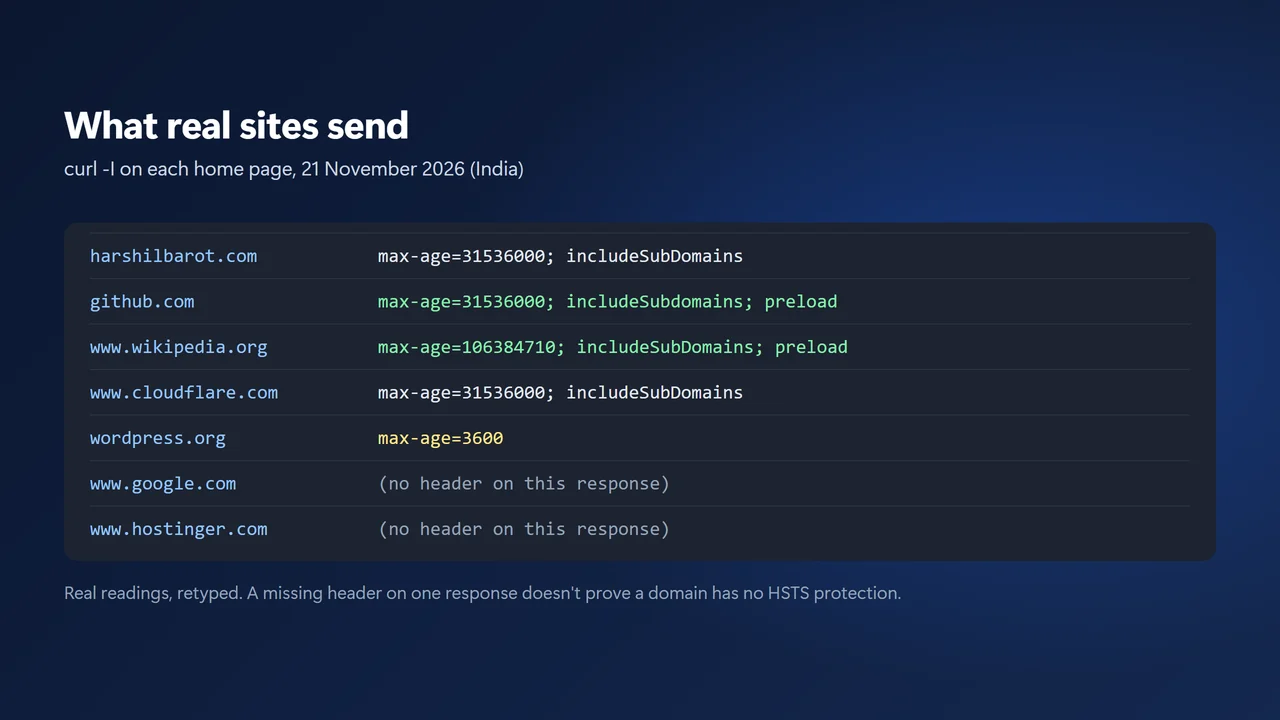
Big sites don’t agree on one value. GitHub and Wikipedia preload; Cloudflare uses a year with subdomains but no preload; WordPress.org uses one hour.
This site sends a one-year policy with includeSubDomains on every HTTPS response I checked, including the www redirect, robots.txt and an image. The plain-HTTP 301 to HTTPS carries no header, which is what MDN says it should do. In October 2026 a security audit of this site recommended against preloading for now, because preloading “needs every subdomain on HTTPS permanently”.
Before You Turn It On
- Every page loads over HTTPS with a valid certificate (see how to check when your SSL certificate expires).
- HTTP redirects to HTTPS on the same host with a 301. You can check an HTTP status code with one command.
- If you’ll use includeSubDomains: list every subdomain in your DNS (www, mail, shop, staging, old tools) and confirm each one has HTTPS.
- No page loads images, scripts or fonts over
http://. - You know where the header will be set: server, CDN or plugin, and only one of them.
How to Add the HSTS Header
Start with a short value. The preload site suggests stepping through max-age=300 (5 minutes), 604800 (1 week) and 2592000 (1 month), waiting the full max-age of each stage and checking for broken pages, before moving to a year. The examples below use the final one-year value; swap in the short one first.
Apache, or LiteSpeed via .htaccess (most shared and WordPress hosting)
<IfModule mod_headers.c>
Header always set Strict-Transport-Security "max-age=31536000; includeSubDomains"
</IfModule>
Put it in the .htaccess file in your site root, outside the # BEGIN WordPress block so WordPress doesn’t overwrite it. Apache’s docs say the always condition adds the header “even on error” responses, not only successful ones. Keep the value in quotes: LiteSpeed documents that leaving it unquoted causes an HTTP 500 error (“Too many arguments to directive”). LiteSpeed also lets you set headers in WebAdmin under Context → Static → Extra Headers (that route is for server admins, not shared hosting).
One catch with .htaccess: if the same file also answers plain-HTTP requests, Header always set adds the header to the HTTP 301 redirect too. Browsers ignore it there (RFC 6797 section 8.1), so it does no harm, but the check below will show it. If you control the server config, put the line in the HTTPS (port 443) virtual host instead.
Nginx
add_header Strict-Transport-Security "max-age=31536000; includeSubDomains" always;Add it inside the server block that listens on 443. Without always, Nginx only sends it on certain success and redirect codes. Watch out: a location block with its own add_header drops the headers set at server level, so the HSTS line has to be repeated there.
Cloudflare
In the dashboard go to SSL/TLS → Edge Certificates → HTTP Strict Transport Security (HSTS), click Enable HSTS, read the warning, click I understand and Next, set the max-age (1 to 12 months), choose whether to apply it to subdomains, and save. Cloudflare says HSTS is available on every plan, including Free. If Cloudflare adds the header, remove it from your server so you don’t send two. (Which CDN sits in front matters here; see Hostinger CDN vs Cloudflare.)
Hostinger and WordPress
On this site, Hostinger’s responses carry an x-litespeed-cache header, so the LiteSpeed .htaccess line above is the usual route. I found no HSTS switch in Hostinger’s documentation, so I don’t claim one exists. Some WordPress security plugins add HSTS too; if you use one, check it doesn’t add a second header or turn on preload by default.
Check That It Works
curl -sI https://example.com/ | grep -i strict-transport-security

strict-transport-security: max-age=31536000; includeSubDomains
On Windows PowerShell, run curl.exe -sI https://example.com/ | findstr /i strict (plain curl there is a different command). Check the home page, the www version, a normal post and an image or CSS file. Also check that http:// redirects with a 301 and does not carry the header (or see the .htaccess note above). In a browser, DevTools → Network → click the page → Headers shows the same line. If your own browser is stuck with an old policy while testing, Chrome lets you see the rules it holds at chrome://net-internals/#hsts.
Two more checks from MDN and hstspreload.org. If your site’s canonical address is www, the www host must send the header itself, because visitors who only ever load www never see the root domain’s header. And if you plan to preload, your HTTPS redirects (for example https://example.com to https://www.example.com) must also carry it. On this site, the www redirect does.
HSTS Preload: Read This Before Adding preload
The preload list is built into browsers, so it protects even the very first visit, the gap RFC 6797 calls the “bootstrap MITM vulnerability”. MDN says that while Google hosts the service, “all browsers are using this preload list.” To qualify, hstspreload.org requires:
- A valid certificate.
- A redirect from HTTP to HTTPS on the same host, if you are listening on port 80.
- HTTPS on all subdomains, including www and “internal subdomains that are not publicly accessible”.
- On the base domain:
max-ageof at least 31536000, plusincludeSubDomainsandpreload.
Then you submit the domain on hstspreload.org; the header alone doesn’t add you. The same site gives three warnings worth repeating word for word: “HSTS preloading is not recommended” (its benefits “are minimal compared to the benefits provided by HSTS”), inclusion “cannot easily be undone”, and a removal “may take 6-12 weeks to reach most Chrome users, and may take longer for other browsers.” Adding a domain can also take “several months” to reach stable Chrome. OWASP warns it “can have PERMANENT CONSEQUENCES”.
My rule: preload only if you control every subdomain you’ll ever create, and they will all have HTTPS for good. For most small business sites and blogs, a one-year HSTS header without preload gives most of the benefit without the lock-in.
max-age=0 over HTTPS (and remove preload from the header if you’re leaving the list). MDN notes max-age=0 only works once the browser makes a secure request and receives it, so keep HTTPS working while the old policy expires.Mistakes to Avoid
- Starting with a year. A mistake then lasts a year for every returning visitor.
- Adding includeSubDomains without checking subdomains. An old
mail.orstaging.without HTTPS stops working in browsers. - Relying on HSTS over plain HTTP. RFC 6797 says the server “MUST NOT” send it there and browsers ignore it, so the header on your HTTPS responses is what counts.
- Setting it in two places. Browsers use only the first header; duplicates make debugging harder.
- Turning on preload because a plugin offers it. hstspreload.org says tools should “not include the preload directive by default”.
- Treating HSTS as a substitute for a working certificate. It makes certificate problems worse, not better (see free vs paid SSL certificates).
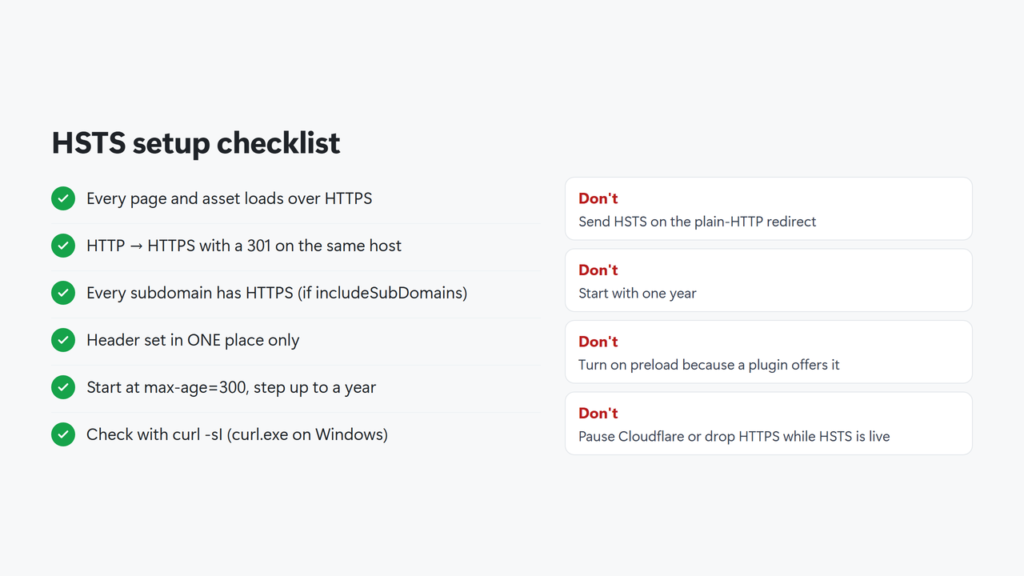
Checklist in text: confirm HTTPS works on every page and subdomain; redirect HTTP to HTTPS with a 301; set the header in one place only; start at max-age=300 and step up to a year; check it with curl -sI; skip preload unless every subdomain will stay on HTTPS permanently.
What is the HSTS header?
HSTS (HTTP Strict Transport Security) is the Strict-Transport-Security response header. It tells browsers to use only HTTPS for your site for max-age seconds and to block clicking through certificate errors.
What is a good HSTS max-age?
Start short, such as 300 seconds, then step through a week and a month. One year (31536000) is the common final value and the minimum for the preload list.
Should I use includeSubDomains?
Only if every subdomain works over HTTPS. It applies the rule to all of them, so a subdomain without HTTPS becomes unreachable in browsers that saw the header.
Should I submit my site to the HSTS preload list?
Usually not. hstspreload.org itself says preloading is not recommended because its extra benefit over HSTS is small, and removal can take 6-12 weeks to reach most Chrome users.
How do I check if a site has HSTS?
Run curl -sI followed by the https URL and look for the strict-transport-security line, or check the response headers in your browser’s DevTools Network tab.
How do I disable HSTS?
Send max-age=0 over HTTPS and keep HTTPS working until browsers have picked it up. If you are on the preload list, you also need to request removal.