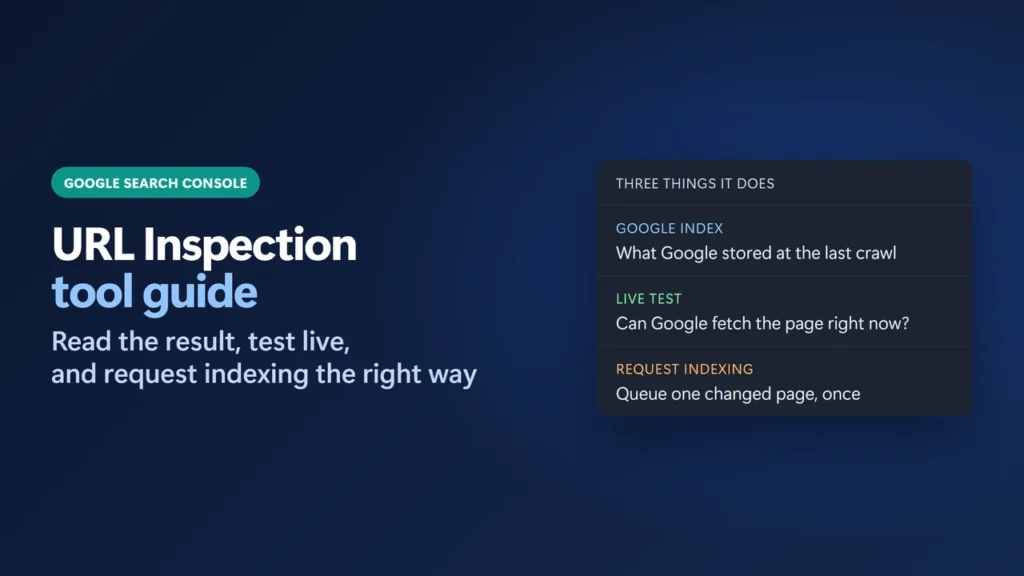
The URL Inspection tool in Google Search Console shows what Google knows about one page on your site: whether it is indexed, when Googlebot last crawled it, which canonical Google chose, and why a page was left out. To use it, paste the full URL into the search bar at the top of any Search Console screen and press Enter. Click Test live URL to check the page as it is right now, and click Request indexing only after you have fixed or published something important.
Below I walk through every part of the result using real inspections of this site from 19 November 2026: an indexed post, a live test, a post published that morning, and a URL that Google is not allowed to crawl.
Key takeaways
- The default result is Google’s indexed copy, not your live page. Use Test live URL to see the page as it is now.
- “URL is on Google” means indexed. Google says it does not guarantee the page shows in results.
- A green live test only means Google can access the page. It does not check duplicates, quality or manual actions.
- If a page is blocked by robots.txt, Indexing allowed? can’t show a noindex tag, because Google never reads the page.
- Request indexing has a daily limit and repeat requests don’t speed things up. For many URLs, use a sitemap.
Table of Contents
- 1What the URL Inspection Tool Does
- 2How to Open It
- 3Reading the Result: Google’s Indexed Copy
- The Page indexing section, field by field
- Enhancements and experience
- 4Test Live URL: Checking the Page as It Is Now
- 5A Real Trap: Blocked by robots.txt
- 6When and How to Request Indexing
- 7Common Results and What to Do
- 8Limits and the URL Inspection API
- 9Mistakes to Avoid
- What is the URL Inspection tool in Google Search Console?
- What is the difference between “Google Index” and “Live Test”?
- Does “URL is available to Google” mean my page will be indexed?
- How long does Request indexing take?
- How many URLs can I inspect or submit per day?
- Why is “Request indexing” greyed out?
- Why does “Indexing allowed?” say Yes when my page has noindex?
What the URL Inspection Tool Does
Google’s Search Console Help describes it as a tool that “provides information about Google’s indexed version of a specific page, and also allows you to test whether a URL might be indexable.” It answers three questions for a single URL:
- Is it in Google’s index? And if not, which reason Google gives.
- What did Google see? The last crawl date, the crawler, whether the fetch worked, and the canonical it picked.
- Would it work now? The live test fetches the page again so you can check a fix before Google recrawls.
It works on one URL at a time. For patterns across many pages, use the Page indexing report (Indexing → Pages). Google’s help notes that report has no per-URL search, so you use URL Inspection for that.
How to Open It
- From the top bar. Type or paste the full URL, including
https://, into the “Inspect any URL” box at the top of any Search Console screen, then press Enter. - From a report. In most reports, hover over a URL and click the inspect icon next to it.
The URL must belong to the property you have open. A Domain property covers every subdomain and both http and https. A URL-prefix property covers only URLs that start with its exact prefix, so https://example.com/ does not cover http:// or m.example.com. Google states the scope rules on its “Add a website property” page and says on the inspection page that the URL must be in the open property. This site uses a URL-prefix property, so I inspect https://harshilbarot.com/ URLs only.
Reading the Result: Google’s Indexed Copy
The first screen shows the indexed result. Google is clear that “This is not a live test”: everything comes from the last version Google crawled. Here is a post from this site that was indexed:
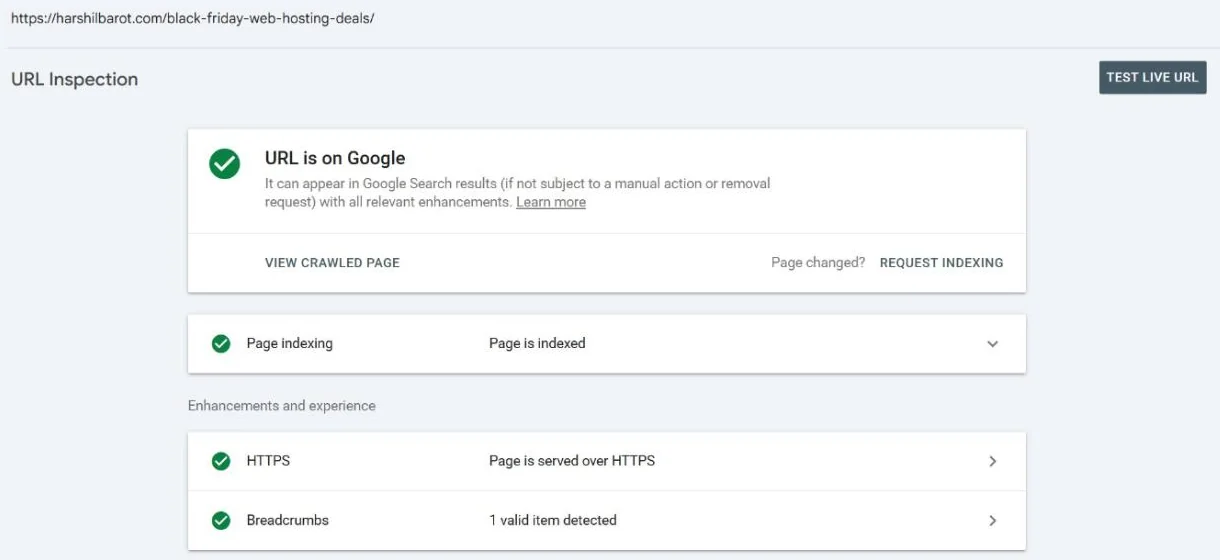
The top card gives one of these statuses:
| Status | What Google says it means | What to do |
|---|---|---|
| URL is on Google | Indexed and can appear in results; no problems with the enhancements found | Nothing. To confirm it really shows, Google suggests searching for the URL on Google. |
| URL is on Google, but has issues | Indexed, but some enhancements (such as structured data) have problems | Open the enhancement card and fix the warning or error. |
| URL is not on Google | Won’t appear in Google Search results | Read the Page indexing section to see why, then decide if it needs fixing. |
| URL is an alternate version | An AMP page that is an alternate of a non-AMP canonical | Usually nothing. |
One caveat is worth repeating. Google says “URL is on Google” doesn’t guarantee that your page is appearing in Search results, because the tool does not check every requirement, such as manual actions or legal removals.
The Page indexing section, field by field
Click the Page indexing row to expand it. These are the real fields for the same post, crawled at 20:32 on 18 November 2026:
| Field | What it tells you | This site’s value |
|---|---|---|
| Sitemaps | Submitted sitemaps that list the URL | Temporary processing error |
| Referring page | A page Google may have used to find the URL | None detected |
| Last crawl | When Google last crawled it, in your local time | 18 Nov 2026, 20:32:23 |
| Crawled as | Which crawler fetched it (smartphone or desktop) | Googlebot smartphone |
| Crawl allowed? | Whether robots.txt allowed the crawl | Yes |
| Page fetch | Whether Google got the page from your server | Successful |
| Indexing allowed? | Whether the page blocked indexing (for example with noindex) | Yes |
| User-declared canonical | The canonical your page states | The post’s own URL |
| Google-selected canonical | The canonical Google chose | Inspected URL |
Two values look worrying but aren’t here. Temporary processing error under Sitemaps is one of the values Google lists, and its help says “Re-running an inspection might resolve this issue.” This post is in the site’s XML sitemap (see how to submit a sitemap to Google Search Console). None detected for the referring page doesn’t mean no page links to it: Google says an absent value “doesn’t mean that no referring page exists”. The line “URL might be known from other sources that are currently not reported” means Google found it some other way.
The canonical rows matter most when you see duplicates. If the Google-selected canonical is a different URL, Google is treating your page as a copy of that one. Google adds that this value “can be a few hours out of date”.
Enhancements and experience
Below Page indexing you see cards such as HTTPS and Breadcrumbs. This post showed “Page is served over HTTPS” and “1 valid item detected” for its breadcrumb markup. Google says the tool doesn’t show every rich result type yet, so a missing card does not prove your markup is missing. To test markup itself, Google points to the Rich Results Test.
Test Live URL: Checking the Page as It Is Now
Click Test live URL in the top right. Google fetches the page again and shows a second tab, so you can switch between GOOGLE INDEX and LIVE TEST. The live result for another post on this site read “URL is available to Google” with “Page can be indexed”. Unlike the indexed view, it showed no HTTPS card, only Breadcrumbs.
Use the live test when you have just fixed something: removed a noindex tag, changed robots.txt, fixed a server error or published a page. It is also the only place you can see a screenshot of how Google renders the page: click View tested page, then the Screenshot tab. Google says screenshots are not available for the indexed result.
Some statuses can’t appear in a live test at all, because Google decides them at indexing time. These include Crawled – currently not indexed, Discovered – currently not indexed and the duplicate and canonical statuses. If your indexed result shows one of these, a clean live test does not mean it is fixed.
A Real Trap: Blocked by robots.txt
To show a failing result, I inspected this site’s search page, /?s=dns. The indexed result said “URL is not on Google” and “Page is not indexed: URL is unknown to Google”, with no sitemap, no referring page and N/A for every crawl field. The live test explained why:
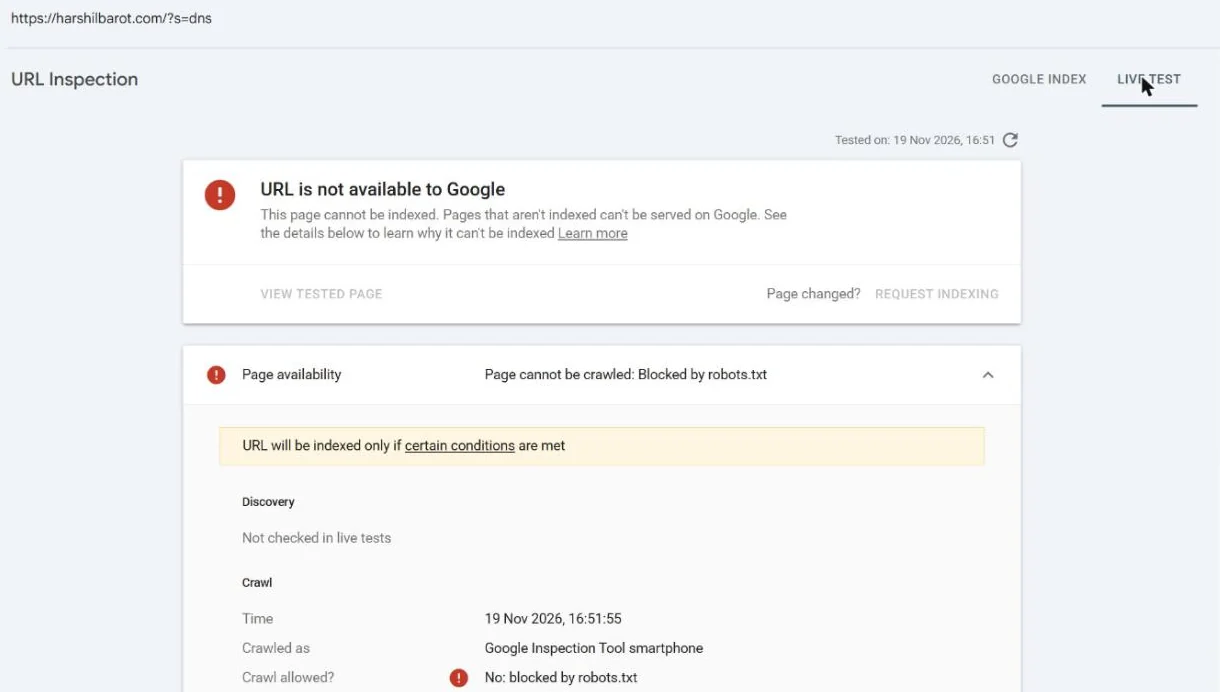
“Page cannot be crawled: Blocked by robots.txt”. Crawl allowed? “No: blocked by robots.txt”. Page fetch “Failed”. The crawler is named Google Inspection Tool smartphone, not Googlebot, and Request indexing is greyed out, because Google says you can’t request indexing for a page the live test finds non-indexable.
This is intended: the site’s robots.txt has Disallow: /*?s=. The search page also carries a noindex robots tag, which I confirmed with a logged-out request. But Google never sees that tag. Its help warns that when robots.txt blocks a page, “Indexing allowed? will always be ‘Yes’ because Google can’t see and respect any noindex directives”, and the page “might appear in Search results” anyway if other sites link to it. Google’s advice for a page that must stay out of the index is to remove the robots.txt block and use noindex. On this site the block is deliberate: the aim is to stop Google spending crawls on endless search-result URLs, and the indexed result above shows Google doesn’t know this one. A page you must keep out of Google needs noindex without the block. For when to block a URL at all, see my robots.txt guide for AI crawlers.
When and How to Request Indexing
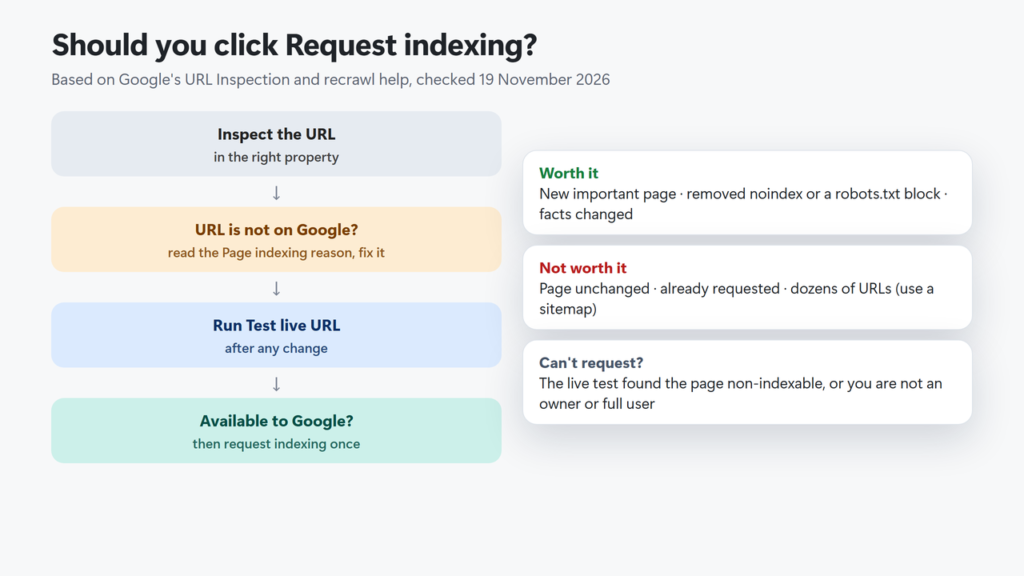
Click Request indexing on the inspection result. Google runs a quick check and, if the page passes, adds it to “the indexing queue”. What Google says about it, checked 19 November 2026:
- Timing. “Indexing can take up to a week or two”, though it “typically takes only a day or so”. Google’s recrawl page says crawling “can take anywhere from a few days to a few weeks”.
- No guarantee. “Submitting a request does not guarantee that the page will appear in the Google Index.”
- A daily limit. Google says there is one but publishes no number, so I don’t quote one.
- No speed-up from repeats. Requesting “multiple times for the same URL won’t get it crawled any faster.”
- Many URLs? Google says your “best choice is to submit a sitemap” with accurate
<lastmod>dates.
On this site, /301-vs-302-redirect/ was published on the morning of 19 November 2026 and indexing was requested the same day. When I inspected it that afternoon it already read “URL is on Google”. That is one URL on one day, not a promise: Google also says it prioritises “high quality, useful content”, and one roundup on this site, never submitted with Request indexing, has waited about seven months without a crawl (see Discovered – currently not indexed).
When is it worth clicking? Google’s own FAQ says Google recrawls pages automatically, so “don’t bother” unless there is an important change Google hasn’t noticed for “a week or more”. Good candidates are a new important post, a page where I removed a noindex or robots block, or a page whose facts changed. Google’s recrawl page also says that on hosted platforms such as Blogger or WordPress, “in most cases, the platform submits your new content to search engines automatically”, so check your platform’s own help. For engines other than Google, my guide to Rank Math Instant Indexing covers IndexNow.
Common Results and What to Do
| You see | What it means | First fix |
|---|---|---|
| URL is unknown to Google | Google hasn’t seen the URL before | Link to it from indexed pages, list it in your sitemap, then request indexing |
| URL marked ‘noindex’ | Google found a noindex directive | Remove noindex if you want it indexed, run a live test, then request indexing |
| URL blocked by robots.txt | robots.txt stops crawling; it can still be indexed through links | Remove the rule if the page should be crawled |
| Indexed, though blocked by robots.txt | Indexed from links even though robots.txt blocks crawling | Unblock it and use noindex if it should be out; remove the rule if it should be in |
| Page with redirect | The URL redirects, so it won’t be indexed itself | Inspect the target URL instead |
| Not found (404) | The URL returned 404 | Fine if removed on purpose; 301 it if it moved |
| Soft 404 | A “not found” page that returns 200 | Return a real 404, or add real content |
| Duplicate, Google chose different canonical than user | Google prefers another URL as canonical | Compare the two canonical rows; make the pages distinct or accept it |
| Crawled – currently not indexed | Crawled, not indexed for now | Improve the page; a live test can’t confirm this one |
Site-wide failures show up in a live test too. Google lists DNS errors, server connection errors and “Invalid server SSL certificate” among them. If you see that last one, check when an SSL certificate expires. If the Sitemaps row keeps saying nothing was found, my Rank Math sitemap troubleshooting guide covers the usual causes.
Limits and the URL Inspection API
Google says there is a per-property daily limit for inspections and for live tests, and “a daily limit” on indexing requests, but it publishes no numbers for the web tool. Be careful with articles that quote exact counts.
For checking many URLs, there is the URL Inspection API, launched in January 2022. Google’s usage-limits page lists 2,000 queries per day and 600 per minute per site. The API returns only the indexed result: Google’s reference says “you cannot test the indexability of a live URL”, and it describes only an inspect method, nothing for requesting indexing. (It is separate from Google’s Indexing API, which this guide doesn’t cover.) SEO tools and plugins use it to monitor important pages.
Mistakes to Avoid
- Reading the indexed result as live. If you changed the page today, run Test live URL.
- Treating a green live test as “indexed soon”. Google says there is no definitive test for that.
- Clicking Request indexing every day. Repeats don’t help and use your quota.
- Blocking a page in robots.txt to remove it. Google can’t see noindex on a blocked page. Use noindex and let Google crawl it.
- Inspecting a URL from the wrong property. http vs https and www vs non-www count as different prefixes.
- Panicking over “None detected”. A missing referring page doesn’t mean nothing links to the URL.
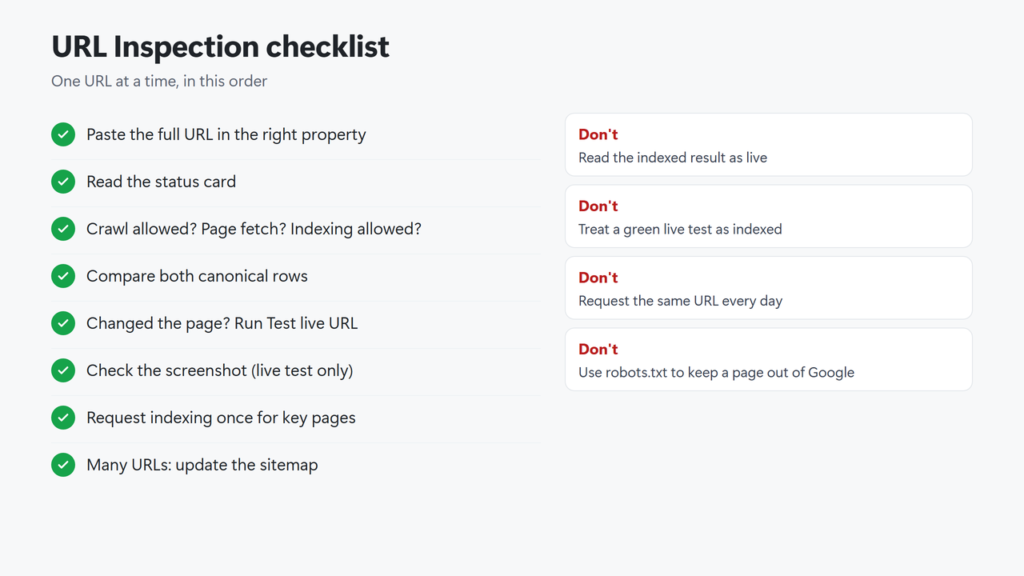
Checklist in text: paste the full URL into the top bar of the right property; read the status card; expand Page indexing and check crawl allowed, page fetch, indexing allowed and both canonicals; if you changed the page, run Test live URL and view the screenshot; fix what it reports; request indexing once for important pages; check back in a few days; use a sitemap for many URLs.
What is the URL Inspection tool in Google Search Console?
It is a Search Console tool that shows Google’s indexed information for one URL on your site, including index status, last crawl, canonical and enhancements, and lets you run a live test and request indexing.
What is the difference between “Google Index” and “Live Test”?
Google Index shows the version Google last crawled. Live Test fetches the page now. A live test can’t show canonical choice, duplicates or quality decisions, which Google makes at indexing time.
Does “URL is available to Google” mean my page will be indexed?
No. Google says the live test only confirms its crawler can access the page. Duplicates, quality, manual actions and removals are not checked.
How long does Request indexing take?
Google says it typically takes a day or so but can take up to a week or two, and a request does not guarantee indexing. One post on this site was indexed the same day; another, never requested, has waited about seven months without a crawl.
How many URLs can I inspect or submit per day?
Google says there are daily limits but publishes no numbers for the web tool. The URL Inspection API allows 2,000 queries per day and 600 per minute per site.
Why is “Request indexing” greyed out?
Google won’t accept a request for a page the live test finds non-indexable, for example one blocked by robots.txt. Google also says only owners and full users can request indexing.
Why does “Indexing allowed?” say Yes when my page has noindex?
If robots.txt blocks the page, Google can’t read the noindex tag, so the field shows Yes. Remove the robots.txt block so Google can see the noindex.