
To find out who hosts a website, look up the site’s IP address, then check who that IP address is registered to. Next, read the site’s response headers, which often name the host or the CDN in front of it. The domain’s registration record (WHOIS or RDAP) usually names the registrar, not the host. And if the IP belongs to a CDN such as Cloudflare, the real host is hidden from public lookups.
I ran every lookup in this guide on this site, harshilbarot.com, on 18 November 2026. The results show why “who hosts it” can have more than one answer: the domain is registered with one company and hosted with another.
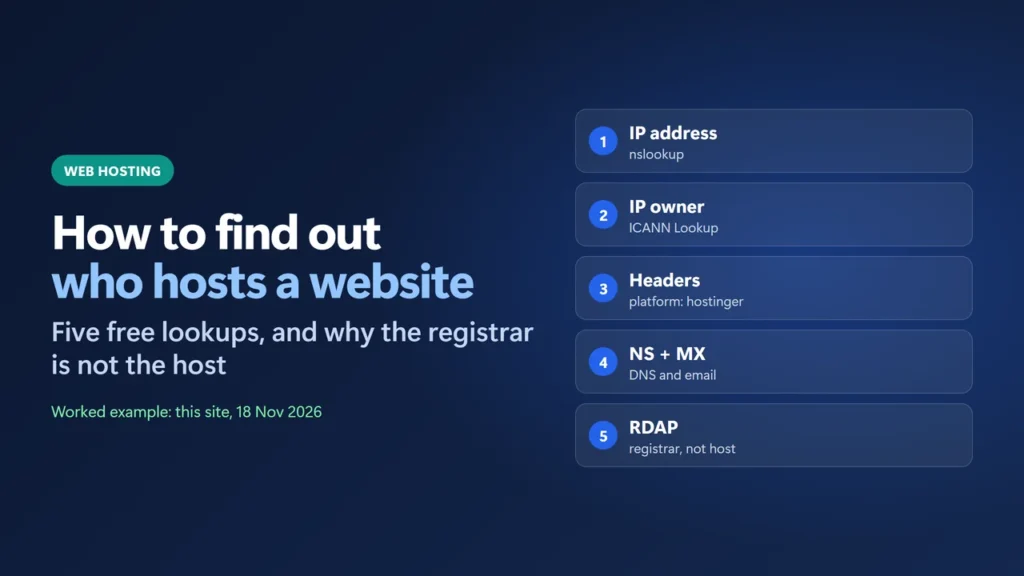
Key takeaways
- The IP address owner is the best public clue to the web host. Look it up with ICANN Lookup, which also covers IP addresses.
- Response headers often name the host or CDN. This site’s headers say
platform: hostinger. - WHOIS/RDAP shows the registrar, dates and nameservers. ICANN’s list of published fields has no hosting field.
- A CDN hides the host. Cloudflare says it “does not host content” through its CDN and forwards abuse reports to the hosting provider.
- Mail and DNS can sit with different companies. Check the MX and NS records separately.
Table of Contents
- 1Four companies can sit behind one domain
- 2Step 1: Find the website’s IP address
- 3Step 2: Look up who owns the IP address
- 4Step 3: Read the response headers
- 5Step 4: Check the nameservers and mail records
- 6Step 5: Check the domain registration (registrar, not host)
- 7When a CDN hides the real host
- 8What these lookups can’t tell you
- 9How to find out who hosts your own website
- 10Common mistakes
- How do I find out who hosts a website for free?
- Does WHOIS show who hosts a website?
- Why does the lookup say Cloudflare?
- Can I find the real host behind Cloudflare?
- Is the domain registrar the same as the web host?
- How do I find out who hosts my email?
Four companies can sit behind one domain
“Hosting” often means four separate jobs, and each can belong to a different company. Each one has its own lookup. (If the difference between a domain and hosting is new to you, my domain vs hosting guide explains it first.)
| Job | What it does | How to find it | This site (18 Nov 2026) |
|---|---|---|---|
| Registrar | Where the domain name is registered and renewed | RDAP / WHOIS lookup of the domain | GoDaddy.com, LLC |
| DNS host | Answers DNS questions for the domain | NS (nameserver) records | Hostinger (dns-parking.com) |
| Web host | Runs the server that stores and serves the site | IP owner + response headers | Hostinger, behind Hostinger CDN |
| Email host | Receives mail for the domain | MX records | Hostinger (mx1/mx2.hostinger.com) |
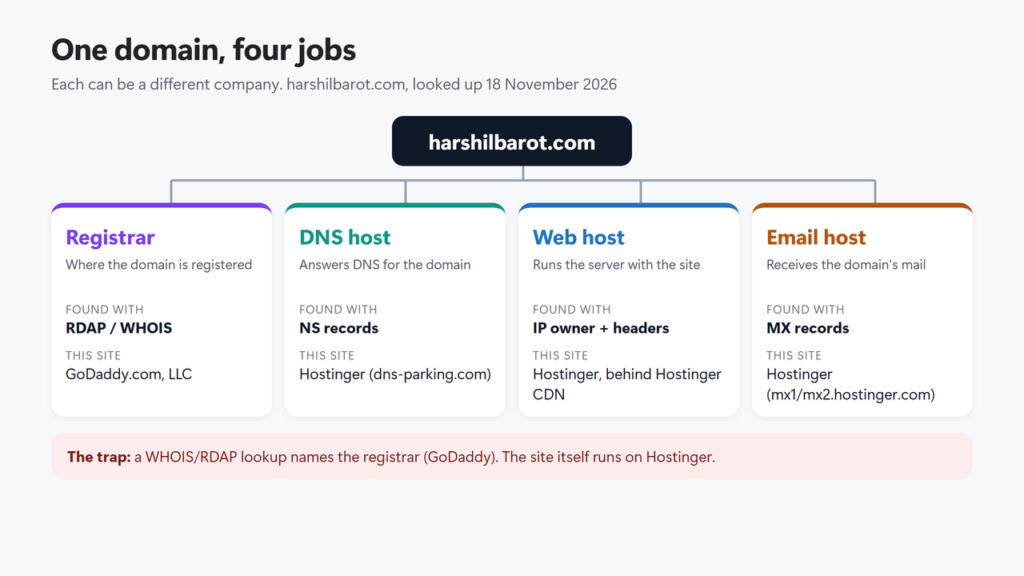
So if someone asked “who hosts harshilbarot.com?”, a WHOIS-style lookup alone would point at GoDaddy. That is the registrar. The site itself runs on Hostinger.
Step 1: Find the website’s IP address
Every website answers on one or more IP addresses. On Windows, open Command Prompt and run nslookup with the domain. Microsoft’s documentation says the first parameter is the name to look up, and an optional second one is the DNS server to ask.
nslookup harshilbarot.com
nslookup harshilbarot.com 1.1.1.1
How to read the result: the first Server and Address lines name the DNS server that answered you (for example one.one.one.one and 1.1.1.1), not the website. The website’s IP addresses come after Name:, under Addresses. In my test a “DNS request timed out” line appeared before the addresses, and the answer still followed.
You can also use a browser: Google Public DNS answers lookups in plain JSON at https://dns.google/resolve?name=harshilbarot.com&type=A.
What I saw: every answer listed two IPv4 addresses, and they kept changing. Google returned 147.79.69.247 and 91.108.106.55; seconds later Cloudflare’s resolver returned 84.32.84.219 and 88.222.222.79. That is normal when a site sits behind a CDN, which hands out many addresses. Write down one or two and move on.
Step 2: Look up who owns the IP address
IP addresses are handed out in blocks, and each block is registered to an organisation. You can look that up for free. The official tool is ICANN Lookup (lookup.icann.org). ICANN says it can “look up the current registration data for domain names and Internet number resources”, and IP addresses are Internet number resources.
Paste the IP address into the search box and press Lookup. The result comes from the regional internet registry that manages that address block. For this site’s addresses that is RIPE NCC (the screenshot shows whois.ripe.net); North American addresses come from ARIN.
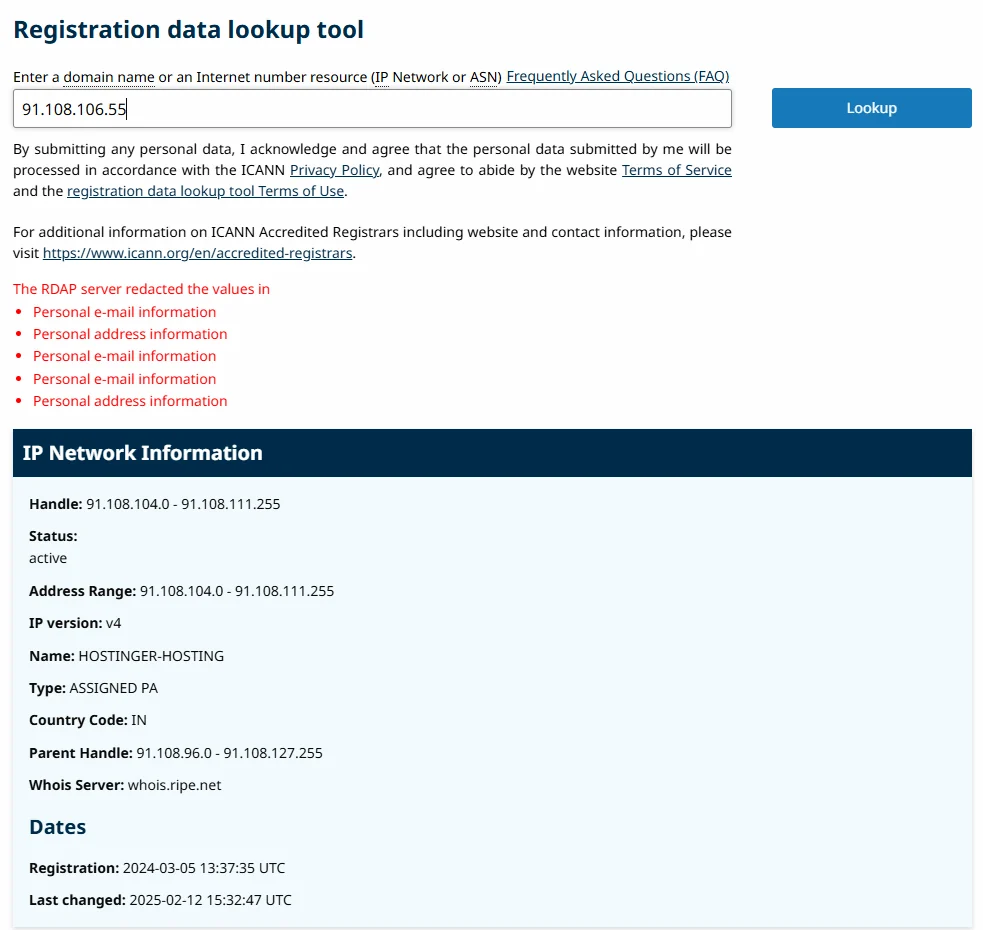
Look for the Name field. RIPE’s documentation calls it the netname: “a name given to a range of IP address space”. For 91.108.106.55 it reads HOSTINGER-HOSTING. I checked 11 of the addresses this site returned over a few minutes, and each one came back as HOSTINGER-HOSTING or HOSTINGER-CDN (blocks named for Hostinger’s CDN).
Step 3: Read the response headers
Servers send short labels, called headers, with every page. Some hosts and CDNs add their own name there. To see them in Chrome or Edge, press F12, open the Network tab, reload the page, click the first row (the page itself) and read Response Headers. From a terminal you can run:
curl -I https://harshilbarot.com/Run it in Command Prompt, or type curl.exe -I in Windows PowerShell, where plain curl is a shortcut for a different command.
These are six of the lines this site returned on 18 November 2026:
x-litespeed-cache: hit
platform: hostinger
panel: hpanel
Server: hcdn
x-hcdn-request-id: df77f46ee6c8677710a4c2b285234bf6-mum-edge16
x-hcdn-cache-status: MISS
Two of those are easy to read: platform: hostinger and panel: hpanel (hPanel is Hostinger’s control panel). Hostinger’s own help page says its CDN “is working when responses from your website carry the x-hcdn-request-id header”. So these headers point to Hostinger hosting with Hostinger CDN in front.
Don’t rely on the Server header alone. MDN describes it as “the software used by the origin server”, not the company. It often says something vague like nginx, or the CDN’s name.
Step 4: Check the nameservers and mail records
The nameservers show who runs the domain’s DNS. Look them up with nslookup -type=NS:
nslookup -type=NS harshilbarot.com
nslookup -type=MX harshilbarot.com
This site’s nameservers are athena.dns-parking.com and apollo.dns-parking.com. Hostinger’s help says dns-parking.com nameservers “typically” mean “your DNS zone is managed by Hostinger”. That proves where DNS is managed, not where the website runs: a DNS zone at one company can point to a server anywhere. (To move DNS yourself, see how to change nameservers.)
The MX records show who receives the domain’s email. Here they are mx1.hostinger.com and mx2.hostinger.com. A business that uses Google Workspace would show smtp.google.com, the value Google’s current setup page gives (older setups may show other Google names). That tells you the email host, nothing about the web host.
Step 5: Check the domain registration (registrar, not host)
A domain lookup (still often called WHOIS) shows the registrar, key dates, status and nameservers. ICANN’s Registration Data Policy lists the fields that must be published, such as Registrar, Creation Date and Domain Status, plus Name Server(s) where collected. None of them is a hosting field, so this lookup can’t tell you the host on its own.
RDAP is the newer protocol for this data. ICANN says registries and registrars “are no longer required to provide WHOIS services” since 28 January 2025, “except for .com, .name, and .post”, and that RDAP is now the definitive source for generic top-level domains (gTLDs) such as .com and .org. Country-code domains such as .uk or .in are run by their own registries, so what you see for them can differ. Personal details such as the owner’s name and email are usually redacted where the law requires it.
What happened when I tried: ICANN Lookup could not fetch the record for harshilbarot.com. Three tries in a row showed “Unable to perform RDAP query. This may be due to technical issues by the RDAP server operator.” The same query through rdap.org, a community-run RDAP redirector (it is not an ICANN service), reached the .com registry and worked. It showed the registrar as GoDaddy.com, LLC, registration in February 2014, and the Hostinger nameservers. If ICANN Lookup fails for you, wait and try again, or try another RDAP client.
When a CDN hides the real host
Many sites put a CDN or security proxy in front of their server (here is what a CDN is). Then the IP address and headers you see belong to the CDN, not the host. Cloudflare’s documentation says a proxied record “will be answered with Cloudflare anycast IP addresses” instead of the origin IP address, the address of “the server hosting your website or application”.
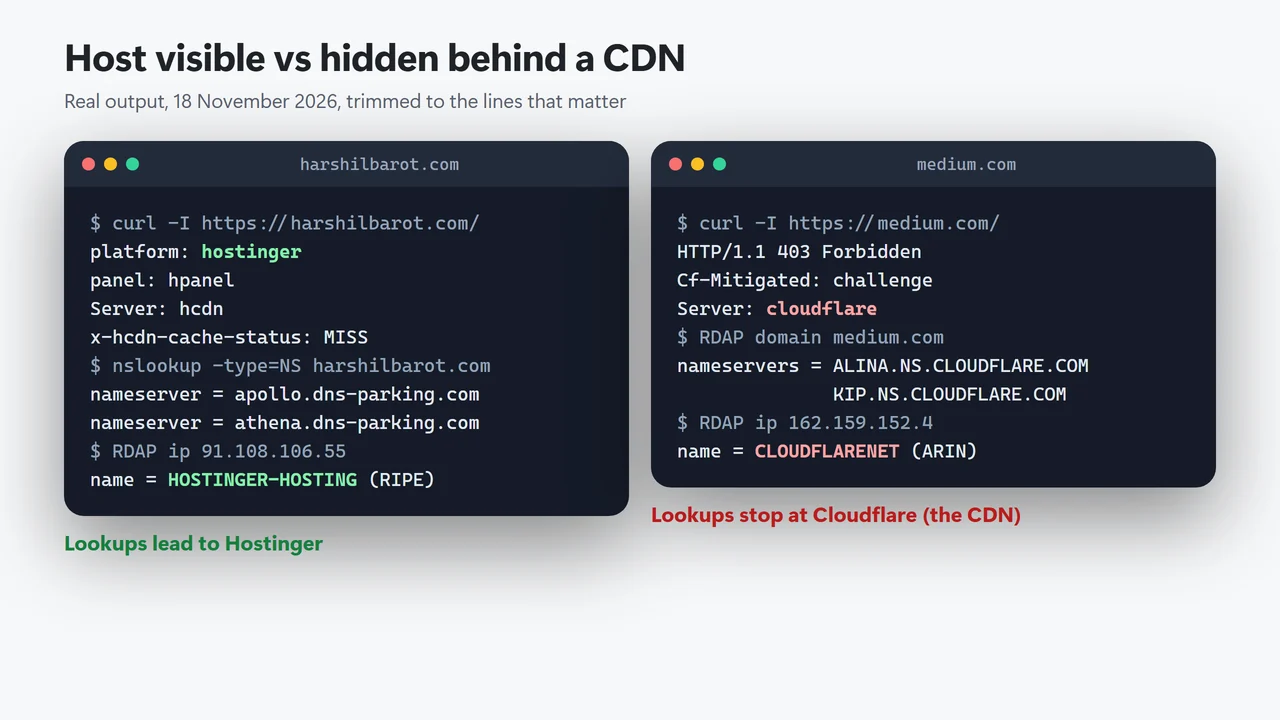
Here is what that looks like, using medium.com as an example of a site behind Cloudflare. Its nameservers are Cloudflare’s, its IP addresses are registered to Cloudflare (CLOUDFLARENET at ARIN), and its headers say Server: cloudflare with a CF-Ray ID. Even a blocked request still showed it: a plain curl -I got a 403 bot challenge with Server: cloudflare. Compare that with this site, where the lookups lead straight to Hostinger:
So what can you do when you hit a CDN?
- For an abuse or copyright problem, report it to the CDN. Cloudflare says it “does not host content” through its CDN services and that it will “forward your complaint to the website operator and the hosting provider”. It says it may respond “with additional details”; it does not promise to tell you the host’s name.
- Check old or side records. Subdomains such as mail or ftp are sometimes not behind the CDN. Look them up the same way, but treat any match as a clue, not proof.
- Remember the exception. Cloudflare can also be the actual host, for content stored on services such as Cloudflare Pages or Workers. Its abuse page says it “might qualify as the origin hosting provider” in those cases.
Hostinger’s own CDN works the same way in front of Hostinger servers; my Hostinger CDN vs Cloudflare comparison covers the difference between the two.
What these lookups can’t tell you
- Reseller hosting. The IP owner may be the data centre or a larger host. The company that sells and supports the plan may be a different, smaller brand.
- Reverse DNS is often empty. A reverse (PTR) lookup maps an IP back to a name, as RFC 1035 describes. For the two of this site’s IPs I checked it returned nothing, so don’t count on it.
- Online “hosting checker” sites. They are handy, but they work from public data like this, so a CDN hides the host from them too.
- The site may move. Results are a snapshot. A migration changes the IP addresses, and the old answers can linger for a while in DNS caches.
How to find out who hosts your own website
If it’s your site and you have lost track, start with your own records before any lookup:
- Search your email for invoices or renewal notices with words like “hosting”, “cPanel” or “hPanel”.
- Check your card or PayPal statements for a yearly hosting charge.
- Log in at your registrar and look at the nameservers; they usually point you to the DNS host.
- Then run Steps 1 to 3 above. If the trail ends at a CDN, log in to the CDN account: its DNS settings show the origin server address, which you can look up in Step 2.
Once you know the host, you can decide whether to stay. My guide on how to choose web hosting explains what to look for, and the guide on moving a WordPress site to Hostinger covers the move itself. If you change hosts, see how long DNS propagation takes for when visitors will see the new server.
Common mistakes
- Taking the registrar for the host. On this site they are two different companies.
- Calling the CDN the host. Cloudflare IPs usually mean Cloudflare is in front, not that Cloudflare stores the site.
- Trusting one IP address. CDN sites return many addresses. Check two or three.
- Reading the Server header as a company name. It names software, and it can be changed.
- Assuming email is hosted with the website. MX records often point somewhere else.
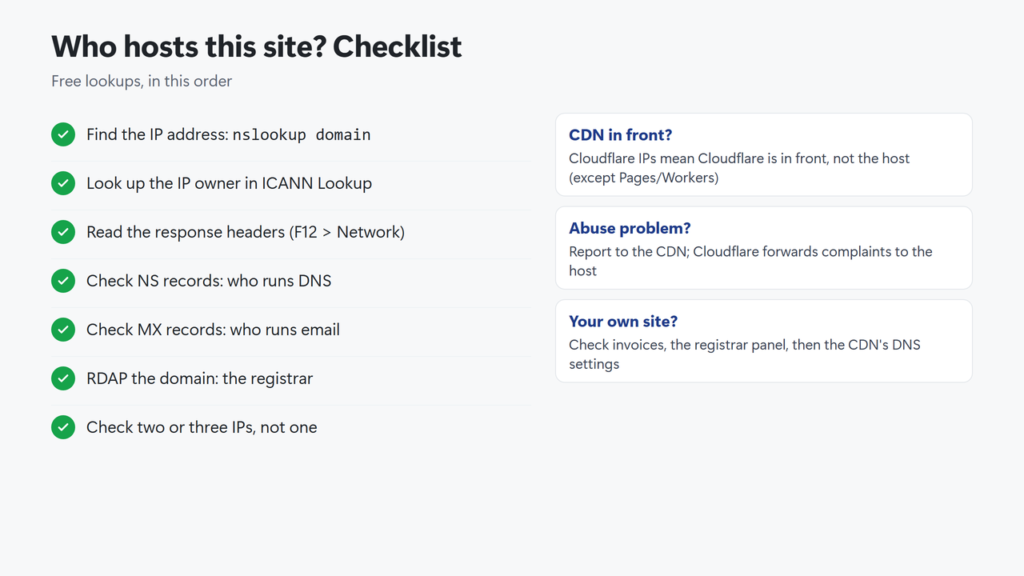
Checklist in text: find the IP address with nslookup; look up the IP owner in ICANN Lookup; read the response headers; check the NS and MX records; look up the domain registration for the registrar; if the trail ends at a CDN, report problems to the CDN or check the CDN account for your own site.
How do I find out who hosts a website for free?
Look up the site’s IP address with nslookup, then paste the IP into ICANN Lookup at lookup.icann.org. The Name field shows who the address block is registered to. Then check the response headers, which often name the host or CDN.
Does WHOIS show who hosts a website?
Not directly. A WHOIS or RDAP lookup of the domain shows the registrar, dates, status and nameservers. None of those is the web host, although the nameservers can be a clue.
Why does the lookup say Cloudflare?
The site uses Cloudflare as a CDN or proxy, so you see Cloudflare’s IP addresses instead of the real server. Cloudflare says it does not host content through those services. The exception is content on Cloudflare’s own hosting products such as Pages or Workers.
Can I find the real host behind Cloudflare?
Usually not from public data. For abuse or copyright problems, report the site to Cloudflare, which says it forwards complaints to the hosting provider. If it is your own site, the origin address is in your Cloudflare DNS settings.
Is the domain registrar the same as the web host?
Not always. This site’s domain is registered with GoDaddy while the site is hosted with Hostinger. Many people buy both from one company, but they are separate services.
How do I find out who hosts my email?
Look up the MX records with nslookup -type=MX yourdomain.com. The mail server names show the email provider, for example smtp.google.com for Google Workspace.