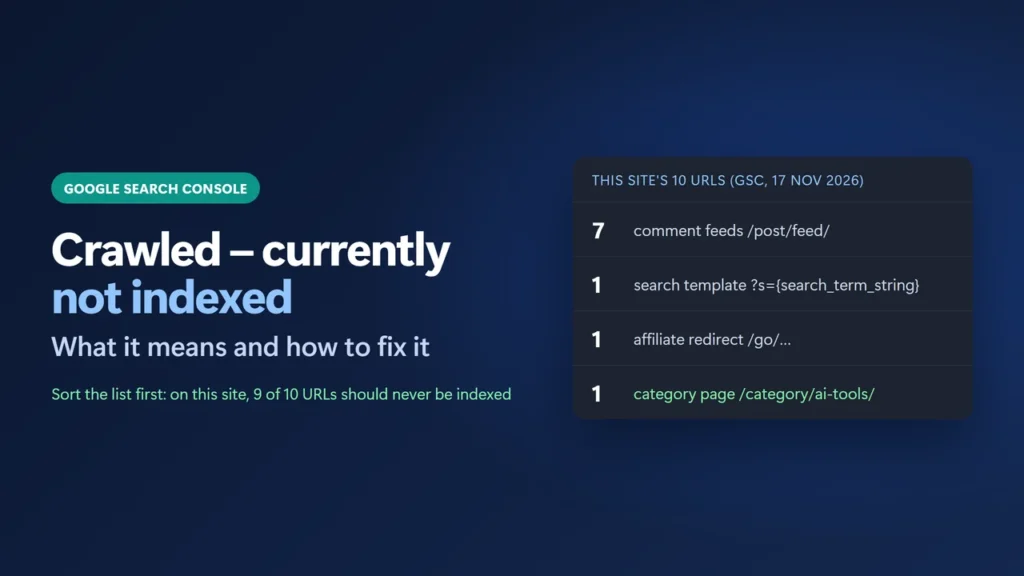
Crawled – currently not indexed means Google visited the page but decided not to add it to its index, at least for now. It is not an error. Google’s Search Console Help says this is “a common message for many sites and doesn’t necessarily indicate an issue that needs attention.” The fix starts with the example list: it can include feeds, search pages or redirects that should never be indexed. On this site, 9 of the 10 were. Leave those alone. For each page you do care about, inspect it, make it clearly worth indexing, link to it, and request indexing once.
Below I show the real list from this site’s Search Console, sort each URL, and then walk through the fixes that apply to pages that matter.
Key takeaways
- Google crawled the URL and chose not to index it. The Source column says Google systems, not Website.
- Sort the list first. On this site, 9 of the 10 URLs were feeds, a search template or a redirect.
- For a page that matters: URL Inspection, live test, improve the page, add internal links, then Request indexing once.
- Requesting indexing again and again does not help. Google’s Search Central docs say repeat requests won’t get a URL crawled faster.
- There is no target ratio of indexed to non-indexed pages. Google does not index every URL.
Table of Contents
- 1What “Crawled – Currently Not Indexed” Means
- How it differs from the statuses next to it
- 2A Real Example: This Site’s 10 URLs
- 3Step 1: Decide Which URLs Should Be Indexed
- 4Step 2: Inspect the URL
- 5Step 3: Make the Page Clearly Worth Indexing
- 6Step 4: Link to It and List It
- 7Step 5: Request Indexing Once
- 8Should You Click Validate Fix?
- 9Mistakes to Avoid
- What does crawled currently not indexed mean?
- Is crawled currently not indexed bad?
- How long does it take Google to index a page after I fix it?
- What is the difference between discovered and crawled currently not indexed?
- Should I use robots.txt to remove these URLs from the report?
- Why does Search Console still show URLs I already fixed?
What “Crawled – Currently Not Indexed” Means
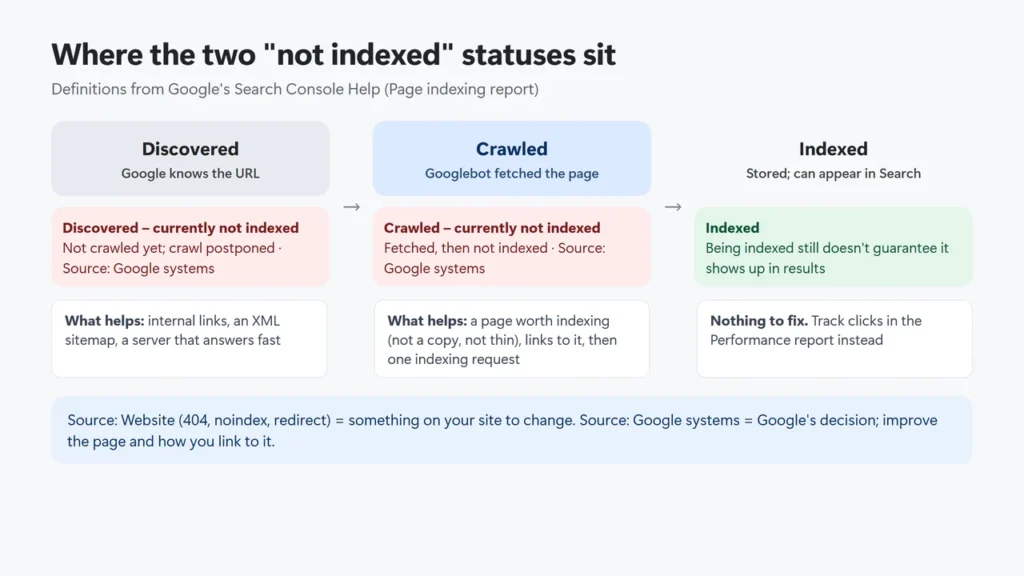
Search Console’s Page indexing report defines it in one line: “The page was crawled by Google but not indexed.” So Google could reach the page and read it. It then decided, for now, not to store it in the index it serves results from. Pages that are not indexed can’t appear in Google Search.
In the report’s Source column this reason is labelled Google systems. Google’s help explains that you can generally fix only issues where the source is “Website”, such as a 404 or a noindex tag. With “Google systems” there is no single setting to switch. You change the page, or how the site points to it, and let Google look again.
How it differs from the statuses next to it
| Status | What happened |
|---|---|
| Discovered – currently not indexed | Google found the URL but has not crawled it yet. Google says it usually postponed the crawl to avoid overloading the site, so the last crawl date is empty. |
| Crawled – currently not indexed | Google crawled the URL and chose not to index it. |
| Excluded by ‘noindex’ tag | Your page told Google not to index it. The source is Website. |
| Duplicate without user-selected canonical | Google treats it as a duplicate, chose another page as the canonical and won’t serve this one. |
| Soft 404 | The page returns 200 but looks empty or like an error page to Google. |
A Real Example: This Site’s 10 URLs
On 17 November 2026 I opened Indexing → Pages in Search Console for this site. The report (data last updated 13 November 2026) showed 96 indexed pages and 41 not indexed. Crawled – currently not indexed held 10 URLs, first detected on 21 March 2026. Here is the full example list:
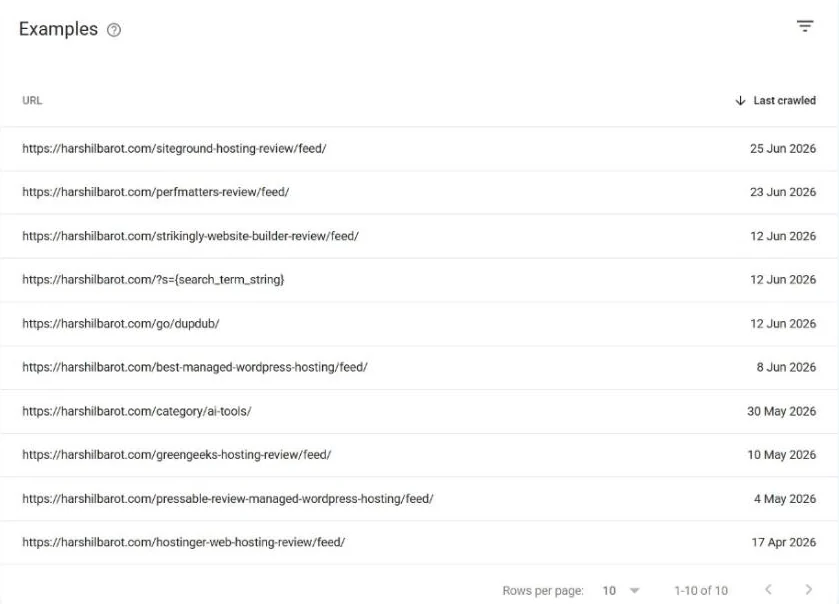
Sorted by type, the list looks like this:
| Type | Count | Should it be indexed? |
|---|---|---|
Comment feeds, such as /siteground-hosting-review/feed/ | 7 | No. They are RSS files of a post’s comments. |
Search template /?s={search_term_string} | 1 | No. It is a placeholder from the site’s schema, not a real search. |
Affiliate redirect /go/dupdub/ | 1 | No. It is a 301 redirect to another site. |
Category archive /category/ai-tools/ | 1 | Yes, if it gives readers a useful hub. |
Not one of the 10 is an article. I also checked where each URL comes from, using logged-out requests on 17 November 2026:
- The feeds are linked from the
<head>of every post: WordPress adds a “Comments Feed” link to each one. The feed returns 200 and an RSS file, which has no reason to be in search results. - The search URL is the template from the home page’s WebSite schema (a SearchAction with
?s={search_term_string}). Google appears to have picked up that template as a URL. The search page sendsnoindex, but because robots.txt blocks/*?s=, Google can’t crawl it to see that tag. - The /go/ link is an affiliate redirect. It returns a 301 with an
X-Robots-Tag: noindex, nofollowheader. - The category page returns 200, is set to index, has a self canonical and lists 9 posts. It is the only URL here that could earn a place in the index.
Disallow: /*/feed/$) and search URLs (Disallow: /*?s=). I don’t know when those rules were added; they were already there on 25 October 2026. The “Last crawled” dates for those URLs are all between April and June 2026. Google’s help does not say whether a blocked URL stays under this reason or moves to another one, so I won’t guess. A block only stops crawling; robots.txt “is not a mechanism for keeping a web page out of Google”. Either way these entries are harmless: Google says non-indexed URLs “can be fine”.The lesson: before you fix anything, read the list. A count of 10 sounds like 10 problems. Here it was one page worth a look.
Step 1: Decide Which URLs Should Be Indexed
Open the reason in the Page indexing report and go through the Examples table. The report shows up to 1,000 examples. For each URL ask one question: would a searcher be glad to land on this page?
- No (feeds, internal search,
?replytocomcomment links, redirects, attachment pages, thin tag archives): leave them. Stop linking to them if you can. Addnoindexonly if they are pages people could open, and remember noindex only works if robots.txt does not block the URL. - Yes (posts, product or service pages, useful category hubs): continue with the steps below.
- Old URL that moved: redirect it with a 301 to its new address.
Step 2: Inspect the URL
Paste the URL into the URL Inspection box at the top of Search Console. The first result is Google’s indexed record, “not the live version on the web.” Look at Last crawl, Crawl allowed?, Page fetch and the canonical fields. Then click Test live URL to fetch the page as it is today.
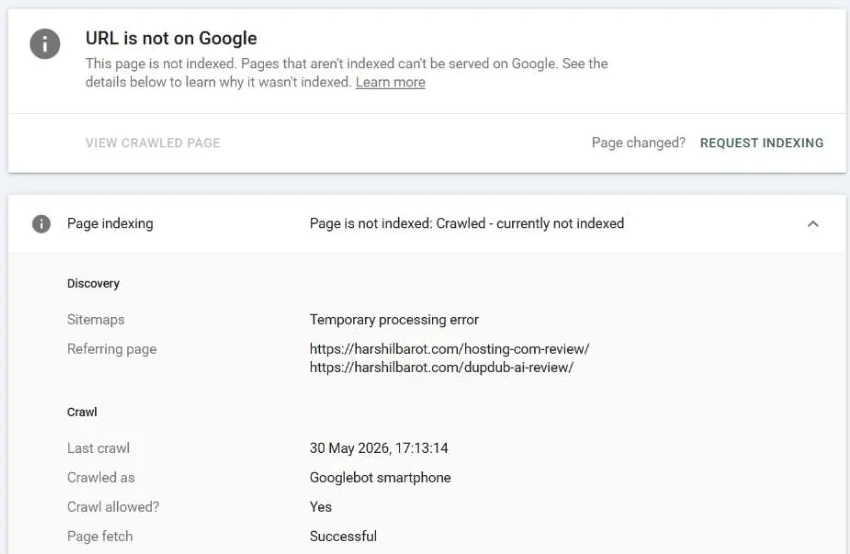
For this site’s /category/ai-tools/, the indexed record says “Crawled – currently not indexed”, last crawl 30 May 2026, crawl allowed: Yes, page fetch: Successful. The live test on 17 November 2026 said “URL is available to Google” and “Page can be indexed”. So the live test found nothing blocking it. The live test doesn’t check everything: Google says “duplicate or canonical conditions are not tested in the live test.” The record’s Sitemaps line also reads “Temporary processing error”, even though the page is listed in the sitemap; the Google help I read does not explain that line, so I am not reading anything into it. Google last crawled the page more than five months ago. When the live test passes like this, the remaining work is about the page itself and the links to it.
noindex tag, a robots.txt block, a redirect chain (redirect loops), server errors (500 errors) or a page that only loads after a login. Google’s technical requirements are simple: Googlebot isn’t blocked, the page returns HTTP 200, and it has indexable content.Step 3: Make the Page Clearly Worth Indexing
Google’s own list of common indexing issues starts with “the quality of the content on page is low”. It also checks during indexing whether a page is a duplicate of another one. Meeting the technical rules “doesn’t mean that a page will be indexed”. So look at the page as a reader would:
- Is it a near copy? If two of your pages answer the same question, merge them and redirect the weaker one, or set a canonical. Google treats your canonical as “a hint, not a rule”.
- Does it add something? Google’s helpful-content questions include: “Does the content provide original information, reporting, research, or analysis?” It also lists “mainly summarizing what others have to say without adding much value” as a warning sign.
- Is it thin? A category page that is only a heading and a list of posts says little on its own. A short introduction that explains what the section covers and points to the best starting post makes it more useful to readers. Google does not say this will get a category page indexed, so treat it as an improvement, not a guaranteed fix.
- Is it complete when it loads? If key content appears only after scripts or a click, check the live test’s rendered HTML (View tested page) to see what Google received.
Google’s people-first guidance is written about ranking, not indexing, so treat it as a sound guide for improving the page rather than a published rule for what gets indexed.
Step 4: Link to It and List It
Google finds and weighs pages through links. Its link guidelines say: “Every page you care about should have a link from at least one other page on your site.” Add a natural, descriptive link from two or three related posts that are already indexed. Use a normal <a href> link; Google can generally only follow those. For this site’s category page, URL Inspection lists two referring pages Google knows about (/hosting-com-review/ and /dupdub-ai-review/); links from a few more AI tool posts would be the natural next step.
Make sure the page is in your XML sitemap too (see how to submit a sitemap to Google Search Console). On this site the category page is listed in category-sitemap.xml. A sitemap helps discovery but, in Google’s words, “doesn’t guarantee” crawling or indexing. If your sitemap is not being read, my Rank Math sitemap troubleshooting guide covers the fixes.
Step 5: Request Indexing Once
After a real change, go back to URL Inspection, run the live test and click Request indexing. Google’s URL Inspection help and its “Ask Google to recrawl your URLs” page are clear about what this does and does not do:
- “Submitting a request does not guarantee that the page will appear in the Google Index.”
- Indexing “typically takes only a day or so” but “can take up to a week or two”.
- “Requesting a recrawl multiple times for the same URL won’t get it crawled any faster.”
- There is “a daily limit” on requests. Google does not publish the number, so ignore figures you see quoted.
As of 17 November 2026 I have not requested indexing for this site’s /category/ai-tools/; the page should be improved first.
Bing and some other engines also accept IndexNow submissions; on WordPress, Rank Math Instant Indexing can send them while the module is on (it is on by default in a fresh install). Google does not appear in IndexNow’s list of participating search engines, and Google’s Search Central documentation does not describe using IndexNow, so it does not replace this step for Google.
Should You Click Validate Fix?
The reason’s detail page has a Validate fix button. Google says validation rechecks “only URLs with known instances of this issue”, “typically takes up to about two weeks”, and stops “when Google finds a single remaining instance”.
Google describes it as a way “to let Google know that you’ve fixed the issue.” That fits issues you fix on the site, such as a 404 or a stray noindex. Here the source is Google systems, and Google does not document whether validation speeds up indexing for this status. On this site the list also holds seven feeds and a search URL that are meant to stay out of the index, and validation stops “when Google finds a single remaining instance”. I would use URL Inspection for the few pages that matter instead.
Mistakes to Avoid
- Blocking pages in robots.txt to “clean up” the report. robots.txt “is not a mechanism for keeping a web page out of Google”, and a blocked page can’t show Google a noindex tag.
- Deleting good pages to improve a ratio. Google says not to expect every URL to be indexed and that totals won’t match your own URL count. In the 16 July 2026 Search Off the Record episode on the indexing report, Google’s show notes say there is “no magic metric for indexed vs. non-indexed pages”.
- Requesting indexing every day. It does not speed anything up and uses your quota.
- Changing the date without changing the page. In my view, a fresh date on the same content gives Google nothing new to judge.
- Ignoring speed when many pages wait to be crawled. If many good pages sit in Discovered – currently not indexed, check slow server response too. Google says it reschedules those crawls when crawling “was expected to overload the site”.
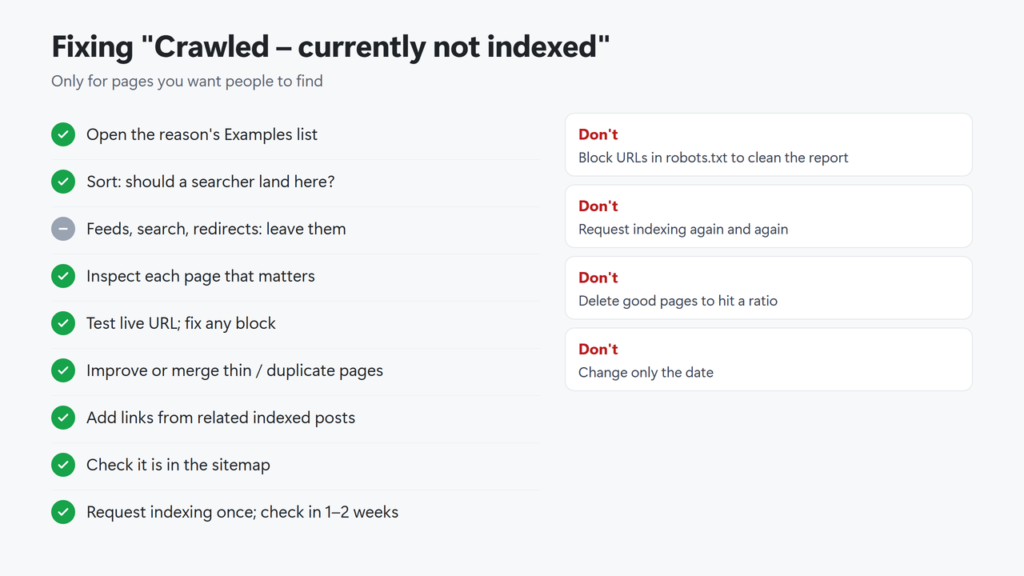
Checklist in text: open the example list; sort each URL (should it be indexed?); leave feeds, search and redirects; inspect the pages that matter; run the live test and fix any block; improve or merge thin or duplicate pages; add internal links from related indexed posts; confirm the page is in the sitemap; request indexing once; check back in one to two weeks.
What does crawled currently not indexed mean?
Google crawled the page but decided not to index it for now, so it can’t appear in search results. Google says it is a common message and doesn’t necessarily mean something needs fixing.
Is crawled currently not indexed bad?
Not by itself. Google does not index every URL. It matters only for pages you want people to find. Check the example list first. On this site, 9 of the 10 entries were feeds, a search template or a redirect.
How long does it take Google to index a page after I fix it?
Google’s URL Inspection help says indexing typically takes a day or so and can take up to a week or two after a request. Validation in the Page indexing report typically takes up to about two weeks.
What is the difference between discovered and crawled currently not indexed?
Discovered means Google knows the URL but has not crawled it yet. Crawled means Google fetched the page and chose not to index it.
Should I use robots.txt to remove these URLs from the report?
No. robots.txt stops crawling, not indexing, and a blocked page can’t show Google its noindex tag. Leave URLs that shouldn’t be indexed as they are, or use noindex on pages people can open.
Why does Search Console still show URLs I already fixed?
The report reflects Google’s last crawl, and Google’s help notes that you might have fixed the error after the URL was last crawled. Run a live test to confirm your fix. The report changes only after Google crawls the URL again, and for this status a recrawl still doesn’t guarantee indexing.

Affiliate disclosure: some links on this page are affiliate links, so I may earn a commission if you buy, at no extra cost to you.