
To reduce TTFB in WordPress, first find out which layer answered the request: a CDN, your page cache, or PHP building the page from scratch. Then fix that layer. In most cases that means turning on page caching, letting a CDN serve logged-out visitors, removing redirect hops, and only then making the uncached path faster with a current PHP version and an object cache. On this site’s pages, a copy from the CDN arrived in about 16 ms, and about 560 ms when PHP had to build the page.
This guide shows how to measure TTFB, how to read the headers that tell you which layer answered, and the fixes in the order that saves the most time.
How I worked this out: this site runs WordPress 7.1.3 on Hostinger with the LiteSpeed web server, PHP 8.5 and LiteSpeed Cache 7.9.2 (read from Site Health and the plugin list on 26 October 2026), with Hostinger CDN in front (seen in its response headers). That day I timed 20 logged-out requests to two of its pages from Chrome on my PC in India, ran PageSpeed Insights, and checked the redirects. The method is described below, and it is one session from one place, so treat the numbers as a worked example, not a benchmark. Definitions and thresholds come from Google’s web.dev and Chrome documentation, LiteSpeed’s documentation and Hostinger’s help pages, checked on 26 October 2026.
Key takeaways
- TTFB is the time from starting a page request to the first byte of the reply. Google calls 0.8 seconds or less good and over 1.8 seconds poor.
- TTFB includes redirects, DNS, the connection and the server’s wait, so a fast server can still have a slow TTFB.
- Check the cache headers first. A CDN HIT, a page cache hit and a full miss can differ by hundreds of milliseconds on the same page.
- Fix the cached path before the uncached one: page cache, then CDN, then redirects, then PHP and the database.
- TTFB is not a Core Web Vital. It matters because it comes before First Contentful Paint and Largest Contentful Paint.
Table of Contents
- 1What TTFB Measures (and What Counts as Good)
- 2How to Measure Your TTFB
- PageSpeed Insights
- Chrome DevTools
- curl from a terminal
- 3Find the Slow Layer: Read the Cache Headers
- What the layers cost on this site
- 4How to Reduce TTFB in WordPress, Step by Step
- 1. Make sure the page cache is working
- 2. Put a CDN in front, and check what it caches
- 3. Remove redirect hops
- 4. Speed up the uncached path
- 5. Warm the cache after a purge
- 6. Consider better hosting last
- 5Troubleshooting: TTFB Is Still High
- 6Frequently Asked Questions
- What is a good TTFB for a WordPress site?
- Is TTFB a Core Web Vital?
- Why is my TTFB high only when I am logged in?
- Does a CDN reduce TTFB in WordPress?
- Which plugin reduces TTFB?
- Why does my TTFB change every time I test?
What TTFB Measures (and What Counts as Good)
Time to First Byte is the time between the browser starting to load a page and the first byte of the server’s response arriving. Google’s web.dev article on TTFB lists what it adds up: redirect time, service worker start-up, the DNS lookup, the connection and TLS set-up, and the request until the first byte arrives. So TTFB is not only “server speed”. A visitor far from your server, or a chain of redirects, adds to it even when WordPress is fast.
| Source | Good | Needs work / fails |
|---|---|---|
| web.dev and PageSpeed Insights field data | 0.8 s or less | Over 0.8 s needs improvement; over 1.8 s is poor |
| Lighthouse (Document request latency) | 600 ms or less | Flagged when the server takes more than 600 ms |
The two numbers measure different things. The 0.8-second field figure covers the whole navigation for real visitors, measured at the 75th percentile. The 600 ms Lighthouse figure is only how long the server took to answer the main document in a lab test. web.dev calls 0.8 seconds a rough guide: TTFB is not a Core Web Vital, but a slow one makes a good Largest Contentful Paint harder to reach.
How to Measure Your TTFB
PageSpeed Insights
Run your URL in PageSpeed Insights. At the top, real-user data shows TTFB as an experimental metric when Google has enough Chrome data for your page. Small sites often see No Data there, which is what this site’s guide page showed on 26 October. Further down, open Document request latency in the Performance section (on a passing page it sits under Passed audits). It reports redirects, the server response time and text compression. For this site’s LiteSpeed guide it said “Server responds quickly (observed 477 ms)”.
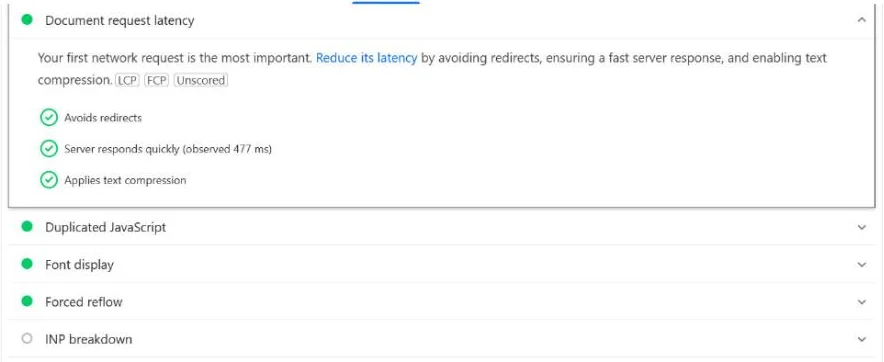
One lab run is one sample from Google’s test machine. PSI does not show which cache layer answered it, so use the header check below to see that.
Chrome DevTools
Open DevTools, go to the Network tab, reload, click the first request (the page itself) and open Timing. The Waiting (TTFB) bar is the wait for the first byte of that request. Test in a private window or while logged out. Logged-in pages are not served from the public page cache or a CDN copy (LiteSpeed Cache can keep a private copy per user), so your numbers can differ from what visitors get.
curl from a terminal
curl -s -o /dev/null -w "dns %{time_namelookup} connect %{time_connect} tls %{time_appconnect} ttfb %{time_starttransfer}\n" https://example.com/On Windows PowerShell 5.1, type curl.exe (plain curl runs a different command there) and use -o NUL instead of -o /dev/null. All curl times count from the start, so time_starttransfer includes DNS, the connection and TLS. Run it several times; the first run is often slower. One caution from this test: this site’s protection returned 403 Forbidden to my command-line GET requests that day, while the browser got 200. If curl gets a 403, measure in the browser instead of trying to get around the block.
Find the Slow Layer: Read the Cache Headers
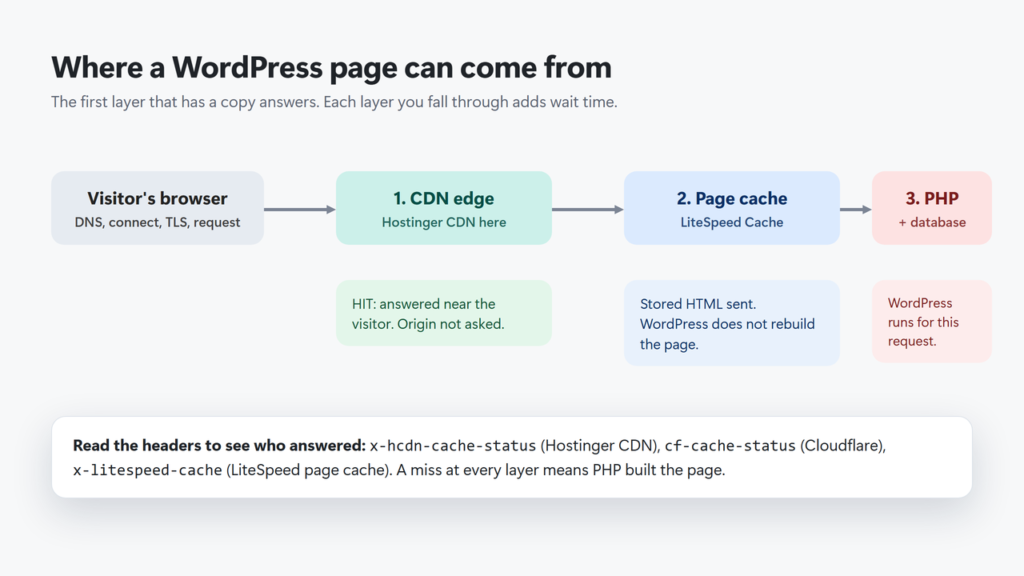
A WordPress page can come from three places. The first one that has a copy answers, and every layer the request falls through adds time:
| Header | Layer | What to look for |
|---|---|---|
x-hcdn-cache-status | Hostinger CDN | HIT = served by the CDN; MISS = fetched from your server |
cf-cache-status | Cloudflare | HIT = served by Cloudflare; DYNAMIC = not eligible for cache (normal for HTML unless you add a cache rule) |
x-litespeed-cache | LiteSpeed page cache | hit = stored page sent; miss = WordPress built the page this time |
To see them, open DevTools → Network, click the page request and read Response Headers, logged out. Load the page twice: the first visit after a purge is often a miss everywhere.
What the layers cost on this site
I timed two pages, the home page and the LiteSpeed guide, five times each in two ways. Each was a fetch() request from an open Chrome tab with cookies left out (so it counted as logged out), not a full page load. Normal requests could be served from cache. For the other five, I added a new, unique query string each time, so neither the CDN nor LiteSpeed had a copy and PHP had to build the page. (A separate check confirmed that: the same new query string went miss, then hit, then hit.) TTFB here is the browser’s request-to-first-byte time, without DNS or connection set-up.
| Who answered | Requests | TTFB on this site |
|---|---|---|
| CDN HIT (edge copy) | 8 | 12–27 ms, plus one 196 ms outlier |
| CDN MISS, LiteSpeed hit | 2 | 281 ms and 450 ms |
| CDN MISS, LiteSpeed miss (PHP built the page) | 10 | 469–678 ms, median 563 ms |
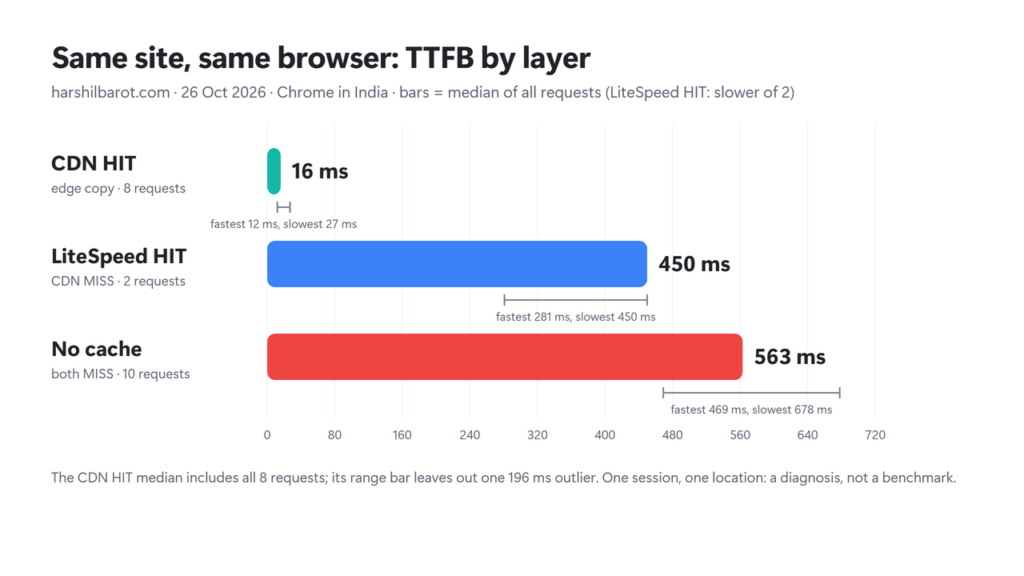
Two things stand out. First, every request that reached the server took a few hundred milliseconds, even with LiteSpeed’s cached copy. The CDN’s own header (x-hcdn-upstream-rt) showed it waited 0.26–0.30 seconds for the server on those two requests; my test did not split that into network time and server time. Second, with no cache, 8 of the 10 requests stayed under Lighthouse’s 600 ms line and 2 went over it (640 and 678 ms). So on this site the biggest win is how often visitors get a cached copy, not raw PHP speed. Your numbers will differ with your host, theme, plugins and how far your visitors are from the server.
How to Reduce TTFB in WordPress, Step by Step
1. Make sure the page cache is working
A page cache stores the finished HTML, so the next visitor gets it without WordPress rebuilding the page. LiteSpeed’s documentation puts it this way: once a page is cached, “the web app does not need to regenerate the page”. On a LiteSpeed server, use LiteSpeed Cache; on other servers, use a caching plugin or your host’s cache. Then check the header: load a page twice while logged out and look for x-litespeed-cache: hit on the second load. If it always says miss, my guide to x-litespeed-cache: miss walks through the causes, and my LiteSpeed Cache settings guide covers the settings this site uses.
2. Put a CDN in front, and check what it caches
web.dev calls a CDN a high priority for TTFB if you do not already use one, because edge servers sit closer to visitors. The catch is that many CDNs cache images, CSS and JavaScript but not HTML by default. Cloudflare’s documentation says it does not cache HTML by default; you need a cache rule or its paid Automatic Platform Optimization for WordPress. Hostinger’s documentation says PHP pages are never CDN-cached, yet on this site the HTML came back with x-hcdn-cache-status: HIT on repeat requests. Do not rely on the documentation either way: read the header on your own pages. My Hostinger CDN vs Cloudflare guide compares the two for sites on Hostinger.
3. Remove redirect hops
Every redirect is a full extra request before the real page starts. Make sure your internal links, menus and canonical tags use the final address (https, with or without www as your site uses). On this site, http://harshilbarot.com/ reaches the page in one redirect, but http://www.harshilbarot.com/ takes two (first to https://www, then to the address without www). Most visitors never type that address, but links that use it pay for both hops. web.dev suggests fixing same-origin redirects first, because you control them.
4. Speed up the uncached path
Some requests reach PHP anyway: the dashboard, pages excluded from the cache (such as carts), the first visit after a purge, and logged-in pages that have no cached copy yet. To make those faster:
- Use a current PHP version. WordPress.org recommends PHP 8.3 or greater. On Hostinger, change it under Websites → Dashboard → PHP Configuration. Hostinger says the change applies to every website on the plan, and you can only go back to the older version during the same login session, so test the site straight after switching.
- Turn on an object cache if your host offers Memcached or Redis. It keeps database results in memory, which helps the requests that miss the page cache. This site uses Memcached through LiteSpeed Cache; if the test fails, see my object cache troubleshooting guide.
- Check for OPcache. The PHP manual says it stores precompiled code in memory so PHP does not parse scripts on each request. Ask your host whether it is on, or check your PHP settings in the hosting panel.
- Remove heavy or unused plugins, and test whether one slow plugin is to blame by timing an uncached request before and after deactivating it on a staging copy.
5. Warm the cache after a purge
After you purge, the next visitor to each page pays the full uncached cost. LiteSpeed Cache has a crawler that refreshes expired pages, but its documentation says it must be enabled at the server level, and Hostinger’s tutorial says the crawler is only available on its cloud plans. If yours is off, open your most important pages yourself, logged out, after a purge. With a CDN, that only warms the CDN location nearest to you. Purge only what changed; my how to purge LiteSpeed Cache explains the options.
6. Consider better hosting last
web.dev says hosting should be the first thing you consider, and if your host is clearly overloaded, start there. I put it last because the cache steps above are free, and on this site the gap between cached and uncached requests was the biggest one I measured. If uncached TTFB is still slow after them, the server may be overloaded or too far from your visitors. Moving up a plan or choosing a data centre near your audience is the fix then. My Hostinger review covers the plan this site runs on, and if you are choosing a caching plugin on another host, my WordPress speed plugins compared can help.
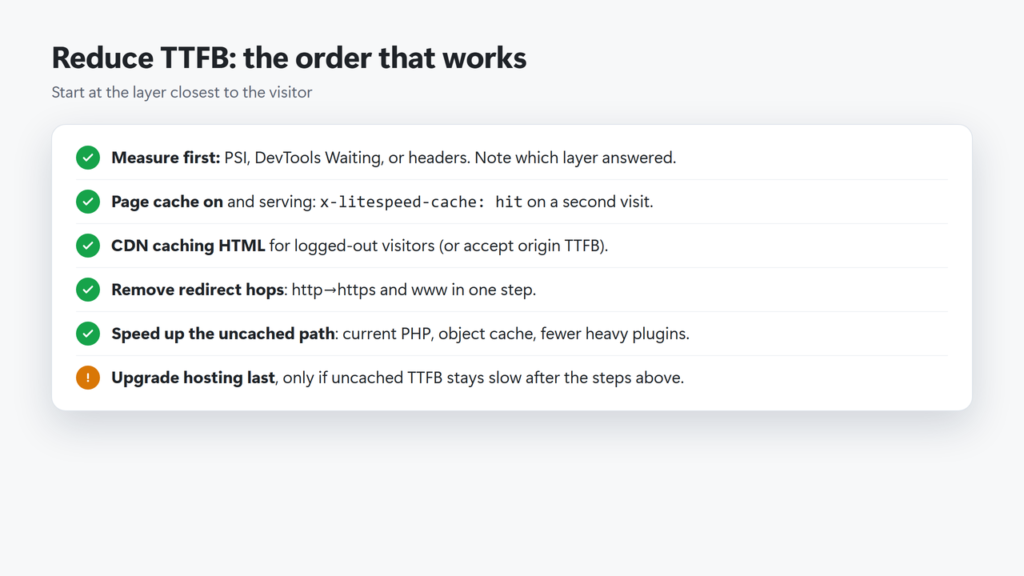
The checklist in text: measure first and note which layer answered; confirm x-litespeed-cache: hit (or your cache’s equivalent) on a second visit; make sure the CDN caches HTML for logged-out visitors or accept the trip to your server; remove redirect hops; speed up the uncached path with current PHP, an object cache and fewer heavy plugins; upgrade hosting only if uncached TTFB stays slow.
Troubleshooting: TTFB Is Still High
| What you see | Likely cause | What to do |
|---|---|---|
| Slow in PSI, fast for you | PSI may have hit a cold cache or a far-away edge (PSI does not show its headers) | Run it again; check your own headers after a purge |
| Always slow, header says miss | Page cache off or bypassed | Check exclusions, cookies, logged-in state |
| Fast cached, very slow uncached | Slow PHP, plugin or database | PHP version, object cache, plugin test |
| Slow only for far-away visitors | Distance to the server | CDN that caches HTML, or a closer server |
| Slow on links with ?utm_ or other tags | Each new query string is a new cache entry | LiteSpeed’s Drop Query String (LiteSpeed Enterprise 5.2.3+; OpenLiteSpeed needs .htaccess rules). It does not stop a CDN missing on new query strings |
| Extra time before the page starts | Redirect chain | Link to the final URL; fix http/www rules |
Remember that logged-in testing is misleading for all of these. Check logged out, and load each page twice before you judge the cache.
Frequently Asked Questions
What is a good TTFB for a WordPress site?
Google’s web.dev calls 0.8 seconds or less good and over 1.8 seconds poor for real visitors. Lighthouse flags a server response over 600 ms. A cached page served from a CDN can be far faster than either.
Is TTFB a Core Web Vital?
No. The Core Web Vitals are LCP, INP and CLS. TTFB matters because it happens before the page can start to paint, so a slow TTFB makes a good LCP harder.
Why is my TTFB high only when I am logged in?
Logged-in pages are not served from the public page cache or a CDN copy. LiteSpeed Cache can keep a private copy per user, but the first view still runs PHP. Test in a private window or logged out to see what visitors get.
Does a CDN reduce TTFB in WordPress?
Only for what it caches. If the CDN serves the HTML from an edge, TTFB drops a lot; if it only caches images and CSS, the page request still goes to your server. Check the CDN’s cache status header.
Which plugin reduces TTFB?
A page cache plugin that matches your server, such as LiteSpeed Cache on a LiteSpeed server. Plugins that only minify CSS or JavaScript do not make the first byte arrive sooner.
Why does my TTFB change every time I test?
Cache state, network distance and server load all vary. Run several tests, note the cache headers each time, and compare like with like.