
Writesonic helped me turn content ideas into usable outlines and first drafts much faster. My rating is 4.4/5: I recommend it for publishers and marketing teams that want AI writing alongside a more organized SEO workflow. Today, Writesonic also offers AI search visibility monitoring and GEO tools. The strongest benefit I personally found was faster planning, drafting and revision. The biggest drawback was the cleanup: generic phrasing, repetition and factual claims still needed my attention. It can justify its cost when you use it regularly, but occasional writers may pay for capabilities they do not need.
This Writesonic review separates my hands-on content experience from features I assessed through current product documentation. I have not measured a ranking, traffic or AI citation increase attributable to Writesonic.
Disclosure: This review may contain affiliate links. If you purchase through an affiliate link, I may earn a commission at no additional cost to you. My opinions remain independent. Read my affiliate disclosure.
Table of Contents
- 1Writesonic Review: My Quick Verdict
- 2What Is Writesonic Today?
- 3How I Tested Writesonic
- 4Writesonic Dashboard and Ease of Use
- 5My Hands-On Writesonic Test
- Test 1: Creating an SEO Article
- Test 2: AI Search and GEO Visibility — Not Benchmarked
- Test 3: SEO and Site Audit — Documentation Assessment
- Test 4: Revising an Existing Content Workflow
- 6The Features That Matter in Practice
- AI Article Writer, Outlines and Editing
- SEO Content and Research
- AI Search Visibility and Prompt Tracking
- Sentiment and the Action Center
- Agentic Workflows and Integrations
- 7My Feature Scorecard
- 8Writesonic Pricing: How Much Does It Cost?
- Which Plan Would I Choose?
- 9Is Writesonic Worth the Money?
- 10Writesonic Pros and Cons
- What Worked Well for Me
- What Disappointed Me
- 11Writesonic vs Competitors
- 12Writesonic vs ChatGPT: Do You Need Both?
- 13Best Writesonic Alternatives
- 14Who Should Use Writesonic — and Who Should Skip It?
- 15Writesonic Review Verdict: Is It Worth It in 2026?
- 16Writesonic Review FAQs
- Is Writesonic Worth It?
- Is Writesonic Free?
- How Much Does Writesonic Cost?
- Is Writesonic Better Than ChatGPT?
- Is Writesonic Good for SEO?
- What Is Writesonic GEO?
- Is Writesonic Good for Bloggers?
- Does Writesonic Guarantee Plagiarism-Free Content?
- Can Writesonic Replace a Human Writer?
- Can Writesonic Guarantee AI Search Visibility?
Writesonic Review: My Quick Verdict
| Area | My verdict |
|---|---|
| Overall rating | 4.4/5, based on my hands-on content workflow |
| Best for | Regular publishers, SEO professionals and content teams |
| Not ideal for | Occasional writers or anyone expecting publish-ready content without editing |
| Starting price | $99 monthly; $79/month with annual billing |
| Free access | Trial advertised; verify its limits and billing terms before upgrading |
| Main strength | Fast outlines, drafts, rewriting and SEO-focused revision |
| Main weakness | Human editing and fact-checking remain necessary |
| Ease of use | I found the interface easy to use |
| SEO capabilities | Useful for content planning and optimization; not a ranking guarantee |
| GEO capabilities | Documented tracking and analysis; I did not benchmark visibility outcomes |
| Content quality | A strong starting point that benefits from original evidence and editing |
| Value | Better for a recurring publishing workflow than occasional generation |
| Recommendation | Try it against a real brief before committing to a subscription |
What Is Writesonic Today?
Writesonic is an AI content, SEO and AI search visibility platform. Its current positioning extends beyond generating articles: teams can investigate how their brands appear in selected AI answers and use content or optimization workflows to respond to gaps.
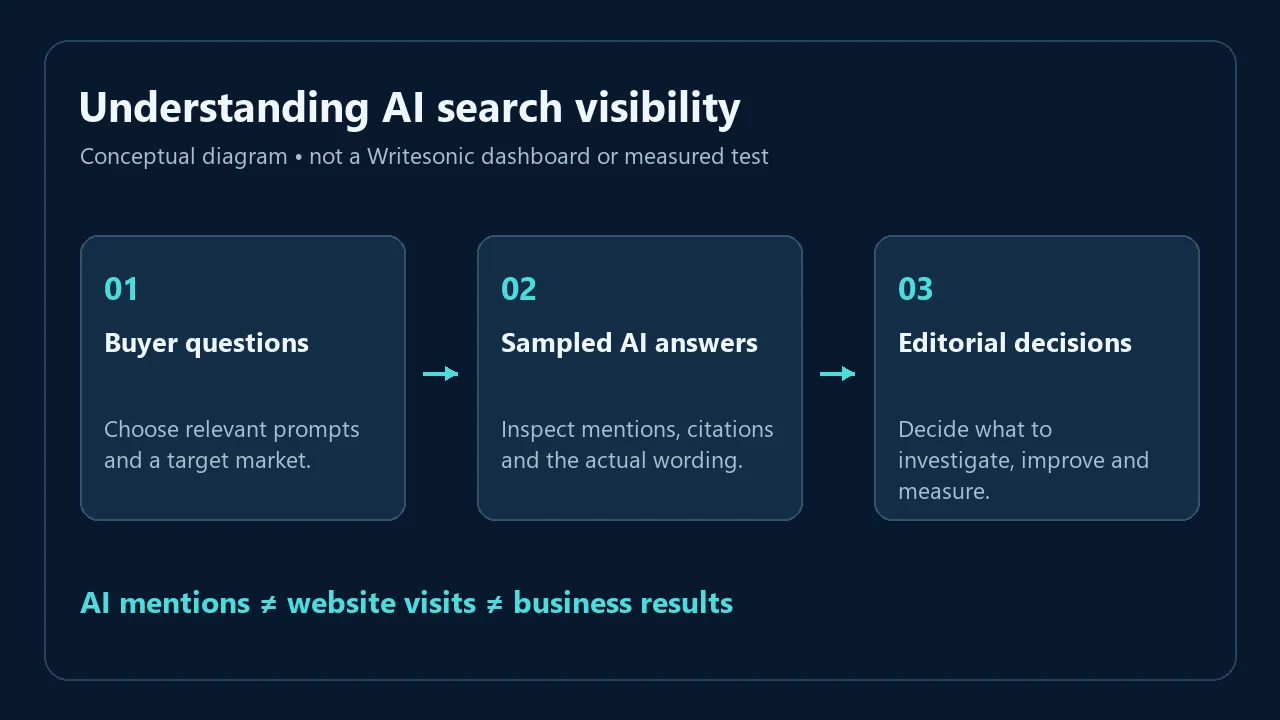
Those jobs are related, but they measure different things. An article can be clear and useful without receiving an AI citation. A brand can appear in an AI answer without a reader visiting its website. Google rankings, AI mentions, referral visits and sales should therefore be evaluated separately.
SEO means improving how a website can be discovered and understood through search. GEO, or generative engine optimization, focuses on how a brand and its information appear in answers generated by AI systems. Neither discipline becomes automatic because a tool assigns a score.
That distinction matters when choosing Writesonic. Someone buying a faster writing assistant has a different problem from a company monitoring competitors across AI answers. Ask which problem you actually have before paying for the combined platform.
How I Tested Writesonic
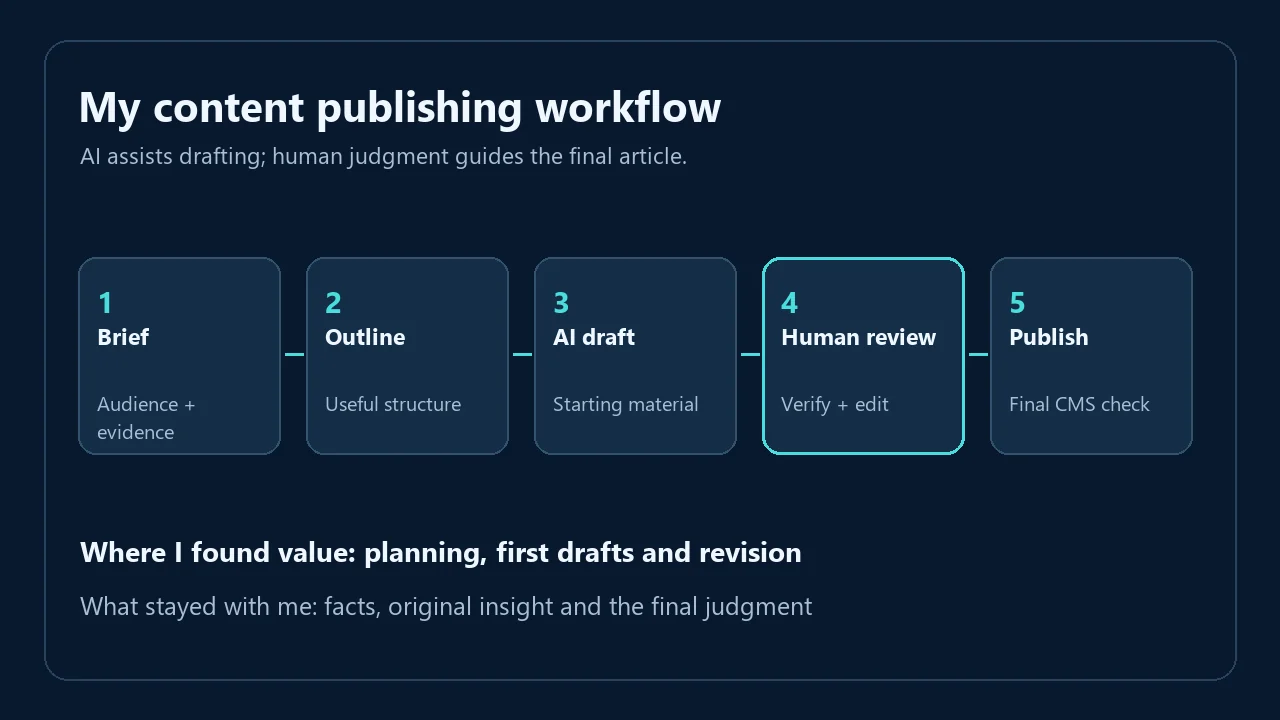
I personally used Writesonic for long-form blog writing, article outlines, rewriting, content expansion, SEO-focused content, titles, meta descriptions and improvements to existing drafts. I also explored its SEO and research features to judge whether they helped produce material I could realistically publish.
My assessment focused on five questions: Was the structure useful? Did the wording need extensive cleanup? Did the workflow help address search intent? Which factual claims needed verification? Did it make the overall process easier?
I found meaningful time savings in planning, drafting, FAQs and optimization. I did not run a timed productivity study, so I am not attaching a percentage or hours-saved claim to that experience. Likewise, my 4.4/5 rating is an overall editorial judgment, not a mathematical average of invented feature scores.
Testing boundary: The hands-on conclusions concern content creation and revision. AI visibility monitoring, sentiment reporting, automated audit fixes and agentic workflows below are assessed from documentation and current plan information. I have not independently tested their accuracy or measured their effect on my site. I also do not have a recorded testing date range or plan version to report.
You can read more about my work and approach on my about page.
Writesonic Dashboard and Ease of Use
I found Writesonic easy to use for writing tasks. Moving from an idea to an outline, then revising the draft, felt practical rather than intimidating. The rewriting and expansion tools were particularly helpful when I already knew what a paragraph needed to say.
An approachable interface does not remove the need for editorial judgment. You still need a clear audience, a useful angle and enough subject knowledge to reject weak output. A vague brief is likely to produce a broad article, even if the interface makes generation effortless.
The wider platform also introduces a different learning task: understanding projects, tracking prompts and visibility reports. That is more involved than producing a headline. I would assess the writing workflow and the monitoring workflow separately during a trial.

My Hands-On Writesonic Test
Test 1: Creating an SEO Article
Long-form writing and outlines were among the strongest parts of my experience. Writesonic helped me get past a blank page and organize a topic into sections that I could develop. That is valuable because deciding what an article should cover often takes more effort than drafting an individual paragraph.
The useful output was a starting structure, not a completed editorial decision. I still needed to assess whether the sections answered the reader’s question, whether a claim had evidence and whether the article offered something beyond familiar explanations.
Longer output sometimes repeated ideas or used filler. That can make an article look comprehensive while increasing the reader’s work. My editing priority was to remove repeated points and preserve sections that genuinely helped someone understand the subject or make a decision.
For a product review, I would supply my own observations, limitations and examples before expanding the draft. I would never ask an AI writer to invent a test. A review becomes useful through the evidence the reviewer contributes, not through its length.
Test 2: AI Search and GEO Visibility — Not Benchmarked
I explored SEO and research features, but I am not presenting a measured GEO experiment here. No before-and-after visibility percentage, competitor result or AI answer screenshot from my account is available to substantiate such a claim.
For anyone evaluating monitoring, my recommended trial would start with buyer questions that accurately describe the business. Check the target market, competitors and raw answers. Then keep that prompt set stable long enough to distinguish a pattern from an isolated change.
This is an evaluation method, not a result from my account. It would help answer whether Writesonic surfaces decisions your team can act on, rather than simply creating another dashboard to watch.
Test 3: SEO and Site Audit — Documentation Assessment
I cannot claim to have validated Writesonic’s audit recommendations or automatic fixes on my own site. The documented audit workflow is worth investigating, but a list of issues is only valuable if the recommendations are accurate and the implementation is safe.
A useful acceptance check would compare a recommendation with the page, the CMS field and the rendered result. For example, does a proposed title change describe the content better? Does it conflict with the existing SEO plugin? Does the correction persist in the underlying WordPress post?
Writesonic’s troubleshooting documentation says its site audit fixer applies changes to rendered pages through a script rather than storing those changes in the site’s backend database. That is an important implementation distinction. I would verify persistence and coordinate changes with my normal WordPress SEO workflow before relying on them.
For the CMS side of that decision, see my Rank Math review.
Test 4: Revising an Existing Content Workflow
Rewriting, expansion and improving existing drafts were useful in my testing. These tasks benefited from having an existing idea to work with. Writesonic could help express or develop that idea, while I retained control over the factual content and final tone.
Expansion required particular care. More text is useful when it supplies a missing explanation, qualification or example. It becomes a disadvantage when it repeats the same point with different wording. I treated the output as a set of suggestions rather than accepting every paragraph.
Titles, meta descriptions and FAQs also saved planning time. I still checked whether each title matched the article’s promise and whether each FAQ answered a real buying concern. Generating several options is helpful; publishing all of them is not.
The Features That Matter in Practice
AI Article Writer, Outlines and Editing
Writesonic’s documented article workflow offers guided planning and drafting controls. My firsthand experience with outlines and long-form content supports its usefulness as a writing assistant, although the current interface and allowances may differ from the version I used.
The main benefit for me was momentum: a structure and draft gave me something concrete to improve. The limitation was that fluent wording could still be generic. Publishers gain the most when they arrive with a strong brief, original information and an editing standard.
Rewriting and expansion added value when I could identify the weakness in an existing passage. Asking for a clearer explanation is more productive than asking the tool to make everything longer. I would judge success by whether the revision helps the reader, rather than whether the output sounds polished.
SEO Content and Research
Writesonic’s SEO-focused workflow felt more useful to me than a basic AI writer because it supported planning and optimization around the content. That does not mean every suggested term, heading or claim belonged in the final article.
I still verified facts, statistics and product claims manually. A generated reference or plausible statistic is a lead to investigate, not proof. When evidence is missing, I prefer a qualified statement or no claim at all.
Content optimization should also preserve the page’s purpose. Adding a term can improve clarity; adding every related phrase can make the page harder to read. If you are selecting a broader research tool as well, my Semrush and Ahrefs comparison covers that separate buying decision.
AI Search Visibility and Prompt Tracking
Writesonic’s documented monitoring tools track selected prompts and provide answers, mentions and citation information. Their practical purpose is to help a team inspect where its brand appears and where competitors appear instead.
A visibility percentage is a measure of the sampled answers being tracked. It should not be read as the percentage of all AI users who know your brand. Changing the questions, market or engine can change the measurement itself.
My recommendation is to inspect the underlying answers before deciding what to change. A missing mention in an irrelevant prompt may not matter. An inaccurate explanation of your service in a relevant buying question may deserve attention even if the overall score looks healthy.
The value of monitoring therefore depends partly on the team’s ability to select meaningful questions and respond to the findings. I have not verified Writesonic’s monitoring accuracy firsthand, so that remains a separate purchase test from its writing quality.
Sentiment and the Action Center
The documented sentiment view analyzes how brands are described in AI answers. Positive, neutral or negative wording can add context to a mention count. It is not a substitute for customer feedback or a complete measure of brand reputation.
The Action Center provides recommendations intended to help teams respond to visibility gaps. I would evaluate a suggested action by its relevance, evidence, implementation cost and expected benefit. A recommendation that sounds sensible is still a hypothesis until you assess it against your business.
I did not personally benchmark either feature. Teams considering them should test whether the reports lead to better editorial or marketing decisions, then verify what their chosen plan includes.
Agentic Workflows and Integrations
Agentic workflows can coordinate tasks across research, content and optimization. Their attraction is less manual coordination. Their risk is that errors can travel further when several steps are accepted together. My preference would be to retain human approval before publishing or changing important site content.
Writesonic documents Google Search Console and WordPress connections, among other integrations. Search Console supplies Google search performance data; it does not establish that a change in AI mentions caused a change in organic traffic.
The WordPress publishing documentation also describes updating existing posts. I would review the target post, publishing status and overwrite behavior before using that workflow. Exporting a draft for a final CMS check is a reasonable choice when preserving native blocks and metadata matters.
I did not test these integrations end to end. Confirm permissions and plan availability before building an operational process around them. For broader search research, my Semrush review addresses a different part of the workflow.
My Feature Scorecard
These are qualitative assessments. I have not assigned separate numerical scores to areas I did not benchmark.
| Area | Assessment | What supports it |
|---|---|---|
| Ease of use | Strong in my content testing | Approachable writing and revision interface |
| AI content | Useful starting point | Fast drafts and outlines; generic phrasing and repetition needed editing |
| SEO workflow | Useful | Helped with planning, titles, FAQs and optimization |
| Research accuracy | Needs verification | Facts, statistics and claims still required checking |
| GEO and AI visibility | Not personally benchmarked | Assessment based on documentation, not account results |
| Content workflow | Strong with an editor | Good assistance across drafting and revision |
| Integrations and audit fixes | Not personally benchmarked | Implementation needs an acceptance check |
| Value | Depends on recurring use | Stronger case for frequent work than occasional writing |
Writesonic Pricing: How Much Does It Cost?
Pricing last checked: October 2026 (8 October). Prices are USD and may change. Annual equivalents require annual billing; they are not monthly installments.
| Plan | Monthly | Annual equivalent | Articles/month | Prompts / daily answers | Users / projects | Best fit |
|---|---|---|---|---|---|---|
| Starter | $99 | $79/month | 15 | 50 / 50 | 1 / 1 | One publisher |
| Basic | $249 | $199/month | 25 | 100 / 300 | 2 / 1 | Small team |
| Growth | $499 | $399/month | 50 | 200 / 600 | 3 / 2 | Larger workflow |
| Enterprise | Custom | Custom | Custom | Custom | Custom | Negotiated needs |
Annual totals are $948, $2,388 and $4,788 respectively. Self-service tiers track ChatGPT, Gemini and Google AI Overviews; Enterprise lists eight platforms. Growth includes sentiment and a limited Action Center trial; full Action Center access is Enterprise. Agent runs are limited on self-service plans. Starter, Basic and Growth list 10, 20 and 50 monthly audits, covering 100, 1,200 and 2,500 pages per audit.
The site advertises free trial access without a card to start. I did not verify checkout, trial duration or conversion terms. Check these before subscribing.
Which Plan Would I Choose?
Start with the least expensive plan that supports your real workload. A solo blogger should not upgrade simply because a higher tier is labeled popular. Identify the constraint first: article volume, people, projects, tracking coverage or an advanced feature.
For agencies, project limits deserve attention before article allowances. For brands buying GEO reporting, engine coverage and actionable reporting may matter more than draft volume. Confirm the specific capabilities in the account and checkout rather than relying on an older pricing tutorial.
Is Writesonic Worth the Money?
Writesonic is worth considering when it improves a recurring workflow enough to justify the subscription and the editing time that remains. In my experience, its strongest return was getting useful content work started quickly.
| Buyer | My recommendation |
|---|---|
| Solo blogger | Consider it for regular publishing; occasional writers should compare a simpler assistant |
| Professional SEO | Evaluate content workflow and monitoring separately against existing tools |
| Agency | Check projects, users and reporting requirements before committing |
| Content team | Stronger case when several recurring tasks benefit from one workflow |
| Brand investing in GEO | Test prompt relevance, raw answers and useful actions, not just the dashboard score |
| Beginner | Learn briefing and editing first; software cannot supply missing subject expertise |
One useful buying exercise is to compare the cost of your current process with the proposed process. Include review time, tool overlap and unused capacity. If Writesonic creates drafts faster but requires the same final editing, the saving is real but narrower than an automated-publishing claim.
As an illustration, a hypothetical $99 subscription would need to save about 3.3 hours at a value of $30 per hour to cover its fee. That is arithmetic, not a measured result or an earnings promise. Your actual value depends on your work and whether those saved hours are useful.
Writesonic Pros and Cons
What Worked Well for Me
- Fast ideation and first drafts made it easier to begin an article.
- Blog outlines and long-form structure provided a useful foundation.
- Rewriting, expansion and editing tools helped improve existing material.
- SEO-focused work felt more organized than using a basic text generator.
- The interface was easy to use for my writing tasks.
- Titles, FAQs and optimization benefited from having several options to evaluate.
What Disappointed Me
- Some output sounded generic or obviously AI-written without editing.
- Longer articles could repeat ideas and add unnecessary filler.
- Facts, statistics and claims still required manual verification.
- The broader platform can be expensive when you only need writing assistance.
- Original insights, examples and human expertise still determine the quality of the finished page.
- Advanced capabilities need separate evaluation; my writing results do not prove their effectiveness.
Writesonic vs Competitors
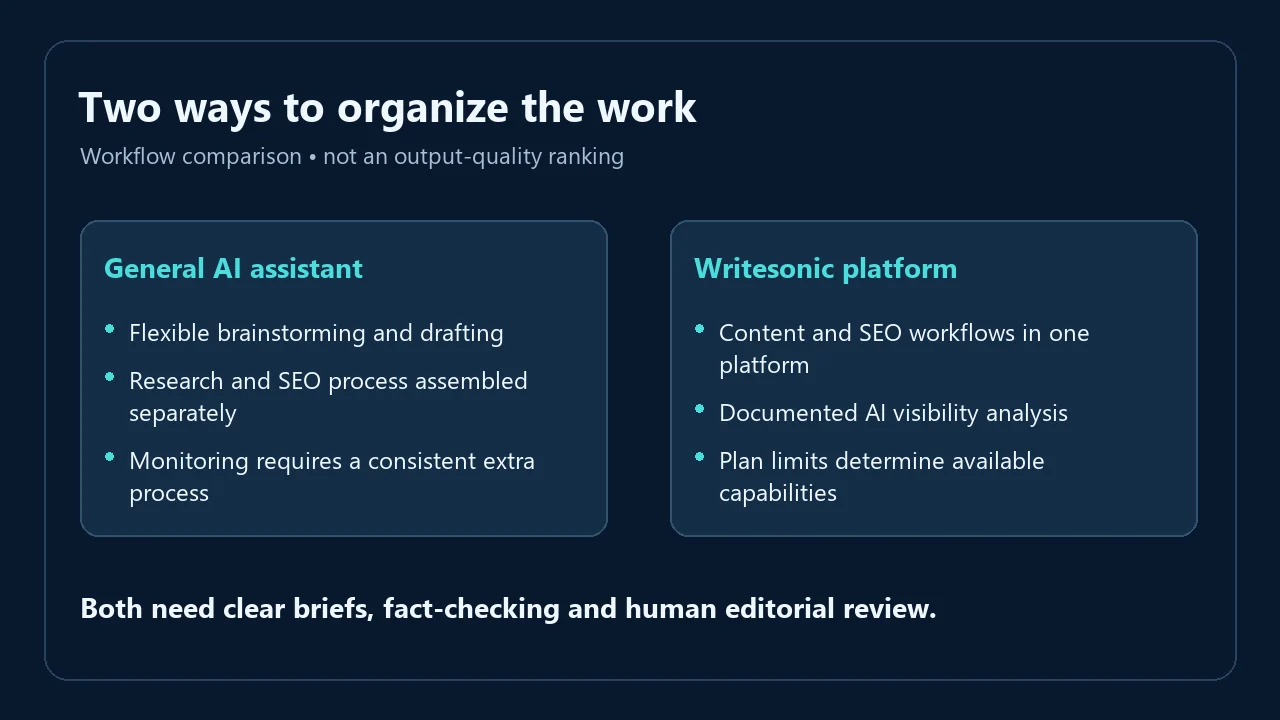
This is a comparison of current product focus, not a controlled output-quality contest. I have not tested all six tools against the same brief, and their plans bundle different capabilities.
| Tool | Current focus | Why compare it? | What to check |
|---|---|---|---|
| Writesonic | Content, SEO and AI visibility workflows | Integrated work around publishing and brand monitoring | Feature gates, projects and editing needs |
| ChatGPT | General-purpose AI assistance, writing and research | Flexible help across many tasks | Plan limits and the additional SEO/monitoring workflow you need |
| Surfer | Content optimization with AI search analytics offerings | A focused content optimization process | Which tier includes the monitoring coverage you want |
| Frase | Research, content, SEO/GEO optimization and monitoring | A competing connected publishing workflow | Site, article and engine limits |
| Jasper | Brand-oriented marketing content and agent workflows | Consistency across marketing production | Seats, brand controls and advanced workflow access |
| Scalenut | GEO content, AI visibility and optimization | Another combined content/visibility platform | Refresh frequency, workspaces and promotion terms |
Surfer, Frase, Jasper and Scalenut have evolved too. Comparing today’s Writesonic with an old description of those products would be misleading. Compare the exact plans you would purchase, using the same site count, engine coverage and content requirements.
Writesonic vs ChatGPT: Do You Need Both?
You do not automatically need both. ChatGPT may be enough if your main tasks are brainstorming, rewriting and drafting, and you are comfortable assembling your own research and publishing process.
The overlap is substantial: both can help turn a brief into text and refine wording. Writesonic’s buying argument is the surrounding specialized workflow and the monitoring capabilities you actually use. Generating a good paragraph alone does not establish that the larger subscription is worthwhile.
Conversely, asking ChatGPT a few buyer questions does not create an ongoing brand-monitoring program. You would still need a consistent prompt set, engines, markets, records and a way to compare changes. Those operational needs are separate from conversational writing assistance.
I would avoid keeping two paid subscriptions merely because they are popular. Map each recurring task to a tool. If both tools perform the same drafting job and neither adds a useful extra step, keep the one that fits your process better. My AI Fiesta review discusses another AI workspace option, while my Abacus AI review looks at a broader AI platform.
Best Writesonic Alternatives
- ChatGPT: Consider it for flexible writing and research assistance when you prefer to manage SEO and publishing separately. It is a different buying proposition from a dedicated visibility workflow.
- Surfer: Consider it when content optimization is the main job. Compare its content and AI search analytics options with the relevant Writesonic tier rather than assuming every plan provides the same coverage.
- Frase: Consider it for a connected research, content and optimization workflow. Its current platform also includes GEO and AI visibility capabilities, so inspect limits instead of treating it as an outline-only tool.
- Jasper: Consider it when brand consistency and marketing production matter most. Evaluate the controls your team needs and which tier supplies them.
- Scalenut: Consider it for combined GEO content and visibility work. Check its monitoring frequency, workspace allowance and whether an advertised rate is promotional.
Who Should Use Writesonic — and Who Should Skip It?
Writesonic makes the most sense for a publisher, SEO professional or marketing team with frequent content work and a clear editing process. It is also worth evaluating for brands that have a practical reason to monitor AI answers and a team ready to act on what they learn.
I would skip it if you publish rarely, have no time to verify output, or expect software to replace your expertise. I would also avoid a higher tier when the required capability has not been tested against a real business question. A bigger feature list is not a reason to create work you did not need.
Before connecting client accounts or submitting confidential material, review the current privacy terms, permissions and your organization’s requirements. I have not audited Writesonic’s security or data-handling practices, so I am not presenting a compliance recommendation.
Writesonic Review Verdict: Is It Worth It in 2026?
My 4.4/5 rating reflects a useful content assistant with clear editorial limits. Writesonic impressed me most with outlines, fast drafting and tools for improving existing content. It helped me work faster, but I still needed to contribute expertise, check facts and remove generic or repetitive text.
I recommend trying it with a real brief if you publish regularly or need a more organized content and SEO process. Assess the GEO suite separately if that is why you are buying. The best purchase is the plan that solves a recurring problem you can name and verify.
Writesonic Review FAQs
Is Writesonic Worth It?
Writesonic is worth considering for regular content work that benefits from faster planning, drafting and revision. My rating is 4.4/5 based on those tasks. Occasional writers should compare simpler assistants, and teams buying GEO features should test those capabilities separately rather than assuming my writing experience proves monitoring performance.
Is Writesonic Free?
Writesonic advertises free trial access, but that should not be confused with an unlimited permanent free plan. I have not verified the signup and checkout terms. Confirm the trial’s duration, usable features, limits and any later payment requirements before making a subscription decision.
How Much Does Writesonic Cost?
The current USD prices and annual commitments are shown in the pricing table above. Compare the full billing term, included workload and capabilities you need. An annual monthly equivalent is a way of expressing the yearly price; it does not mean you are billed that amount month by month.
Is Writesonic Better Than ChatGPT?
Writesonic may suit you better when its specialized content, SEO or visibility workflows solve a recurring problem. ChatGPT may be sufficient for flexible drafting and editing with a process you manage yourself. I have not run a controlled comparison that supports declaring either tool universally better at producing content.
Is Writesonic Good for SEO?
I found Writesonic useful for SEO-focused content planning, outlines, titles, FAQs and draft improvement. That assistance does not guarantee rankings. The finished page still needs accurate information, a useful angle, appropriate structure and a sound website. Treat optimization suggestions as editorial inputs rather than instructions to add every keyword.
What Is Writesonic GEO?
Writesonic’s GEO capabilities concern how brands and information appear in AI-generated answers. Documented tools include visibility monitoring, answer analysis and related recommendations. They can help identify questions to investigate, but a report is not a guarantee of citations, referral traffic or sales. I have not measured GEO outcomes from my account.
Is Writesonic Good for Bloggers?
Writesonic worked well for my outlines, long-form starting drafts, rewriting and expansion. Bloggers who publish regularly may get more value than someone generating an occasional post. You still need firsthand knowledge and editing. I would judge it using the kind of article you actually publish, including the cleanup needed afterward.
Does Writesonic Guarantee Plagiarism-Free Content?
I would not treat AI-generated content as an originality guarantee. Check important passages, quotations and references, and contribute your own evidence and explanation. I have not performed a comprehensive plagiarism benchmark of Writesonic. A polished draft still needs an editorial review before you publish it under your name.
Can Writesonic Replace a Human Writer?
Writesonic did not replace human judgment in my workflow. It helped with structure, drafting and revision, but I still needed to check claims, remove repetition and add original insights. For a page that makes recommendations or describes a real product test, the writer’s experience and responsibility remain essential.
Can Writesonic Guarantee AI Search Visibility?
No. Monitoring selected questions can show where a brand appears in sampled answers, but it does not ensure future mentions or citations. Useful evaluation requires relevant prompts, consistent measurement and inspection of the answers. Also keep AI mentions, website visits and business results separate when judging whether changes helped.