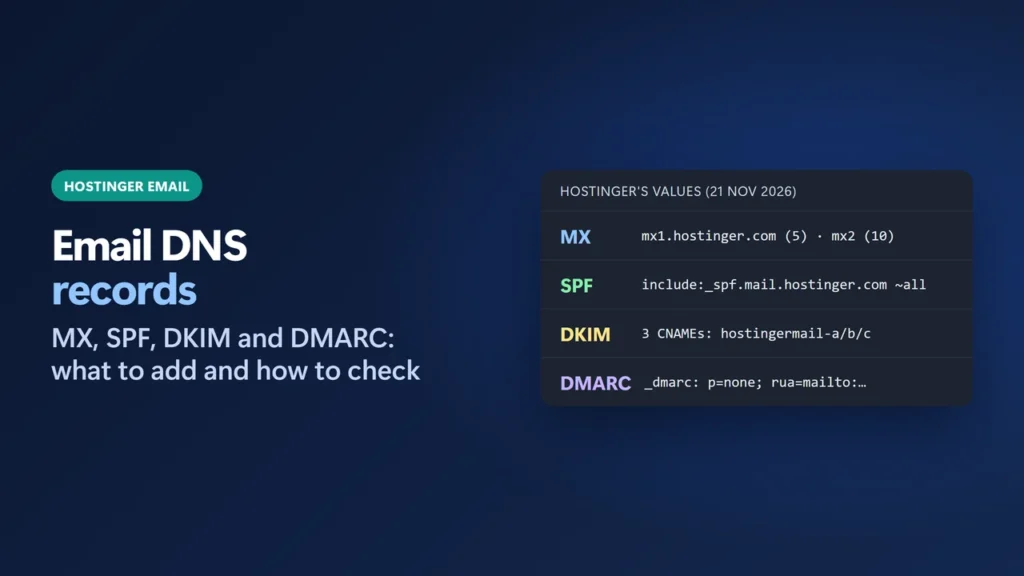
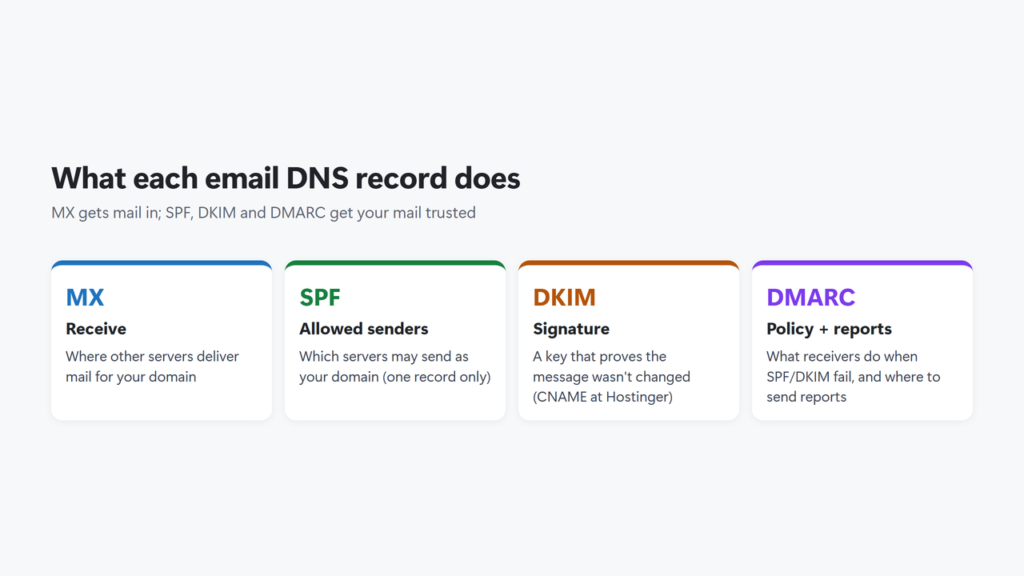
Hostinger email DNS records are four types of DNS record (seven records in all) that let your domain receive and send mail through Hostinger Email: two MX records (mx1.hostinger.com priority 5 and mx2.hostinger.com priority 10), one SPF TXT record (v=spf1 include:_spf.mail.hostinger.com ~all), three DKIM CNAME records (hostingermail-a, -b and -c), and one optional but highly recommended DMARC TXT record at _dmarc. If your domain uses Hostinger’s nameservers, hPanel can add the first three for you; DMARC you add yourself.
Below are the exact values, where to add them, and a real check of this site’s own records on 21 November 2026, which turned up one gap worth fixing.
Key takeaways
- MX receives mail, SPF and DKIM prove your mail is genuine, DMARC tells receivers what to do when checks fail.
- Keep one SPF record. A second one gives a “permerror” under RFC 7208, so SPF can’t pass.
- Add Hostinger’s DKIM as CNAME records, not TXT. Hostinger says TXT breaks signing.
- Gmail requires SPF or DKIM from every sender, and DMARC from bulk senders (5,000+ messages a day to personal Gmail accounts).
- Hostinger says DNS changes usually apply within a few hours and allows up to 24 hours.
Table of Contents
- 1The Hostinger Email DNS Records
- 2Option 1: Let hPanel Add Them (Hostinger Nameservers)
- 3Option 2: Add the Records by Hand
- 1. MX records
- 2. SPF record
- 3. DKIM records
- 4. DMARC record
- 4A Real Check: This Site’s Records
- 5How to Check Your Records
- 6What Gmail and Yahoo Require
- 7When to Tighten DMARC
- 8Mistakes to Avoid
- What are the MX records for Hostinger Email?
- What is Hostinger’s SPF record?
- Should Hostinger DKIM be a CNAME or a TXT record?
- Do I need a DMARC record for Hostinger Email?
- How long do Hostinger email DNS changes take?
- Can I use Hostinger Email if my domain is on Cloudflare?
The Hostinger Email DNS Records
| Type | Name / host | Value / points to | Priority / TTL | Job |
|---|---|---|---|---|
| MX | @ | mx1.hostinger.com | 5 | Receive mail |
| MX | @ | mx2.hostinger.com | 10 | Receive mail (backup) |
| TXT (SPF) | @ | v=spf1 include:_spf.mail.hostinger.com ~all | TTL 300 or default | Say which servers may send for you |
| CNAME (DKIM) | hostingermail-a._domainkey | hostingermail-a.dkim.mail.hostinger.com | TTL 300 | Sign outgoing mail |
| CNAME (DKIM) | hostingermail-b._domainkey | hostingermail-b.dkim.mail.hostinger.com | TTL 300 | Sign outgoing mail |
| CNAME (DKIM) | hostingermail-c._domainkey | hostingermail-c.dkim.mail.hostinger.com | TTL 300 | Sign outgoing mail |
| TXT (DMARC) | _dmarc | v=DMARC1; p=none; rua=mailto:dmarc@yourdomain.com | default | Policy and reports |
Check how your DNS editor wants names: some take the full name (hostingermail-a._domainkey.yourdomain.com), others only the part before your domain. If a lookup later shows yourdomain.com.yourdomain.com, the domain was typed twice. On TTL, see what TTL in DNS means.
Option 1: Let hPanel Add Them (Hostinger Nameservers)
- In hPanel, go to Emails, click Mailboxes next to your domain, then Domain settings in the left menu.
- Click Connect automatically, then Yes, proceed.
- Add the DMARC record yourself (Option 2, step 4). Hostinger’s page says automatic setup adds “the necessary MX, SPF, and DKIM records” and recommends adding DMARC manually.
- After a few hours, look at Domain settings again to confirm the records show as connected.
This only works if the domain uses Hostinger’s nameservers. If you’re not sure, look up your NS records, or see how to change nameservers at Hostinger.
Option 2: Add the Records by Hand
Use this when your domain’s nameservers point somewhere else, such as Cloudflare or your registrar. Add the records wherever your nameservers point, because that is where your live DNS zone is. Hostinger says to delete existing MX, SPF and DKIM records from an old email provider first, and warns that mixing MX records from two providers causes lost mail.
1. MX records
Add two MX records at @: mx1.hostinger.com with priority 5 and mx2.hostinger.com with priority 10. Remove any other MX records.
2. SPF record
Add or edit the TXT record at @ that starts with v=spf1:
v=spf1 include:_spf.mail.hostinger.com ~allIf you also send mail through another service (a newsletter tool or a CRM), don’t add a second SPF record. Add that service’s include: to this one, for example v=spf1 include:_spf.mail.hostinger.com include:other-service.example ~all. RFC 7208 says a domain “MUST NOT” have multiple SPF records, and limits SPF to 10 DNS-querying terms.
3. DKIM records
Add the three CNAME records from the table. Hostinger is explicit: “DKIM must be added as CNAME. If added as TXT or with a typo, signing fails”. Hostinger also offers a custom DKIM key (a TXT record) under Emails → Mailboxes → Custom DKIM, which it says can take up to 6 hours to verify. Other services that send as your domain (a newsletter tool, for example) give you their own DKIM records to add alongside Hostinger’s.
On Cloudflare: MX and TXT records are always DNS-only, but CNAMEs can be proxied. Cloudflare’s docs say only A, AAAA and CNAME records can be proxied; set the DKIM CNAMEs to DNS only so receivers reach Hostinger’s key. (Hostinger’s pages I checked don’t mention this setting; it follows from how Cloudflare proxying works. Background: Hostinger CDN vs Cloudflare.)
4. DMARC record
Add a TXT record with the name _dmarc and this value, using a mailbox you read:
v=DMARC1; p=none; rua=mailto:dmarc@yourdomain.comHostinger calls DMARC “not mandatory” for basic email but “highly recommended”. p=none asks receivers to take no action; rua asks receivers to send you daily aggregate reports, so you can see who sends mail as your domain before you tighten anything.
HOSTINGER
Domain and email in one place
- On Hostinger nameservers, Connect automatically adds the MX, SPF and DKIM records for you
- Domain settings checks all four records and has a Check status button
- DMARC is the one record you add yourself (steps above)
Affiliate link. Features from Hostinger’s help pages, checked 21 November 2026; check current plans and prices on Hostinger’s site.
A Real Check: This Site’s Records
On 21 November 2026 I looked up harshilbarot.com’s email records through Google’s (8.8.8.8) and Cloudflare’s (1.1.1.1) public resolvers with PowerShell’s Resolve-DnsName. Both returned the same answers:
| Record | What I found | Verdict |
|---|---|---|
| Nameservers | apollo / athena.dns-parking.com (zone SOA admin: dns.hostinger.com) | Hostinger DNS, so automatic setup is available |
| MX | mx1.hostinger.com (5), mx2.hostinger.com (10) | Correct |
| SPF | One record: v=spf1 include:_spf.mail.hostinger.com ~all | Correct; uses 3 of the 10 lookups |
| DKIM | All three CNAMEs present; only selector a returned a key | Present; b and c have no key (see note) |
| DMARC | v=DMARC1; p=none (no rua) | Valid, but sends no reports |
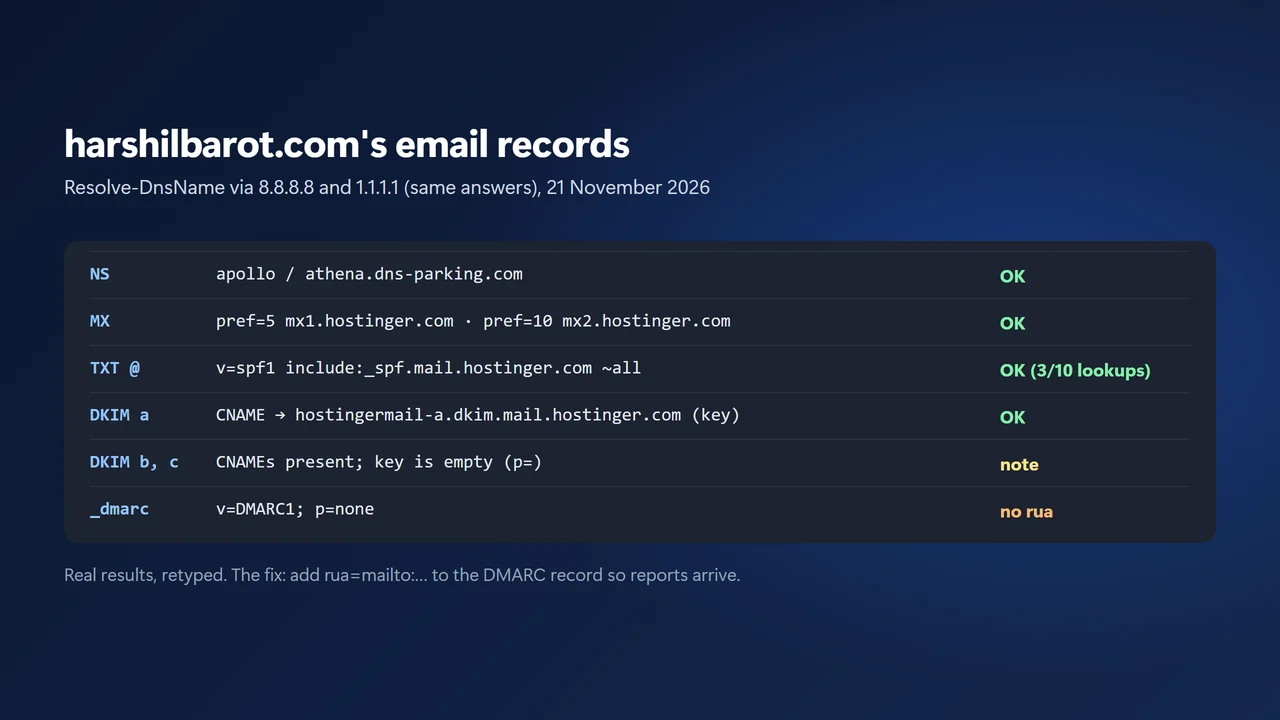
The DMARC record is the gap. Without rua, receivers have nowhere to send reports, so the record can’t tell me if anyone is spoofing the domain. Yahoo’s sender guidance calls a reporting address “strongly recommended” for bulk senders. Adding rua=mailto:... is a one-line change.
Two details I noticed but can’t fully explain from Hostinger’s docs. Hostinger’s SPF include itself pulls in relay.mail.hostinger.com and relay.mailchannels.net, so Hostinger’s SPF record also authorises MailChannels’ sending servers for your domain. Hostinger’s support pages don’t mention MailChannels, and DNS alone doesn’t show when or why it is used. And DKIM selectors b and c returned an empty key (p=), which RFC 6376 defines as a revoked key, while selector a returned a full key. Hostinger’s pages don’t say how it uses the three selectors, so I’d check a real message’s headers (look for s=hostingermail-a and dkim=pass) rather than guess.
How to Check Your Records
Run these in Windows PowerShell, replacing the domain:
Resolve-DnsName yourdomain.com -Type MX -Server 8.8.8.8
Resolve-DnsName yourdomain.com -Type TXT -Server 8.8.8.8
Resolve-DnsName _dmarc.yourdomain.com -Type TXT -Server 8.8.8.8
Resolve-DnsName hostingermail-a._domainkey.yourdomain.com -Type CNAME -Server 8.8.8.8
On macOS or Linux, the same checks with dig:
dig +short MX yourdomain.com @8.8.8.8
dig +short TXT yourdomain.com @8.8.8.8
dig +short TXT _dmarc.yourdomain.com @8.8.8.8
dig +short CNAME hostingermail-a._domainkey.yourdomain.com @8.8.8.8
Then send a test message to a Gmail address, open it, choose Show original, and check that SPF, DKIM and DMARC say PASS. hPanel’s Domain settings page also checks all four records. If a change doesn’t show yet, Hostinger says changes usually apply within a few hours and allows up to 24 hours (more on how long DNS propagation takes).
What Gmail and Yahoo Require
| Sender | Google (Gmail) | Yahoo |
|---|---|---|
| Everyone | “Set up SPF or DKIM”; use a TLS connection | “SPF or DKIM at a minimum” |
| Bulk senders | 5,000+ messages a day to personal Gmail accounts: SPF and DKIM, DMARC (“can be set to none”), From: alignment, one-click unsubscribe | SPF and DKIM, DMARC of “at least p=none” that passes; Yahoo publishes no volume threshold |
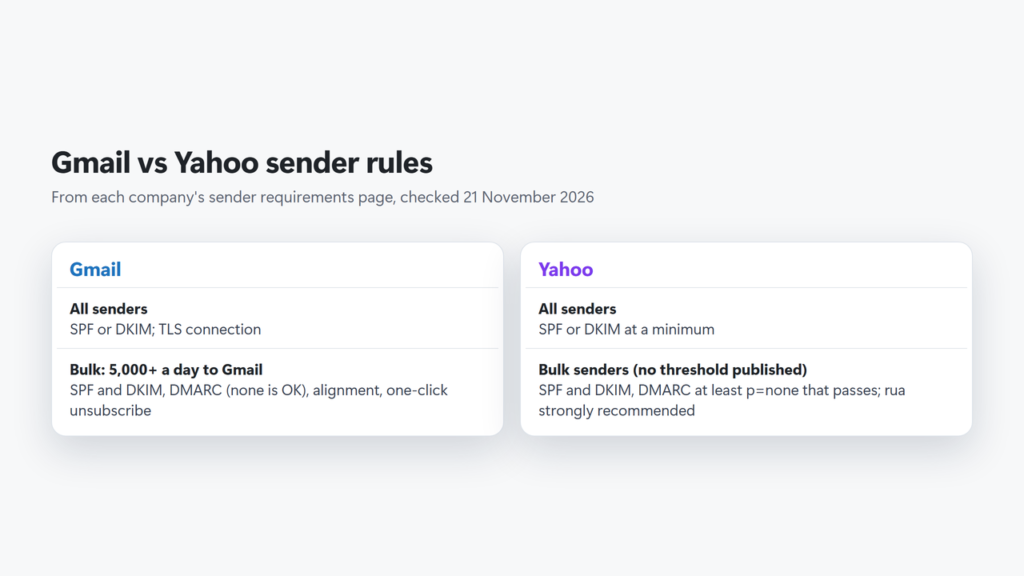
SPF and DKIM cover the authentication part of the “everyone” rules. The rest (such as valid forward and reverse DNS and TLS on the sending server, a low spam rate and standard message formatting) depend on the sending server and on how you send; on Hostinger Email that is Hostinger’s servers (or a relay its SPF authorises). MX records are for receiving mail, not a sender requirement. DMARC with reports is cheap insurance, and required if you ever send newsletters at volume from the same domain.
When to Tighten DMARC
DMARC is now defined by RFC 9989 (May 2026), which replaced RFC 7489. Its three policies are none (no preference; you get reports only if you add rua), quarantine (failing mail is suspicious) and reject (a failure is a clear indication that the use of the domain name is not valid). Move from none to quarantine, then reject, only after a few weeks of reports show that every service sending as your domain passes SPF or DKIM in alignment. Hostinger gives no guidance on this step, and doing it too early can block your own invoices or newsletters.
Mistakes to Avoid
- Two SPF records. Merge them into one
v=spf1line. - DKIM added as TXT. Hostinger’s default DKIM must be CNAME.
- Old MX records left behind. Mail splits between providers and some is lost.
- Editing DNS at the wrong place. Change records where your nameservers point, not where you bought the domain.
- Proxying DKIM CNAMEs on Cloudflare. Set them to DNS only.
- Jumping to p=reject. Watch reports with p=none first.
- Mixing up email and website DNS. Email records don’t move your website, and vice versa (domain vs hosting explains the split).
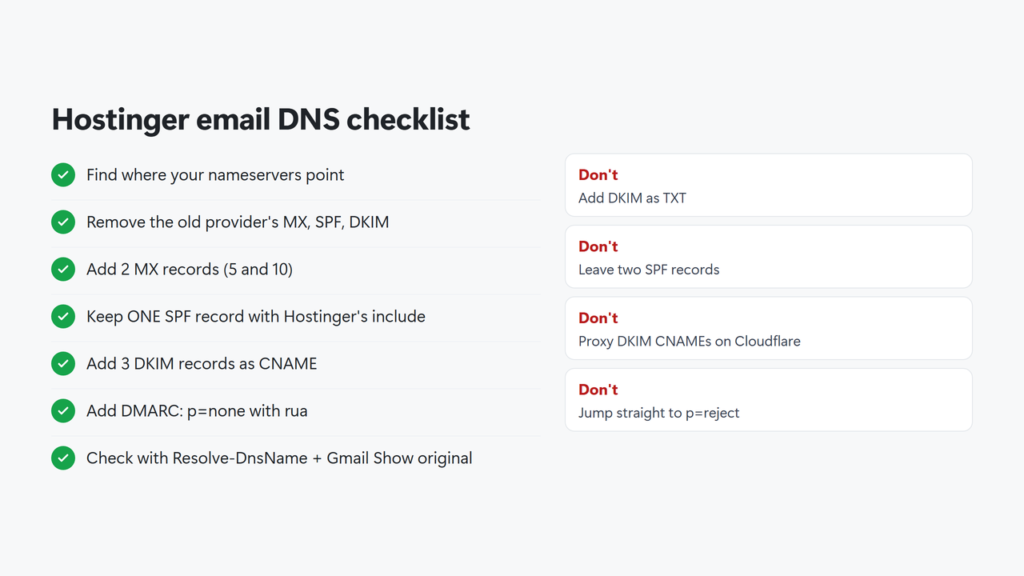
Checklist in text: confirm where your nameservers point; remove the old provider’s MX, SPF and DKIM; add two MX, one SPF, three DKIM CNAMEs and a DMARC record with rua; set DKIM to DNS only on Cloudflare; wait a few hours; check with Resolve-DnsName and a Gmail “Show original”; read DMARC reports before tightening.
What are the MX records for Hostinger Email?
Two MX records at @: mx1.hostinger.com with priority 5 and mx2.hostinger.com with priority 10.
What is Hostinger’s SPF record?
A TXT record at @ with the value v=spf1 include:_spf.mail.hostinger.com ~all. Keep only one SPF record and add other senders’ includes to it.
Should Hostinger DKIM be a CNAME or a TXT record?
CNAME. Hostinger’s default DKIM uses three CNAMEs, hostingermail-a, -b and -c under _domainkey, and Hostinger says adding them as TXT makes signing fail. Only the optional custom DKIM is a TXT record.
Do I need a DMARC record for Hostinger Email?
Hostinger says it is not mandatory but highly recommended, and Gmail and Yahoo require it for bulk senders. Start with v=DMARC1; p=none; rua=mailto: plus an address you read.
How long do Hostinger email DNS changes take?
Hostinger says they usually apply within a few hours and allows up to 24 hours.
Can I use Hostinger Email if my domain is on Cloudflare?
Yes. Add the MX, SPF, DKIM and DMARC records in Cloudflare’s DNS, and set the DKIM CNAMEs to DNS only.

Affiliate disclosure: some links on this page are affiliate links, so I may earn a commission if you buy, at no extra cost to you.