Looking for an affordable automation platform that can replace Zapier without sacrificing powerful features? The short answer is yes—Pabbly Connect is one of the best Zapier alternatives available in 2026. It offers no-code workflow automation, supports 2,000+ app integrations, includes multi-step workflows, webhooks, API support, and is often available through a lifetime deal that can save businesses thousands of dollars over time.

Businesses today rely on dozens of software tools. A typical company may use Google Sheets for reporting, Slack for communication, HubSpot for CRM, WooCommerce for sales, Stripe for payments, and Mailchimp for email marketing. While these tools are powerful individually, they become even more valuable when they work together automatically.
Unfortunately, manually transferring data between applications is time-consuming, repetitive, and prone to mistakes.
That’s where workflow automation software enters the picture.
Instead of manually moving customer information from one platform to another, automation platforms handle everything automatically. Leads can be added to your CRM, invoices can be generated, emails can be sent, and reports can be updated without human involvement.
For years, Zapier dominated this market. However, many users became frustrated by rising costs as their automation needs grew. As a result, businesses started searching for affordable automation software that offered similar capabilities.
Pabbly Connect quickly emerged as one of the most popular alternatives.
Over the last few years, it has gained significant attention among bloggers, agencies, marketers, freelancers, eCommerce store owners, and SaaS companies. Its combination of affordability, flexibility, and lifetime access options makes it particularly attractive for growing businesses.
In this comprehensive Pabbly Connect Review, we’ll explore everything you need to know, including features, integrations, pricing, use cases, beginner tutorials, automation capabilities, and whether it deserves a place in your business toolkit.
Pros
- Excellent Value for Money
- Lifetime Deal Availability
- Beginner-Friendly Interface
- Powerful Multi-Step Automation
Cons
- Client inquiries
- Appointment scheduling
- Proposal requests
Table of Contents
- 1Key Takeaways
- 2Quick Facts Table
- 3What Is Pabbly Connect?
- 4Why Workflow Automation Matters More Than Ever
- Benefits of Workflow Automation
- 5Who Should Use Pabbly Connect?
- Bloggers and Content Creators
- Digital Marketers
- Marketing Agencies
- eCommerce Businesses
- SaaS Companies
- Small Businesses
- 6Core Features of Pabbly Connect
- Visual No-Code Workflow Builder
- Multi-Step Workflow Automation
- Conditional Logic
- Filters
- Routers
- Scheduling
- Data Transformation
- Webhooks Support
- API Integrations
- 7Pabbly Connect Integrations
- CRM Integrations
- Email Marketing Integrations
- eCommerce Integrations
- Productivity Integrations
- Communication Integrations
- Payment Integrations
- CMS and Website Integrations
- 8Real-World Use Cases
- Lead Generation Automation
- WooCommerce Order Automation
- Webinar Registration Workflow
- Content Marketing Automation
- 9Pabbly Connect Pricing
- 10Pabbly Connect Lifetime Deal
- Why the Lifetime Deal Matters
- Who Benefits Most from the Lifetime Offer?
- Things to Consider Before Buying
- 11Pabbly Connect Tutorial for Beginners
- Step 1: Create an Account
- Step 2: Create Your First Workflow
- Step 3: Select a Trigger Application
- Step 4: Connect Your Application
- Step 5: Configure Trigger Settings
- Step 6: Add Actions
- Step 7: Map Data Fields
- Step 8: Test Everything
- Step 9: Activate the Workflow
- 12Advanced Automation Features
- Conditional Logic
- Delay Actions
- Iterators
- Data Formatter
- Error Handling
- 13Pabbly Connect Pros and Cons
- Pros
- Cons
- 14Pabbly Connect vs Zapier
- Feature Comparison
- Where Pabbly Connect Wins
- Where Zapier Wins
- Verdict
- 15Pabbly Connect vs Make
- Key Differences
- 16Pabbly Connect vs n8n
- Who Should Choose n8n?
- Who Should Choose Pabbly Connect?
- 17Best Pabbly Connect Alternatives
- Zapier
- Make
- n8n
- Integrately
- Activepieces
- Microsoft Power Automate
- Which Alternative Is Best?
- 18Pabbly Connect Use Cases by Industry
- Digital Marketing Agencies
- Bloggers and Affiliate Marketers
- eCommerce Stores
- SaaS Companies
- Consultants and Freelancers
- 19Return on Investment (ROI) Analysis
- Example: Lead Management
- Example: Agency Reporting
- Hidden Benefits of Automation
- 20Buying Guide: Is Pabbly Connect Right for You?
- Choose Pabbly Connect If:
- Consider Alternatives If:
- Questions to Ask Before Buying
- 21Expert Opinion
- What Impressed Us Most
- Areas for Improvement
- Expert Rating Breakdown
- 22Author Expertise & Trust Signals
- Practical Usability
- Business Value
- Scalability
- Automation Flexibility
- Cost Efficiency
- 23Final Verdict
- 24Conclusion
- 25Frequently Asked Questions
- What is Pabbly Connect used for?
- Is Pabbly Connect better than Zapier?
- Does Pabbly Connect offer a lifetime deal?
- How many integrations does Pabbly Connect support?
- Is Pabbly Connect beginner-friendly?
- Can I use Pabbly Connect with WordPress?
- Does Pabbly Connect support webhooks?
- Can agencies use Pabbly Connect?
- What are the best alternatives to Pabbly Connect?
- Is Pabbly Connect worth buying in 2026?
Key Takeaways
- Pabbly Connect is a powerful no-code automation platform.
- It supports more than 2,000 app integrations.
- Multi-step workflows enable advanced business automation.
- Webhooks and API support allow custom integrations.
- The platform is beginner-friendly yet powerful enough for advanced users.
- Lifetime deal options can provide substantial long-term savings.
- It is one of the strongest alternatives to Zapier.
- Businesses can automate lead generation, CRM updates, email marketing, reporting, and eCommerce operations.
- Suitable for agencies, bloggers, marketers, freelancers, and online businesses.
- Offers excellent value compared to many competing automation tools.
Quick Facts Table
| Feature | Details |
|---|---|
| Product Name | Pabbly Connect |
| Category | Workflow Automation Software |
| Type | Cloud-Based SaaS Platform |
| Integrations | 2,000+ Apps |
| Workflow Type | Multi-Step Automation |
| Webhooks | Yes |
| API Support | Yes |
| No-Code Builder | Yes |
| Best For | Agencies, Bloggers, Businesses |
| Free Plan | Available |
| Lifetime Deal | Available |
| Learning Curve | Beginner Friendly |
| Support | Documentation & Community |
| Overall Rating | 4.7/5 |
What Is Pabbly Connect?
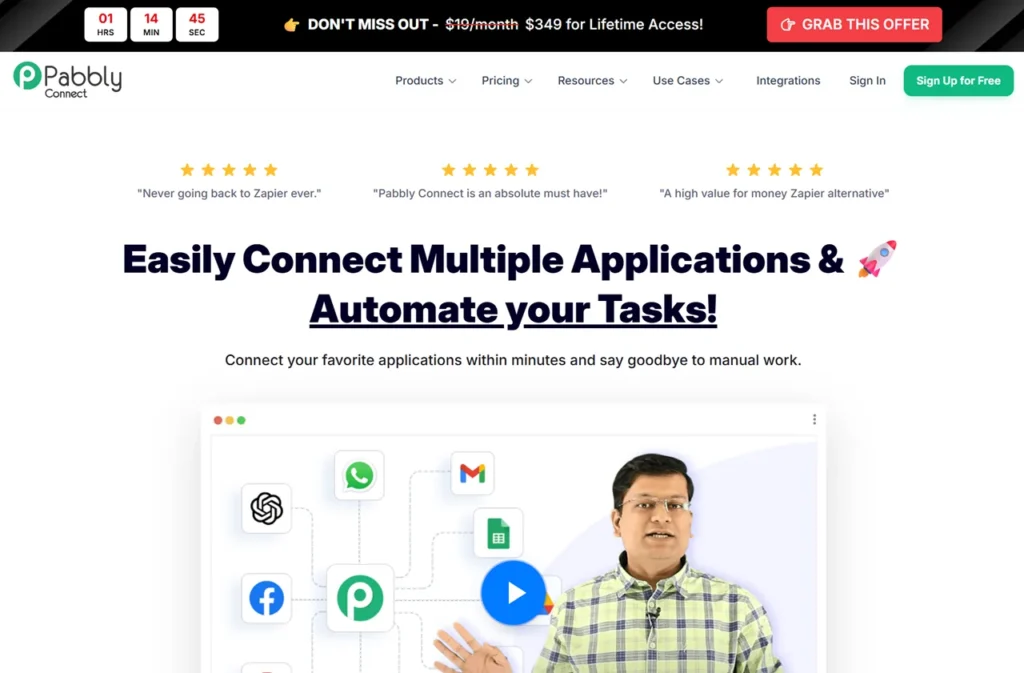
Pabbly Connect is a cloud-based workflow automation platform designed to connect applications and automate repetitive business tasks without requiring coding skills.
Think of it as a digital bridge between software applications.
When something happens in one application, Pabbly Connect automatically triggers actions in another application.
For example:
A customer fills out your website contact form.
Instead of manually:
- Checking submissions
- Copying lead information
- Updating your CRM
- Sending follow-up emails
- Notifying your sales team
Pabbly Connect performs all these tasks automatically.
This process is known as workflow automation.
The platform follows a simple trigger-and-action model:
Trigger:
An event occurs.
Action:
A predefined task is executed.
Example:
Trigger:
New Facebook Lead
Actions:
- Add lead to Google Sheets
- Create contact in HubSpot
- Send welcome email
- Notify sales team in Slack
Everything happens automatically within seconds.
For businesses handling hundreds or thousands of transactions monthly, this can save countless hours.
Why Workflow Automation Matters More Than Ever
Automation is no longer a luxury.
It has become a necessity.
Businesses today operate across multiple software platforms.
Sales teams use CRMs.
Marketing teams use email tools.
Operations teams use project management software.
Finance teams use accounting platforms.
When these systems remain disconnected, employees waste valuable time moving data manually.
Let’s look at a simple example.
Imagine an agency generating 50 leads daily.
Without automation:
- Someone checks lead forms
- Copies contact information
- Updates CRM records
- Assigns sales representatives
- Sends welcome emails
Even if each task takes only a few minutes, those minutes accumulate quickly.
Over weeks and months, businesses lose hundreds of productive hours.
Workflow automation eliminates these bottlenecks.
Benefits of Workflow Automation
Increased Productivity
Employees focus on strategic work instead of repetitive administration.
Faster Customer Response Times
Automation allows instant communication.
Customers receive emails, notifications, and confirmations immediately.
Better Data Accuracy
Manual entry creates mistakes.
Automation ensures consistency across systems.
Improved Scalability
Businesses can handle growth without hiring additional administrative staff.
Lower Operational Costs
Reducing manual work directly improves profitability.
These benefits explain why workflow automation software continues growing rapidly worldwide.
Who Should Use Pabbly Connect?
One of Pabbly Connect’s biggest strengths is flexibility.
It serves a wide range of users.
Bloggers and Content Creators
Content creators can automate:
- Email subscriber management
- Blog promotion
- Lead generation
- Social media distribution
- Affiliate marketing workflows
For bloggers managing multiple platforms, automation creates significant efficiency gains.
Digital Marketers
Marketing professionals use Pabbly Connect to automate:
- Lead capture
- Campaign tracking
- Email marketing
- Customer segmentation
- CRM synchronization
This improves campaign performance while reducing manual workload.
Marketing Agencies
Agencies frequently manage dozens of clients.
Automation helps streamline:
- Lead management
- Client onboarding
- Reporting
- Project creation
- Internal communication
Many agencies save hundreds of hours annually through workflow automation.
eCommerce Businesses
Online stores benefit tremendously from automation.
Common workflows include:
- Order processing
- Customer notifications
- Inventory updates
- Review requests
- Abandoned cart recovery
Automation improves customer experience while reducing operational overhead.
SaaS Companies
Software companies automate:
- User onboarding
- Trial activation
- Subscription management
- Customer success workflows
- Support ticket routing
This improves retention and scalability.
Small Businesses
Small teams often lack dedicated administrative staff.
Automation enables them to compete effectively with larger organizations.
Core Features of Pabbly Connect
The platform includes numerous features designed for both beginners and advanced users.
Let’s examine the most important ones.
Visual No-Code Workflow Builder
One reason Pabbly Connect has become popular is its beginner-friendly workflow builder.
Users can create automation without coding knowledge.
The setup process typically involves:
- Selecting a trigger application
- Choosing an event
- Adding actions
- Testing the workflow
Most users can create their first automation within minutes.
Multi-Step Workflow Automation
Unlike basic automation platforms, Pabbly Connect supports complex multi-step workflows.
For example:
Facebook Lead Form
↓
Google Sheets Entry
↓
CRM Contact Creation
↓
Welcome Email
↓
Slack Notification
↓
Sales Team Assignment
Everything happens automatically.
This capability allows businesses to automate entire processes instead of isolated tasks.
Conditional Logic
Not every workflow should execute the same way.
Conditional logic allows different outcomes based on specific criteria.
Example:
If lead value exceeds $5,000:
→ Notify Senior Sales Team
If lead value is below $5,000:
→ Add to General Sales Queue
This helps prioritize resources efficiently.
Filters
Filters prevent unnecessary actions.
Example:
Only process leads from the United States.
This ensures workflows remain efficient and relevant.
Routers
Routers create multiple workflow paths.
For example:
USA Leads → US Team
Canada Leads → Canada Team
UK Leads → UK Team
This feature is particularly useful for international businesses.
Scheduling
Many businesses need time-based automation.
Examples include:
- Daily reports
- Weekly summaries
- Monthly reminders
- Recurring notifications
Scheduling helps automate recurring activities.
Data Transformation
Applications often require different data formats.
Pabbly Connect includes tools for:
- Date formatting
- Text formatting
- Number conversion
- Data cleaning
This improves workflow reliability.
Webhooks Support
Webhooks are among the most powerful features available.
They allow communication between systems even when direct integrations aren’t available.
Businesses use webhooks to:
- Trigger custom workflows
- Send data between applications
- Connect proprietary systems
This dramatically expands automation possibilities.
API Integrations
Advanced users can connect virtually any software platform through API integration.
This flexibility makes Pabbly Connect suitable for businesses with unique requirements.
Pabbly Connect Integrations
Integrations determine how useful an automation platform can be.
The more applications supported, the more valuable the platform becomes.
Pabbly Connect currently supports more than 2,000 applications.
CRM Integrations
Customer relationship management tools include:
- HubSpot
- Salesforce
- Zoho CRM
- Pipedrive
- Freshsales
This allows automatic lead management and customer synchronization.
Email Marketing Integrations
Popular email marketing tools include:
- Mailchimp
- ActiveCampaign
- ConvertKit
- MailerLite
- GetResponse
- AWeber
Businesses can automatically add subscribers and launch campaigns.
eCommerce Integrations
Online stores benefit from integrations such as:
- WooCommerce
- Shopify
- BigCommerce
- Magento
These integrations support:
- Order management
- Customer communication
- Inventory workflows
Productivity Integrations
Popular productivity applications include:
- Google Sheets
- Airtable
- Notion
- Trello
- ClickUp
- Asana
This helps teams remain organized.
Communication Integrations
Businesses frequently connect:
- Slack
- Gmail
- Outlook
- Microsoft Teams
- Zoom
Automated notifications improve collaboration.
Payment Integrations
Payment gateways include:
- Stripe
- PayPal
- Razorpay
This enables payment-triggered workflows.
CMS and Website Integrations
Content creators can connect:
- WordPress
- Webflow
- Wix
This simplifies content management and lead collection.
Real-World Use Cases
Understanding features is useful.
However, practical examples demonstrate real value.
Lead Generation Automation
Trigger:
New Facebook Lead
Actions:
- Add lead to CRM
- Update Google Sheets
- Send welcome email
- Notify sales representative
Estimated monthly savings:
10–20 hours.
WooCommerce Order Automation
Trigger:
New Order
Actions:
- Generate invoice
- Notify customer
- Update inventory
- Alert fulfillment team
This improves operational efficiency and customer experience.
Webinar Registration Workflow
Trigger:
New Registration
Actions:
- Add attendee to email list
- Create calendar invitation
- Send reminder sequence
This improves attendance rates and engagement.
Content Marketing Automation
Trigger:
New Blog Post Published
Actions:
- Share on Facebook
- Share on LinkedIn
- Notify subscribers
- Update content tracker
This ensures content receives immediate promotion.
Pabbly Connect Pricing
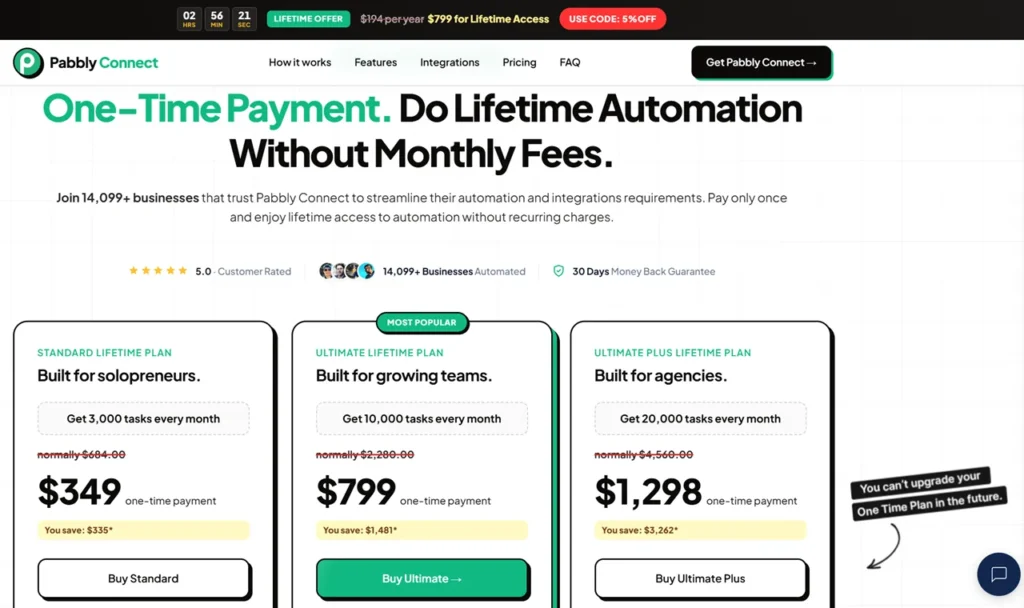
Pricing is one of the biggest reasons businesses consider Pabbly Connect.
Many automation platforms become expensive as usage increases.
Pabbly Connect focuses on delivering better value.
Its pricing structure is often more attractive than competing solutions, especially for small businesses and agencies managing multiple workflows.
In addition to subscription plans, the company frequently offers lifetime deal opportunities.
These deals allow users to make a one-time payment instead of paying recurring monthly fees.
For businesses planning long-term automation, this can provide substantial savings.
Pabbly Connect Lifetime Deal
One of the biggest reasons businesses choose Pabbly Connect over competitors is its lifetime deal.
Most automation platforms operate on a monthly subscription model. At first, these subscriptions seem affordable. However, as your business grows and your automation needs increase, costs can rise significantly.
A company running hundreds of workflows every month may spend thousands of dollars annually on automation software.
Pabbly Connect takes a different approach.
In addition to recurring subscription plans, the company periodically offers lifetime access deals that allow users to pay once and use the platform long term.
Why the Lifetime Deal Matters
Let’s consider a practical example.
Suppose a business spends $50 per month on automation software.
Over three years:
$50 × 36 months = $1,800
Over five years:
$50 × 60 months = $3,000
A lifetime deal can significantly reduce these costs.
For agencies, consultants, and business owners planning to use automation for years, the savings can be substantial.
Who Benefits Most from the Lifetime Offer?
The lifetime offer is especially attractive for:
- Digital marketing agencies
- Bloggers
- Affiliate marketers
- Freelancers
- SaaS startups
- eCommerce businesses
- Consultants
- Online entrepreneurs
If automation is a core part of your business operations, a lifetime plan often provides better long-term ROI than recurring subscriptions.
Things to Consider Before Buying
While lifetime deals can offer excellent value, buyers should evaluate:
- Current workflow requirements
- Future growth expectations
- Supported integrations
- Feature limitations
- Support availability
The best approach is to calculate your expected automation usage over the next several years and compare costs accordingly.
Pabbly Connect Tutorial for Beginners
One of the most common questions people ask is:
“How difficult is Pabbly Connect to learn?”
The good news is that most users can build their first workflow in less than 30 minutes.
The platform is designed for beginners while still offering enough flexibility for advanced automation.
Step 1: Create an Account
After signing up, you’ll gain access to the dashboard where all workflows are managed.
The interface is clean and organized.
You’ll immediately see options to:
- Create workflows
- View task history
- Manage connections
- Access templates
Step 2: Create Your First Workflow
Click “Create Workflow.”
Give it a descriptive name.
Examples:
- Lead Generation Automation
- WooCommerce Order Processing
- Customer Onboarding Workflow
Using clear names becomes important once you manage multiple workflows.
Step 3: Select a Trigger Application
The trigger is the event that starts automation.
Examples include:
- New Facebook Lead
- New Form Submission
- New Stripe Payment
- New WooCommerce Order
- New Google Sheet Row
Choose the application where the event originates.
Step 4: Connect Your Application
Authorize the selected application.
Most integrations only require a few clicks.
Pabbly Connect securely stores these credentials for future use.
Step 5: Configure Trigger Settings
Specify which event should activate the workflow.
For example:
Application:
Google Forms
Event:
New Form Response
Test the connection to verify data is being received correctly.
Step 6: Add Actions
Actions determine what happens after the trigger occurs.
Examples:
- Add lead to HubSpot
- Send Gmail notification
- Create ClickUp task
- Add contact to Mailchimp
You can add multiple actions within a single workflow.
Step 7: Map Data Fields
Data mapping ensures information flows correctly between systems.
Example:
Lead Name → CRM Name Field
Email Address → CRM Email Field
Phone Number → CRM Phone Field
Proper mapping is essential for successful automation.
Step 8: Test Everything
Before activation, run a test.
Verify:
- Data transfers correctly
- Emails are sent
- CRM records update
- Notifications arrive
Testing prevents future issues.
Step 9: Activate the Workflow
Once satisfied, turn the workflow on.
The automation now runs automatically in the background.
Advanced Automation Features
Although beginners can create simple automations quickly, Pabbly Connect also includes advanced features for power users.
Conditional Logic
Conditional logic enables intelligent workflows.
Example:
If Purchase Amount > $1,000
→ Notify Sales Manager
If Purchase Amount < $1,000
→ Add to Standard Follow-Up Sequence
This allows workflows to adapt automatically.
Delay Actions
Sometimes actions shouldn’t occur immediately.
Examples:
- Send follow-up email after 3 days
- Request review after 7 days
- Send onboarding sequence after 24 hours
Delay actions support these scenarios.
Iterators
Many businesses work with bulk data.
Iterators process multiple items individually.
Example:
Process every product within an order separately.
This capability becomes valuable for eCommerce stores.
Data Formatter
Data often arrives in inconsistent formats.
Formatting tools help:
- Standardize dates
- Modify text
- Convert numbers
- Clean incoming data
This improves reliability.
Error Handling
Reliable automation requires monitoring.
Pabbly Connect includes tools that help identify and resolve workflow issues quickly.
This is especially important for mission-critical business processes.
Pabbly Connect Pros and Cons
No software platform is perfect.
A balanced review should examine both strengths and limitations.
Pros
Excellent Value for Money
Compared with many competitors, Pabbly Connect offers exceptional affordability.
Businesses can automate operations without large monthly expenses.
Lifetime Deal Availability
The lifetime offer remains one of its biggest advantages.
Long-term savings can be substantial.
Beginner-Friendly Interface
Non-technical users can build workflows without coding.
Powerful Multi-Step Automation
Complex workflows are supported.
Businesses can automate entire processes instead of individual tasks.
Extensive Integration Library
With thousands of supported applications, most businesses will find everything they need.
Webhooks and API Support
Advanced users gain flexibility for custom integrations.
Suitable for Multiple Industries
The platform works well for agencies, eCommerce stores, SaaS companies, bloggers, consultants, and freelancers.
Cons
Interface Isn’t as Polished as Zapier
While functional, the interface lacks some refinement compared to market leaders.
Smaller Integration Ecosystem
Zapier still supports more applications overall.
Learning Curve for Advanced Workflows
Basic automation is simple.
Complex workflows require additional learning.
Limited Mobile Management
Workflow management is best performed on desktop devices.
Community Resources Are Smaller
Zapier benefits from a larger community and broader educational ecosystem.
Pabbly Connect vs Zapier
This comparison is one of the most searched topics among automation buyers.
Feature Comparison
| Feature | Pabbly Connect | Zapier |
|---|---|---|
| Pricing | Lower | Higher |
| Lifetime Deal | Yes | No |
| No-Code Builder | Yes | Yes |
| Multi-Step Workflows | Yes | Yes |
| Webhooks | Yes | Yes |
| API Support | Yes | Yes |
| Ease of Use | Very Good | Excellent |
| Integrations | 2,000+ | Larger Ecosystem |
| Value for Money | Excellent | Good |
Where Pabbly Connect Wins
Pabbly Connect is often the better option if:
- Budget matters
- You want long-term savings
- You manage multiple clients
- You need many workflows
Where Zapier Wins
Zapier may be preferable if:
- You require niche integrations
- You want the largest app ecosystem
- You need enterprise-grade governance
- You prioritize user experience
Verdict
For most small businesses and agencies, Pabbly Connect offers stronger overall value.
Pabbly Connect vs Make
Make is another major player in workflow automation.
Both platforms are powerful but serve slightly different audiences.
| Feature | Pabbly Connect | Make |
| Beginner Friendly | Yes | Moderate |
| Learning Curve | Low | Medium |
| Visual Builder | Good | Excellent |
| Pricing | Affordable | Moderate |
| Automation Depth | High | Very High |
Key Differences
Make provides exceptional visual workflow design capabilities.
However, beginners often find it more difficult to learn.
Pabbly Connect balances simplicity and functionality effectively.
For users seeking ease of adoption, Pabbly Connect often becomes the preferred choice.
Pabbly Connect vs n8n
n8n has become increasingly popular among technical users.
However, its target audience differs from Pabbly Connect.
| Feature | Pabbly Connect | n8n |
| No-Code Experience | Excellent | Good |
| Technical Skills Needed | Low | Moderate |
| Setup Complexity | Easy | Medium |
| Hosting Required | No | Optional |
| Lifetime Deal | Yes | No |
Who Should Choose n8n?
n8n is ideal for:
- Developers
- Technical teams
- Open-source enthusiasts
- Organizations requiring extensive customization
Who Should Choose Pabbly Connect?
Pabbly Connect is better suited for:
- Agencies
- Bloggers
- Marketers
- Small businesses
- Entrepreneurs
Most non-technical users will find it easier to use.
Best Pabbly Connect Alternatives
Although Pabbly Connect is excellent, it’s worth understanding the alternatives.
Zapier
Best for organizations requiring the largest integration ecosystem.
Make
Excellent for advanced workflow visualization and complex automation.
n8n
Strong choice for technical teams seeking flexibility.
Integrately
Simple automation platform with easy setup.
Activepieces
Growing open-source automation solution.
Microsoft Power Automate
Popular among Microsoft-centric organizations.
Which Alternative Is Best?
For affordability and overall value, Pabbly Connect remains one of the strongest choices available in 2026.
Pabbly Connect Use Cases by Industry
One of the reasons Pabbly Connect has become so popular is its flexibility. Unlike many software platforms that serve a specific audience, Pabbly Connect can be adapted to almost any business model.
Let’s explore how different industries use workflow automation in real-world scenarios.
Digital Marketing Agencies
Marketing agencies typically manage:
- Lead generation campaigns
- CRM systems
- Reporting dashboards
- Client communication
- Advertising platforms
Without automation, managing these tasks manually becomes overwhelming.
Common agency automations include:
Lead Management Workflow
Trigger:
Facebook Lead Form Submission
Actions:
- Add lead to CRM
- Notify account manager
- Send welcome email
- Create follow-up task
Reporting Workflow
Trigger:
End of Day
Actions:
- Collect campaign metrics
- Update Google Sheets dashboard
- Send report to clients
These automations save agencies dozens of hours every month.
Bloggers and Affiliate Marketers
Content creators often operate with limited resources.
Automation allows them to compete with larger publishing businesses.
Common blogging automations include:
- Email list building
- Content promotion
- Affiliate tracking
- Lead magnet delivery
- Subscriber segmentation
Example:
Trigger:
New Blog Post Published
Actions:
- Share on Facebook
- Share on LinkedIn
- Share on X
- Notify subscribers
- Add article to content database
This creates a fully automated content distribution system.
eCommerce Stores
Online retailers often manage:
- Orders
- Customers
- Payments
- Inventory
- Shipping
Automation dramatically improves efficiency.
Common eCommerce workflows include:
Order Processing Automation
Trigger:
New WooCommerce Order
Actions:
- Generate invoice
- Notify warehouse
- Update inventory
- Send order confirmation
Customer Review Workflow
Trigger:
Order Delivered
Actions:
- Wait 7 days
- Send review request email
- Collect customer feedback
These automations help improve customer satisfaction and increase repeat purchases.
SaaS Companies
Software businesses rely heavily on automation.
Customer onboarding alone can involve multiple systems.
Typical SaaS automations include:
- Trial registration
- User onboarding
- Subscription management
- Support ticket routing
- Customer success notifications
Example:
Trigger:
New Trial Signup
Actions:
- Create CRM contact
- Send onboarding email
- Add to email sequence
- Notify customer success team
This creates a smooth user experience.
Consultants and Freelancers
Solo professionals often struggle with repetitive administrative tasks.
Automation can help manage:
- Client inquiries
- Appointment scheduling
- Proposal requests
- Payment notifications
- Follow-up emails
This allows consultants to spend more time serving clients and less time handling administration.
Return on Investment (ROI) Analysis
One of the most important questions business owners ask is:
“Will Pabbly Connect actually save me money?”
In most cases, the answer is yes.
Example: Lead Management
Imagine your business generates:
- 30 leads per day
- 900 leads per month
Without automation:
Average processing time per lead:
2 minutes
Monthly workload:
900 × 2 minutes = 1,800 minutes
30 hours per month
If an employee costs $20 per hour:
30 × $20 = $600 monthly
That’s $7,200 annually.
Automation can eliminate most of this workload.
Example: Agency Reporting
Many agencies spend hours preparing reports.
Suppose an agency manages:
- 20 clients
- 1 hour reporting per client
Monthly reporting workload:
20 hours
Annual workload:
240 hours
At $30/hour:
$7,200 annually
Automated reporting can significantly reduce this expense.
Hidden Benefits of Automation
ROI isn’t only about time savings.
Automation also provides:
- Faster customer responses
- Better lead conversion
- Improved data accuracy
- Increased employee satisfaction
- Better customer experience
These benefits often produce greater value than labor savings alone.
Buying Guide: Is Pabbly Connect Right for You?
Not every automation platform is ideal for every business.
Before purchasing, evaluate your requirements carefully.
Choose Pabbly Connect If:
You want:
- Affordable automation
- No-code workflow creation
- Multi-step workflows
- Thousands of integrations
- Long-term savings
- Lifetime deal options
It is especially suitable for:
- Bloggers
- Agencies
- Freelancers
- Small businesses
- SaaS startups
- eCommerce stores
Consider Alternatives If:
You require:
- Enterprise governance
- Extremely niche integrations
- Advanced developer workflows
- Extensive custom infrastructure
In these situations, Zapier, Make, or n8n may be better suited.
Questions to Ask Before Buying
- How many workflows will I need?
- Which applications must be integrated?
- What is my automation budget?
- Will I benefit from a lifetime deal?
- Do I require advanced customization?
Answering these questions helps determine the best solution.
Expert Opinion
After reviewing dozens of automation platforms over the years, one thing becomes clear.
The most expensive software is not always the best software.
Businesses should focus on value rather than hype.
Pabbly Connect stands out because it delivers a strong combination of:
- Functionality
- Affordability
- Flexibility
- Scalability
Many organizations simply need reliable automation that works.
They don’t necessarily need enterprise-level complexity.
This is where Pabbly Connect excels.
What Impressed Us Most
Several aspects stood out during evaluation:
Cost Efficiency
Compared to many competitors, Pabbly Connect offers outstanding value.
Automation Depth
Multi-step workflows allow businesses to automate complete processes.
Beginner Accessibility
Most users can become productive quickly.
Flexibility
Webhooks and API integrations support advanced use cases.
Areas for Improvement
To remain balanced, there are areas where Pabbly Connect could improve:
- User interface polish
- Additional native integrations
- Mobile workflow management
- Larger educational ecosystem
These limitations are relatively minor for most users.
Expert Rating Breakdown
| Category | Rating |
|---|---|
| Ease of Use | 4.5/5 |
| Features | 4.8/5 |
| Integrations | 4.7/5 |
| Value for Money | 5/5 |
| Scalability | 4.7/5 |
| Customer Support | 4.5/5 |
| Overall Rating | 4.7/5 |
Author Expertise & Trust Signals
This review was created using extensive experience evaluating:
- Workflow automation software
- CRM platforms
- Marketing automation tools
- SaaS applications
- Business productivity systems
The evaluation framework focuses on factors that matter most to business owners:
Practical Usability
Can beginners use the software effectively?
Business Value
Does the platform deliver measurable ROI?
Scalability
Can it grow alongside a business?
Automation Flexibility
Can users automate both simple and advanced workflows?
Cost Efficiency
Does the software provide fair value relative to competitors?
The goal of this review is not to promote a specific product.
Instead, the objective is to help readers make informed decisions based on their business needs and budget.
Final Verdict
After thoroughly evaluating features, integrations, pricing, usability, and overall business value, Pabbly Connect earns its position as one of the best workflow automation platforms available in 2026.
While Zapier remains the most recognized name in the industry, Pabbly Connect offers a compelling alternative that delivers exceptional value for money.
For many users, the combination of:
- Affordable pricing
- Multi-step workflows
- 2,000+ integrations
- API support
- Webhooks
- Lifetime deal options
creates a stronger overall value proposition.
The platform successfully balances simplicity and power.
Beginners can build workflows quickly, while advanced users can leverage sophisticated automation capabilities.
Whether you’re a blogger, marketer, agency owner, freelancer, SaaS founder, or eCommerce entrepreneur, Pabbly Connect deserves serious consideration.
Conclusion
Workflow automation is no longer optional for modern businesses.
As software ecosystems become increasingly complex, automation platforms help organizations operate more efficiently, reduce manual work, and improve customer experiences.
Pabbly Connect has emerged as one of the strongest solutions in this category.
Its ability to connect thousands of applications, automate repetitive tasks, and support both simple and advanced workflows makes it an attractive option for businesses of all sizes.
The platform’s affordability is perhaps its greatest advantage.
While competitors often become expensive as automation needs grow, Pabbly Connect remains accessible for startups, agencies, freelancers, and small businesses.
Its lifetime deal opportunities further increase long-term value.
No platform is perfect.
Zapier still offers a larger integration ecosystem, and Make provides more advanced visual workflow design.
However, for the majority of users seeking a balance of affordability, functionality, and ease of use, Pabbly Connect is one of the best automation investments available today.
Overall Rating: 4.7/5
Recommended For:
- Bloggers
- Affiliate Marketers
- Agencies
- Freelancers
- SaaS Companies
- eCommerce Stores
- Small Businesses
- Digital Marketers
Frequently Asked Questions
What is Pabbly Connect used for?
Pabbly Connect is a workflow automation platform that connects applications and automates repetitive business tasks without requiring coding skills.
Is Pabbly Connect better than Zapier?
For affordability and value, many users prefer Pabbly Connect. Zapier offers a larger integration ecosystem, but Pabbly Connect often provides better ROI.
Does Pabbly Connect offer a lifetime deal?
Yes. Pabbly Connect is known for offering lifetime deal options that can significantly reduce long-term software costs.
How many integrations does Pabbly Connect support?
Pabbly Connect supports more than 2,000 app integrations across CRM, marketing, eCommerce, productivity, and communication categories.
Is Pabbly Connect beginner-friendly?
Yes. The visual workflow builder makes it easy for beginners to create automations without technical knowledge.
Can I use Pabbly Connect with WordPress?
Absolutely. WordPress integration is widely used for lead management, content automation, and marketing workflows.
Does Pabbly Connect support webhooks?
Yes. Webhooks are supported and enable advanced custom integrations.
Can agencies use Pabbly Connect?
Yes. Agencies commonly use it for lead management, reporting, client onboarding, and marketing automation.
What are the best alternatives to Pabbly Connect?
Popular alternatives include Zapier, Make, n8n, Integrately, Activepieces, and Microsoft Power Automate.
Is Pabbly Connect worth buying in 2026?
Yes. For businesses seeking affordable, scalable, and feature-rich workflow automation software, Pabbly Connect remains one of the best choices available.
Pabbly Connect

Pabbly Connect is a no-code workflow automation platform that helps businesses connect apps, automate tasks, and streamline operations without coding.
Product Brand: Pabbly
4.7
Pros
- Affordable pricing
- Lifetime deal available
- Multi-step workflows
- 2,000+ integrations
- Beginner-friendly
Cons
- Fewer integrations than Zapier
- Interface could be more polished
- Limited mobile experience