To check SSL certificate expiration in your browser, click the icon to the left of the web address. Open the connection details and view the certificate. Its validity dates show when it expires. From a terminal, run openssl s_client and read the notAfter line, which is the exact moment the certificate stops being trusted. Let’s Encrypt certificates, like the one on this site, last 90 days by default, so the date is never far away.
Every certificate value and command output below comes from real checks I ran on 19 November 2026. I checked this site’s certificate and a public test site whose certificate expired years ago, so you can see both cases.
Key takeaways
- The expiry date is the certificate’s notAfter field. Browsers stop trusting the site the moment it passes.
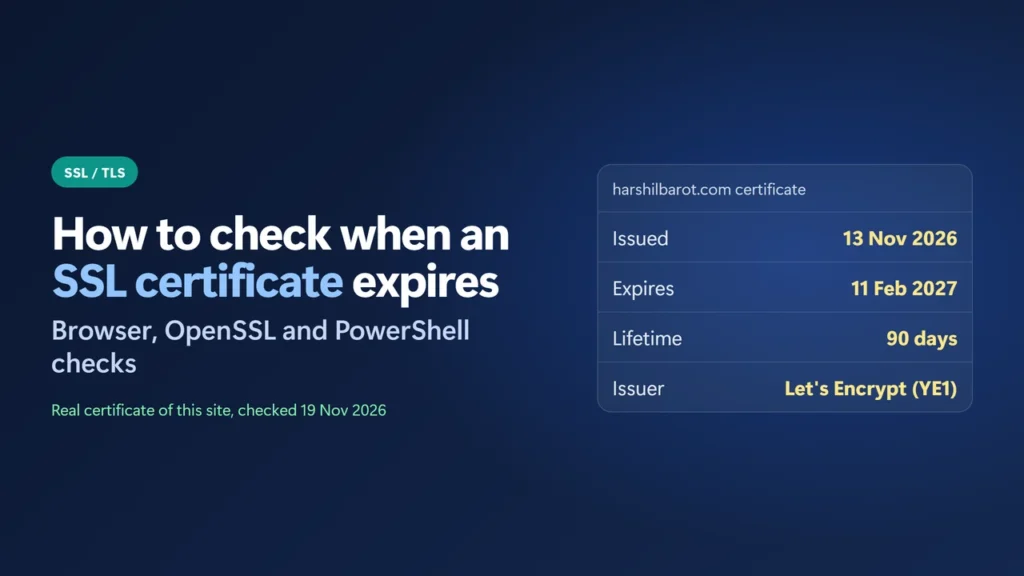
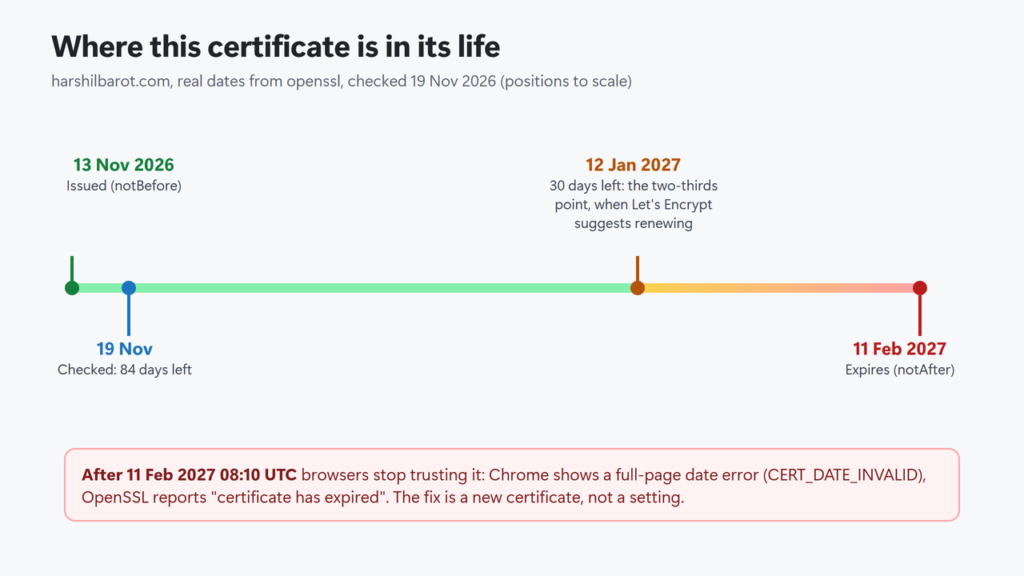
- This site’s Let’s Encrypt certificate was issued on 13 November 2026 and expires on 11 February 2027: a 90-day lifetime.
openssl x509 -checkendturns the check into a yes/no answer you can script or schedule.- Certificate lifetimes are getting shorter across the industry, so automatic renewal matters more than reminders.
- If a certificate has expired, the fix is a new certificate from your host or CA. No browser or plugin setting removes the error.
Table of Contents
- 1Check the expiry date in your browser
- 2Check it from the command line with OpenSSL
- Get a yes/no answer with -checkend
- 3Check it on Windows with PowerShell
- 4What happens when a certificate expires
- 5How long certificates last now
- 6Make sure it renews by itself
- 7If your certificate has already expired
- How do I check when an SSL certificate expires?
- How long does an SSL certificate last?
- What happens if my SSL certificate expires?
- Can I check SSL expiry from the command line on Windows?
- Does a free SSL certificate renew automatically?
- Why does my certificate show a different expiry date in another tool?
Check the expiry date in your browser
This is the fastest way and needs no tools. In Chrome on a computer:
- Open the site. Select the icon to the left of the web address. Google’s Chrome Help points to this icon for connection details.
- Open the connection item. When the certificate is fine it reads Connection is secure.
- Click Certificate is valid. The certificate viewer opens.
- Under Validity Period, read Expires On. That is the expiry date.
These labels come from Chromium’s own interface text. Menu names can change between versions, so if a label differs, look for the certificate or connection details. The viewer also shows which domain names the certificate covers and which authority issued it.
Firefox, Edge and Safari have similar padlock or site-information menus. The browser shows the certificate for the exact address you opened, so check both www and the bare domain if your site answers on both.
Check it from the command line with OpenSSL
Most Linux systems and macOS have an openssl command. On a Mac it may be the LibreSSL version, so an option such as -ext may not work there; drop it if you get an error. On Windows, run these commands in Git Bash, which comes with Git for Windows (I used its OpenSSL 3.5.6). They won’t work as written in PowerShell or Command Prompt. This one line connects to the site, fetches its certificate and prints the dates:
echo | openssl s_client -connect example.com:443 -servername example.com 2>/dev/null \
  | openssl x509 -noout -subject -issuer -startdate -enddate -ext subjectAltName
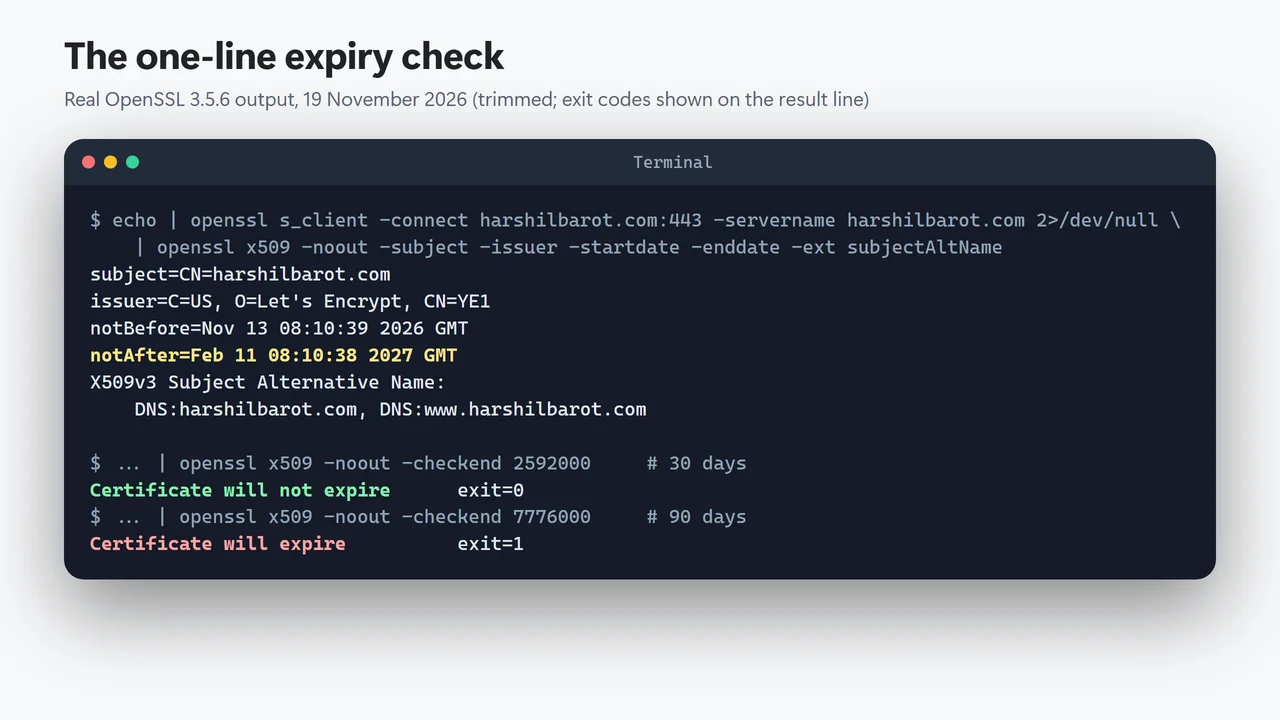
-servername sets the name sent in SNI. That name tells a server with many sites which certificate you want. OpenSSL 1.1.1 and later send the -connect name anyway. Naming it keeps the command right on older versions too. Here is the real output for this site:
How to read it:
- notBefore is when the certificate started to be valid: 13 November 2026, 08:10:39 GMT.
- notAfter is when it stops: 11 February 2027, 08:10:38 GMT. That is the expiry date.
- issuer shows who signed it: Let’s Encrypt, through its intermediate called YE1.
- Subject Alternative Name lists every name the certificate covers. Here it is
harshilbarot.comandwww.harshilbarot.com. A name missing from this list gets a name-mismatch error even if the date is fine.
Get a yes/no answer with -checkend
-checkend takes a number of seconds and tells you whether the certificate will have expired by then. It also sets the exit code: 0 means still valid then, 1 means it expires within that time. That makes it easy to use in a script or a scheduled task. 30 days is 2,592,000 seconds:
echo | openssl s_client -connect example.com:443 -servername example.com 2>/dev/null \
  | openssl x509 -noout -checkend 2592000
For this site, the 30-day check said “Certificate will not expire” (exit code 0). The 90-day check (7,776,000 seconds) said “Certificate will expire” (exit code 1), which is right: the certificate had about 84 days left when I ran it.
You can also run it every Monday at 09:00 from cron on Linux. Cron mails you any output, if your server sends cron mail. Add a line like this with crontab -e. It prints nothing while the certificate is fine, so cron only mails you when there is a problem:
0 9 * * 1 echo | openssl s_client -connect example.com:443 -servername example.com 2>/dev/null | openssl x509 -noout -checkend 1209600 >/dev/null || echo "example.com certificate expires within 14 days (or the check failed)"I tested the command part in Git Bash. For this site it printed nothing. For the expired test site it printed the warning line, because -checkend exited with 1. On one earlier try the connection returned no certificate, and the line was printed too. Either way you get an alert.
Check it on Windows with PowerShell
Windows has no built-in OpenSSL, but PowerShell can read the certificate through .NET. This works in Windows PowerShell 5.1:
$req = [Net.HttpWebRequest]::Create('https://example.com/')
$req.Method = 'HEAD'
try { $req.GetResponse().Close() } catch { $_.Exception.Message }
$c = $req.ServicePoint.Certificate
$c.Subject; $c.Issuer
$c.GetExpirationDateString()
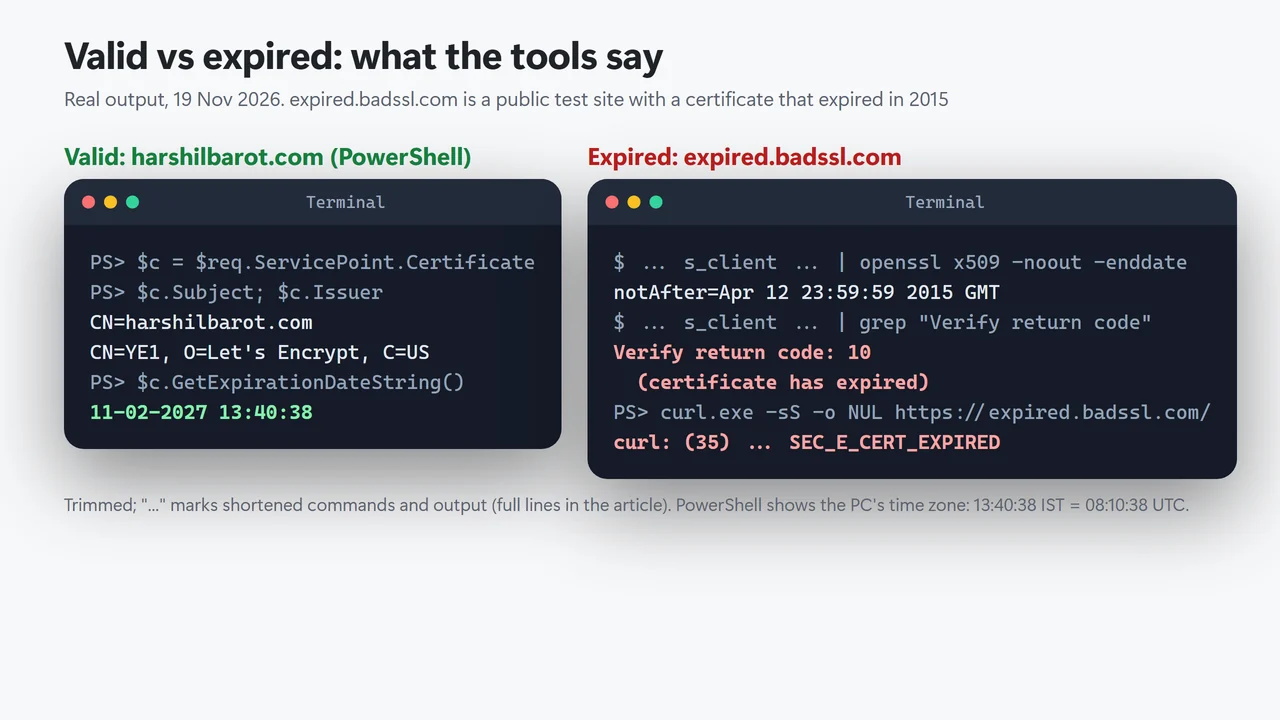
For this site it printed 11-02-2027 13:40:38. That is the same moment as OpenSSL’s 08:10:38 GMT. Microsoft’s documentation says the method formats the date “using the current culture and time zone”, and my PC is set to India time (UTC+5:30) with day-month-year dates. Keep that in mind when you compare results from different tools.
The try line matters when the certificate has already expired. On the expired test site below, the request failed with “Could not establish trust relationship for the SSL/TLS secure channel”, but the next lines still read its expiry: 13-04-2015 05:29:59 in India time.
What happens when a certificate expires
Nothing on the server changes, but every client that checks dates stops trusting the site. To see it, I ran the same tools against expired.badssl.com, a public test site kept with a certificate that expired on 12 April 2015:
| Tool | What it reported |
|---|---|
| OpenSSL | Verify return code: 10 (certificate has expired) |
| curl.exe built into Windows (8.22.0) | curl: (35) schannel: next InitializeSecurityContext failed: SEC_E_CERT_EXPIRED (0x80090328) - The received certificate has expired. |
| Chrome | A full-page security warning. Chromium’s list of network errors names this error CERT_DATE_INVALID |
For a real site that means visitors see a warning page instead of your content. Scripts, payment callbacks and apps that call your site can fail too, because tools like curl refuse the connection. Uptime monitors that only check for a server response may not notice, because the server is still up.
How long certificates last now
The 90-day lifetime of this site’s certificate is Let’s Encrypt’s standard. Lifetimes are shrinking for everyone, though. The CA/Browser Forum sets the rules for public certificates. Its members are certificate authorities and browser makers. In 2025 they approved ballot SC-081v3, and Apple, Google, Microsoft and Mozilla all voted yes. The rules now cut the maximum lifetime of a public TLS certificate in steps:
| Certificates issued from | Maximum lifetime |
|---|---|
| 15 March 2026 | 200 days |
| 15 March 2027 | 100 days |
| 15 March 2029 | 47 days |
Let’s Encrypt plans to go further. It says it will reduce “the maximum lifetime of our certificates to 45 days by February 2028”. Its announced timeline moves the default profile to 64 days on 10 February 2027 and to 45 days on 16 February 2028; plans like this can change. It warns that “renewing at a hardcoded interval of 60 days will no longer be sufficient”. It suggests renewing “at approximately two thirds of the way through the current certificate’s lifetime”. If you renew by hand, you will be doing it more and more often, so automatic renewal is the approach that scales.
Make sure it renews by itself
If your host includes a free certificate, check whether it renews it for you. Hostinger hosts this site. It says its Lifetime SSL “installs automatically once a domain is added to your hosting plan, and renews automatically for as long as the website is hosted at Hostinger”. This site also has a CDN in front of it. From outside, I can’t tell if my check got the plan’s certificate or the CDN’s. For this check that doesn’t matter: the date that counts is on the certificate visitors get. (My guide to free vs paid SSL certificates explains when a paid one is worth it.)
Automatic renewal still fails sometimes. The common causes are:
- DNS points somewhere else. A host can only renew a free certificate while the domain points to it. After a move, check that DNS has switched (see DNS propagation) and that the new host has issued its own certificate. If you aren’t sure which company serves the site now, find out who hosts a website.
- A name was added or removed. A new subdomain needs to be covered by the certificate, or it gets a mismatch error even while the main domain is fine.
- A CDN or proxy sits in front. Visitors see the CDN’s certificate, not the host’s. Check the expiry on both if you manage both.
- Waiting for a reminder email. Let’s Encrypt’s expiry notification emails ended on 4 June 2025, so don’t count on a reminder from the CA.
A simple safety net is the weekly -checkend 1209600 (14 days) cron line above. Some uptime monitors also offer a certificate-expiry check you can switch on.
If your certificate has already expired
- Confirm it really expired: run the OpenSSL check and read
notAfter. If the date is still in the future, the problem is more likely the visitor’s clock or a different certificate. - In your hosting panel, renew or reissue the SSL certificate for the domain. On managed hosting this is usually one button; with a paid certificate, renew it with the seller and install the new files.
- If a CDN or proxy sits in front of the site, renew its certificate too: visitors see the CDN’s certificate.
- Re-run the OpenSSL check against both
wwwand the bare domain, and test any old address that redirects to the site (301 vs 302 redirects shows how to see every hop). After a host move, my WordPress migration guide covers the full switch.
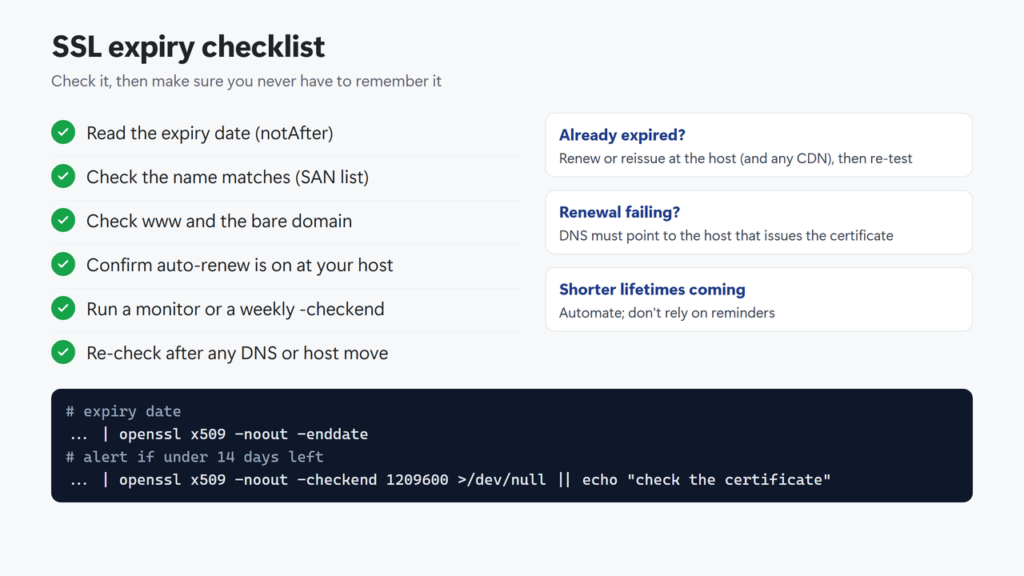 Checklist in text: read the expiry date (notAfter); check that the name you use is in the SAN list; check www and the bare domain; confirm automatic renewal is on at your host; run a monitor or a weekly -checkend; re-check after any DNS or host move. If it already expired, renew or reissue at the host, renew any CDN certificate and re-test. If renewal keeps failing, make sure DNS points to the host that issues the certificate.
How do I check when an SSL certificate expires?
In Chrome, select the icon to the left of the web address, then Connection is secure, then Certificate is valid, and read Expires On under Validity Period. From a terminal, run openssl s_client with -servername and pipe it to openssl x509 -noout -enddate; the notAfter line is the expiry date.
How long does an SSL certificate last?
Let’s Encrypt certificates last 90 days by default (it has announced 64 days from 10 February 2027). Paid certificates can last longer, but under CA/Browser Forum ballot SC-081 the maximum drops to 200 days for certificates issued from 15 March 2026, 100 days from 15 March 2027 and 47 days from 15 March 2029.
What happens if my SSL certificate expires?
Browsers show a full-page security warning (Chromium calls the error CERT_DATE_INVALID), and tools such as curl and OpenSSL refuse the connection or report the certificate as expired. The site is still online, but visitors have to get past the warning to reach it.
Can I check SSL expiry from the command line on Windows?
Yes. Use PowerShell and .NET (read ServicePoint.Certificate and call GetExpirationDateString(), which uses your PC’s time zone and date format), or run OpenSSL in the Git Bash window that comes with Git for Windows.
Does a free SSL certificate renew automatically?
Often, but check with your host. Hostinger, for example, says its Lifetime SSL renews automatically. Renewal can fail if the domain no longer points to that host or a name was added, so check the date after any DNS or hosting change.
Why does my certificate show a different expiry date in another tool?
Usually time zones: OpenSSL prints GMT, while PowerShell uses your PC’s time zone, and browsers usually do too. A different date altogether can mean you are seeing another certificate, such as a CDN’s or the one for www instead of the bare domain.