
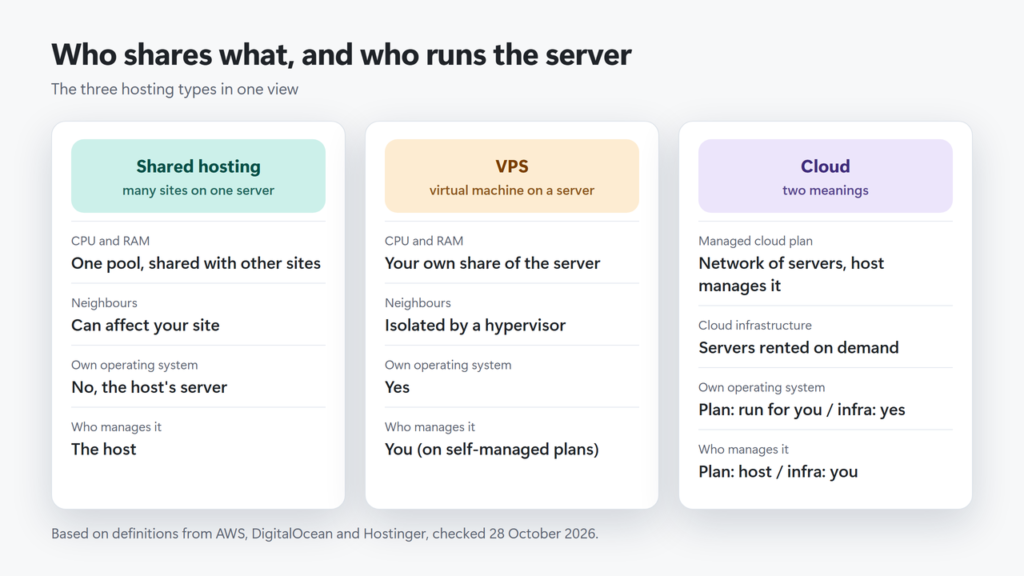
Shared vs VPS vs cloud hosting comes down to who shares the server and who runs it. Shared hosting puts your site on a server whose CPU and memory are shared with other customers; it is the cheapest option and the host runs the server for you. A VPS (virtual private server) gives you your own share of a server’s resources and root access, but you usually manage its software and security yourself. Cloud hosting means two different things: to AWS it is computing you rent on demand, while hosts such as Hostinger sell “Cloud” plans that are managed hosting with more resources than shared, run across a network of servers.
Short version: start on shared hosting, move to managed cloud hosting when your site keeps hitting its resource limits, and pick a VPS only when you need full control and are willing to look after a server.
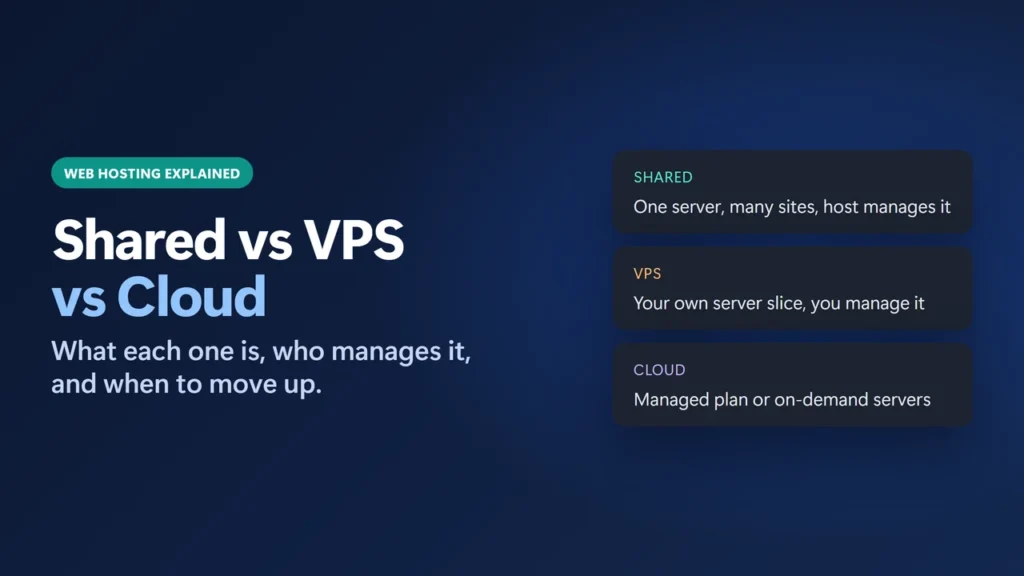
How I worked this out: this site, harshilbarot.com, is a WordPress site on Hostinger, and on 28 October 2026 I read its server details in WordPress Site Health (screenshot below). I did not move the site between hosting types or speed-test one type against another for this guide, so it has no performance numbers. Definitions come from AWS, DigitalOcean and Hostinger. Prices and limits come from Hostinger’s plan pages and help centre and DigitalOcean’s pricing page, all checked on 28 October 2026 in US dollars, before VAT, while Hostinger was running a Black Friday sale. This guide has no affiliate links.
Key takeaways
- Shared hosting is cheapest and the host manages the server, but other sites on it can affect yours.
- A VPS gives you your own share of a server’s resources and root access; on most VPS plans, including Hostinger’s self-managed KVM plans, keeping the operating system and software updated and secure is your job, even where the host adds extras such as Hostinger’s managed firewall and weekly backups.
- “Cloud hosting” can mean on-demand infrastructure (AWS, DigitalOcean) or a managed hosting plan (Hostinger Cloud). Check which one a host is selling.
- Hostinger’s VPS deal prices are for 24 months and its shared and Cloud deal prices for 48 months, so compare the renewal prices and terms, not just the headline monthly price.
- Move up when your site keeps hitting its plan limits after you have optimised it, not before.
Table of Contents
- 1Shared vs VPS vs Cloud Hosting at a Glance
- 2What Is Shared Hosting?
- 3What Is a VPS?
- 4What Is Cloud Hosting? It Depends Who Is Selling It
- 1. Cloud infrastructure (the AWS meaning)
- 2. Managed cloud hosting (the Hostinger meaning)
- 5Price and Resources Compared (Real Plans, 28 October 2026)
- 6How to See What Your Hosting Gives WordPress
- 7Signs You Have Outgrown Shared Hosting
- 8Which One Should You Choose?
- 9Moving Up Without Breaking Your Site
- 10Troubleshooting: Problems That Point to Your Hosting
- 11Frequently Asked Questions
- Is a VPS faster than shared hosting?
- Is cloud hosting better than a VPS?
- When should I upgrade from shared hosting?
- Do I need technical skills for a VPS?
- How much does a VPS cost compared with shared hosting?
- Can I move from shared to cloud hosting without moving my site?
Shared vs VPS vs Cloud Hosting at a Glance
| Type | What you get | Pick it when |
|---|---|---|
| Shared hosting | Space on a server shared with other sites; the host manages the server | It’s your first site, a blog or a small business site with steady traffic |
| Managed cloud hosting (e.g. Hostinger Cloud) | More CPU and RAM than shared, a dedicated IP, still managed by the host | Your site has outgrown shared hosting and you don’t want to run a server |
| VPS (self-managed) | Your own share of a server, its own operating system and root access | You need custom software or settings and can manage a Linux server |
| Cloud infrastructure (e.g. AWS, DigitalOcean) | Servers you create and pay for on demand, usually unmanaged | You are a developer who wants to scale or rebuild servers yourself |
What Is Shared Hosting?
With shared hosting, many websites live on one server and draw on the same pool of CPU, memory and disk. AWS describes it as all websites sharing “the same physical server” and competing “for critical resources like internal memory, hard disk space, and processing power.” Hostinger calls it “the most affordable hosting solution”.
The host maintains the server and gives you a control panel, so you never touch the operating system. The trade-off, in Hostinger’s words: “since you’re sharing server resources with other users, any issues experienced by other sites can directly affect your website too.” Shared plans also cap what each account can use; Hostinger’s help centre lists CPU, I/O, RAM and processes, and PHP workers as the limits to watch.
What Is a VPS?
A VPS is a virtual machine on a physical server. The host’s hypervisor, in Hostinger’s explanation, “divides the server’s CPU, RAM, storage, and bandwidth into isolated virtual environments called VPSes.” You still share the hardware, but, as AWS puts it, you get “exclusive access to your share of hardware and resources even though the rest of the physical server is still being shared.” Each VPS has its own operating system and, usually, full root access.
Most VPS plans are self-managed. DigitalOcean says its core Droplet (VPS) offering “is unmanaged, which means you are responsible for managing the server.” Hostinger’s VPS FAQ says: “While you’ll be responsible for your virtual private servers, we’ll take care of the speed, uptime, and stability of our physical servers.” For VPS hosting in general, Hostinger’s tutorial says that means “firewall management, software updates, and security patching”. Managed VPS plans exist too, where the provider takes care of “core updates, maintenance, and software installation” (AWS). None of the plans priced below is a managed VPS, so check a managed plan’s price separately.
What Is Cloud Hosting? It Depends Who Is Selling It
This is where most comparisons get confusing, because “cloud hosting” has two meanings.
1. Cloud infrastructure (the AWS meaning)
AWS says that with cloud hosting “you rent a hosting service on demand, by self-service from a cloud provider”, and that it “offers pay-as-you-go systems”. What you rent can be a single virtual server or many. DigitalOcean is a good example of how blurry the line is: it calls a Droplet “DigitalOcean’s brand name for a virtual private server (VPS)”, sells it as cloud infrastructure, and bills it per second with a monthly cap. So a cloud server and a VPS can be the same thing with different billing.
2. Managed cloud hosting (the Hostinger meaning)
Hostinger’s Cloud plans are a managed hosting product. Hostinger says cloud hosting “runs your website across a network of connected virtual servers instead of a single physical machine. If one server has an issue, another takes over”, and that it “combines the power of a VPS and the simplicity of managed web hosting”, with “a pre-built environment and an easy-to-use control panel”. The host still runs the server.
Hostinger also claims its Cloud plans give “4X more speed and 20X more resources compared to traditional web hosting”. That is Hostinger’s marketing claim; I have not tested it.
Price and Resources Compared (Real Plans, 28 October 2026)
Here are Hostinger’s entry plans for each type, side by side, plus DigitalOcean as an example of unmanaged cloud infrastructure. Hostinger’s prices are Black Friday deal prices, paid upfront for the whole term.
| Plan (type) | Deal price and upfront total | Renews at |
|---|---|---|
| Hostinger Premium (shared) | $2.49/mo; $119.52 for 48 months | $10.99/mo |
| Hostinger Unlimited (shared) | $3.49/mo; $167.52 for 48 months | $16.99/mo |
| Hostinger Cloud Startup (managed cloud) | $7.99/mo; $383.52 for 48 months | $25.99/mo |
| Hostinger KVM 1 (self-managed VPS) | $6.49/mo; $155.76 for 24 months | $11.99/mo |
| Hostinger KVM 2 (self-managed VPS) | $8.79/mo; $210.96 for 24 months | $14.99/mo |
| DigitalOcean Basic Droplet (unmanaged) | From $4/mo (512 MiB RAM), billed per second with a monthly cap | No upfront term |
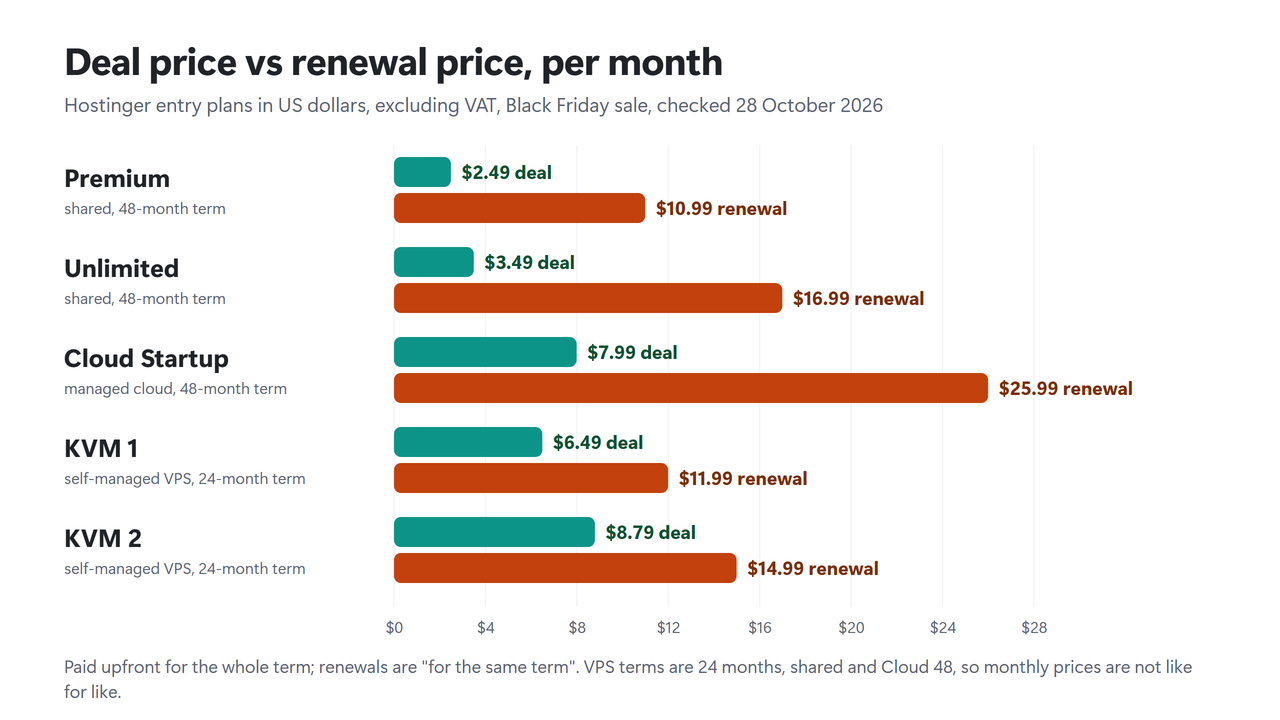
What the numbers show. The headline prices are not like for like. The shared and Cloud deals lock you in for 48 months, the VPS deals for 24. Renewal changes the picture most: Premium shared hosting renews at more than four times its deal price, while KVM 1 renews at less than double.
At renewal, KVM 1 ($11.99 a month on a 24-month term) costs $1 a month more than Premium ($10.99 a month on a 48-month term) and lists 4 GB of RAM against Premium’s 2 GB limit. But the terms differ, and on the VPS that RAM also has to run the operating system and software you install and look after yourself. Over 48 months at today’s listed prices, Premium costs $119.52, Cloud Startup $383.52 and KVM 1 about $443.52 ($155.76 for the first 24 months plus 24 × $11.99), assuming renewal prices don’t change. My guide to hosting renewal prices explains how to compare first-term and renewal costs.
| Plan | CPU and RAM | Storage and websites |
|---|---|---|
| Premium (shared) | 1 core, 2 GB | 20 GB SSD; 3 websites |
| Unlimited (shared) | 2 cores, 3 GB | 50 GB NVMe; unlimited websites (Fair Usage Policy applies) |
| Cloud Startup | 4 cores, 4 GB | 100 GB NVMe; see note below |
| KVM 1 (VPS) | 1 vCPU, 4 GB | 50 GB NVMe; 4 TB bandwidth |
| KVM 2 (VPS) | 2 vCPU, 8 GB | 100 GB NVMe; 8 TB bandwidth |
Hostinger’s own pages disagree on Cloud Startup’s website count: the plan card says “Unlimited websites”, while its limits article lists 100 for every Cloud plan. If you run many sites, check this with Hostinger before you buy. Cloud Startup also includes a dedicated IP address, where Hostinger’s shared plans use a shared one, and every KVM plan gets a dedicated IP too. Backups are weekly on Premium and the KVM plans, daily on Unlimited and Cloud Startup.
How to See What Your Hosting Gives WordPress
Before you upgrade, look at what you already have. In WordPress, go to Tools → Site Health → Info and open the Server section. Here is this site’s, on 28 October 2026:
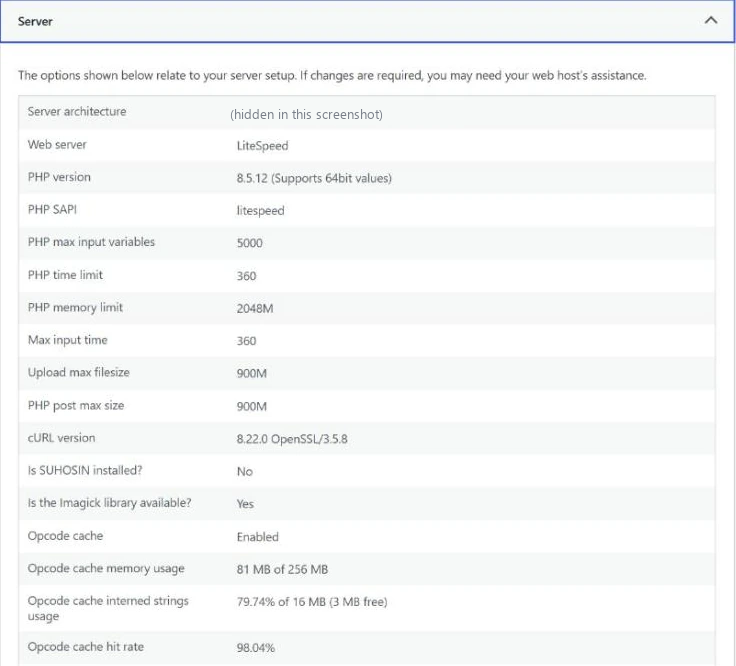
It shows the web server (LiteSpeed here), the PHP version (8.5.12), and PHP’s own limits: a memory limit of 2048M, a time limit of 360 seconds and a 900M upload limit. Read these carefully. The PHP manual defines the memory limit as “the maximum amount of memory in bytes that a script is allowed to allocate”, so it is a ceiling for each PHP script, not the RAM your plan gives you. Your plan’s real limits (CPU, RAM, processes, PHP workers) are in your host’s control panel; on Hostinger they are on the Resources Usage page, and the plan’s limits are in the Details section of the dashboard.
Signs You Have Outgrown Shared Hosting
Hostinger’s help article on reaching plan limits is a useful checklist. The thresholds and messages are Hostinger’s own, and other hosts name and set their limits differently, but AWS also warns that a growing site on shared hosting can run into “internal server errors or unavailable service errors”:
- The site is slow but shows no errors. When CPU is maxed out, “There will be no error messages, but the website will feel sluggish.” Hostinger advises keeping CPU “below 80% during the busiest times.” Hitting the I/O limit slows the site the same way.
- Visitors see 503 Service Unavailable. Hostinger says this can happen when the plan reaches its RAM or process limit.
- Pages hang or time out. That can be the PHP worker limit: “users may experience delays or timeouts”.
- Your control panel warns you. Hostinger’s Resources Usage page shows “Your websites could experience slower performance” when limits are reached.
- It keeps happening. “If you reach the limit of processes or RAM 10-20 times within one month, it is a very strong indication that your website needs a larger pool of resources”.
Moving to Hostinger Cloud raises these limits rather than removing them: the same help article says that if a Cloud Enterprise plan reaches its limits, Hostinger will “offer you the best VPS solution”.
Optimise before you pay more. Hostinger notes that “Usually, high CPU usage is caused by poorly optimized website code”, and suggests fewer plugins, fewer cron jobs and caching first, and for a short spike it lets you temporarily boost an account’s resources. Its list of fixes includes enabling LiteSpeed Cache; my LiteSpeed Cache settings guide shows this site’s settings, and my guide on how to reduce TTFB in WordPress shows how to measure where the time goes. If the site is still struggling after that, it is time to move up.
Which One Should You Choose?
- Choose shared hosting for a first site, a blog or a small business site with steady traffic. It is the cheapest option and you don’t manage the server.
- Choose managed cloud hosting when a growing site or online store keeps hitting shared limits and you want more resources without becoming a server administrator.
- Choose a self-managed VPS when you need root access, custom software or settings a control panel doesn’t offer, and you are comfortable keeping a Linux server updated and secure. Hostinger’s own advice is to upgrade to a VPS “once your managed web hosting no longer meets your requirements and you know how to manage a virtual server.”
- Choose cloud infrastructure (DigitalOcean, AWS and similar) when you are a developer who wants to pay monthly or by usage, rebuild servers at will and manage everything yourself.
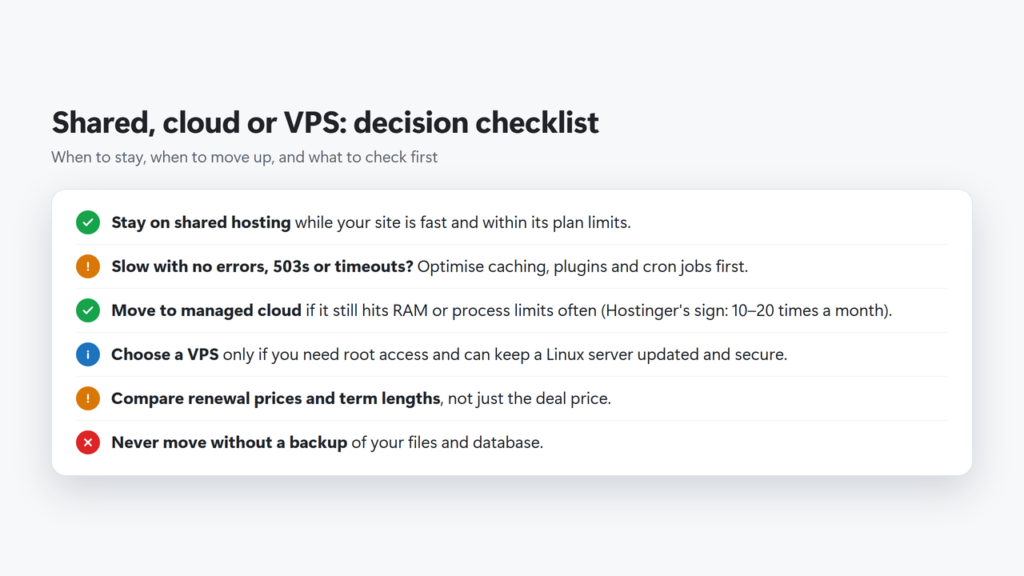
The checklist in text: stay on shared hosting while the site is fast and within its limits; optimise caching, plugins and cron jobs first when it slows down; move to managed cloud if it still hits RAM or process limits often (Hostinger’s sign is reaching them 10–20 times a month); choose a VPS only if you need root access and can manage the server; compare renewal prices and term lengths, not deal prices; and back up your site before any move.
If you are comparing providers rather than hosting types, my best web hosting services list and my best cloud hosting providers guide compare specific hosts, and best managed WordPress hosting covers hosts that run WordPress for you. My Hostinger review and DigitalOcean review go deeper on the two providers used as examples here.
Moving Up Without Breaking Your Site
- Back up first, files and database, and keep a copy off the server.
- Shared to managed cloud at the same host is often an in-place upgrade. Hostinger says upgrading its web hosting to Cloud “only takes a few clicks via our user-friendly hPanel.”
- Shared to VPS means setting up a separate server: choose an operating system or control panel, secure it, migrate the site, then point your domain at the new IP address.
- Check the renewal price and term of the new plan before you pay, as well as the deal price.
- Test after the move: load key pages logged out, check forms and checkout, and look at Site Health again.
Troubleshooting: Problems That Point to Your Hosting
| What you see | Likely cause | What to do |
|---|---|---|
| Slow pages, no error messages | CPU or I/O limit on a shared plan | Check your host’s resource usage page; enable page caching |
| 503 Service Unavailable | RAM or process limit reached | Find the plugin or traffic spike behind it; upgrade if it keeps recurring |
| Pages hang or time out | PHP worker limit | Cache pages so fewer requests need PHP; reduce slow plugins |
| Slow at random times on shared hosting | Possibly other sites on the server | Ask your host; a VPS gives you dedicated resources, and managed cloud plans give you more of them |
| Site down after a server update on a VPS | Self-managed: updates are your job | Restore a backup or snapshot; test updates on a copy first |
Frequently Asked Questions
Is a VPS faster than shared hosting?
Not automatically. A VPS gives you its own share of the server (Hostinger promises dedicated CPU, RAM and disk on its KVM plans), but some low-cost cloud VPSs share CPU: DigitalOcean says its Basic Droplets suit bursty applications that can handle variable levels of CPU. Speed also depends on how you configure the server. A well-cached site on good shared hosting can be fast; I did not run a speed test between hosting types for this guide.
Is cloud hosting better than a VPS?
It depends what the host means by cloud. Managed cloud plans (like Hostinger Cloud) are easier because the host runs the server. Cloud servers from providers like DigitalOcean are effectively VPSs billed on demand, so you manage them just like a VPS.
When should I upgrade from shared hosting?
When your site keeps hitting its plan limits after you have optimised it. Hostinger treats reaching the RAM or process limit 10–20 times in one month as a very strong sign the site needs more resources.
Do I need technical skills for a VPS?
For a self-managed VPS, yes. You are responsible for the operating system, software updates and security patches, and usually the firewall. If you don’t want that, choose managed cloud hosting or a managed VPS.
How much does a VPS cost compared with shared hosting?
On 28 October 2026, during a sale, Hostinger’s KVM 1 VPS was $6.49 a month for 24 months (renewing at $11.99) and its Premium shared plan $2.49 a month for 48 months (renewing at $10.99). DigitalOcean’s smallest Basic Droplet was $4 a month. Prices change, so check before you buy.
Can I move from shared to cloud hosting without moving my site?
At some hosts, yes. Hostinger says upgrading its web hosting to a Cloud plan takes a few clicks in hPanel. Moving to a VPS is different, because it is a new server you set up yourself.