
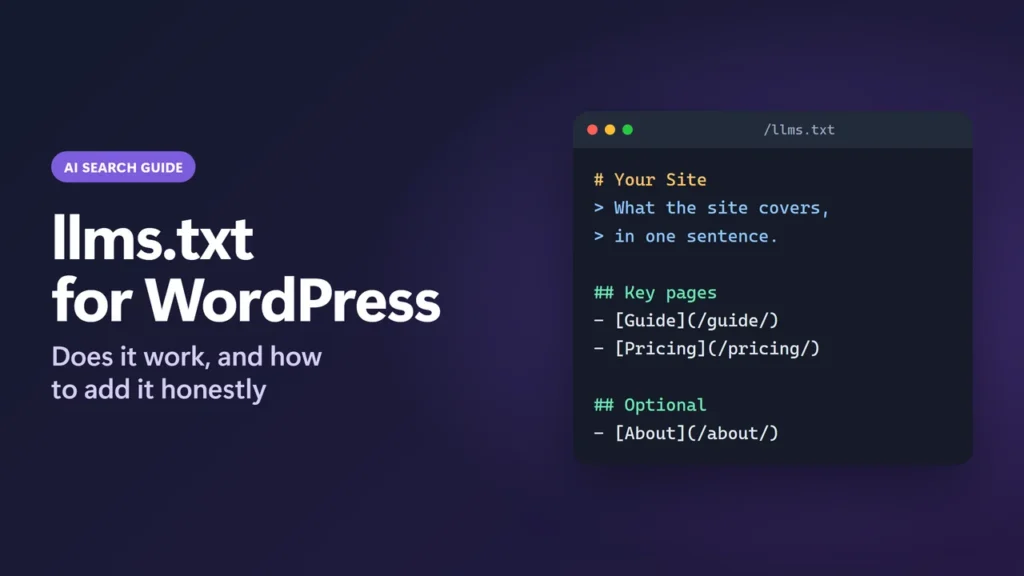
llms.txt is a plain Markdown file at yoursite.com/llms.txt that lists your most useful pages for AI tools, with a short summary of the site. You can add one to WordPress in a few minutes with Rank Math, Yoast SEO or All in One SEO. But be clear about what it does: Google says its Search features do not use llms.txt, and no major AI company has said its crawler reads it.
So it is cheap to add and unlikely to hurt, but it is not a ranking factor and not a shortcut into AI answers. This guide explains what the file is, what the evidence says, how to set it up in each plugin, and the mistakes I found in this site’s own file.
How I worked this out: this site has served an llms.txt file since at least August 2026, generated by Rank Math, plus a separate llms-full.txt. I checked both live files, their response headers and Rank Math’s settings screen on 23 October 2026. Statements from Google, the plugin makers and the llms.txt proposal were checked on their official pages the same day. I do not have server logs that show whether AI bots read this site’s file, so I make no claim either way.
Key takeaways
- llms.txt is a proposal from Jeremy Howard of Answer.AI (September 2024), not an official web standard.
- Google’s AI optimization guide says Google Search does not use llms.txt, and that creating one for other systems is fine.
- No major AI company has said its crawler reads llms.txt. An Ahrefs study of 137,210 domains found 97% of llms.txt files got no requests at all.
- Rank Math, Yoast SEO and All in One SEO can all create the file for free.
- If you add one, keep it short and accurate: an H1, a one-line summary and your best pages.
Table of Contents
- 1What Is llms.txt?
- What goes inside the file
- 2Does llms.txt Actually Work?
- 3Should You Add llms.txt to Your WordPress Site?
- 4How to Add llms.txt in WordPress
- Rank Math
- Yoast SEO
- All in One SEO
- Without a plugin
- 5What to Put in Your llms.txt
- What I found in this site’s own file
- 6What About llms-full.txt?
- 7How to Check Your llms.txt Is Working
- 8Common llms.txt Problems in WordPress
- The file returns a 404
- My changes are not showing
- Two plugins are fighting over the file
- Pages I did not expect are listed
- 9llms.txt Checklist
- 10Frequently Asked Questions
- What is llms.txt in WordPress?
- Does Google use llms.txt?
- Do ChatGPT, Claude or Perplexity read llms.txt?
- Is llms.txt bad for SEO?
- Which plugin is best for llms.txt?
- What is the difference between llms.txt and llms-full.txt?
- Should I add llms.txt to robots.txt?
What Is llms.txt?
llms.txt is a proposed file format for giving large language models (LLMs) a quick, clean map of a website. Jeremy Howard of Answer.AI published the proposal on 3 September 2024. The idea is simple: web pages are full of menus, ads and scripts, so a short Markdown file that points to the important pages is easier for an AI tool to read inside its limited context window.
The proposal lives at llmstxt.org, which now describes a second version (updated August 2026). It is not a standard from the IETF or W3C. It sits alongside robots.txt and your XML sitemap but does a different job:
| File | What it is for | Who reads it |
|---|---|---|
| robots.txt | Tells crawlers what they may and may not fetch | Search engines and most well-behaved bots |
| sitemap.xml | Lists every URL you want indexed | Search engines |
| llms.txt | A short, curated guide to your most useful pages, in Markdown | Any AI tool that chooses to use it. No major one has said it does. |
What goes inside the file
The format is plain Markdown with a set order. Only the first line, an H1 with your site name, is required by the proposal.
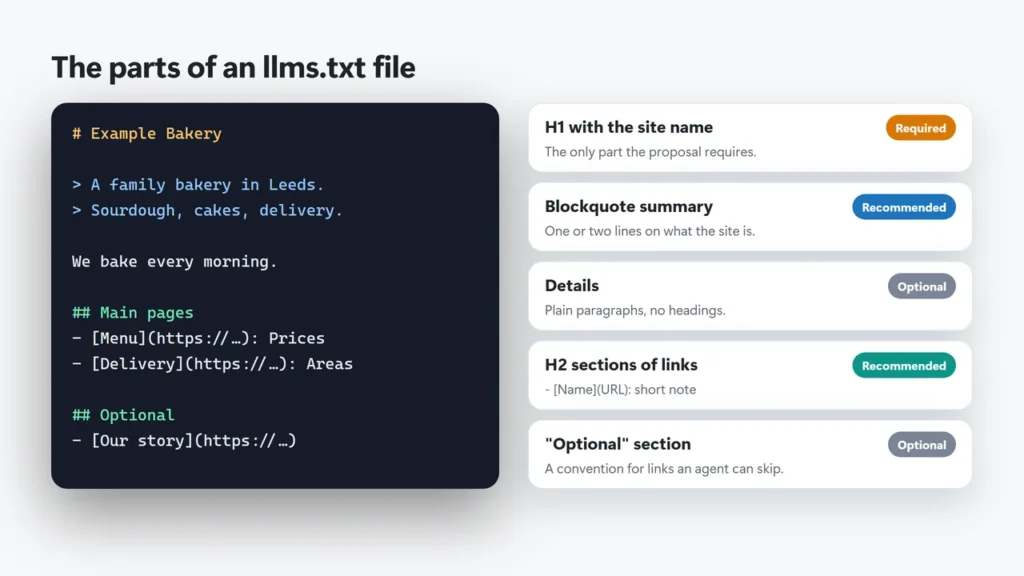
- An H1 with the name of the site or project.
- A blockquote (a line starting with
>) with a short summary. - Optional paragraphs with more detail.
- H2 sections that each hold a list of links, written as
- [Page name](URL): note. - An “Optional” section for secondary links. Version 2 of the proposal keeps it as a convention for links an agent can skip, but it no longer has any special technical meaning.
Here is a small example for a made-up bakery:
# Example Bakery

> A family bakery in Leeds. We sell sourdough, cakes and custom
> wedding cakes, and we deliver within 10 miles.

## Main pages
- [Menu and prices](https://example.com/menu/): Breads, cakes and prices
- [Wedding cakes](https://example.com/wedding-cakes/): How ordering works
- [Delivery](https://example.com/delivery/): Areas, fees and times

## Optional
- [Our story](https://example.com/about/): Who runs the bakery
Does llms.txt Actually Work?
This is the part most guides skip. Here is what the main players have said on the record.
| Who | What they have said | Date |
|---|---|---|
| Google Search | Its AI optimization guide says you do not need AI text files to appear in Search, because “Google Search itself doesn’t use them”. It adds that making llms.txt for other systems is fine. | Published May 2026, updated July 2026 |
| Google Search | Its AI features page says there are no special requirements to appear in AI Overviews or AI Mode. | Updated December 2025 |
| John Mueller, Google | Posted on Bluesky that no AI system used llms.txt at that time. In January 2026 he added that Google hosting llms.txt files of its own is not an endorsement. | June 2025 and January 2026 |
| OpenAI, Anthropic, Perplexity | Their crawler pages explain robots.txt controls. None says the crawler reads llms.txt. All three publish llms.txt files for their own developer docs. | Checked October 2026 |
| Chrome Lighthouse | Has an llms.txt check in its new Agentic Browsing audits. A missing file is marked not applicable; a server error is flagged. | May 2026 |
The best usage data so far is third-party. Ahrefs looked at bot traffic data for 137,210 domains from its own analytics tools in May 2026 and published the study in June 2026. About 28% of those sites had an llms.txt file, which Ahrefs calls an upper bound because its users are more SEO-aware than most. 97% of the files received no requests at all. Of the requests that did happen, SEO audit tools were the largest group (about 22%), and AI bots of all kinds made about 20%. Ahrefs also points out that a fetch does not prove a bot used what it fetched.
My honest reading: llms.txt does not help your Google rankings or your chance of appearing in AI Overviews. It may help an AI coding assistant or an agent that is pointed at your site on purpose, which is why software companies use it for their documentation. For a typical blog or business site, it is a small, optional extra.
Should You Add llms.txt to Your WordPress Site?
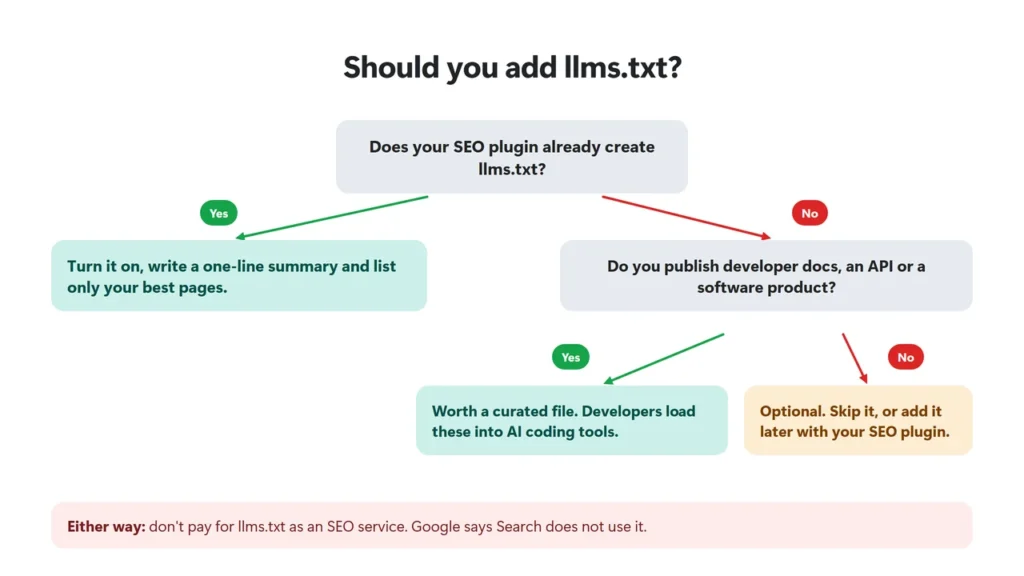
- Yes, if your SEO plugin already does it. It takes minutes, costs nothing and Rank Math sends it with a noindex header, so it will not show up in search results.
- Yes, if you run documentation, an API or a software product. Developers paste these files into AI coding tools, which is the use case the companies behind these files point to.
- Do not pay for it. A paid plugin or service sold as “AI visibility” through llms.txt is selling something that Google says it does not use.
- Neither applies? Then it is optional. Skip it, or switch it on in your SEO plugin later.
- Do not let it replace the basics. Clear pages, accurate facts, good internal links and a crawlable site matter far more for search and AI answers.
How to Add llms.txt in WordPress
All three big SEO plugins can create the file. Use the one you already have; there is no reason to install a second SEO plugin just for this.
| Plugin | Added in | Where to find it | Cost | How it updates |
|---|---|---|---|---|
| Rank Math | 1.0.250 (July 2025) | Rank Math SEO → General Settings → Edit llms.txt (turn on the LLMS Txt module first) | Free | Generated by the plugin rather than saved as a file, so it shows new posts once your page cache and CDN are purged |
| Yoast SEO | 25.3 (June 2025) | Yoast SEO → Settings → Site features → AI tools → llms.txt | Free | Automatic mode refreshes weekly |
| All in One SEO | 4.8.4 (June 2025) | All in One SEO → Sitemaps → LLMs.txt tab | Free (llms-full.txt and Markdown pages need Pro) | Generated by the plugin from your settings; on by default |
Rank Math
- If Rank Math is in Easy Mode, switch to Advanced Mode with the toggle at the top of the Rank Math dashboard. Easy Mode shows only the Summary field.
- Go to Rank Math SEO → Dashboard and turn on the LLMS Txt module.
- Go to Rank Math SEO → General Settings → Edit llms.txt.
- Choose the post types and taxonomies to include, and the number of posts and terms to list.
- Fill in Summary. Rank Math shows it as the blockquote under your site name.
- Use Additional Content only for a few extra lines or links you want to add by hand.
- Save, then open
yoursite.com/llms.txtin a private window to check it.
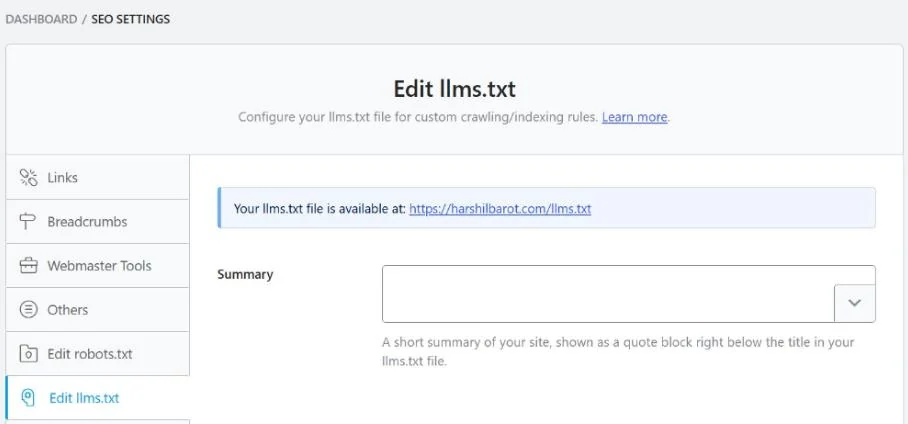
That first step is the one that confused me on this site. The Edit llms.txt screen showed only the Summary field, as in the screenshot above, because Rank Math was in Easy Mode. For a wider look at the plugin, see my Rank Math review.
Yoast SEO
Go to Yoast SEO → Settings → Site features, find llms.txt in the AI tools group and turn it on. You can let Yoast pick the pages, which favours your cornerstone content, or select pages yourself. In automatic mode it lists a handful of recently updated posts per content type, cornerstone content first. Yoast writes a real file to your server and refreshes it weekly in automatic mode. It will not overwrite an llms.txt file that it did not create, and it is not available on multisite.
All in One SEO
Go to All in One SEO → Sitemaps and open the LLMs.txt tab. The feature is on by default in recent versions. You can set the title and description, choose post types and taxonomies, and exclude individual posts or terms. The full-content llms-full.txt file and Markdown versions of pages need AIOSEO Pro.
Without a plugin
You can write the file by hand and upload it to your site’s root folder with your host’s file manager or SFTP. The downside is upkeep: a static file does not change when you publish or delete posts. A physical file can also clash with a plugin that generates one, so pick one method.
SEOPress added llms.txt in version 9.5; its release post says you switch it on under SEO → PRO → llms.txt, and itself cautions that most AI systems do not yet rely on the file. With any other SEO plugin, check its settings first.
What to Put in Your llms.txt
Think of it as a short, honest guide to your site for someone in a hurry. A few rules work well:
- Start with the H1. The site name must be the first heading.
- Write a one-sentence summary of who you are and what the site covers.
- List your best pages, not all of them. Your sitemap already lists everything.
- Write a short, accurate note for each link. These notes often come from your meta descriptions, so outdated or salesy descriptions show up here too.
- Leave out thin, private or temporary pages, such as old promotions, thank-you pages or anything behind a login.
- Keep claims factual. Anything in this file is a statement about your site.
What I found in this site’s own file
Checking this site’s llms.txt for this guide turned up four things worth fixing, and they are common:
- The H1 is not the first line. Rank Math adds a “Generated by Rank Math SEO” credit line above it. The proposal expects the H1 first. Rank Math’s code includes a filter,
rank_math/llms_txt/remove_credit: return true and the line disappears (see the snippet below). - There is no summary. The Summary field was empty, so the file has no blockquote.
- Some notes are long article intros. Older posts without a tight meta description fall back to their opening paragraph.
- It is long, and not all of it is plain fact. At about 28 KB, it lists 50 posts, the site’s pages and a large block of extra text added by hand, some of which reads more like marketing than facts. A shorter, curated file is closer to what the proposal intends.
To remove Rank Math’s credit line, add this to a code snippets plugin or your child theme’s functions.php, then purge your caches:
add_filter( 'rank_math/llms_txt/remove_credit', '__return_true' );What About llms-full.txt?
llms-full.txt is a single file that contains the full text of your key pages, not just links. It is not part of the llms.txt proposal. Mintlify, a documentation platform, says it started the format together with Anthropic, and it caught on for software documentation.
This site has one, built by a small custom plugin rather than by Rank Math. For most WordPress sites I would skip it. It duplicates your content in another place you have to keep accurate, and there is even less evidence that crawlers use it. It makes more sense for documentation that developers load into AI coding tools.
How to Check Your llms.txt Is Working
Run this in a terminal, replacing the domain with yours:
curl -sI https://example.com/llms.txt- Status 200. A 404 means the module is off or the file is missing. Lighthouse treats a missing file as fine but flags server errors.
- Content-Type text/plain (or text/markdown).
- X-Robots-Tag: noindex (optional). Rank Math sends
noindex, nofollowon this site, which keeps the file itself out of search results. Other plugins may not, and that is not an error. Google’s John Mueller has said noindexing it can make sense.
Then open the file in a private window and read it as a stranger would. Does the first heading name your site? Does the summary make sense? Do the links work?
Common llms.txt Problems in WordPress
The file returns a 404
Check that the feature is turned on in your SEO plugin. If it is, go to Settings → Permalinks and click Save without changing anything. That refreshes WordPress’s rewrite rules, which plugins such as Rank Math use to serve the file. Yoast writes a real file instead, so with Yoast check that the file exists in your site’s root folder.
My changes are not showing
Caching is the usual cause. Purge your page cache, and if your host has a CDN, purge that too. On this site, Hostinger‘s CDN kept serving an old copy of llms.txt after an edit until the CDN cache was cleared in hPanel. With Yoast in automatic mode, also remember it refreshes weekly. My LiteSpeed Cache settings guide shows how to check whether a page is being served from the cache.
Two plugins are fighting over the file
A physical llms.txt file in your site’s root folder is served before any plugin gets the chance. If you switch plugins, delete the old file. Yoast will not overwrite a file it did not create.
Pages I did not expect are listed
Plugins list published content from the post types you select. Remove post types you do not want, exclude individual posts if your plugin allows it, and noindex pages that should not be public. Rank Math leaves out password-protected and noindex posts.
llms.txt Checklist
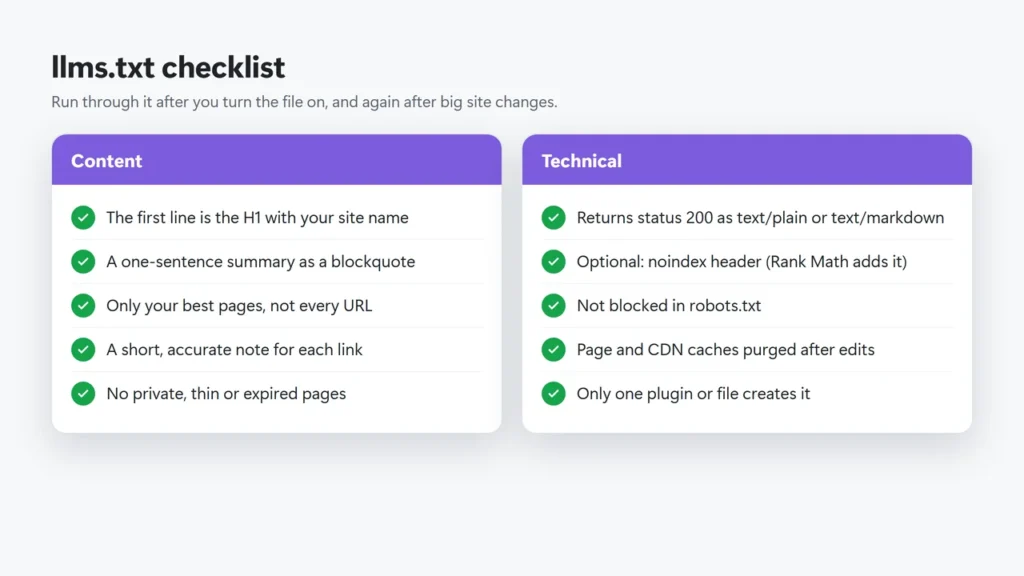
Content
- The first line is the H1 with your site name.
- A one-sentence summary as a blockquote.
- Only your best pages, not every URL.
- A short, accurate note for each link.
- No private, thin or expired pages.
Technical
- It returns status 200 as text/plain or text/markdown.
- A noindex header is optional (Rank Math adds one).
- robots.txt does not block it.
- Page and CDN caches are purged after edits.
- Only one plugin or file creates it.
If you work on AI search visibility more broadly, the basics still decide most of the outcome: pages that answer the question clearly, facts you can back up and a site that is easy to crawl. Tools such as Semrush now track AI visibility, which is a better measure than whether a bot fetched one text file. You can also read how I review products.
Frequently Asked Questions
What is llms.txt in WordPress?
It is a Markdown file at yoursite.com/llms.txt that lists your most useful pages for AI tools, with a short summary. In WordPress, Rank Math, Yoast SEO and All in One SEO can create it for you.
Does Google use llms.txt?
Not for Search. Google’s AI optimization guide says Google Search does not use AI text files like llms.txt, and its AI features page says there are no special requirements for AI Overviews or AI Mode. Other Google teams do touch the format: Chrome’s Lighthouse checks it, and some Google developer sites publish one.
Do ChatGPT, Claude or Perplexity read llms.txt?
None of OpenAI, Anthropic or Perplexity has said its crawler reads llms.txt. They do publish llms.txt files for their own developer documentation.
Is llms.txt bad for SEO?
No. It does not affect rankings either way. Rank Math serves it with a noindex header, so the file itself will not appear in search results.
Which plugin is best for llms.txt?
Use the SEO plugin you already have. Rank Math, Yoast SEO and All in One SEO all create it for free. Installing a second SEO plugin only for llms.txt is not worth it.
What is the difference between llms.txt and llms-full.txt?
llms.txt lists links with short notes. llms-full.txt contains the full text of your pages in one file. llms-full.txt is not part of the llms.txt proposal; it is a convention from documentation sites.
Should I add llms.txt to robots.txt?
The llms.txt proposal does not ask for it. Just make sure robots.txt does not block the file if you want tools to be able to fetch it.