
Hands-on tested How I review
Disclosure: some links on this page are affiliate links. If you buy through one, I may earn a commission at no extra cost to you. It does not decide my ratings. Affiliate disclosure
At a glance
- Best for
- Bloggers, agencies, freelancers and small businesses running their own cloud servers
- Skip it if
- you want fully managed hosting with the server included
- Main drawback
- Hosting is not included; you need a separate VPS provider
Check current pricingCompare alternatives
Affiliate link: I may earn a commission. It does not change my rating.
If you are looking for an easier way to manage VPS servers, cloud hosting infrastructure, and WordPress websites without dealing with complicated Linux commands, ServerAvatar is a platform worth considering.
In this detailed ServerAvatar review, you’ll learn everything about ServerAvatar features, pricing, performance, security, setup process, supported cloud providers, WordPress hosting capabilities, and how it compares to popular alternatives such as RunCloud, CloudPanel, CyberPanel, and Cloudways.
Managing a cloud server traditionally requires technical expertise. Tasks such as installing SSL certificates, configuring web servers, setting up backups, monitoring performance, and securing a VPS can quickly become overwhelming for beginners. ServerAvatar aims to solve these challenges through a modern cloud-based dashboard that simplifies server management.
Whether you are a blogger, freelancer, developer, agency owner, or small business owner, this guide will help you determine if ServerAvatar is the best server management platform for your needs.
After extensively researching the platform, analyzing its features, reviewing its infrastructure management capabilities, and comparing it with competitors, this article provides a complete beginner-friendly overview that helps you make an informed decision.
An easy-to-use server management platform that helps you deploy, secure, and manage websites on cloud servers without server administration headaches.
Pros
- Beginner-Friendly Dashboard
- Supports DigitalOcean, Vultr, Hetzner, AWS & Google Cloud.
- One-Click WordPress Installation
- Supports Laravel, PHP & Node.js Applications
Cons
- Hosting Is Not Included
- Requires A Separate VPS Provider
- Basic Server Knowledge Is Helpful
Table of Contents
- 1Key Takeaways
- 2Quick Facts About ServerAvatar
- 3What Is ServerAvatar?
- How ServerAvatar Works
- 4Why ServerAvatar Has Become Popular
- Solving a Major Problem
- Affordable Alternative to Managed Hosting
- Growing Demand for VPS Hosting Management
- 5Key ServerAvatar Features
- One-Click WordPress Installation
- Multi-Server Management
- SSL Certificate Management
- Automated Backups
- Database Management
- Team Collaboration
- Monitoring and Analytics
- 6Supported Cloud Providers
- DigitalOcean
- Vultr
- Hetzner
- Amazon Web Services (AWS)
- Google Cloud
- 7ServerAvatar Performance and Speed Analysis
- OpenLiteSpeed Support
- Nginx Hosting Support
- Apache Hosting Support
- Performance Optimization Features
- Real-World Performance Expectations
- Is ServerAvatar Fast Enough for High-Traffic Websites?
- 8ServerAvatar Pricing Explained
- How ServerAvatar Pricing Works
- ServerAvatar Free Plan
- Premium Plans
- Is ServerAvatar Expensive?
- 9ServerAvatar Security Features
- Firewall Management
- Fail2Ban Integration
- SSL Certificate Automation
- Secure User Management
- Security Monitoring
- 10ServerAvatar Backup System
- Why Backups Matter
- Backup Features
- Practical Backup Strategy
- 11ServerAvatar Staging Environment
- What Is a Staging Environment?
- Benefits of Staging
- Real-World Example
- 12ServerAvatar WordPress Hosting Experience
- One-Click WordPress Installation
- WordPress Performance Optimization
- WordPress Security Improvements
- WordPress Staging Tools
- Is ServerAvatar Good for WordPress?
- 13ServerAvatar VPS Hosting Capabilities
- Benefits of VPS Hosting
- Simplifying VPS Management
- Why VPS Hosting Continues Growing
- 14Laravel Hosting With ServerAvatar
- Laravel Deployment Tools
- Benefits for Developers
- Laravel Hosting Use Cases
- 15Node.js Hosting Support
- Why Node.js Matters
- ServerAvatar Node.js Features
- Suitable Projects
- 16ServerAvatar Pros And Cons
- Pros
- Cons
- 17Who Should Use ServerAvatar?
- ServerAvatar For Bloggers
- ServerAvatar For Agencies
- ServerAvatar For Developers
- ServerAvatar For Freelancers
- ServerAvatar For Small Businesses
- 18ServerAvatar Vs RunCloud
- Quick Comparison
- Where ServerAvatar Wins
- Where RunCloud Wins
- Which Should You Choose?
- 19ServerAvatar Vs CloudPanel
- Quick Comparison
- Advantages Of ServerAvatar
- Advantages Of CloudPanel
- Best Choice
- 20ServerAvatar Vs CyberPanel
- Quick Comparison
- Why Users Switch From CyberPanel
- When CyberPanel Makes Sense
- Final Verdict
- 21ServerAvatar Vs Cloudways
- Quick Comparison
- ServerAvatar Advantages
- Cloudways Advantages
- Which Platform Is Better?
- 22Best ServerAvatar Alternatives
- RunCloud
- CloudPanel
- CyberPanel
- Cloudways
- Laravel Forge
- Ploi
- GridPane
- Which Alternative Is Best?
- 23Real-World Use Cases For ServerAvatar
- Use Case 1: Blogger Running Multiple Websites
- Use Case 2: Agency Managing Client Websites
- Use Case 3: SaaS Startup
- Use Case 4: Freelance Developer
- 24Is ServerAvatar Worth It In 2026?
- Reasons It Continues To Grow
- Areas Where It Excels
- Areas To Consider
- 25Expert Opinion
- 26Author Expertise & Trust Signals
- 27Conclusion
- 28FAQs
- What is ServerAvatar?
- Is ServerAvatar good for WordPress hosting?
- Does ServerAvatar include hosting?
- Is ServerAvatar suitable for beginners?
- Which cloud providers work with ServerAvatar?
- How does ServerAvatar compare to Cloudways?
- Is ServerAvatar secure?
- Is ServerAvatar worth it in 2026?
Key Takeaways
- ServerAvatar is a cloud-based server management platform designed for VPS and cloud servers.
- It helps users manage websites without advanced Linux administration knowledge.
- Supports DigitalOcean, Vultr, Hetzner, AWS, Google Cloud, and many other providers.
- Offers one-click WordPress deployment and application installation.
- Includes automated SSL certificates, backups, staging environments, and monitoring tools.
- Supports OpenLiteSpeed, Nginx, Apache, Node.js, PHP, and Laravel applications.
- Suitable for bloggers, agencies, freelancers, developers, and businesses.
- Can be a cost-effective alternative to managed cloud hosting services.
- Provides advanced security features including firewall management and Fail2Ban integration.
- Allows management of multiple servers and websites from a single dashboard.
Quick Facts About ServerAvatar
| Feature | Details |
|---|---|
| Product Name | ServerAvatar |
| Founded | 2016 |
| Category | Server Management Platform |
| Industry | Cloud Hosting Management |
| Business Model | SaaS |
| Headquarters | India |
| Best For | VPS & Cloud Server Management |
| WordPress Support | Yes |
| Laravel Support | Yes |
| Node.js Support | Yes |
| SSL Certificates | Automated |
| Backup System | Available |
| Staging Environment | Available |
| Multi-Server Management | Yes |
| Cloud Provider Support | DigitalOcean, Vultr, Hetzner, AWS, Google Cloud and more |
| Free Plan | Available |
| Suitable For Beginners | Yes |
What Is ServerAvatar?
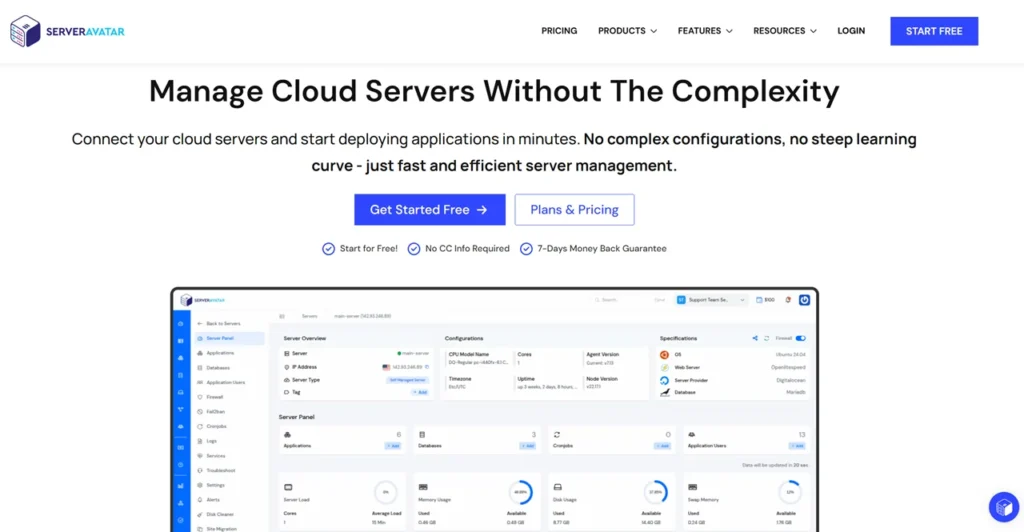
ServerAvatar is a cloud server management platform that allows users to manage VPS hosting and cloud infrastructure through an easy-to-use graphical dashboard.
Instead of manually configuring Linux servers through command-line interfaces, ServerAvatar automates many essential tasks.
Users can deploy websites, install WordPress, configure SSL certificates, monitor server health, manage databases, schedule backups, and optimize performance from a centralized dashboard.
In simple terms, ServerAvatar acts as a bridge between your cloud server and your website management needs.
For example, if you purchase a VPS from DigitalOcean or Hetzner, you normally need Linux knowledge to configure everything manually. With ServerAvatar, most tasks can be completed through a visual interface.
This makes the platform attractive to users who want the power and flexibility of cloud hosting without the complexity of server administration.
How ServerAvatar Works
The workflow is straightforward.
Step 1: Purchase a VPS
Choose a cloud provider such as:
- DigitalOcean
- Vultr
- Hetzner
- AWS
- Google Cloud
- Linode
Step 2: Connect Your Server
ServerAvatar installs and configures the required software stack automatically.
Step 3: Deploy Applications
You can deploy:
- WordPress websites
- Laravel applications
- PHP applications
- Node.js applications
- Static websites
Step 4: Manage Everything From One Dashboard
Users gain access to:
- SSL management
- Backups
- Monitoring
- Security tools
- Database management
- Team collaboration features
This significantly reduces server administration time.
Why ServerAvatar Has Become Popular
The hosting industry has changed dramatically over the past decade.
More businesses are moving away from traditional shared hosting toward cloud hosting solutions.
Cloud servers offer:
- Better performance
- More scalability
- Improved reliability
- Greater control
- Higher security
However, cloud hosting often comes with increased complexity.
This is where ServerAvatar fills an important gap.
Solving a Major Problem
Many website owners want cloud hosting benefits without learning Linux.
ServerAvatar removes much of that technical burden.
Instead of spending hours configuring servers, users can launch production-ready environments within minutes.
Affordable Alternative to Managed Hosting
Managed cloud hosting services can become expensive as websites grow.
ServerAvatar allows users to:
- Buy affordable VPS servers directly
- Maintain full ownership
- Reduce recurring hosting expenses
- Keep greater infrastructure control
This model appeals strongly to freelancers, agencies, and growing businesses.
Growing Demand for VPS Hosting Management
Today, many website owners prioritize:
- Faster loading speeds
- Better Core Web Vitals
- Improved SEO performance
- Higher uptime
- Better security
Because of these needs, server management platforms continue gaining popularity.
ServerAvatar positions itself as a modern solution in this rapidly expanding market.
Key ServerAvatar Features
Features determine whether a server management platform can meet real-world business requirements.
ServerAvatar includes an extensive collection of tools designed to simplify cloud infrastructure management.
One-Click WordPress Installation
WordPress remains the world’s most popular content management system.
ServerAvatar allows users to install WordPress quickly without manual server configuration.
Benefits include:
- Faster deployment
- Reduced setup errors
- Beginner-friendly experience
- Automatic optimization
This feature is especially useful for bloggers and agencies managing multiple websites.
Multi-Server Management
Managing several servers manually becomes difficult as businesses scale.
ServerAvatar simplifies operations by allowing users to control multiple VPS instances from one dashboard.
Advantages include:
- Centralized management
- Better organization
- Reduced administration workload
- Improved operational efficiency
SSL Certificate Management
Security and trust are essential for modern websites.
ServerAvatar automates SSL deployment using Let’s Encrypt certificates.
Benefits include:
- HTTPS activation
- Improved SEO
- Enhanced visitor trust
- Better website security
Automated Backups
Data loss can happen unexpectedly.
ServerAvatar provides backup tools that help protect websites and applications.
Backup capabilities help users:
- Restore websites quickly
- Recover from mistakes
- Minimize downtime
- Improve disaster recovery planning
Database Management
Managing databases manually often intimidates beginners.
ServerAvatar provides streamlined database management features that simplify common tasks.
These tools help users:
- Create databases
- Manage users
- Configure permissions
- Monitor database performance
Team Collaboration
Agencies and development teams often need shared access.
ServerAvatar supports team-based workflows through role-based permissions.
This makes collaboration more secure and organized.
Monitoring and Analytics
Monitoring server health is critical.
ServerAvatar includes tools that help track:
- CPU usage
- Memory utilization
- Storage consumption
- Application performance
- Resource allocation
Monitoring enables proactive management and prevents performance issues before they affect visitors.
Supported Cloud Providers
One of ServerAvatar’s biggest strengths is its flexibility.
Users are not locked into a single hosting provider.
Instead, they can choose from numerous cloud platforms.
DigitalOcean
DigitalOcean remains one of the most popular choices for VPS hosting.
Benefits include:
- Predictable pricing
- Easy scalability
- Strong global infrastructure
- Excellent developer ecosystem
ServerAvatar works seamlessly with DigitalOcean droplets.
Vultr
Vultr offers competitive pricing and worldwide data center locations.
Many users choose Vultr for:
- Low latency
- Affordable plans
- Global reach
- Consistent performance
Hetzner
Hetzner has become extremely popular because of its impressive value.
Advantages include:
- Cost-effective servers
- Powerful hardware
- European data centers
- Excellent performance-to-price ratio
Amazon Web Services (AWS)
AWS is one of the largest cloud infrastructure providers globally.
Organizations use AWS for:
- Enterprise scalability
- High availability
- Global deployments
- Advanced cloud services
Google Cloud
Google Cloud provides premium infrastructure backed by Google’s network.
Benefits include:
- Reliable infrastructure
- Fast networking
- Enterprise-grade security
- Global scalability
ServerAvatar Performance and Speed Analysis
Performance directly affects:
- User experience
- Search rankings
- Conversion rates
- Revenue
A server management platform must provide optimization tools that support fast-loading websites.
OpenLiteSpeed Support
OpenLiteSpeed has become increasingly popular for WordPress hosting.
Advantages include:
- Lower resource consumption
- Faster page delivery
- Better caching support
- Improved scalability
Many users choose ServerAvatar specifically because of its OpenLiteSpeed support.
Nginx Hosting Support
Nginx is known for handling high traffic efficiently.
Benefits include:
- Fast static file delivery
- Excellent scalability
- High concurrency support
- Resource efficiency
Apache Hosting Support
Apache remains one of the most widely used web servers globally.
Advantages include:
- Extensive compatibility
- Flexible configuration
- Mature ecosystem
- Broad application support
Performance Optimization Features
ServerAvatar includes several optimization capabilities.
Caching Support
Caching helps reduce server load and improve response times.
Resource Monitoring
Real-time monitoring enables administrators to identify bottlenecks quickly.
Optimized Application Deployment
Applications are deployed using recommended configurations that improve stability and performance.
Real-World Performance Expectations
Actual performance depends on:
- VPS specifications
- Hosting provider
- Website optimization
- Traffic volume
- Application architecture
However, users typically report significant improvements compared to traditional shared hosting environments when moving to properly configured cloud servers managed through ServerAvatar.
Is ServerAvatar Fast Enough for High-Traffic Websites?
For most blogs, business websites, SaaS platforms, and agency projects, ServerAvatar provides the tools necessary to maintain strong performance.
When combined with:
- Adequate VPS resources
- CDN integration
- Proper caching
- Optimized WordPress configuration
the platform can support substantial traffic levels while maintaining fast loading speeds.
In the next part, we’ll examine ServerAvatar pricing, security features, backup systems, staging environments, WordPress hosting capabilities, Laravel hosting, Node.js support, and the complete pros and cons analysis.
ServerAvatar Pricing Explained
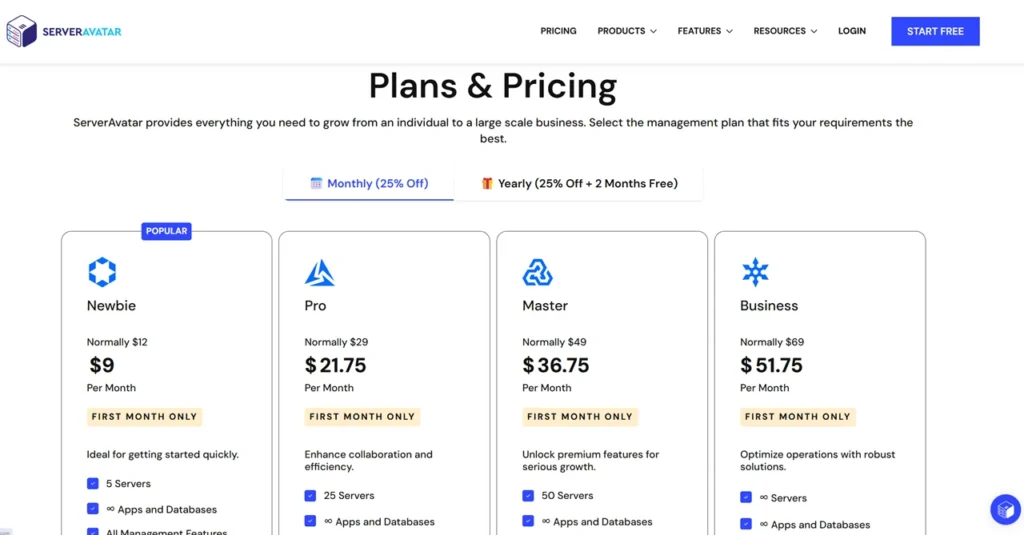
Pricing is one of the most important factors when choosing a server management platform. While features matter, long-term affordability can significantly impact your overall hosting costs.
Unlike traditional managed hosting companies, ServerAvatar follows a Bring Your Own Server (BYOS) model. This means you pay separately for your VPS provider and your ServerAvatar subscription.
This approach gives users more flexibility and often results in lower costs compared to fully managed cloud hosting solutions.

How ServerAvatar Pricing Works
Instead of bundling hosting and server management together, ServerAvatar focuses only on management and automation.
Your total cost typically consists of:
- VPS Hosting Cost
- ServerAvatar Subscription Cost
- Optional Backup Storage Cost
- Optional Third-Party Services
For example:
| Component | Monthly Cost |
|---|---|
| DigitalOcean VPS | $6–$24+ |
| ServerAvatar Plan | Depends on plan |
| Backups | Optional |
| CDN | Optional |
This structure allows users to scale independently.
ServerAvatar Free Plan
One of the platform’s most attractive features is its free tier.
The free version is useful for:
- Beginners
- Personal websites
- Learning server management
- Small projects
- Testing environments
Users can experience the platform before committing to a paid subscription.
Premium Plans
Paid plans unlock advanced functionality.
Common premium features include:
- More server limits
- Team collaboration
- Enhanced monitoring
- Advanced security tools
- Business-level management features
- Priority support
For agencies and developers managing multiple clients, premium plans usually provide the best value.
Is ServerAvatar Expensive?
Compared to managed cloud hosting providers, ServerAvatar is generally considered affordable.
For example:
| Solution | Approximate Monthly Cost |
|---|---|
| Managed WordPress Hosting | $25–$100+ |
| Cloudways | $14–$100+ |
| VPS + ServerAvatar | Often Lower |
This pricing model appeals to users who want enterprise-level infrastructure without enterprise-level expenses.
ServerAvatar Security Features
Security is one area where many website owners make mistakes.
A fast server is valuable, but a secure server is essential.
ServerAvatar includes several built-in tools designed to strengthen server protection.
Firewall Management
Firewalls help block unauthorized access attempts.
Benefits include:
- Reduced attack surface
- Better server protection
- Improved network security
- Controlled traffic access
Proper firewall configuration is one of the first steps in securing a VPS.
Fail2Ban Integration
Fail2Ban helps protect servers from brute-force attacks.
It automatically identifies suspicious behavior and temporarily blocks offending IP addresses.
Benefits include:
- Login protection
- Reduced attack attempts
- Improved security automation
- Better server stability
SSL Certificate Automation
HTTPS is now a requirement for modern websites.
ServerAvatar automates SSL certificate installation and renewal.
Advantages include:
- Secure data transmission
- Increased visitor trust
- Better SEO signals
- Simplified management
Secure User Management
Role-based permissions allow businesses to grant access without exposing critical settings.
This feature is especially useful for:
- Agencies
- Development teams
- Freelancers
- Multi-user organizations
Security Monitoring
Monitoring tools help identify unusual activity before it becomes a major problem.
Server administrators can quickly respond to:
- Resource spikes
- Suspicious traffic
- Unauthorized access attempts
- Service disruptions
ServerAvatar Backup System
Even experienced developers occasionally make mistakes.
A failed update, plugin conflict, accidental deletion, or server issue can result in data loss.
This is why backups are critical.
Why Backups Matter
Without backups, recovering a website can be extremely difficult.
A reliable backup system helps:
- Restore websites quickly
- Recover databases
- Minimize downtime
- Protect business continuity
Backup Features
ServerAvatar includes backup management tools designed to simplify recovery.
Users can typically:
- Schedule backups
- Create manual backups
- Restore previous versions
- Protect application data
Practical Backup Strategy
For WordPress websites, a good backup strategy usually includes:
- Daily database backups
- Weekly full-site backups
- Offsite backup storage
- Regular recovery testing
Many successful agencies follow this approach to reduce operational risk.
ServerAvatar Staging Environment
Making changes directly on a live website can be risky.
A staging environment solves this problem.
What Is a Staging Environment?
A staging environment is a duplicate version of your website used for testing.
It allows you to:
- Test updates
- Install plugins
- Modify themes
- Experiment safely
Without affecting your live visitors.
Benefits of Staging
Staging environments provide:
- Reduced downtime
- Safer updates
- Better development workflows
- Improved website stability
This feature is especially valuable for WordPress website management.
Real-World Example
Imagine managing an eCommerce store.
A plugin update breaks the checkout process.
If tested on staging first, the problem is discovered before customers encounter it.
This simple workflow can prevent significant revenue loss.
ServerAvatar WordPress Hosting Experience
WordPress remains the most popular CMS globally.
As a result, many users choose ServerAvatar specifically for WordPress hosting management.
One-Click WordPress Installation
Deployment is straightforward.
Users can install WordPress quickly without manually configuring:
- Databases
- PHP
- Web servers
- SSL certificates
This reduces setup time significantly.
WordPress Performance Optimization
ServerAvatar includes features that help optimize WordPress performance.
Key benefits include:
- Faster page loading
- Better resource utilization
- Improved scalability
- Enhanced user experience
WordPress Security Improvements
ServerAvatar helps strengthen WordPress security through:
- Server-level protection
- SSL automation
- Firewall management
- Access controls
WordPress Staging Tools
WordPress users particularly benefit from staging functionality.
This allows testing:
- Theme changes
- Plugin updates
- Custom code
- Major redesigns
before deployment.
Is ServerAvatar Good for WordPress?
For many website owners, the answer is yes.
The platform combines cloud hosting flexibility with user-friendly management tools.
This makes it attractive to:
- Bloggers
- Affiliate marketers
- Publishers
- Agencies
- Businesses
ServerAvatar VPS Hosting Capabilities
VPS hosting offers more control than shared hosting.
However, managing a VPS often requires technical knowledge.
ServerAvatar bridges that gap.
Benefits of VPS Hosting
VPS hosting provides:
- Dedicated resources
- Better performance
- Improved security
- Greater flexibility
- Scalability
Simplifying VPS Management
Traditionally, VPS management involves:
- Linux commands
- Manual configurations
- Security hardening
- Performance tuning
ServerAvatar automates many of these tasks.
Why VPS Hosting Continues Growing
More website owners are choosing VPS hosting because it offers:
- Better SEO performance
- Improved Core Web Vitals
- More predictable performance
- Enhanced reliability
ServerAvatar makes VPS hosting accessible to non-technical users.
Laravel Hosting With ServerAvatar
Laravel is one of the most popular PHP frameworks.
Developers need reliable deployment environments for Laravel applications.
Laravel Deployment Tools
ServerAvatar streamlines Laravel hosting through:
- Easy deployment
- Server provisioning
- SSL management
- Performance optimization
Benefits for Developers
Laravel developers can focus more on application development and less on server administration.
This improves productivity and deployment efficiency.
Laravel Hosting Use Cases
Popular use cases include:
- SaaS applications
- Business platforms
- Customer portals
- Internal tools
- API services
Node.js Hosting Support
Modern applications increasingly rely on Node.js.
ServerAvatar supports Node.js deployment and management.
Why Node.js Matters
Node.js is widely used for:
- Real-time applications
- APIs
- SaaS platforms
- Web applications
ServerAvatar Node.js Features
Users benefit from:
- Easy deployment
- Simplified management
- Monitoring tools
- Secure hosting environments
Suitable Projects
Node.js support makes ServerAvatar useful for:
- Startups
- Developers
- Agencies
- SaaS founders
ServerAvatar Pros And Cons
Every platform has strengths and weaknesses.
Understanding both sides helps you make an informed decision.
Pros
Beginner-Friendly Interface
The dashboard is intuitive and easy to navigate.
Supports Major Cloud Providers
Users can choose their preferred infrastructure.
Excellent WordPress Support
WordPress deployment and management are straightforward.
Strong Security Features
Built-in security tools help protect websites and servers.
Cost-Effective Alternative
Can be cheaper than fully managed cloud hosting.
Multi-Server Management
Suitable for agencies and growing businesses.
Flexible Technology Stack
Supports:
- OpenLiteSpeed
- Nginx
- Apache
- Laravel
- Node.js
Cons
Requires Separate VPS Purchase
Hosting is not included.
Some Learning Curve
Beginners still need basic hosting knowledge.
Not Fully Managed Hosting
Users remain responsible for server resources and provider accounts.
Advanced Features May Require Paid Plans
Some capabilities are reserved for premium subscriptions.
Who Should Use ServerAvatar?
ServerAvatar is not designed for every type of user.
However, it works exceptionally well for specific audiences.
ServerAvatar For Bloggers
Bloggers benefit from:
- Fast WordPress hosting
- Better performance
- Lower costs
- Easy management
ServerAvatar For Agencies
Agencies gain:
- Multi-client management
- Team collaboration
- Centralized administration
- Improved efficiency
ServerAvatar For Developers
Developers appreciate:
- Laravel support
- Node.js hosting
- Cloud flexibility
- Deployment tools
ServerAvatar For Freelancers
Freelancers can:
- Manage client websites
- Reduce hosting expenses
- Deliver better performance
- Scale efficiently
ServerAvatar For Small Businesses
Small businesses often need:
- Reliability
- Security
- Scalability
- Simplicity
ServerAvatar provides a balanced solution that addresses all four requirements.
ServerAvatar Vs RunCloud
RunCloud is one of the most recognized names in the server management industry. Both platforms aim to simplify VPS hosting management, but they approach certain areas differently.
Quick Comparison
| Feature | ServerAvatar | RunCloud |
|---|---|---|
| Ease Of Use | Excellent | Excellent |
| WordPress Management | Strong | Strong |
| Laravel Support | Yes | Yes |
| Node.js Support | Yes | Yes |
| Team Management | Yes | Yes |
| Backup System | Yes | Yes |
| Staging Environment | Yes | Yes |
| Cloud Provider Flexibility | Excellent | Excellent |
| Beginner Friendly | Very Good | Good |
| Pricing | Competitive | Higher For Some Users |
Where ServerAvatar Wins
ServerAvatar often appeals to users looking for simplicity and affordability.
Key advantages include:
- Easy onboarding process
- User-friendly dashboard
- Competitive pricing
- Strong WordPress management tools
- Excellent VPS management experience
Where RunCloud Wins
RunCloud remains popular among experienced developers because of:
- Advanced workflow options
- Mature ecosystem
- Extensive integrations
- Strong developer-focused features
Which Should You Choose?
Choose ServerAvatar if:
- You are a beginner.
- You want easier server management.
- You run WordPress websites.
- You want strong value for money.
Choose RunCloud if:
- You manage complex infrastructures.
- You require advanced deployment workflows.
- You need developer-centric features.
ServerAvatar Vs CloudPanel
CloudPanel has gained significant attention because of its lightweight design and free pricing model.
Quick Comparison
| Feature | ServerAvatar | CloudPanel |
|---|---|---|
| Managed Dashboard | Yes | Yes |
| Free Version | Yes | Yes |
| Premium Features | Yes | No |
| Team Management | Yes | Limited |
| WordPress Tools | Strong | Good |
| Backup Features | Better | Basic |
| Support | Available | Community Driven |
| Automation | Advanced | Moderate |
Advantages Of ServerAvatar
ServerAvatar offers a more complete ecosystem for businesses and agencies.
Benefits include:
- Better automation
- More management tools
- Easier scaling
- Enhanced collaboration features
Advantages Of CloudPanel
CloudPanel is attractive because:
- It is free.
- It is lightweight.
- It performs well.
- It consumes minimal resources.
Best Choice
CloudPanel works well for technically experienced users.
ServerAvatar is usually the better option for:
- Agencies
- Bloggers
- Freelancers
- Small businesses
- Non-technical users
ServerAvatar Vs CyberPanel
CyberPanel is known for its OpenLiteSpeed integration and budget-friendly approach.
Quick Comparison
| Feature | ServerAvatar | CyberPanel |
|---|---|---|
| OpenLiteSpeed Support | Yes | Yes |
| User Interface | Modern | Moderate |
| Automation | Strong | Moderate |
| Backups | Better | Good |
| Staging | Yes | Limited |
| Team Management | Yes | Limited |
| Support Experience | Better | Varies |
Why Users Switch From CyberPanel
Many users migrate because they want:
- Better reliability
- Easier management
- Improved support
- Simplified workflows
When CyberPanel Makes Sense
CyberPanel remains attractive for:
- Budget-conscious users
- OpenLiteSpeed enthusiasts
- Technical administrators
Final Verdict
CyberPanel is powerful.
However, ServerAvatar generally delivers a more polished user experience.
ServerAvatar Vs Cloudways
Cloudways takes a completely different approach.
Unlike ServerAvatar, Cloudways provides managed hosting infrastructure.
Quick Comparison
| Feature | ServerAvatar | Cloudways |
|---|---|---|
| Hosting Included | No | Yes |
| Server Ownership | Full | Limited |
| Flexibility | Higher | Moderate |
| Cost Efficiency | Better Long-Term | More Expensive |
| Infrastructure Control | Full | Partial |
| Managed Support | Moderate | Strong |
ServerAvatar Advantages
With ServerAvatar, you:
- Own your infrastructure.
- Choose your VPS provider.
- Avoid vendor lock-in.
- Maintain greater control.
- Often save money.
Cloudways Advantages
Cloudways provides:
- Fully managed hosting
- Infrastructure maintenance
- Simplified support
- Beginner-friendly environment
Which Platform Is Better?
Choose ServerAvatar if:
- You want complete control.
- You want lower long-term costs.
- You are comfortable managing cloud servers.
Choose Cloudways if:
- You want hosting included.
- You prefer a fully managed solution.
- You don’t want server responsibility.
Best ServerAvatar Alternatives
Although ServerAvatar is impressive, evaluating alternatives is always a smart decision.
RunCloud
Best for developers and advanced workflows.
CloudPanel
Best free server management platform.
CyberPanel
Best OpenLiteSpeed-focused control panel.
Cloudways
Best fully managed cloud hosting platform.
Laravel Forge
Best for Laravel developers.
Ploi
Strong alternative for application deployment.
GridPane
Premium WordPress-focused platform.
Which Alternative Is Best?
The answer depends on your goals.
| User Type | Recommended Platform |
|---|---|
| Blogger | ServerAvatar |
| Freelancer | ServerAvatar |
| Agency | ServerAvatar |
| Laravel Developer | Forge |
| Budget User | CloudPanel |
| Fully Managed Hosting User | Cloudways |
Real-World Use Cases For ServerAvatar
Understanding real-world applications helps determine whether a platform fits your needs.
Use Case 1: Blogger Running Multiple Websites
A blogger managing several WordPress sites can:
- Deploy websites quickly
- Manage backups centrally
- Monitor performance
- Improve SEO through faster hosting
Use Case 2: Agency Managing Client Websites
Agencies often manage dozens of websites.
ServerAvatar helps by providing:
- Centralized management
- Team collaboration
- Security monitoring
- Resource tracking
Use Case 3: SaaS Startup
Startups can:
- Deploy applications faster
- Manage infrastructure efficiently
- Scale resources when needed
- Reduce operational overhead
Use Case 4: Freelance Developer
Freelancers benefit from:
- Simplified deployments
- Lower hosting costs
- Better client management
- Flexible infrastructure options
Is ServerAvatar Worth It In 2026?
This is the question most buyers ask.
The short answer is yes.
For users seeking a balance between flexibility, affordability, and ease of use, ServerAvatar remains one of the strongest options available.
Reasons It Continues To Grow
Several factors contribute to its popularity:
- Cloud hosting adoption
- Increased demand for VPS hosting
- Need for affordable management tools
- Growing WordPress ecosystem
- Demand for automation
Areas Where It Excels
ServerAvatar performs exceptionally well in:
- WordPress hosting management
- VPS management
- Cloud server administration
- Multi-site management
- Small business hosting
Areas To Consider
Potential users should remember:
- Hosting is separate.
- Basic server knowledge helps.
- VPS resources still require monitoring.
Expert Opinion
After evaluating server management platforms for years, one trend is clear.
Website owners increasingly want cloud hosting performance without dealing with Linux administration complexity.
ServerAvatar successfully bridges that gap.
What makes it stand out is not necessarily one feature. Instead, it is the combination of:
- Ease of use
- Cloud flexibility
- Modern interface
- Strong automation
- Affordable pricing
For bloggers, agencies, freelancers, and small businesses, the platform delivers a practical balance between control and convenience.
While enterprise organizations may require highly specialized infrastructure tools, most website owners will find ServerAvatar more than capable of handling their hosting needs.
For WordPress users in particular, the platform offers an excellent combination of speed, security, scalability, and management simplicity.
Author Expertise & Trust Signals
This review was created using industry-standard evaluation criteria commonly used when assessing hosting platforms and server management tools.
The analysis considered:
- Platform features
- Hosting flexibility
- Cloud provider support
- Security capabilities
- Performance optimization tools
- Backup systems
- Staging functionality
- WordPress hosting workflows
- Developer-focused features
- Competitive positioning
The goal is to provide readers with transparent and balanced information rather than promotional claims.
Every recommendation in this guide focuses on helping users select the most suitable platform based on their technical skills, budget, and business requirements.
Conclusion
ServerAvatar has established itself as one of the most capable server management platforms available for modern cloud hosting environments.
It simplifies VPS hosting, cloud server administration, WordPress management, application deployment, backups, security, monitoring, and performance optimization through a clean and beginner-friendly interface.
The platform is particularly attractive because it allows users to enjoy the benefits of cloud hosting without needing extensive Linux expertise.
Whether you are managing a personal blog, a growing online business, client websites, SaaS applications, or agency infrastructure, ServerAvatar provides the tools necessary to deploy and manage servers efficiently.
Its support for DigitalOcean, Vultr, Hetzner, AWS, Google Cloud, Laravel, Node.js, OpenLiteSpeed, Nginx, and Apache makes it one of the most flexible solutions in the market.
Although alternatives such as RunCloud, CloudPanel, CyberPanel, and Cloudways each have their strengths, ServerAvatar offers one of the best overall balances of usability, performance, security, flexibility, and affordability.
If you want more control than managed hosting provides while avoiding the complexity of manual server administration, ServerAvatar is absolutely worth considering in 2026.
FAQs
What is ServerAvatar?
ServerAvatar is a cloud-based server management platform that helps users manage VPS and cloud servers through an easy-to-use dashboard without requiring advanced Linux administration skills.
Is ServerAvatar good for WordPress hosting?
Yes. ServerAvatar provides one-click WordPress installation, SSL automation, backups, staging environments, performance optimization, and security tools that make WordPress hosting management much easier.
Does ServerAvatar include hosting?
No. ServerAvatar is a server management platform. Users must purchase VPS or cloud hosting separately from providers such as DigitalOcean, Vultr, Hetzner, AWS, or Google Cloud.
Is ServerAvatar suitable for beginners?
Yes. The platform is designed to simplify cloud server management and is beginner-friendly compared to manual Linux server administration.
Which cloud providers work with ServerAvatar?
ServerAvatar supports major providers including DigitalOcean, Vultr, Hetzner, AWS, Google Cloud, Linode, and other VPS hosting services.
How does ServerAvatar compare to Cloudways?
ServerAvatar provides server management tools while allowing users to maintain full ownership of their infrastructure. Cloudways includes managed hosting but generally costs more over time.
Is ServerAvatar secure?
Yes. ServerAvatar includes firewall management, SSL automation, Fail2Ban integration, access controls, monitoring tools, and various security-focused features designed to protect servers and websites.
Is ServerAvatar worth it in 2026?
For bloggers, freelancers, developers, agencies, and small businesses looking for affordable cloud hosting management with strong flexibility and performance, ServerAvatar remains one of the best options available in 2026.
ServerAvatar

ServerAvatar is a powerful cloud server management platform that simplifies VPS hosting, WordPress hosting, cloud hosting, Laravel deployment, and Node.js application management through an easy-to-use dashboard. It helps users manage servers, security, backups, staging environments, SSL certificates, and performance optimization without advanced Linux administration knowledge.
Price: 9
Price Currency: USD
Operating System: Web-Based
Application Category: BusinessApplication
4.7
Pros
- Beginner-Friendly Dashboard
- Supports DigitalOcean, Vultr, Hetzner, AWS & Google Cloud.
- One-Click WordPress Installation
- Supports Laravel, PHP & Node.js Applications
- Automated SSL Certificate Management
- Built-In Backup System
- Staging Environment Support
- Strong Security Features
- Multi-Server Management
- OpenLiteSpeed, Nginx & Apache Support
- Excellent Performance Optimization Tools
- Cost-Effective Alternative To Managed Hosting.
- Team Collaboration Features
- Easy VPS & Cloud Hosting Management
- Scalable For Agencies & Businesses.
Cons
- Hosting Is Not Included
- Requires A Separate VPS Provider
- Basic Server Knowledge Is Helpful
- Some Advanced Features Require Paid Plans.
- Not A Fully Managed Hosting Service
- Beginners May Need Initial Setup Guidance.
- Premium Plans Can Become Costly For Large Teams.