
At a glance
- Best for
- Business sites, agencies with client sites and teams wanting a staging workflow
- Skip it if
- budget is your priority, you run a personal blog or need email hosting bundled
- Price
- $336/year (Essential, 1 site; about $28/mo paid upfront) (checked 13 Nov 2026)
- Main drawback
- Expensive next to shared hosting
Check current pricingCompare alternatives
Affiliate link: I may earn a commission. It does not change my rating.
WP Engine is managed WordPress hosting for businesses, agencies and developers who want the platform work — caching, backups, staging, security and updates to WordPress itself — handled for them. I rate it 4.6/5. It is worth the money when that operational help saves you real time; for a small hobby site, the bill is hard to justify.
Review scope: my rating reflects my own assessment of WP Engine’s platform and workflow. Plans and prices were checked in WP Engine’s public configurator on 10 October 2026. This article does not include a new controlled speed, load or uptime benchmark. Update: prices and plan details in this article were rechecked in November 2026; see the date beside each table.
Purchase buttons use my WP Engine affiliate link, and I may earn a commission if you buy. Read my affiliate disclosure.
Table of Contents
- 1Key Takeaways
- 2What WP Engine Does
- 3WP Engine Plans and Pricing
- 4Performance: What to Measure
- 5Security, Backups and Staging
- 6Support
- 7Data-Centre Regions
- 8Before You Migrate
- 9WP Engine Pros and Cons
- 10WP Engine vs Alternatives
- 11Who Should Use WP Engine — and Who Should Skip It
- 12Final Verdict
- 13FAQs
- What is WP Engine hosting?
- Is WP Engine good for beginners?
- How much does WP Engine cost?
- Is WP Engine better than Bluehost?
- Does WP Engine improve SEO?
- Does WP Engine include email hosting?
- Can I install any WordPress plugin?
Key Takeaways
- WP Engine manages the WordPress infrastructure; your content, plugins, custom code and deployments still need an owner.
- Essential plans cost from $336 a year for one site (checked 10 October and again on 13 November 2026, when WP Engine’s plans page showed no Black Friday discount); compare capacity, add-ons and the renewal quote, not just the headline price.
- Caching and the CDN help cacheable pages; logged-in areas and checkouts still depend on the origin server.
- Check the disallowed-plugin list and practise restoring a backup before moving an important site.
★ EDITOR’S CHOICE
WP Engine
My rating: 4.6/5
Managed WordPress hosting with staging, backups and operational tools.
Affiliate link: I may earn a commission at no extra cost to you.
What WP Engine Does

WP Engine runs the hosting layer of a WordPress site: server-level caching (EverCache), a built-in CDN, free SSL, daily and on-demand backups, staging environments and WordPress core updates and security patches. Developers get Git, SSH and the Local development app. It does not take over everything — plugin choices, custom code, content and access permissions remain your responsibility, and automatic plugin and theme management is a separate scope from core updates.
It is designed for business sites, agencies managing several client sites, busy content sites and WooCommerce stores where downtime or slow pages cost money.
WP Engine Plans and Pricing
WP Engine groups hosting into Essential, Core and Enterprise. Essential uses shared resources; Core and Enterprise add isolated resources and a wider service scope. These are the Essential capacity options I checked:
| Essential capacity | Visits / storage | Annual USD total (monthly equivalent) |
|---|---|---|
| 1 site | 25,000 / 10 GB | $336 ($28) |
| Up to 3 sites | 75,000 / 15 GB | $624 ($52) |
| Up to 10 sites | 100,000 / 20 GB | $1,248 ($104) |
| Up to 30 sites | 400,000 / 50 GB | $3,168 ($264) |
The quotes are annual USD totals from the public configurator on 10 October 2026; the monthly figure is the annual total divided by 12, paid upfront. They are not a locked renewal rate. Promotions, taxes, visit overages and add-ons can change the bill, so confirm the renewal price and how visits are counted before you sign up.
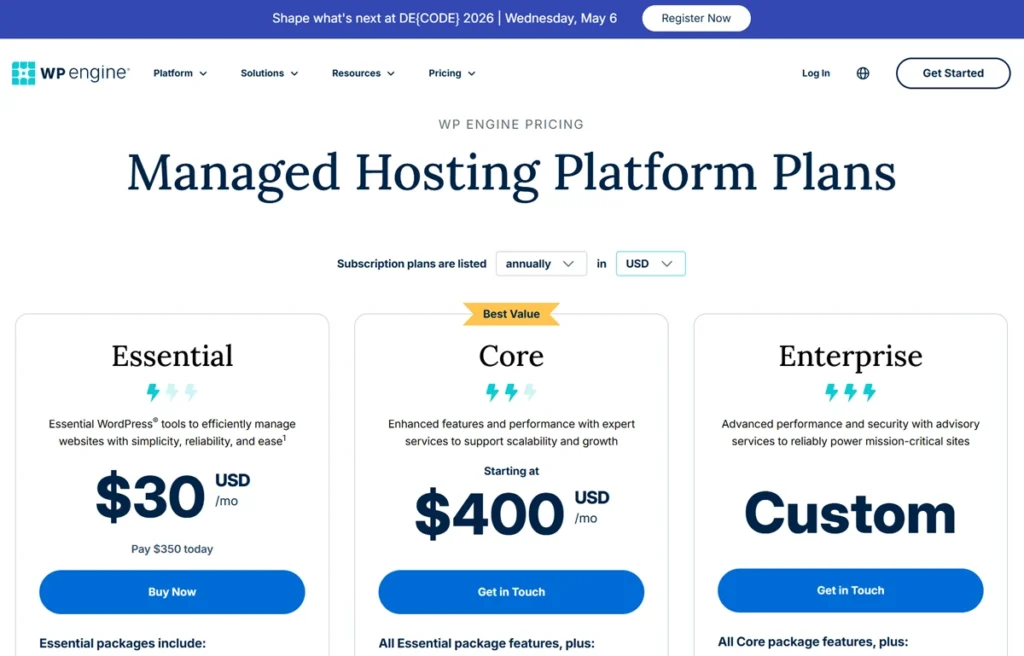
Compare what is bundled — CDN, backups, staging, security and developer tools — with what you would otherwise buy or do yourself. Bundling can make a premium plan good value, but it does not make it cheaper for every website. WP Engine’s Black Friday status is tracked in my Black Friday WordPress hosting deals guide.
Performance: What to Measure
WP Engine’s speed comes from server-level caching, CDN delivery and current PHP versions. Those help most on cacheable pages; logged-in dashboards, carts and checkouts still hit the origin server. Before and after moving, measure your real pages: load times with a warm and a cold cache, server response under traffic, and Core Web Vitals (LCP, INP and CLS) on mobile. Heavier pages and more plugins can expose CPU or database bottlenecks even on a premium host, so check slow queries and uncached work rather than treating the plan as unlimited.
Security, Backups and Staging
The platform includes firewall protection, threat detection, malware scanning and automatic WordPress updates. Daily and on-demand backups give you recovery points, but a restore takes time and can overwrite newer data — on an active store, protect recent orders before restoring an older database. Staging lets you test changes safely; just remember that pushing a staging database to production can also overwrite newer orders or edits, so take a fresh backup first.
Support
WP Engine offers 24/7 live chat with WordPress specialists; the channels and escalation you get depend on your plan. This review does not measure response times. Before buying, confirm who handles plugin conflicts and custom-code problems, since those often fall outside a host’s scope.
Data-Centre Regions
Choose the origin region closest to most of your visitors and use the CDN for everything cacheable. For an Indian audience, WP Engine’s documentation lists Pune for selected Azure Premium configurations, alongside other Asia-Pacific options — not every Essential plan can use every location, so check the regions offered for your plan.
Before You Migrate
- Check WP Engine’s disallowed-plugin list; some caching and local-backup plugins overlap with the platform or cause resource problems.
- Keep a separate, restorable copy of the site using a supported method.
- After the move, test forms, cron jobs, payment callbacks and login pages.
- Write down your site count, storage, traffic allowance, add-ons, business email needs and renewal quote — a plan with enough visits can still be the wrong fit for a dynamic store.
WP Engine Pros and Cons
| Pros | Cons |
|---|---|
| Mature WordPress-only platform with staging, backups and EverCache | Expensive next to shared hosting — from $336 a year for one site |
| Strong developer workflow: Git, SSH and Local | No business email hosting included |
| Built-in CDN, SSL and security features | WordPress only, and some plugins are disallowed |
| Plans that scale from 1 to 30 sites on Essential | Visit-based limits can lead to overage charges |
WP Engine vs Alternatives
- Bluehost is far cheaper and beginner-focused, with much less management and developer tooling.
- Hostinger is the budget option I use for this site; it suits smaller sites that do not need WP Engine’s workflow.
- SiteGround sits in the middle on price and managed features.
- Kinsta is the closest premium rival; my Kinsta pricing guide compares its costs.
For a wider shortlist, see my managed WordPress hosting comparison.
Who Should Use WP Engine — and Who Should Skip It
Choose WP Engine if you run a business site, manage several client sites, expect traffic spikes from campaigns, or want a developer-friendly staging workflow and are prepared to pay for it. Skip it if budget is your priority, if you run a simple personal blog, or if you need email hosting bundled with your website.
Final Verdict
WP Engine earns 4.6/5 from me. It is a strong, mature managed platform, and its value depends on how much you use the staging, backup and developer tools and on the full renewal bill. Hosting supports page experience and availability, but it does not guarantee rankings — if search is a priority, pair it with the work covered in my SEO guides.
FAQs
What is WP Engine hosting?
WP Engine provides managed WordPress infrastructure and platform tools. You still own your content, custom code, plugin choices and business operations, and not every optional management feature is included with every plan.
Is WP Engine good for beginners?
Its guided tools can help beginners, but the cost is hard to justify for a small hobby site. Compare the support scope and your maintenance needs with a simpler hosting package.
How much does WP Engine cost?
WP Engine’s public USD configurator showed Essential one-site hosting at $336 a year (equivalent to $28 a month) on 10 October 2026. Promotions, add-ons, taxes, overages and renewal pricing can change the bill.
Is WP Engine better than Bluehost?
They suit different needs. WP Engine offers far more management, staging and developer tooling; Bluehost is much cheaper. This review does not include a controlled head-to-head speed test.
Does WP Engine improve SEO?
Hosting can support availability and page experience, but it does not guarantee higher rankings. Measure your real pages and improve content, crawlability and front-end performance alongside hosting.
Does WP Engine include email hosting?
No business email hosting is included. Plan mailboxes and transactional email delivery separately, and test order and form emails after migrating.
Can I install any WordPress plugin?
No. WP Engine disallows certain plugins that conflict with its platform or create security or resource problems. Review the list before migrating and replace conflicting caching or backup plugins with a supported workflow.

Affiliate disclosure: some links on this page are affiliate links, so I may earn a commission if you buy, at no extra cost to you.


One thing I’d add: hosting speed is a ranking factor, but many sites moving to WP Engine still lose rankings because they neglect canonicalization, crawl budget, or schema markup. These are easier to fix with a dedicated SEO audit, and our reviews cover tools and agencies that handle that side of things.