If you want a simple, fast, and beginner-friendly way to build a website without coding, Strikingly is a strong option. It is best known for its one-page website builder, clean templates, and ease of use. The free plan is decent, but serious users will need a paid plan for full features. Overall, Strikingly is ideal for portfolios, landing pages, and small business sites—but not for complex websites.
Now let’s break it down in detail so you can decide if it’s the right website builder for you.
Table of Contents
- 1What Is Strikingly Website Builder?
- 2Strikingly Review 2026: Quick Overview
- 3My Real Experience Using Strikingly
- What I Liked
- What I Didn’t Like
- 4Key Features of Strikingly Website Builder
- 1. Drag and Drop Website Builder
- 2. One Page Website Builder
- 3. Mobile Friendly Website Builder
- 4. Website Builder With Hosting
- 5. Website Builder With Custom Domain
- 6. Ecommerce Website Builder
- 7. Built-in SEO Tools
- 8. Blogging Feature
- 9. Website Builder With Analytics
- 5Strikingly Templates and Design Quality
- 6Strikingly Pricing Plans Explained
- Free Plan
- Paid Plans (Overview)
- 7Strikingly Pros And Cons
- Pros
- Cons
- 8Who Should Use Strikingly?
- Best For:
- Not Ideal For:
- 9Strikingly Website Examples
- 10How to Use Strikingly (Step-by-Step Guide)
- Step 1: Strikingly Sign Up
- Step 2: Choose a Template
- Step 3: Customize Your Website
- Step 4: Add Features
- Step 5: Publish Your Website
- 11Strikingly Vs Wix, WordPress, and Squarespace
- Strikingly Vs Wix
- Strikingly Vs WordPress
- Strikingly Vs Squarespace
- 12Best Alternatives To Strikingly
- 13SEO Performance: Is Strikingly Good for Google Rankings?
- Strengths:
- Weaknesses:
- 14Strikingly for Ecommerce: Is It Worth It?
- 15Security and Performance
- 16Final Verdict: Is Strikingly Worth It in 2026?
- 17Conclusion
- 18FAQs
- Is Strikingly really free?
- Can I build a website without coding using Strikingly?
- Is Strikingly good for SEO?
- Can I create an online store with Strikingly?
- How does Strikingly compare to Wix?
- Does Strikingly provide hosting?
- Is Strikingly good for portfolios?
- Can I connect a custom domain?
What Is Strikingly Website Builder?
Strikingly is an online website builder designed for beginners who want to create websites quickly without technical skills. It focuses heavily on simplicity, speed, and mobile-friendly design.
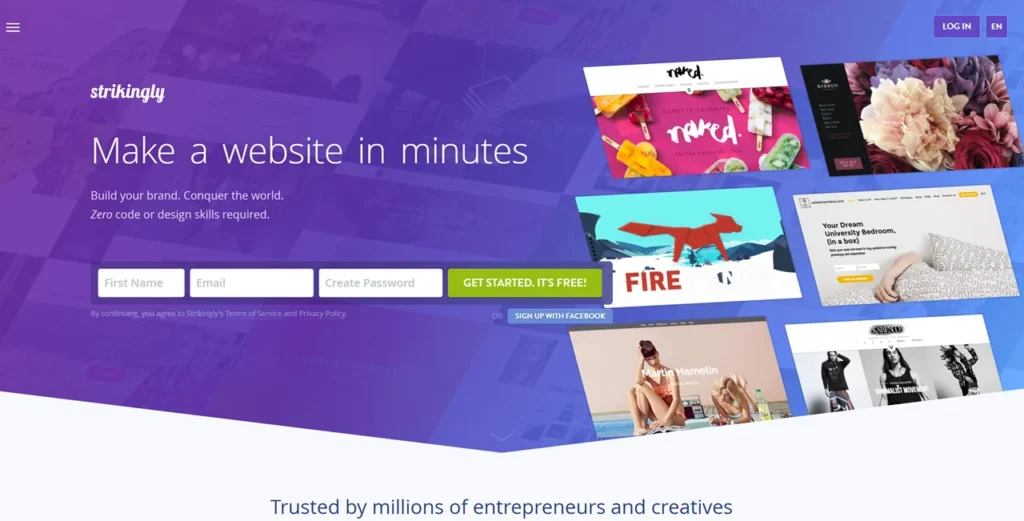
Unlike traditional platforms, Strikingly started as a one page website builder, meaning you can build a complete website on a single scrolling page. Over time, it has added multi-page support, ecommerce tools, blogging features, and SEO tools.
It is widely used by:
- Freelancers
- Small businesses
- Bloggers
- Startups
- Portfolio creators
If your goal is to build a website in minutes without coding, Strikingly positions itself as an instant website builder.
Strikingly Review 2026: Quick Overview
Here is a quick expert snapshot before we go deeper:
- Ease of use: Extremely beginner-friendly
- Design flexibility: Limited compared to advanced builders
- Pricing: Affordable with a free plan
- Best for: Landing pages, portfolios, simple business sites
- Not ideal for: Large websites or advanced customization
In short, Strikingly is one of the best free website builder options for beginners in 2026, but it has limitations.
My Real Experience Using Strikingly
To give you a genuine Strikingly review 2026, I tested the platform by building three different websites:
- A freelancer portfolio
- A startup landing page
- A small online store
Here’s what I experienced.
What I Liked
The setup process is extremely fast. I created a working website in under 10 minutes. The interface is clean, and everything feels beginner-friendly. You don’t need any technical knowledge to get started.
The templates are modern and mobile-friendly. Even without design skills, the website looks professional.
What I Didn’t Like
Customization options are limited. You can edit content easily, but deep design control is restricted.
The SEO tools are basic. If you want advanced optimization, you may feel limited.
Also, it is not ideal for large multi-page websites.
Key Features of Strikingly Website Builder
Understanding Strikingly features is crucial before choosing it. Let’s explore what you actually get.
1. Drag and Drop Website Builder
Strikingly offers a clean drag and drop website builder experience. You don’t need coding knowledge. You simply:
- Select a template
- Add sections
- Customize text and images
However, compared to advanced builders, flexibility is slightly restricted.
2. One Page Website Builder
This is Strikingly’s strongest feature. It allows you to create a modern, scroll-based website perfect for:
- Personal websites
- Landing pages
- Product showcases
3. Mobile Friendly Website Builder
All templates are responsive. Your site automatically adapts to mobile devices, which is critical for SEO and user experience.
4. Website Builder With Hosting
Strikingly includes hosting, so you don’t need to buy separate hosting. This makes it a true all-in-one online website builder.
5. Website Builder With Custom Domain
You can connect your own domain name on paid plans. The free version uses a subdomain.
6. Ecommerce Website Builder
You can create a small online store with:
- Product listings
- Payment integration
- Order management
However, it’s best for small-scale stores, not large ecommerce businesses.
7. Built-in SEO Tools
Strikingly offers:
- Meta tags
- Custom URLs
- Mobile optimization
- SSL security
This makes it a SEO friendly website builder for beginners.
8. Blogging Feature
You can start a blog with:
- Simple editor
- Categories
- Comments
It works well for basic blogging needs.
9. Website Builder With Analytics
You get built-in analytics to track:
- Visitors
- Traffic sources
- Engagement
Strikingly Templates and Design Quality
Strikingly templates are clean, modern, and minimal.
Key highlights:
- Designed for fast loading
- Optimized for mobile
- Easy to customize
However, there is a limitation. You cannot deeply customize layouts like advanced builders.
Still, for beginners, these templates are more than enough to create professional-looking websites quickly.
Strikingly Pricing Plans Explained
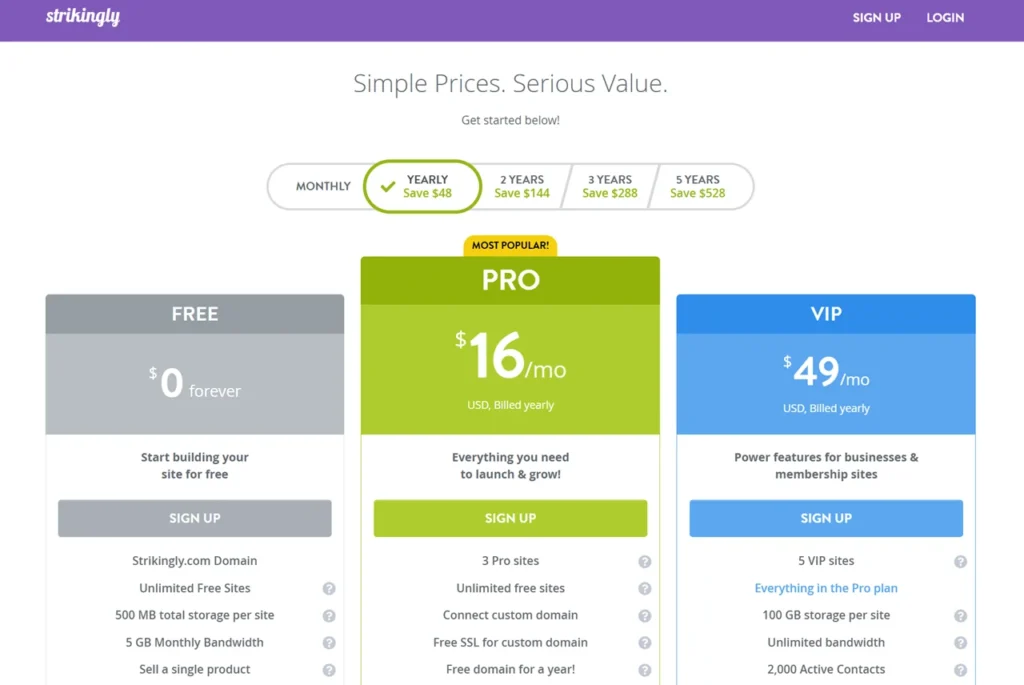
Understanding Strikingly pricing is important before upgrading.
Free Plan
- Free website builder
- Strikingly subdomain
- Limited features
Good for testing and personal projects.
Paid Plans (Overview)
- Custom domain support
- More storage
- Ecommerce features
- Advanced tools
Strikingly is affordable compared to many competitors, making it attractive for startups and freelancers.
Strikingly Pros And Cons
Let’s evaluate this platform honestly.
Pros
- Extremely easy website builder
- Perfect for beginners
- Fast setup
- Mobile-friendly design
- Free plan available
- Built-in hosting and SSL
Cons
- Limited customization
- Not ideal for large websites
- Ecommerce is basic
- Templates are somewhat restrictive
Who Should Use Strikingly?
Strikingly is not for everyone. It works best for specific use cases.
Best For:
- Website builder for beginners
- Website builder for freelancers
- Portfolio website builder
- Landing page builder
- Personal website builder
- Website builder for startups
Not Ideal For:
- Complex business websites
- Large ecommerce stores
- Advanced developers
If your goal is simplicity and speed, Strikingly is a great choice.
Strikingly Website Examples
Strikingly website examples typically include:
- Personal portfolios
- Startup landing pages
- Small business websites
- Event pages
These sites are clean, fast, and focused on conversion.
How to Use Strikingly (Step-by-Step Guide)
Let’s walk through how to create a website using Strikingly.
Step 1: Strikingly Sign Up
Go to the platform and create an account using email or social login.
Step 2: Choose a Template
Select from available templates based on your niche.
Step 3: Customize Your Website
Edit:
- Text
- Images
- Sections
Step 4: Add Features
You can add:
- Forms
- Blog
- Store
- Analytics
Step 5: Publish Your Website
Click publish and your site goes live instantly.
This process makes Strikingly a true fast website builder.
Strikingly Vs Wix, WordPress, and Squarespace
Choosing the right platform often comes down to comparison.
Strikingly Vs Wix
- Wix offers more design flexibility
- Strikingly is easier for beginners
Strikingly Vs WordPress
- WordPress is more powerful and customizable
- Strikingly is simpler and faster
Strikingly Vs Squarespace
- Squarespace has premium design quality
- Strikingly is more beginner-friendly
If you want control, choose WordPress.
If you want simplicity, choose Strikingly.
Best Alternatives To Strikingly
If Strikingly doesn’t fit your needs, consider these:
- Wix (more flexibility)
- WordPress (full control)
- Squarespace (premium design)
- Shopify (for ecommerce)
These platforms offer more advanced features but require more learning.
SEO Performance: Is Strikingly Good for Google Rankings?
Strikingly is a decent SEO friendly website builder, but it has limitations.
Strengths:
- Mobile optimization
- Fast loading speed
- SSL included
Weaknesses:
- Limited advanced SEO control
- Not ideal for large content websites
For small websites and landing pages, it performs well. For large blogs, WordPress is better.
Strikingly for Ecommerce: Is It Worth It?
Strikingly offers ecommerce features, but they are basic.
You can:
- Sell products
- Accept payments
- Manage orders
However, it lacks advanced features like:
- Inventory management
- Multi-currency support
For small stores, it works. For serious ecommerce, choose Shopify.
Security and Performance
Strikingly includes:
- SSL security
- Reliable hosting
- Fast page loading
This makes it a safe and fast website builder for beginners.
Final Verdict: Is Strikingly Worth It in 2026?
Strikingly is one of the easiest website builders available today. It is perfect for beginners who want to create a website quickly without coding.
If your goal is to build a simple website, portfolio, or landing page, Strikingly is an excellent choice. However, if you need advanced features, scalability, or full customization, you should consider alternatives.
Conclusion
Strikingly Website Builder Review 2026 shows that this platform excels in simplicity, speed, and beginner-friendliness. It is a strong option for anyone looking to create a website free, especially for small projects and personal use.
While it may not compete with advanced platforms in flexibility, it delivers exactly what it promises: a simple website builder that helps you go online quickly.
If you are just starting out, Strikingly can be the perfect first step into the world of website creation.
FAQs
Is Strikingly really free?
Yes, Strikingly offers a free plan, but it includes limitations like a subdomain and basic features.
Can I build a website without coding using Strikingly?
Yes, it is a website builder without coding and is designed for beginners.
Is Strikingly good for SEO?
It is good for basic SEO, but not ideal for advanced SEO strategies.
Can I create an online store with Strikingly?
Yes, but it is best for small stores, not large ecommerce businesses.
How does Strikingly compare to Wix?
Wix offers more customization, while Strikingly is easier to use.
Does Strikingly provide hosting?
Yes, it includes built-in hosting and SSL.
Is Strikingly good for portfolios?
Yes, it is one of the best portfolio website builder options for beginners.
Can I connect a custom domain?
Yes, but only on paid plans.