
FlyingHost is managed WordPress hosting from the team behind the FlyingPress caching plugin. Prices run from $19 to $199 a month per site. FlyingHost says every site gets its own container with reserved CPU cores, RAM, PHP workers, database and Redis, plus FlyingPress, Cloudflare Enterprise and Patchstack at no extra cost. My verdict: it’s a strong choice for one busy WordPress site, such as a WooCommerce store or a course site, and a poor choice for many small sites.
This FlyingHost review is research-based. I haven’t hosted a site on FlyingHost. I read its official pricing, help docs, terms and refund policy on 4 November 2026 and compared them with Rocket.net and Kinsta. Prices are in US dollars as listed; FlyingHost’s pricing doesn’t say whether tax is added.
Key takeaways
- Five plans, priced per site: Lite $19, Core $29, Growth $49, Pro $99 and Scale $199 a month. Yearly billing gives 2 months free.
- Each site has dedicated CPU cores (1 to 12), its own MariaDB and Redis, and 4 to 36 PHP workers.
- FlyingPress, Cloudflare Enterprise and Patchstack are included; 100 GB of CDN bandwidth a month, then $5 per 100 GB.
- One listed price per plan, with no separate intro or renewal price shown.
- 14-day free trial, then payments are generally non-refundable, and the terms promise no uptime guarantee.
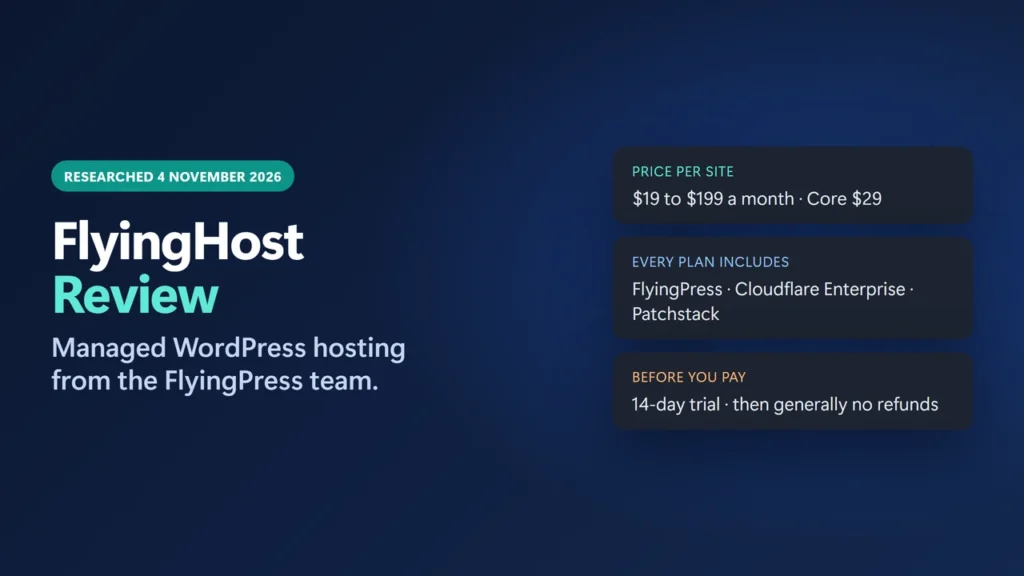
Table of Contents
- 1Editor’s Choice: FlyingHost Core
- 2FlyingHost at a Glance
- 3FlyingHost Pricing and Plans
- Lite or Core?
- 4How FlyingHost Works
- 5What’s Included in Every Plan
- 6FlyingHost vs Rocket.net vs Kinsta
- 7Pros and Cons
- 8Support, Trial and Refunds
- 9What Other Users Say
- 10Who Should Use FlyingHost?
- 11How to Start the FlyingHost Trial
- 12Final Verdict
- 13Frequently Asked Questions
- Who owns FlyingHost?
- How much does FlyingHost cost?
- Is FlyingPress included with FlyingHost?
- Does FlyingHost have a free trial or money-back guarantee?
- Where are FlyingHost’s servers?
- Does FlyingHost support .htaccess?
- Can I host several sites on one FlyingHost plan?
Editor’s Choice: FlyingHost Core
If you run one WordPress site with a lot of uncached traffic, such as a store, membership or course site, Core is the plan I’d start the trial with. FlyingHost describes it as “powerful enough for most WordPress sites”, and 8 PHP workers is a sensible starting point for checkout and logged-in traffic. This is an editorial pick based on FlyingHost’s published specs and terms, not on my own speed tests, and the button uses my affiliate link.
★ EDITOR’S CHOICE
FlyingHost Core: for one busy WordPress site
4.2/5 research-based rating · prices checked 4 November 2026
- Core plan: $29 a month per site ($290 a year), 2 dedicated CPU cores, 4 GB RAM, 8 PHP workers
- Included: FlyingPress, Cloudflare Enterprise and Patchstack (extra CDN bandwidth is $5 per 100 GB)
- One listed price: no separate intro or renewal price shown (4 November 2026)
- 14-day free trial and free managed migration; payments after the trial are generally non-refundable
Start FlyingHost’s 14-Day Free Trial →
Affiliate link. Cancel before day 14 if you don’t want to be charged.
FlyingHost at a Glance
| Item | What FlyingHost offers |
|---|---|
| Company | FlyingWeb LLC, Delaware, USA; built by the FlyingPress team |
| Hosting type | Managed WordPress, one isolated container per site |
| Price | $19 to $199 a month per site; yearly = 10 months’ price |
| Server locations | USA, Germany, India, Singapore, Australia |
| Included | FlyingPress, Cloudflare Enterprise, Patchstack, staging, 14 days of backups |
| Software | Nginx, PHP 8.3 to 8.5, MariaDB 11.8, Redis |
| Trial and refunds | 14-day free trial; paid periods and renewals are non-refundable |
FlyingHost Pricing and Plans
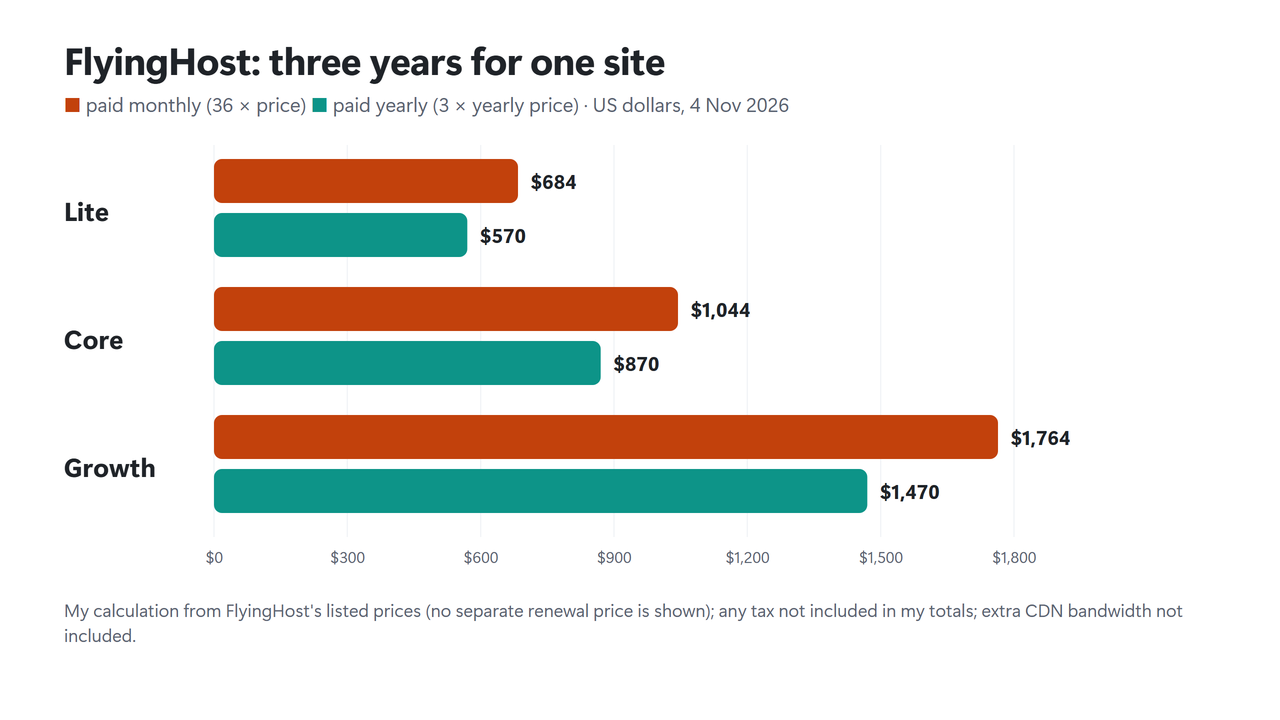
All five plans include the same features. They differ only in resources, and each plan covers one WordPress site. The yearly price is 10 times the monthly price.
| Plan | Monthly | Yearly | CPU cores | RAM | Storage | PHP workers |
|---|---|---|---|---|---|---|
| Lite | $19 | $190 | 1 | 2 GB | 5 GB | 4 |
| Core | $29 | $290 | 2 | 4 GB | 10 GB | 8 |
| Growth | $49 | $490 | 4 | 6 GB | 30 GB | 18 |
| Pro | $99 | $990 | 8 | 12 GB | 75 GB | 24 |
| Scale | $199 | $1,990 | 12 | 20 GB | 150 GB | 36 |
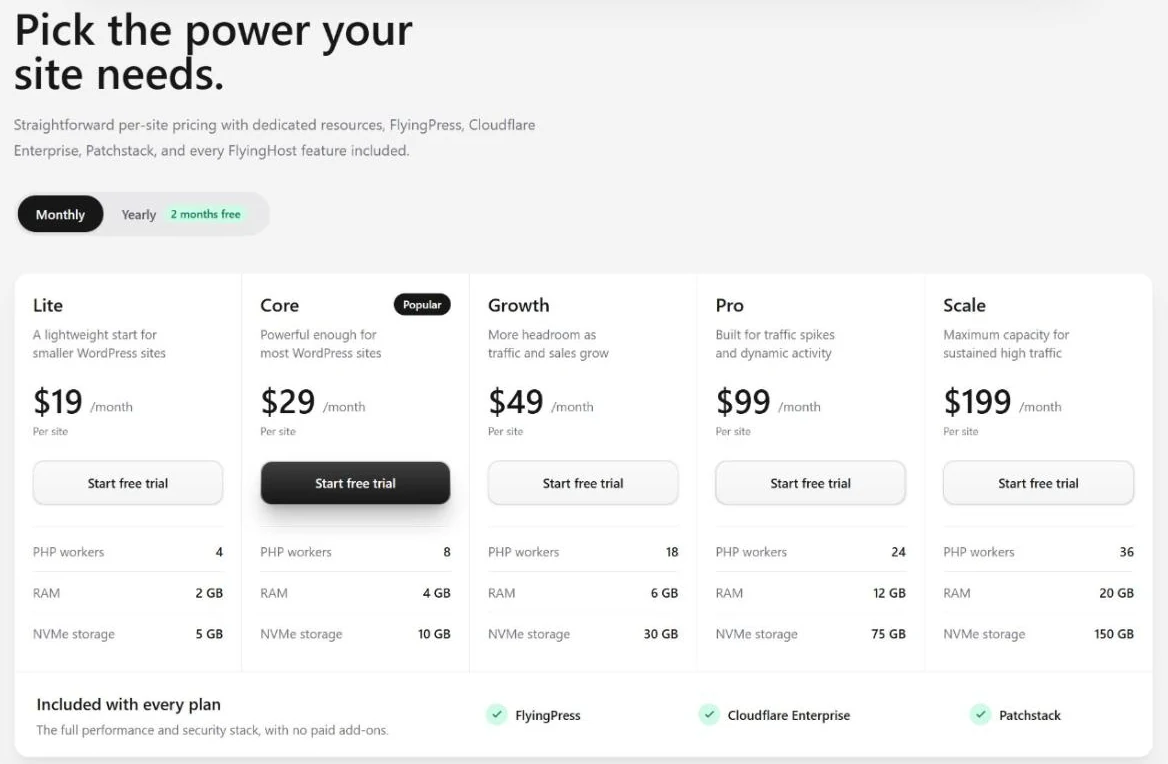
Every plan includes 100 GB of CDN bandwidth a month, and extra bandwidth costs $5 per 100 GB. The plans also set the database and cache memory: Core, for example, has a 512 MiB MariaDB buffer pool and 128 MiB of Redis memory, and Scale has 4 GB and 1 GB.
Unlike most shared hosts, FlyingHost shows no low first-term price and no separate renewal price, which makes budgeting simpler (see my guide to hosting renewal prices for why that matters). I didn’t find a written promise that prices will never change, so treat today’s prices as current, not locked.
Lite or Core?
Lite has 4 PHP workers and 5 GB of storage, which suits a small site that’s mostly cached. FlyingHost describes Core as “powerful enough for most WordPress sites”, and I’d start a store or membership site there, then use the Resources page in its dashboard to see whether you run out of workers before moving up.
How FlyingHost Works
Each site runs in its own managed container. FlyingHost’s docs describe the path of a dynamic request as visitor, then Cloudflare, then Nginx, then PHP and WordPress, then Redis or MariaDB. Cached pages and static files can be served before PHP starts at all.
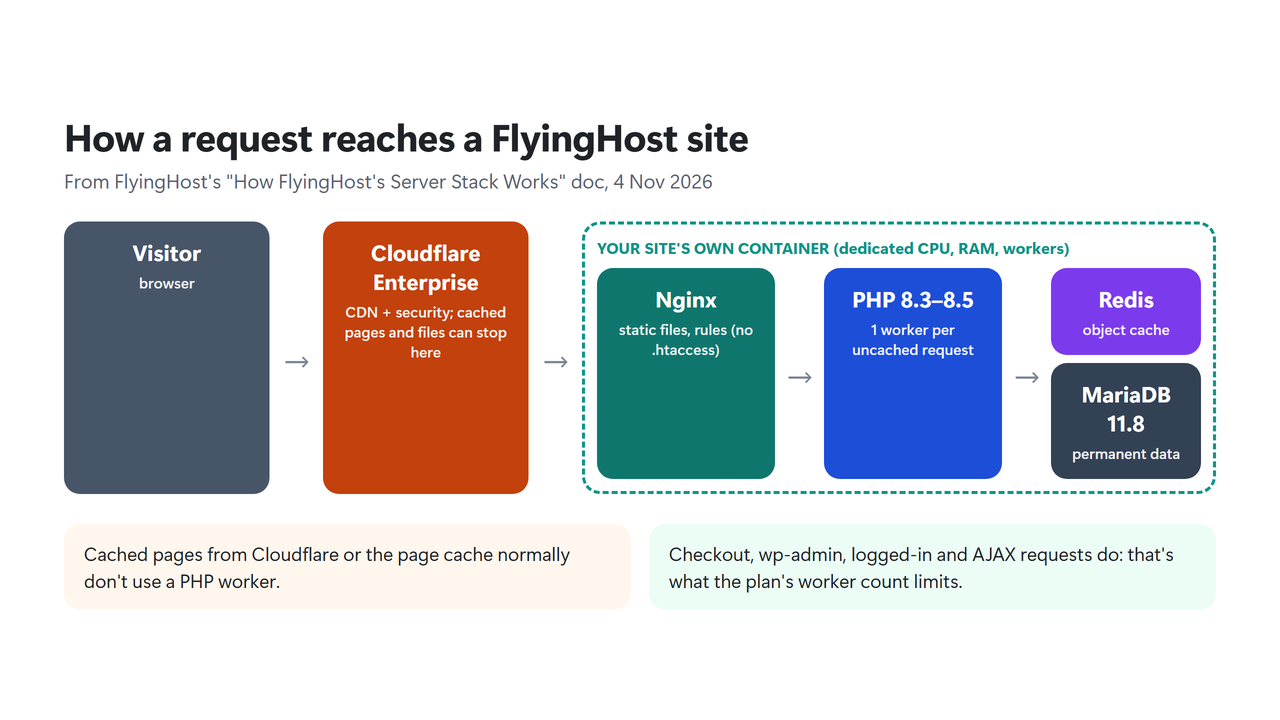
- Dedicated resources: CPU cores are “reserved exclusively for the site”, with 5 GHz+ boost speeds, and each site has its own MariaDB, Redis and OPcache memory.
- PHP workers: think of them as checkout lanes for pages that can’t come from the cache. One worker handles one uncached request, such as a checkout, wp-admin page, AJAX call or cron job. FlyingHost’s own doc notes that more workers “do not make a single slow request faster”.
- Nginx only: FlyingHost doesn’t use Apache or LiteSpeed, so .htaccess rules don’t work. You add server rules under Settings, Custom Nginx config, and FlyingHost tests the syntax before it reloads.
- Server cron: WordPress’s visitor-triggered cron is turned off and a system cron runs wp-cron.php every five minutes, with a 120-second limit per run.
- Limits: PHP 8.3, 8.4 or 8.5, 512 MB PHP memory, 120-second execution time and 100 MB uploads. Root access is restricted.
Two practical points follow. If your site relies on LiteSpeed Cache, you’ll need a different cache plugin (FlyingPress is included), and any .htaccess rules must be rewritten for Nginx. And if a page is slow because of one heavy plugin, a bigger plan won’t fix it; my guide to reducing TTFB in WordPress shows how to find the slow layer first.
What’s Included in Every Plan
- FlyingPress: the caching and optimization plugin, which you can turn on from the dashboard. Bought separately, it’s a paid plugin; see my FlyingPress review.
- Cloudflare Enterprise: the CDN and edge security layer, with 100 GB of CDN bandwidth per site each month.
- Patchstack: WordPress vulnerability protection, including virtual patches for vulnerable plugins, themes and core.
- Cockpit dashboard: staging sites, 14 days of instant backups, one-click WP admin login, real-time logs, a file manager, phpMyAdmin and a web terminal with WP-CLI.
- Agency tools: organizations, team roles and switching between client accounts.
- Free managed migration: FlyingHost says it tests your site before DNS is changed.
FlyingHost vs Rocket.net vs Kinsta
Rocket.net and Kinsta are the closest managed WordPress hosts to FlyingHost’s price. Here are their smallest single-site plans, as each vendor listed them on 4 November 2026:
| FlyingHost Core | Rocket.net Starter | Kinsta Single 20GB | |
|---|---|---|---|
| Price (monthly) | $29 a month | $30 a month ($1 first month) | $35 a month (first month free) |
| Storage | 10 GB | 10 GB | 10 GB |
| Bandwidth | 100 GB CDN | 50 GB | 20 GB server, 125 GB CDN |
| PHP workers | 8 | Unlimited (as listed) | Not listed in plan table |
| Uptime guarantee | None in terms | 99.99% | 99.9% |
| Backup retention | 14 days | 30 days | 14 days |
FlyingHost’s edge is the clear per-site resources (dedicated CPU cores and a stated worker count) and FlyingPress in the price. Rocket.net, which lists an Enterprise CDN and WAF, also lists a 99.99% uptime guarantee and keeps backups for 30 days, and it has a longer public track record; see my Rocket.net review. Kinsta doesn’t recommend its smallest Single plan for ecommerce or membership sites; see my Kinsta pricing guide. For more options, see my best managed WordPress hosting comparison.
Pros and Cons
| Pros | Cons |
|---|---|
| Dedicated CPU cores, RAM and workers per site | Each site needs its own plan |
| FlyingPress, Cloudflare Enterprise and Patchstack included | Payments generally non-refundable after the trial |
| One listed price, no intro/renewal split | No uptime guarantee in the terms |
| PHP 8.3 to 8.5, MariaDB 11.8, Redis, WP-CLI | Nginx only: no .htaccess or LiteSpeed Cache |
| Staging, backups, logs and team roles in one dashboard | New host with little independent data yet |
Support, Trial and Refunds
FlyingHost’s help center lists only six articles so far, and it offers support by chat and email. I didn’t test support response times.
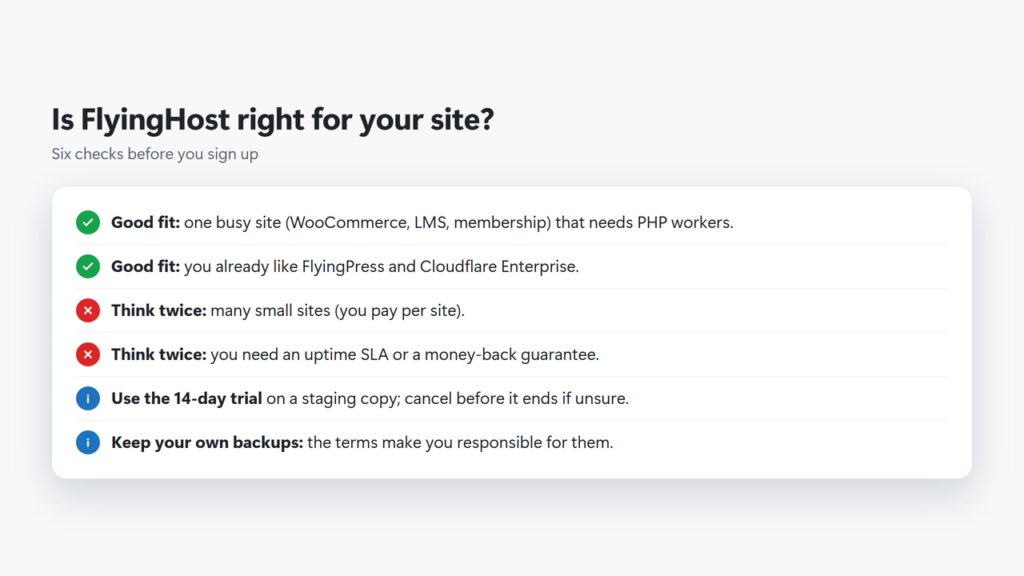
- Trial: 14 days. Its refund policy says “a valid payment method may be required”, and the trial turns into a paid plan unless you cancel before it ends.
- Refunds: “all payments are generally non-refundable once a paid subscription begins”, except for cases such as duplicate charges or billing errors. Renewals are non-refundable too.
- Uptime: the terms say FlyingHost does “not guarantee uninterrupted or error-free availability”.
- Backups: the terms call backups “a convenience” and make you responsible for keeping your own copies.
What Other Users Say
Independent data is thin because FlyingHost is new: its public legal pages and reviews date from mid-2026. On Trustpilot it had a TrustScore of 4.2 from just 7 reviews on 4 November 2026, all five stars and posted between August and September 2026. Several reviewers describe WooCommerce or LearnDash sites and a migration, and three of them are also quoted on FlyingHost’s homepage. Trustpilot itself notes that the reviews “may not be representative”. That’s a promising start, not proof of long-term reliability.
Who Should Use FlyingHost?
- Good fit: one busy site with uncached traffic, such as WooCommerce, LMS or membership sites, where reserved CPU and PHP workers matter.
- Good fit: FlyingPress users who want hosting, CDN and caching from one team.
- Good fit: agencies that bill each client site separately and want team roles.
- Skip it: if you run many small, low-traffic sites. FlyingHost’s own docs say a multi-site plan may suit you better.
- Skip it: if you need a written uptime guarantee, a money-back period after paying, email hosting from your host (not mentioned on its homepage or pricing on 4 November 2026), or Apache rules.
If you’re not sure whether you need managed hosting at all, read my guide to shared vs VPS vs cloud hosting first.
How to Start the FlyingHost Trial
- Open FlyingHost and select Start free trial.
- Create an account with Google or your email, then choose a plan and a server location close to your visitors (I stopped at the sign-up page, so these later screens may differ).
- Ask for the free managed migration, or build on a staging copy first.
- Turn on FlyingPress from the dashboard and test your key pages, checkout and wp-admin.
- Check Resources for PHP worker limits during your busiest hours.
- Before day 14, keep the plan or cancel from your account dashboard.
If it looks right for your site, you can start the FlyingHost trial here.
Final Verdict
I rate FlyingHost 4.2 out of 5 on the evidence available today. On paper it’s one of the clearest managed WordPress offers I’ve read: reserved resources per site, a modern stack, FlyingPress and Cloudflare Enterprise included, and a single listed price. What holds the score back is what it doesn’t promise yet: no uptime guarantee, generally no refunds after the trial, shorter backup retention than Rocket.net and a very short track record. The 14-day trial is the right way to judge it on your own site.
How I got to 4.2: three parts weighted equally, my own judgment of the evidence, not Trustpilot’s score. Resources, software stack and included tools are strong (about 4.7 out of 5); price for one busy site is fair (about 4.3); policies and track record are weak so far (about 3.5): no uptime guarantee, generally no refunds and only a few months of public reviews.
Frequently Asked Questions
Who owns FlyingHost?
FlyingHost is operated by FlyingWeb LLC in Delaware, USA, and is built by the team behind the FlyingPress caching plugin, according to its homepage and terms.
How much does FlyingHost cost?
From $19 a month (Lite) to $199 a month (Scale) per site, or 10 times the monthly price for a year. Core, which it describes as powerful enough for most sites, is $29 a month or $290 a year (checked 4 November 2026).
Is FlyingPress included with FlyingHost?
Yes. Every plan includes FlyingPress at no extra cost, together with Cloudflare Enterprise and Patchstack.
Does FlyingHost have a free trial or money-back guarantee?
It has a 14-day free trial. After a paid plan starts, payments and renewals are generally non-refundable, and a payment method may be required to start the trial.
Where are FlyingHost’s servers?
In the USA, Germany, India, Singapore and Australia, according to its FAQ on 4 November 2026.
Does FlyingHost support .htaccess?
No. FlyingHost uses Nginx, not Apache or LiteSpeed, so you add rules under Settings, Custom Nginx config instead.
Can I host several sites on one FlyingHost plan?
No. Each plan covers one site with its own resources, so five sites need five plans.

Affiliate disclosure: some links on this page are affiliate links, so I may earn a commission if you buy, at no extra cost to you.