
Hands-on tested Pricing checked 13 Oct 2026 How I review
SiteGround is premium shared, cloud and WordPress hosting built on Google Cloud, known for speed, security, daily backups and responsive support. I rate it 4.7/5: an excellent choice when reliability and support matter, with one big catch — renewals cost several times the introductory price.
Table of Contents
- 1Quick Verdict
- 2What SiteGround Is
- 3Performance
- 4SiteGround Plans and Pricing
- 5Features in Practice
- 6Data Centres
- 7Pros and Cons
- 8SiteGround vs Alternatives
- 9Who Should Use SiteGround — and Who Should Skip It
- 10Final Verdict
- 11FAQs
- Is SiteGround good for beginners?
- Is SiteGround good for WordPress?
- Does SiteGround offer free SSL?
- Is SiteGround expensive?
- Does SiteGround offer free migration?
- Where are SiteGround servers located?
- Can I host multiple websites?
- What makes SiteGround unique?
Quick Verdict
Review scope: my rating and observations come from my experience with sites hosted on SiteGround. Prices were rechecked on SiteGround’s official website on 13 October 2026. I have not run a new controlled speed or uptime benchmark for this review.
⚡ Key Takeaways
- What it is: managed hosting on Google Cloud with daily backups, a free CDN, free SSL and its own Site Tools dashboard.
- Best for: WordPress sites and small businesses that value reliability and support.
- Pricing: from $3.99 a month for the first year (StartUp), renewing at $17.99 a month.
- Watch-out: renewals are about 4.2–4.5 times the introductory price.
- My rating: 4.7/5.
What SiteGround Is

SiteGround offers shared hosting, cloud hosting and managed WordPress hosting on Google Cloud infrastructure. Every plan includes free daily backups, a free CDN, free SSL, email hosting and 24/7 support, managed through Site Tools — SiteGround’s own control panel, which gives each site its own dashboard instead of cPanel.

Performance
In my experience, sites hosted on SiteGround feel noticeably faster than on most budget hosts. That comes from its Google Cloud infrastructure, server-level caching, the free CDN and its Speed Optimizer plugin for WordPress, which handles caching, image compression and file optimisation. As always, real speed depends on your theme, plugins and images.
SiteGround Plans and Pricing
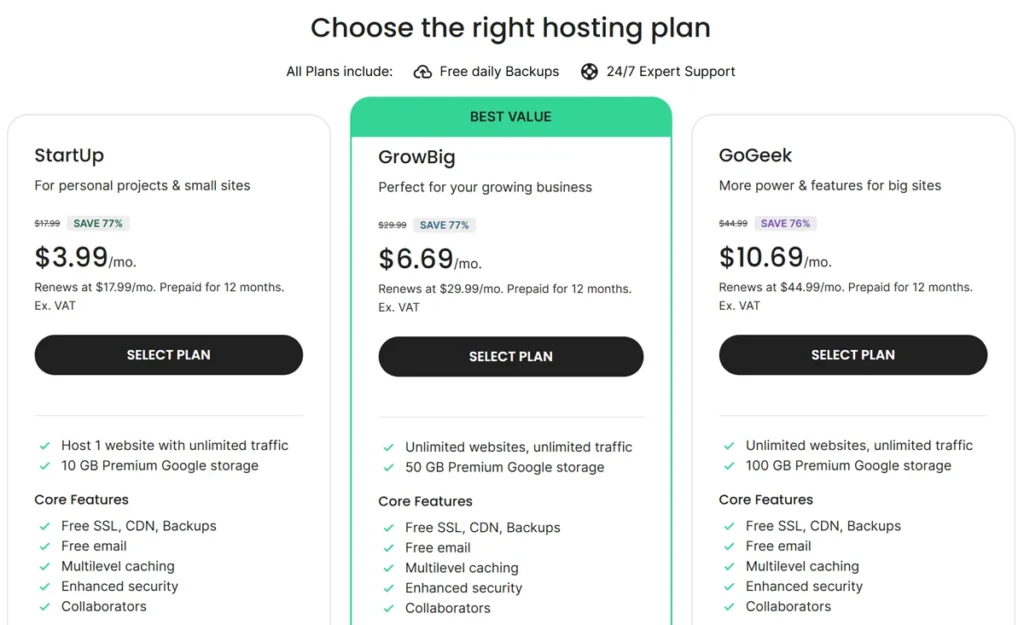
| Plan | First year | Renews at | Best for |
|---|---|---|---|
| StartUp | $3.99/month | $17.99/month | One personal site or small blog |
| GrowBig | $6.69/month | $29.99/month | Growing businesses and multiple sites |
| GoGeek | $10.69/month | $44.99/month | Bigger sites that need more power and features |
The renewal jump is the main thing to plan for: StartUp goes from $3.99 to $17.99 a month, and GoGeek from $10.69 to $44.99. If you plan to stay, compare the cost over two or three years rather than the first-year price alone.
Features in Practice
- Security — a web application firewall, an AI anti-bot system and account isolation.
- Backups — automatic daily backups with on-demand restores.
- WordPress tools — one-click installs, automatic updates, built-in caching and staging on higher plans.
- WooCommerce — one-click store installation, or SiteGround’s own e-commerce option.
- Migration — a free automatic WordPress migrator, or an expert-led transfer.
- Email — professional email at your domain with spam protection.
- Support — 24/7 chat, phone and tickets; responsive and helpful in my experience.
Data Centres
SiteGround hosts sites in Google Cloud data centres in the USA, Europe, Singapore and Sydney, and you pick one when you create a site. There is no data centre in India — Singapore is the closest choice for an Indian audience, with the CDN covering visitors elsewhere.
Pros and Cons
| Pros | Cons |
|---|---|
| Fast Google Cloud infrastructure with a free CDN | Renewals cost about 4.2–4.5× the first-year price |
| Strong security and daily backups on every plan | Introductory prices need 12 months prepaid |
| Responsive 24/7 support and a clean dashboard | More expensive than budget hosts over time |
SiteGround vs Alternatives
Hostinger and Bluehost are cheaper and fine for small sites; SiteGround is the better choice when support and reliability matter more than price. GoDaddy and HostGator are other budget names, but SiteGround is stronger on performance and security. Namecheap is another low-cost alternative.
Who Should Use SiteGround — and Who Should Skip It
It suits bloggers, small businesses, agencies and WordPress users who want dependable hosting with good support. Skip it if the lowest long-term price is your priority, or if you are running a very low-budget project.
Final Verdict
SiteGround earns 4.7/5 from me. It is fast, secure and well supported, and Site Tools makes it easy to run. Budget for the renewal price from day one. For more options, browse my web hosting reviews.
FAQs
Is SiteGround good for beginners?
Yes, it is easy to use and beginner-friendly.
Is SiteGround good for WordPress?
Yes, it is one of the best options available.
Does SiteGround offer free SSL?
Yes, all plans include free SSL.
Is SiteGround expensive?
It is more expensive than budget hosting providers.
Does SiteGround offer free migration?
Yes, it includes migration tools.
Where are SiteGround servers located?
SiteGround runs on Google Cloud data centres in the USA, Europe, Singapore and Sydney, and you choose one when you set up a site. There is no data centre in India; Singapore is the closest option for Indian visitors.
Can I host multiple websites?
Yes, higher plans support multiple websites.
What makes SiteGround unique?
Its performance, security, and support make it stand out.